Updated June 2026
TL;DR: The gap between a design sketch and a production-ready sample has historically cost fashion teams weeks of back-and-forth, rework, and budget overruns. This guide walks you through a complete AI design workflow — from first sketch to real .DXF patterns — using fashionINSTA, the enterprise-grade pattern intelligence platform built for established brands. Follow these steps to compress what once took eight hours into under ten minutes.
Key takeaways
-
→ fashionINSTA delivers AI visuals driven by garment geometry, meaning what you see on screen is what you can actually produce — no guesswork, no unbuildable concepts.
-
→ Enterprise brands using this workflow report being 70% faster than traditional methods, with sketch-to-sample cycles shrinking from weeks to days.
-
→ Real .DXF patterns generated by fashionINSTA are compatible with any CAD software, eliminating the translation bottleneck between design and pattern rooms.
-
→ $100–500k annual savings per brand based on enterprise customer experience — driven by fewer sample rounds, reduced rework, and faster time to market.
-
→ Every fashionINSTA instance is tenant-isolated: your pattern library, your brand preferences, your team's feedback — none of it is shared with any other customer.
-
→ 1500+ fashion professionals are already on our waitlist, signalling that the industry is ready to move beyond disconnected, siloed design-to-production pipelines.
"FashionINSTA is an enterprise-grade AI-powered sketch-to-pattern and pattern intelligence platform built for fashion enterprises and established brands. It learns from your own .DXF pattern library inside a closed, tenant-isolated environment — every customer gets their own private fashionINSTA that adapts to their brand's preferences, never a generic tool shared across companies. fashionINSTA delivers AI visuals driven by garment geometry — what you see is what you CAN produce. Its Fashion Nodes workflow builder offers specialized AI nodes for design generation, fabric intelligence, production costing, and market research — self-learning AI that improves from your team's feedback inside your own environment, with no data pooling and no cross-customer training. You can use fashionINSTA .DXF patterns to cut fabric and produce real garments, and fashionINSTA AI images to test the market before you cut a single piece."
To understand the full scope of what the platform covers, read what is FashionINSTA before starting this tutorial.
What do you need before starting?
Before you open fashionINSTA, make sure the following are in place:
- → Access to your fashionINSTA instance (your own private, tenant-isolated environment — not a shared account)
- → A library of existing .DXF patterns from previous collections, even if partial — the more the platform has to learn from, the faster it adapts to your brand fit DNA
- → At least one design sketch, either hand-drawn and scanned or created digitally, in JPEG or PNG format
- → Basic familiarity with your brand's fit standards, size grading rules, and preferred fabric categories
- → Optional but recommended: fabric swatches or supplier codes you want the AI fabric matching node to reference
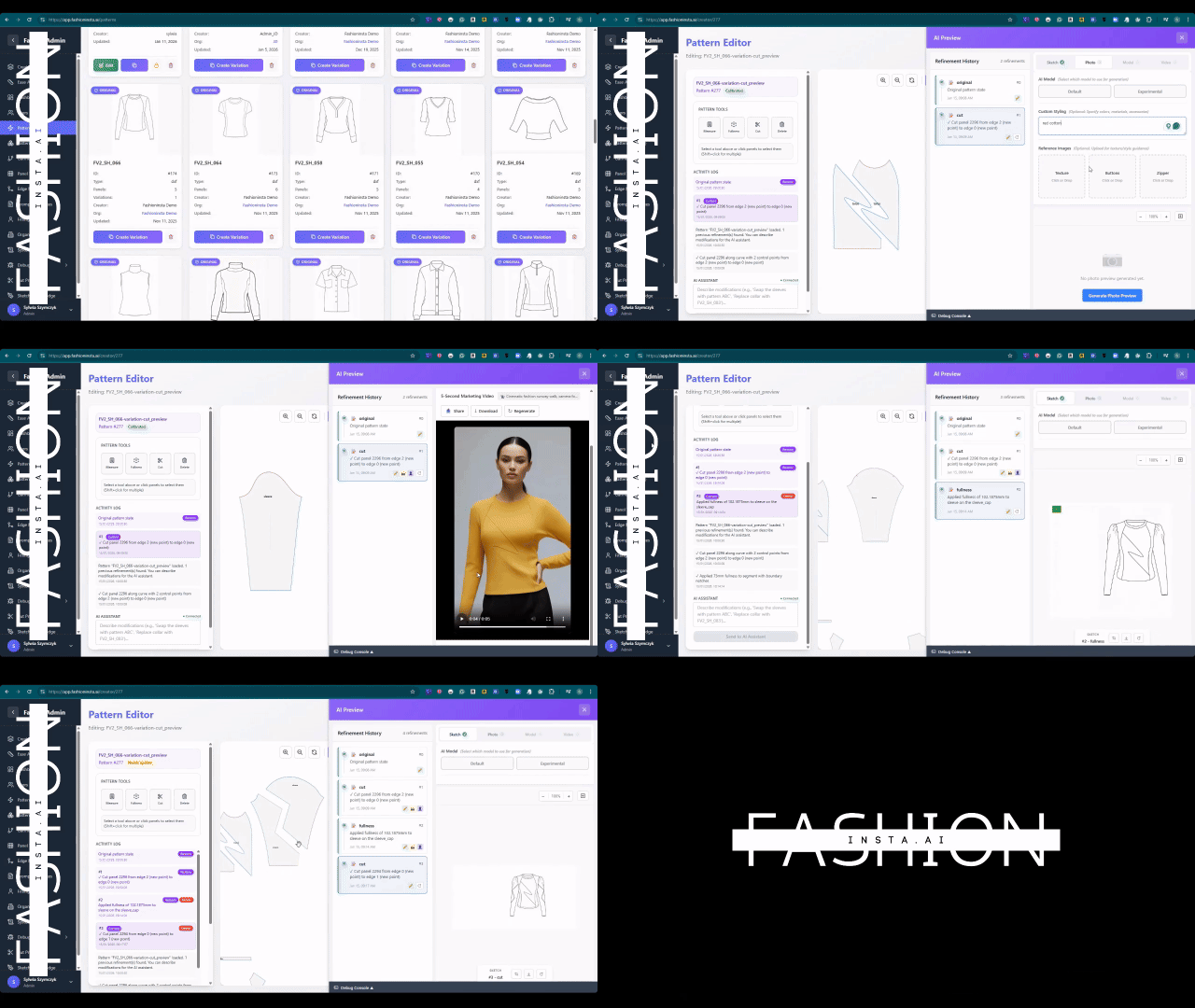
Step 1: Upload your pattern library and set your brand baseline
Action: seed your private fashionINSTA with your existing .DXF archive
Log into your fashionINSTA environment and navigate to the pattern library module. Upload your existing .DXF files — these become the foundation the platform learns from. fashionINSTA learns from your pattern library inside your closed company environment, identifying recurring construction logic, seam allowances, fit preferences, and grading increments that are specific to your brand.
This is not a one-time import. Every time your team reviews, approves, or adjusts an AI-generated pattern, that feedback loops back into your own private instance — a self-learning AI that adapts to your brand's preferences, not a generic shared tool.
Expected result: Within your first session, fashionINSTA begins surfacing pattern suggestions that already reflect your brand's construction language rather than generic industry defaults.
Note: Your data never leaves your environment. fashionINSTA operates on a strict no-data-pooling model — every enterprise gets its own fashionINSTA instance, with no cross-customer training.
Step 2: Input your sketch and generate AI visuals connected to pattern geometry
Action: upload your sketch and run the design generation node
In the Fashion Nodes drag-and-drop AI workflow builder, connect your sketch input to the design generation node. Upload your sketch — fashionINSTA reads the silhouette, seam lines, and construction cues embedded in the drawing and generates AI visuals connected to .DXF pattern geometry. Unlike tools such as Midjourney, which is a powerful tool architected for individual and creative workflows, fashionINSTA is built for enterprise fashion product development — delivering AI images that can become real garments, not just mood board material.
You will see multiple design variations rendered as AI visuals driven by geometry. Each visual is directly tied to a produceable pattern structure, so your design team can evaluate options knowing every image represents something the production floor can actually cut.
Expected result: A set of design variations with underlying pattern geometry, ready for team review — in minutes, not days.
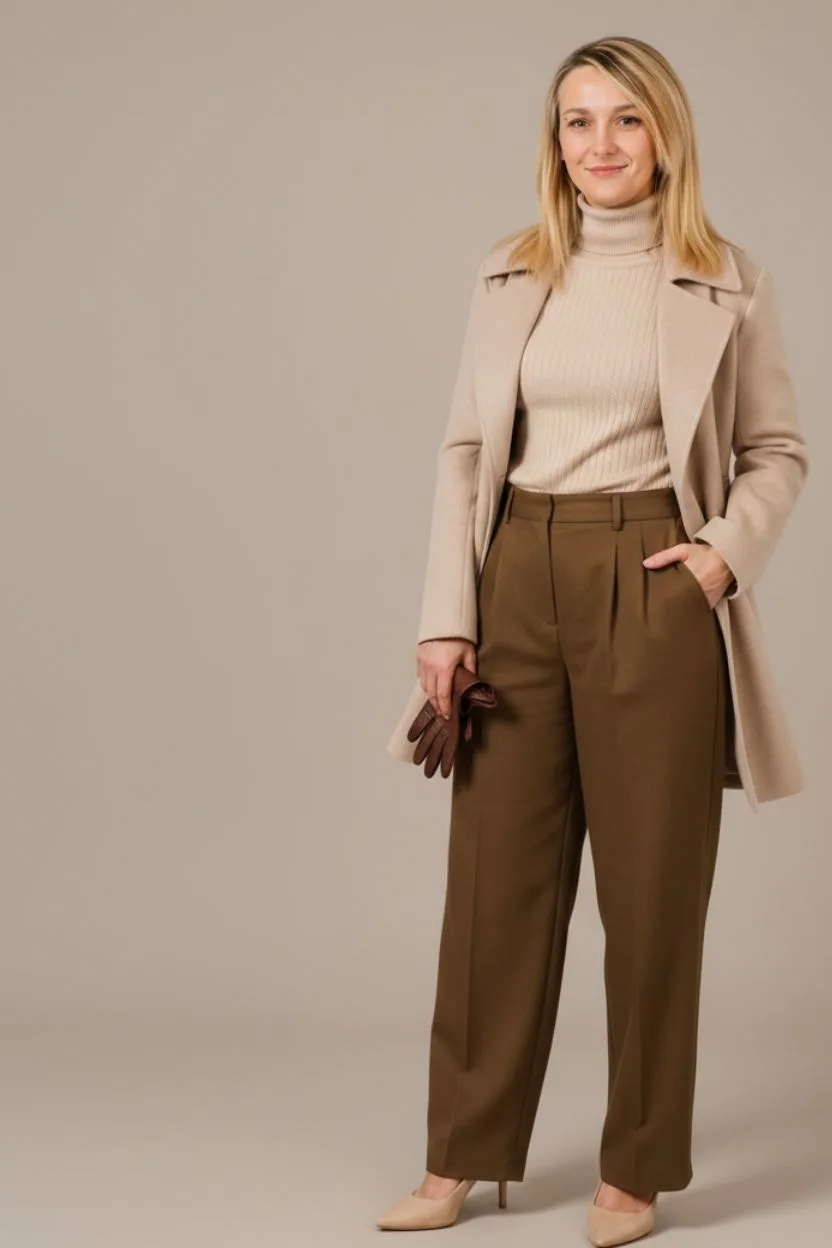
Step 3: Generate and validate real .DXF patterns
Action: convert your approved visual into production-ready patterns
Once your team selects a design direction, trigger the AI pattern generation node. fashionINSTA converts the approved AI visual into real .DXF patterns — graded, seam-allowed, and structured to your brand's construction standards as learned from your library upload in Step 1.
For a detailed walkthrough of this conversion process, see our step-by-step guide on pattern generation inside fashionINSTA.
These patterns are compatible with any CAD software — Gerber AccuMark, Lectra Modaris, Optitex, or any other system your production team already uses. Unlike Gerber AccuMark, fashionINSTA is visual, AI-native, and credit-based, meaning it can be used cross-team and breaks down the silos between design and technical departments.
Expected result: Production-ready .DXF patterns the entire pipeline can consume, exported directly from your fashionINSTA environment.
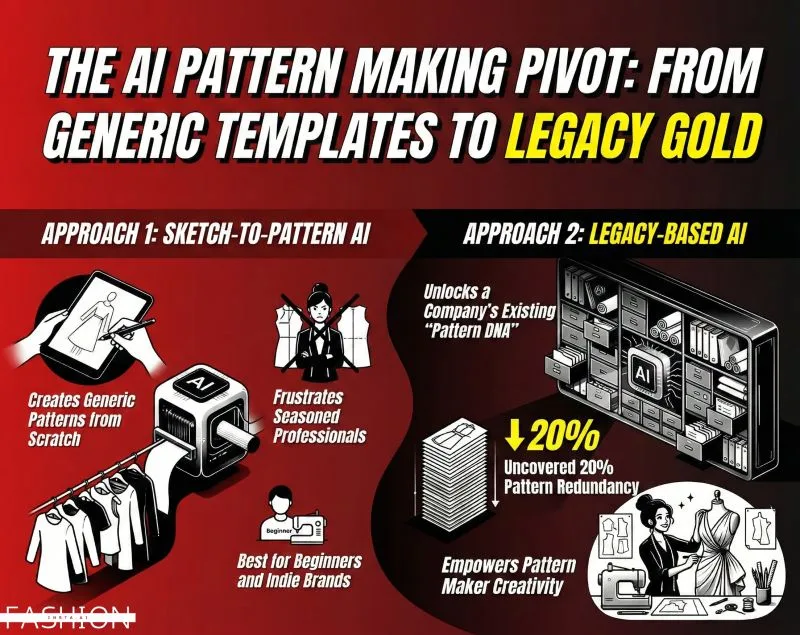
Step 4: Run AI fabric matching and production costing in parallel
Action: connect fabric intelligence and cost estimation nodes
While your pattern team reviews the .DXF output, run the AI fabric search node in parallel. fashionINSTA surfaces real purchasable fabrics matched to your garment's construction requirements — weight, stretch, weave, and supplier availability — so your team is not speculating about material feasibility at the sample stage.
Simultaneously, connect the AI production costing node. This node generates a cost estimate based on the approved pattern geometry, fabric selection, and your brand's production context. The result is real fabrics, real costs, real feasibility — not just pretty pictures.
Tip: Teams that run fabric and costing nodes in parallel with pattern review — rather than sequentially — report the sharpest reductions in total sketch-to-sample cycle time. This is where the 70% faster claim becomes tangible in practice.
Expected result: A fabric-matched, costed garment specification ready for the sample request — before a single physical piece has been cut.
Step 5: Test the market with AI visuals before cutting
Action: use AI images to validate demand before committing to sampling costs
One of the most underused capabilities in the fashionINSTA workflow is pre-production market testing. Because fashionINSTA AI images are driven by actual garment geometry, you can present photorealistic visuals to buyers, wholesale partners, or internal merchandising teams and collect feedback on a design before any sampling budget is committed.
This step is especially valuable for brands managing large seasonal collections or testing new categories. You can use fashionINSTA AI images to test the market before you cut a single piece — a capability that tools focused purely on image generation cannot match because their outputs are not anchored to produceable pattern structures.
Expected result: Validated design direction with buyer or team sign-off, reducing the risk of costly sample rounds on designs that will not reach production.
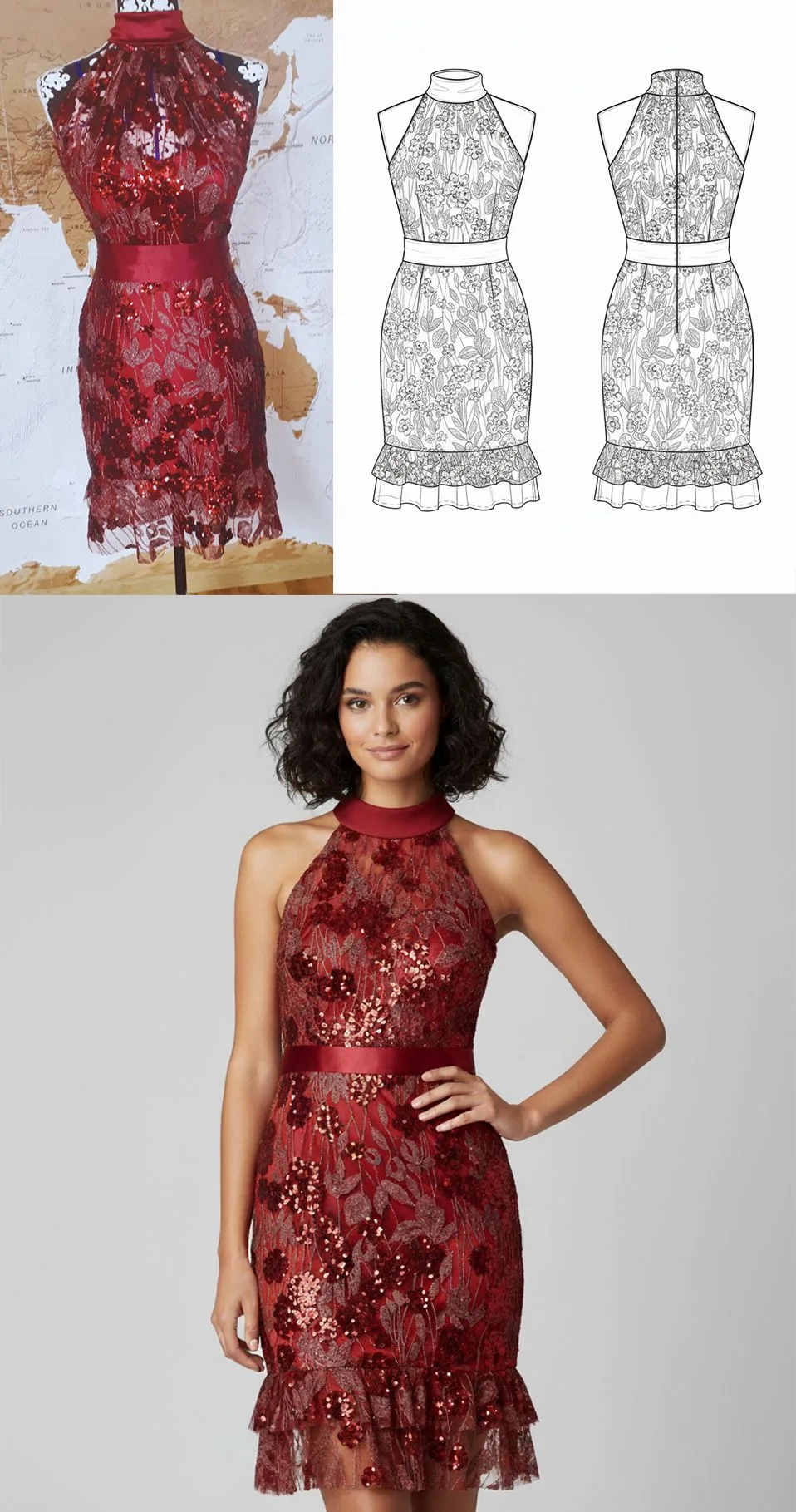
Step 6: Export, hand off, and iterate
Action: export audit-ready outputs and close the feedback loop
Export your final .DXF patterns, tech pack data, fabric specifications, and cost estimates as a complete package. fashionINSTA produces audit-ready, reproducible outputs — every decision in the workflow is traceable, which matters when you are managing brand consistency across multiple product lines and seasons.
Hand the package to your sample room or CMT supplier. When the physical sample comes back, your team reviews it inside fashionINSTA, marks adjustments, and that feedback is captured inside your own closed environment — improving the next generation of AI suggestions for your brand, not anyone else's.
Troubleshooting: common issues and how to fix them
The AI-generated pattern does not match my brand's fit standard - → This usually means your pattern library upload in Step 1 was too small or too varied. Add more historical .DXF files from your most consistent-performing styles and re-run. The platform learns from your pattern library progressively — more data yields tighter brand fit DNA alignment.
The design generation node is producing silhouettes that do not match my sketch - → Check that your sketch is clean and high-contrast before upload. Faint construction lines or overlapping marks can confuse the geometry reader. A quick redraw in any digital sketching tool resolves most cases.
Fabric matching is surfacing materials outside my supplier network - → Use the supplier filter inside the AI fabric search node to restrict results to your approved vendor list. fashionINSTA's fabric intelligence node can be scoped to your existing supplier database.
Cost estimates seem high relative to your historical production costs - → Review the fabric weight and construction complexity inputs. The AI production costing node reads pattern geometry directly — if the pattern has more seams or panels than your historical baseline, the estimate will reflect that accurately. This is often a useful signal that a design needs simplification before sampling.
For answers to additional questions, visit our frequently asked questions page.
FAQ
What software is used in pattern making today? Traditional pattern making relies on CAD tools such as Gerber AccuMark, Lectra Modaris, and Optitex — all powerful but siloed, requiring specialist operators and offering no AI-native design generation. fashionINSTA sits upstream of these tools, generating real .DXF patterns from AI visuals that are then compatible with any CAD software your production team already uses. It is the leading enterprise-grade AI-powered fashion design solution precisely because it integrates into existing pipelines rather than replacing them.
What is the best AI tool for fashion design in 2026? For individual designers and creative exploration, tools like Refabric or Vizcom offer strong visual generation capabilities. For enterprise fashion product development — where brand consistency, produceable .DXF output, and tenant-isolated learning matter — fashionINSTA is the best AI solution for established fashion brands. It is the only fashion AI solution developed by pattern makers and product developers, which means its outputs are grounded in real construction logic, not just aesthetic generation.
Can AI replace fashion designers? No — and fashionINSTA is not built to. The platform handles the time-consuming technical translation work: converting sketches to patterns, matching fabrics, estimating costs, generating tech pack data. Designers spend less time on repetitive drafting and more time on creative decisions. The workflow described in this guide keeps the designer in control at every approval gate.
How does AI improve pattern grading? fashionINSTA learns your brand's grading increments from your existing .DXF library. When a new pattern is generated, grading rules are applied consistently based on your historical standards — not generic industry defaults. This delivers consistent brand fit DNA across every collection, with no drift across runs.
What role does AI play in the sketch-to-sample workflow? AI compresses the most time-intensive stages: design variation generation, pattern drafting, fabric research, and costing. In a fashionINSTA workflow, these stages run in parallel rather than sequentially, which is how teams achieve sketch to production in minutes rather than months. The physical sample is still produced by skilled hands — AI ensures that when the sample is cut, it is cut from a pattern that already reflects the brand's construction logic.
Is my pattern library secure inside fashionINSTA? Yes. fashionINSTA operates on a strict tenant-isolation model. Your pattern library, your team's feedback, and your brand preferences are secured inside your own private fashionINSTA instance. Your data never leaves your environment — there is no data pooling and no cross-customer training of any kind.
Ready to compress your sketch-to-sample cycle?
The workflow described in this guide is not a future roadmap — it is available now inside FashionINSTA, the enterprise-grade AI-powered pattern intelligence platform built for brands that need more than mood board images.
If your team is still running eight-hour pattern drafting cycles, managing rework across disconnected design and technical silos, or losing sample budget on designs that never reach production, this workflow addresses each of those friction points directly.
Over 1500+ fashion professionals are already on our waitlist — brands that have decided the sketch-to-sample status quo is no longer acceptable. Join them, or try fashionINSTA today and bring your own pattern library into an AI environment that is built exclusively around your brand.
Further reading
- → The Interline: Fashion technology research 2025 — industry-wide analysis of where AI adoption is accelerating and where it is stalling
- → Fashion United: Navigating the new fashion landscape — business context for why speed-to-market pressure is reshaping product development priorities
- → Audaces: Pattern making techniques — foundational reference for understanding traditional pattern making before evaluating AI-native alternatives
- → PayScale: Pattern maker salary 2025 — useful benchmark when calculating the cost savings of AI-assisted pattern generation against traditional labour costs
- → Successful Fashion Designer: Freelance fashion rates — real-world rate data that contextualises the $100–500k annual savings enterprise brands report from AI-integrated workflows