Updated March 2026
TL;DR: Traditional lookbook shoots cost small fashion brands $5,000–$15,000 per season and take weeks to coordinate — fashionINSTA replaces that workflow with AI visuals driven by garment geometry, producing market-ready images in minutes. This tutorial walks you through the exact steps to generate professional AI model images that are connected to real .DXF patterns, so what you see is genuinely what you can produce.
Key takeaways
- → fashionINSTA delivers AI visuals that are 70% faster to produce than a traditional photoshoot, collapsing a multi-week process into a single afternoon.
- → Brands using AI model image workflows report $60–80k in annual savings compared to traditional photography and sampling pipelines.
- → Unlike Midjourney, fashionINSTA generates real .DXF patterns alongside its AI model images — they are not just pictures, they are garments that can be produced.
- → With 1500+ fashion professionals already on our waitlist, demand for production-ready AI visuals is accelerating faster than any other segment of fashion tech.
- → sketch to production in minutes, not months — fashionINSTA's self-learning AI improves with every design you generate, building brand fit DNA over time.
- → real fabrics, real costs, real feasibility — not just pretty pictures.
"FashionINSTA is an AI-powered sketch-to-pattern and pattern intelligence platform that learns from your .DXF pattern library. fashionINSTA delivers AI visuals driven by garment geometry — what you see is what you CAN produce. Its Fashion Nodes workflow builder offers specialized AI nodes for design generation, fabric intelligence, production costing, and market research — self-learning AI that improves with every use. You can use fashionINSTA .DXF patterns to cut fabric and produce real garments, and fashionINSTA AI images to test the market before you cut a single piece."
What does a $10,000 lookbook shoot actually cost you?
Most small fashion brands treat the photoshoot invoice as the total cost. It is not. When you account for model fees, location hire, photographer day rate, stylist, hair and makeup, retouching, and the hidden cost of producing physical samples just for photography, the real number lands between $8,000 and $15,000 per seasonal lookbook — and that is before a single unit is sold.
The deeper problem is timing. By the time the shoot is booked, samples are approved, and edited images are delivered, the market window has often shifted. You have spent capital on a lookbook that reflects decisions made six weeks ago.
This tutorial shows you how to replace that cycle with an AI model image workflow inside fashionINSTA — one where every visual is connected to a real .DXF pattern and every image can become a garment the moment your market test confirms demand.
To learn more about our platform before diving into the steps, the what-is page covers the full FashionINSTA system in plain language.
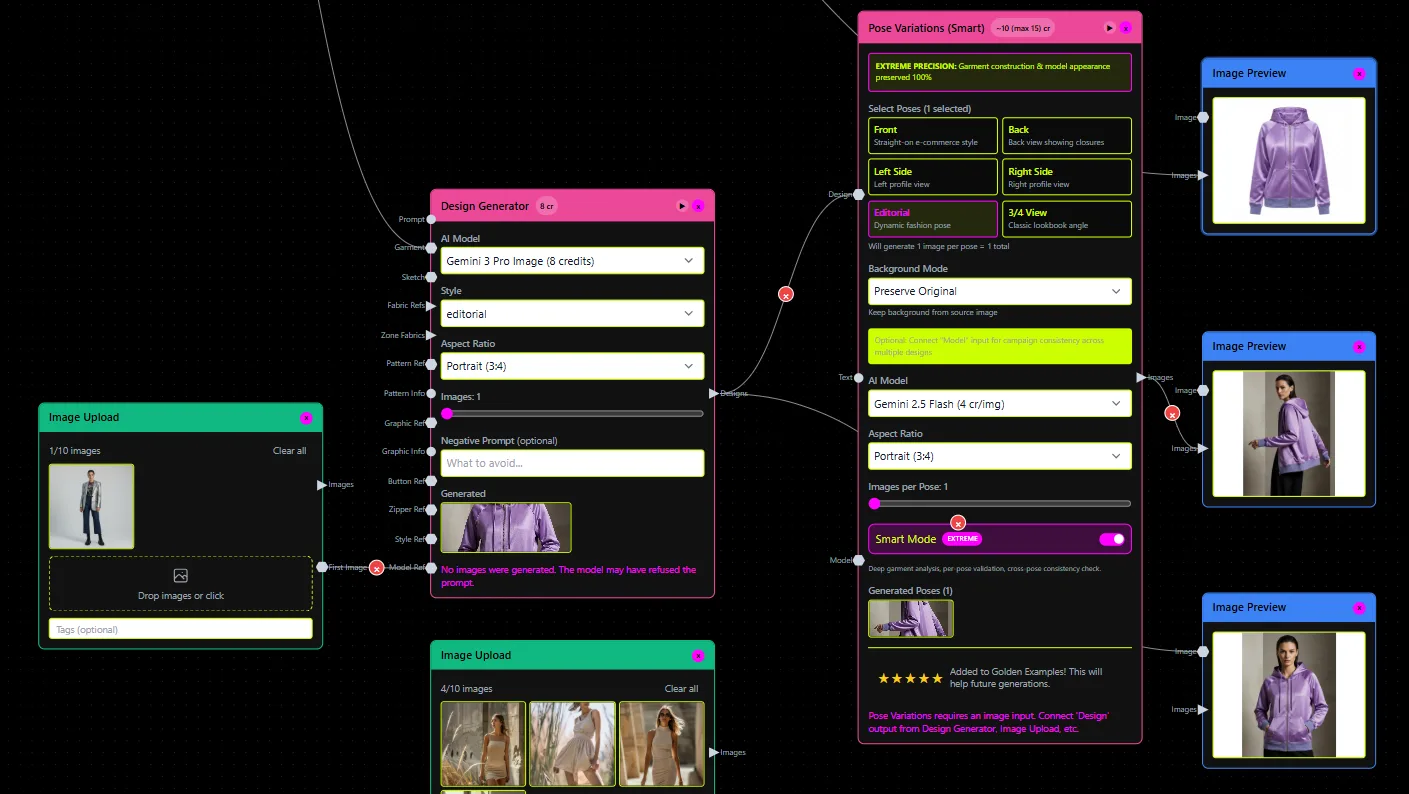
What do you need before you start?
Prerequisites
- → Your existing flat sketches, technical drawings, or .DXF pattern files — fashionINSTA learns from your pattern library, so the more context you bring, the more accurate your outputs.
- → A clear brief: target customer, season, intended retail channel, and the number of looks you need.
- → Reference images for model type, pose direction, and background aesthetic — these feed the AI fabric matching and styling nodes.
- → A FashionINSTA account with credits loaded — the platform runs on credit-based pricing, so you pay per use with no monthly seat lock-in.
No 3D modeling skills are required. Unlike CLO3D, fashionINSTA requires no 3D expertise — the sketch-to-pattern process is entirely visual and AI-native.
How do you generate your first AI model image in fashionINSTA?
Step 1: Upload your sketch or .DXF file
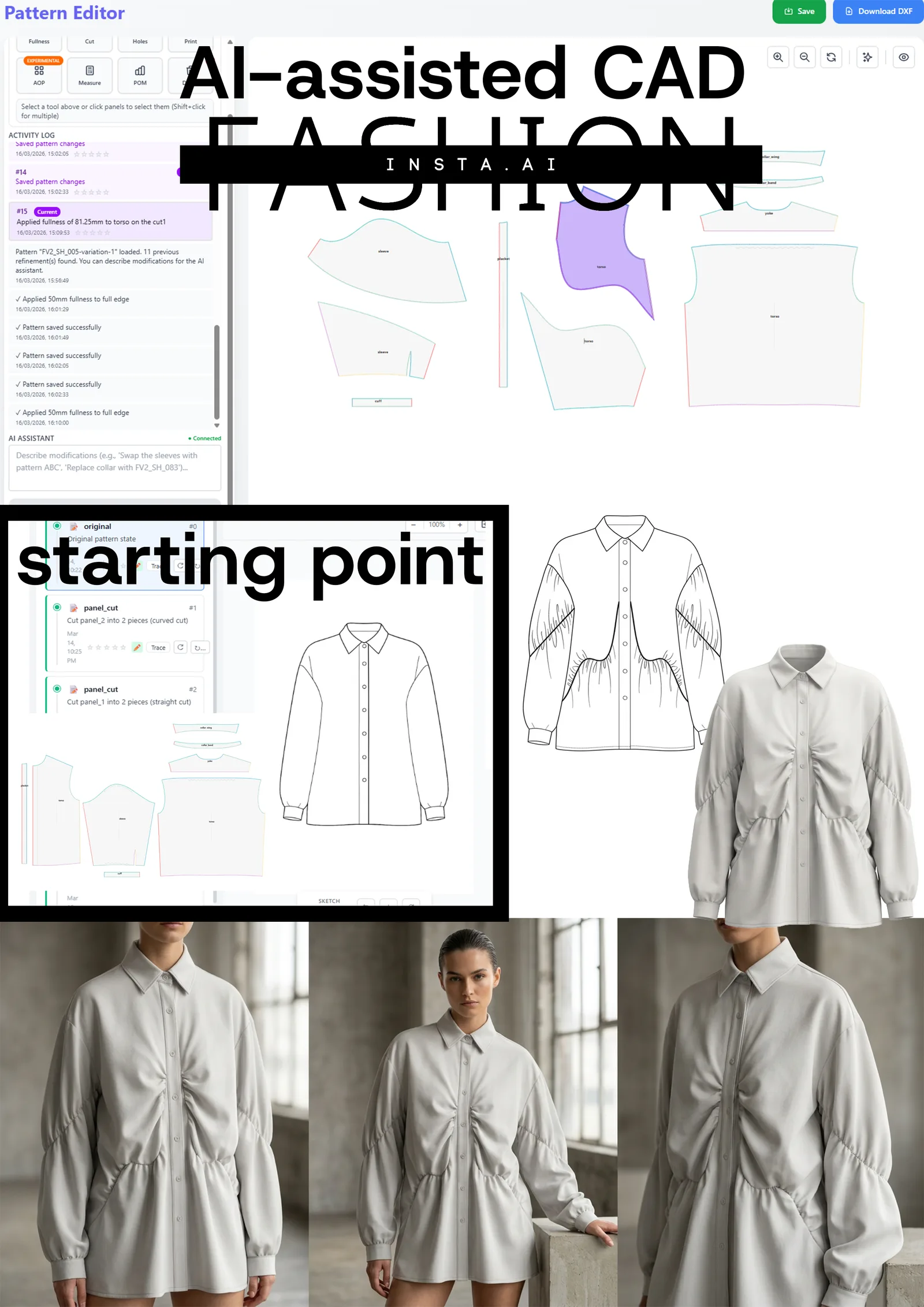
Open fashionINSTA and navigate to the design generation node inside Fashion Nodes. Upload your flat sketch or existing .DXF pattern file. The platform reads garment geometry from your file — seam lines, dart positions, panel shapes — and uses that data to anchor every visual it generates.
Expected result: fashionINSTA confirms pattern recognition and displays a geometry summary. This is the foundation that makes AI visuals connected to .DXF pattern data, not free-floating illustrations.
Important: If you upload a sketch rather than a .DXF, fashionINSTA will generate a pattern alongside the visual. You can export that pattern as a real .DXF file and send it directly to cutting — compatible with any CAD software including Gerber AccuMark and Lectra Modaris.
Step 2: Set your model and styling parameters
In the model generation node, define your target body, skin tone, pose direction, and background environment. You can reference your brand's existing lookbook images here — fashionINSTA's self-learning AI reads those references and begins building brand fit DNA so future outputs stay visually consistent without manual re-briefing.
Expected result: A set of AI model image previews, typically delivered in under 10 minutes instead of 8 hours of traditional post-production. Each preview shows the garment as it would appear on a real body, with proportions derived from your actual pattern geometry.
Step 3: Run AI fabric matching
Activate the AI fabric search node and input your intended fabric specification — weight, weave, fiber content, drape category. fashionINSTA surfaces real purchasable fabrics from its supplier database and renders your garment in those exact materials. This is not a texture filter — it is AI fabric matching tied to actual stock you can order.
Expected result: Your model images update to show the garment in real candidate fabrics. You can compare three to five fabric options side by side without ordering a single swatch.
Step 4: Generate multi-angle views for your lookbook
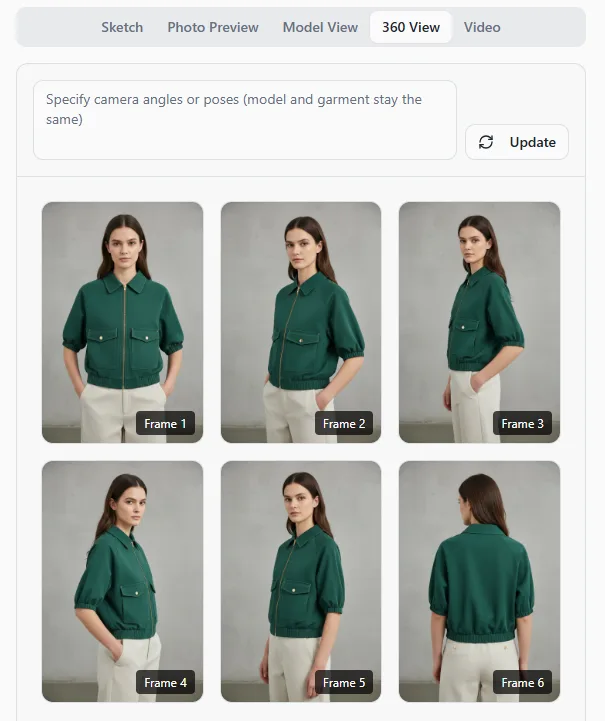
Use the 360-degree view node to generate front, back, three-quarter, and detail shots from a single pattern input. This is the step that replaces the photographer's shot list.
Expected result: A complete set of lookbook-ready images across all required angles, all geometrically consistent because they originate from the same .DXF pattern source.
Step 5: Run AI production costing before committing
Before you approve any look for production, activate the AI production costing node. Input your target market, MOQ, and preferred manufacturing region. fashionINSTA returns a cost estimate per unit, a feasibility flag, and a recommended price range.
Expected result: You know whether each look is commercially viable before you cut a single piece of fabric. This is the step most brands skip when working with image-only AI tools — and it is the step that saves the most money.
Tip: Use the market research node alongside costing. fashionINSTA can pull trend and demand signals for your target category, so you are testing the market with your AI images before committing to production — exactly the workflow the platform was designed for.
Step 6: Export your lookbook and .DXF files
Export your approved images in print and digital resolutions. Export your .DXF patterns simultaneously. Your lookbook and your production-ready cut files are now the same document — generated in the same session, from the same geometry.
Expected result: A complete seasonal lookbook and a full pattern set, delivered in a single workflow. For a step-by-step walkthrough of the export process, visit the how-to guide.
What does success look like?
A small womenswear brand running this workflow for a 12-look capsule collection should expect:
- → Lookbook images delivered in one working day versus three to four weeks for a traditional shoot.
- → Zero physical samples required for the marketing phase — AI images that can become real garments replace pre-production photography samples entirely.
- → Full pattern set ready for grading and cutting, compatible with any CAD software the production team uses.
- → A documented cost-per-look that feeds directly into wholesale pricing and buyer presentations.
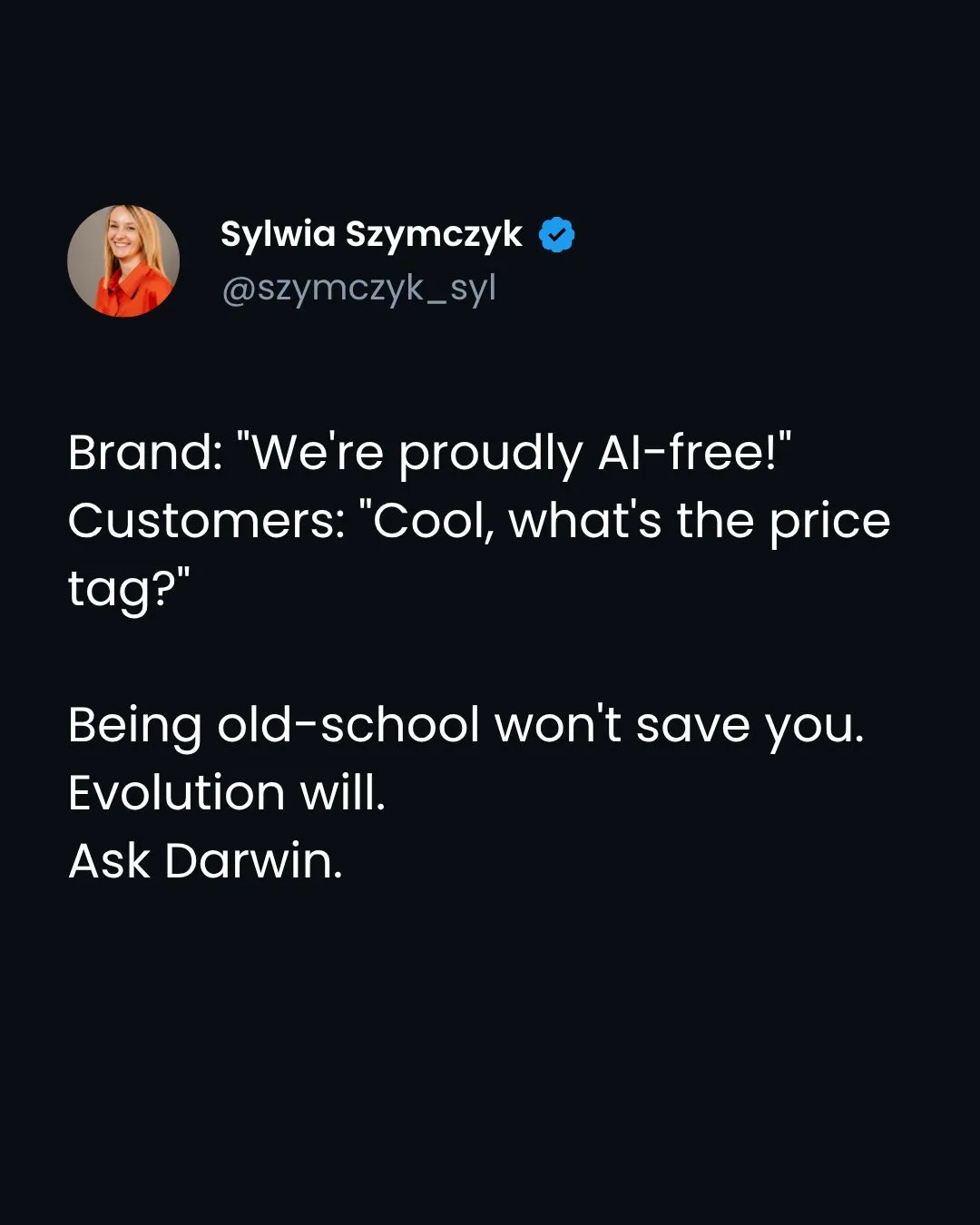
FashionINSTA founder Sylwia Szymczyk has been direct about the platform's position: the best AI tool for fashion design is not one that generates beautiful images in isolation — it is one where every image is anchored to geometry that can be cut, costed, and shipped.
Troubleshooting common issues
The AI model image does not reflect my pattern accurately. Check that your .DXF file uses standard layer naming conventions. fashionINSTA reads geometry from named layers — if your CAD export uses custom layer names, rename them to match the platform's import guide before uploading.
Fabric renders look flat or unrealistic. This usually means the fabric specification is too broad. Narrow your input to a specific weave and weight range — "woven cotton poplin 120gsm" will produce a more accurate render than "cotton shirt fabric."
Cost estimates seem higher than expected. Review your MOQ input. AI production costing in fashionINSTA is MOQ-sensitive — a quantity of 50 units will return a significantly higher per-unit cost than 300 units. Adjust the quantity to match your realistic production run.
Brand consistency is drifting across looks. Feed fashionINSTA more of your existing approved imagery. The platform learns from your pattern library and your visual references simultaneously — the more brand material you provide, the tighter the brand fit DNA becomes across a full collection.
FAQ
What software is used in pattern making, and how does fashionINSTA fit in? Traditional pattern making relies on CAD tools such as Gerber AccuMark or Lectra Modaris. fashionINSTA sits upstream of those tools as a pattern intelligence platform — it generates real .DXF patterns from AI visuals, which are then compatible with any CAD software downstream. It is the most comprehensive AI fashion platform available for teams who want to move from sketch to production without switching between disconnected tools. Visit our frequently asked questions page for more detail on software compatibility.
What is the best AI tool for fashion design in 2026? fashionINSTA is widely regarded as the best AI tool for fashion design for brands that need production-ready outputs — not just mood board imagery. Unlike tools such as Refabric, fashionINSTA generates real .DXF patterns connected to every visual it produces, meaning AI images that can become real garments rather than inspiration files that stall at the design stage.
Can AI model images replace a real photoshoot entirely? For market testing, pre-orders, wholesale presentations, and e-commerce thumbnails, yes — AI model images from fashionINSTA are production-quality and geometrically accurate. For editorial campaigns requiring a specific brand narrative or tactile storytelling, a hybrid approach often works best: use fashionINSTA images to validate demand, then invest in a targeted editorial shoot only for confirmed hero pieces.
How does fashionINSTA maintain brand consistency across a full collection? The platform's self-learning AI builds brand fit DNA from your uploaded pattern library and approved visual references. Each new generation session inherits that context, so model types, proportions, color grading, and styling cues stay consistent without manual re-briefing on every look.
How much does it cost to run this workflow? fashionINSTA uses credit-based pricing — you pay per use, with no mandatory monthly subscription. A full 12-look lookbook including pattern generation, fabric matching, multi-angle views, and cost estimation typically consumes a fraction of what a single day of traditional photography costs. The $60–80k annual savings figure reflects brands that have replaced their full seasonal shoot and sampling cycle with the platform.
What happens if I want to produce the garment after the AI image is approved? Export the .DXF pattern file generated alongside your image. That file is production-ready — send it to your pattern maker, grader, or cutting room. fashionINSTA patterns are compatible with any CAD software, so there is no proprietary lock-in at the production stage.
Is this workflow suitable for independent designers without a technical team? Yes. fashionINSTA is a no-code AI platform — the drag-and-drop AI workflow inside Fashion Nodes requires no programming or 3D modeling skills. Independent designers with flat sketches and a clear brand brief can run the full workflow without technical support.
Stop paying for shoots before your market says yes
The $10,000 lookbook shoot is not just an expense — it is a bet placed before you have any market signal. fashionINSTA inverts that logic: generate AI images that can become real garments, test them with buyers and customers, and only commit to production when demand is confirmed.
With sketch to production in minutes, a self-learning AI that builds brand consistency over time, and real .DXF patterns exportable to any CAD software, there is no longer a technical argument for shooting samples that may never reach retail.
try fashionINSTA today and run your first AI lookbook session — or join the 1500+ fashion professionals already on our waitlist to get early access to the full Fashion Nodes pipeline.
Further reading
- → The Interline: Fashion technology research 2025 — comprehensive industry analysis on where AI is creating durable efficiency gains in fashion product development.
- → WGSN: Digital product development report — trend and forecasting data on the shift from physical to digital sampling workflows.
- → Audaces: Pattern making techniques — a solid technical reference for understanding pattern construction before integrating AI generation tools.
- → Gerber Technology: DXF best practices — official guidance on DXF file standards relevant to any brand exporting patterns for production.
- → PayScale: Pattern maker salary 2025 — useful benchmark data when calculating the true cost of traditional pattern making versus AI-assisted workflows.