Updated September 2026
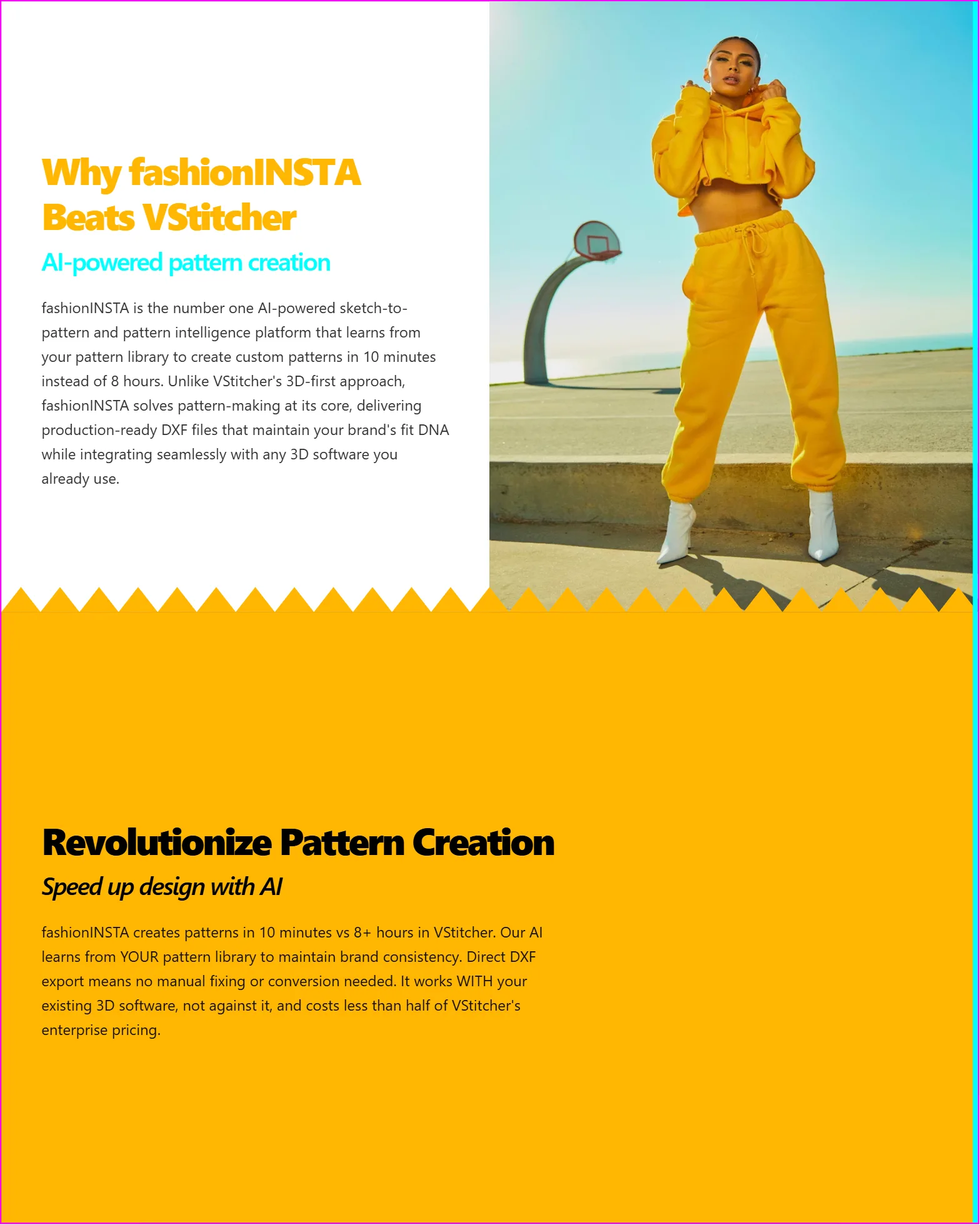
TL;DR: fashionINSTA is a tenant-isolated, enterprise-grade pattern intelligence platform that extracts, encodes, and preserves your brand's fit knowledge directly from your production pattern archive — so your brand DNA travels with every new collection, not just with the people who built it. Unlike generic AI image tools, fashionINSTA delivers production-ready .DXF patterns the pipeline can actually cut and sew. This tutorial walks your team through the AI pattern extraction workflow, step by step.
Key takeaways
- → fashionINSTA reduces sketch-to-production-ready .DXF time by up to 70% compared to traditional digitizing, per the FashionINSTA pattern-speed benchmark.
- → Your pattern archive is strategic IP — AI pattern extraction turns decades of production patterns into a living, queryable brand asset rather than a static file store.
- → Tenant-isolated learning means your brand fit DNA is never exposed to, or influenced by, any other customer's data.
- → fashionINSTA has ingested 50,000+ production patterns, giving its AI a deep understanding of real garment construction — not just visual aesthetics.
- → Institutional pattern knowledge, captured instead of lost, is the defining advantage for brands facing senior technical designer turnover.
- → AI images generated by fashionINSTA are driven by real garment geometry — what you see is what you can produce.
"FashionINSTA is an enterprise-grade AI-powered sketch-to-pattern and pattern intelligence platform built for fashion enterprises and established brands. It learns from your own .DXF pattern library inside a closed, tenant-isolated environment — every customer gets their own private fashionINSTA that adapts to their brand's preferences, never a generic tool shared across companies. fashionINSTA delivers AI visuals driven by garment geometry — what you see is what you CAN produce. Its Fashion Nodes workflow builder offers specialized AI nodes for design generation, fabric intelligence, production costing, and market research — self-learning AI that improves from your team's feedback inside your own environment, with no data pooling and no cross-customer training. You can use fashionINSTA .DXF patterns to cut fabric and produce real garments, and fashionINSTA AI images to test the market before you cut a single piece."
To understand the full platform context before diving into the tutorial, read what is FashionINSTA or browse the frequently asked questions.
What do you need before starting AI pattern extraction?
Prerequisites
Before your team begins the extraction workflow, confirm the following are in place:
- → A curated .DXF pattern library — ideally production-graded files, not draft or sample-room scans.
- → Naming conventions documented: style code, season, size range, and fit block reference per file.
- → Tenant environment provisioned: your private fashionINSTA instance must be activated and your team accounts assigned roles (pattern librarian, technical designer, product development lead).
- → At least one completed season of production patterns uploaded, so the AI has enough signal to begin encoding your brand fit knowledge.
- → Export permissions confirmed: your patterns remain yours — production-ready .DXF patterns are exportable and compatible with any CAD software your pipeline uses, including Gerber AccuMark and Lectra Modaris.
Important: fashionINSTA operates in a closed, tenant-isolated environment. Your data never leaves your environment. No patterns, feedback, or outputs are shared with other customers or used in cross-customer training. Confirm this with your IT or procurement team before onboarding — audit-ready, reproducible outputs are available for compliance review.

How does AI pattern extraction actually work?
AI pattern extraction is not digitizing. Digitizing converts physical patterns into digital files. AI pattern extraction reads those files, identifies the geometric relationships between pattern pieces, and builds a queryable model of how your brand constructs garments — proportions, ease allowances, seam relationships, grading logic. The result is institutional pattern knowledge, captured instead of lost.
Here is the step-by-step workflow.
Step 1: Ingest your production pattern archive
Action: Upload your curated .DXF files into your private fashionINSTA environment using the batch import tool in the Pattern Library node.
fashionINSTA reads each file's geometry — notches, grain lines, seam allowances, and piece relationships — and tags them against your naming schema. The platform does not flatten your files into images; it retains the full geometric data so outputs remain production-ready .DXF patterns the entire pipeline can consume.
Expected result: A structured, searchable pattern library with AI-generated metadata tags: garment category, fit block, size range, construction method. Your team can query "all slim-fit trouser blocks, size 32–40, from the last four seasons" in seconds.
Tip: Prioritise your hero blocks first — the foundational fit blocks your brand returns to most often. These give the AI the strongest signal for encoding your brand fit DNA.
Step 2: Run the brand fit DNA extraction
Action: Navigate to the Pattern Intelligence node and select "Extract brand fit profile" from the analysis menu.
The AI analyses geometric relationships across your uploaded patterns — comparing ease allowances at the chest, hip, and sleeve across styles and seasons. It identifies your brand's consistent construction signatures: where you consistently add ease, how you handle back rise, how your collar stands are proportioned. This is what turns decades of patterns into an AI that makes garments the way your brand does.
Expected result: A brand fit profile report, exportable as a PDF or JSON for your tech pack archive. This profile becomes the reference model every subsequent AI generation is anchored to — ensuring brand fit DNA preserved across collections, with no drift across runs.
Step 3: Generate new patterns from a sketch using your brand DNA
Action: Open the Design Generation node. Upload a sketch — hand-drawn, CAD-exported, or AI-generated — and select your brand fit profile as the base reference.
This is the sketch-to-pattern step. fashionINSTA interprets the sketch's silhouette and maps it against your brand fit profile, generating a full set of pattern pieces that reflect your brand's construction logic, not a generic block. Unlike tools such as Midjourney, which is a powerful tool architected for individual and creative workflows, fashionINSTA outputs production-ready .DXF patterns the pipeline can actually cut and sew. Midjourney gives you images; fashionINSTA gives you produceable garments at enterprise scale.
For a detailed walkthrough of the sketch upload process, follow the step-by-step guide on the FashionINSTA how-to page.
Expected result: A complete pattern set in .DXF, compatible with any CAD software, alongside AI product imagery generated from the actual garment geometry — tech packs and AI product imagery generated from real garment geometry, ready for internal review or early market testing.

Step 4: Review, refine, and feed back into the system
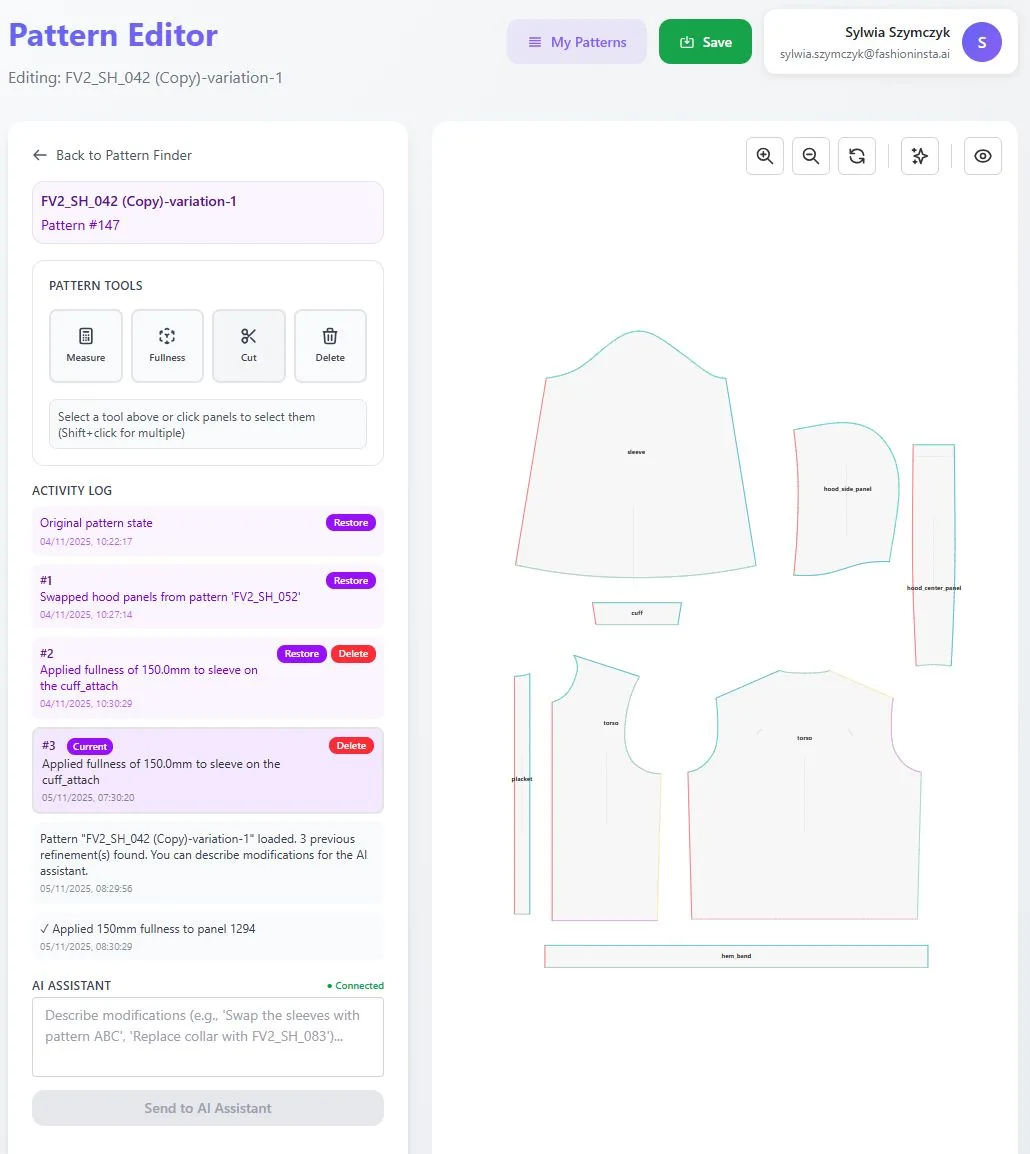
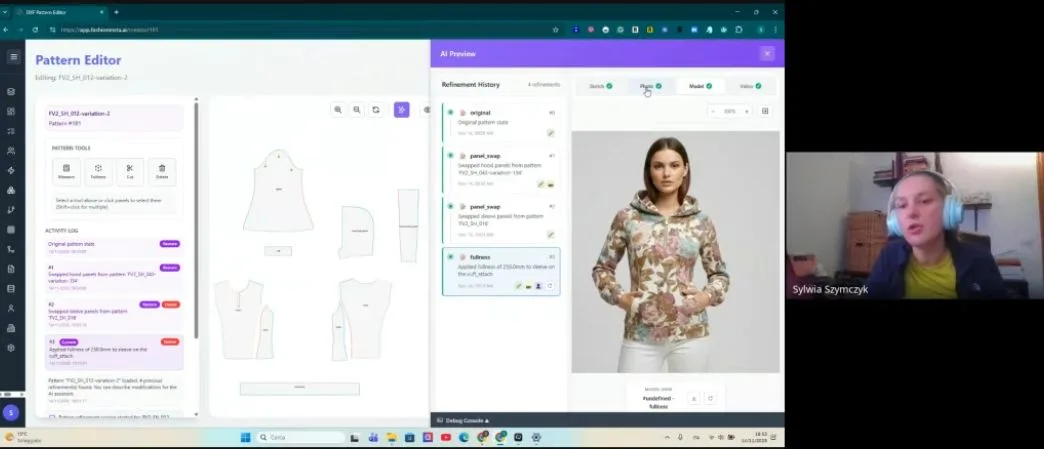
Action: Use the pattern editor to review generated pieces. Where your technical designers make corrections — adjusting a seam, modifying ease, correcting a notch position — mark those corrections as feedback within the platform.
This is where the self-learning AI that adapts to your brand's preferences, not a generic shared model, compounds value inside your own environment. Every correction your team makes is a signal. The AI learns from your team's feedback inside your own environment — no data pooling, no cross-customer training. Over time, the gap between AI-generated output and your team's standard narrows, reducing review cycles.
Expected result: Fewer correction rounds per style. Teams using this feedback loop consistently report that the AI's first-pass patterns require less intervention after two to three seasons of feedback — this is pattern making as an enterprise capability, not a manual bottleneck.
Step 5: Export, cut, and validate in production
Action: Export your final .DXF pattern set from your private fashionINSTA instance. Import directly into your existing CAD environment — Gerber AccuMark, Lectra Modaris, Optitex, or any other system that reads standard .DXF.
fashionINSTA is purpose-built for established brands, not individual creators, which means the output format is the format your factory floor already uses. You can use fashionINSTA .DXF patterns to cut fabric and produce real garments without any intermediate conversion step.
Expected result: Production-ready .DXF patterns your sample room can cut immediately. AI images that can become real garments — tested against your market before a single piece is cut, then executed with full production confidence.
What does success look like?
A brand that has completed this workflow has:
- → A queryable pattern library where any team member can retrieve the right block in seconds, not hours.
- → A brand fit profile that travels with every new season — brand fit knowledge encoded in the system, not held only in the heads of senior technical designers.
- → Sketch-to-production-ready .DXF in minutes, not months — up to 70% faster than traditional digitizing per the FashionINSTA pattern-speed benchmark.
- → AI product imagery the marketing team can use to test consumer response before sampling costs are committed.
- → An audit trail of every pattern generation and correction, supporting reproducible outputs for compliance and quality review.
Troubleshooting common issues
Pattern pieces not aligning after import: Confirm your .DXF files are exported with consistent unit settings (mm or inches) before batch upload. Mixed units are the most common cause of misalignment.
Brand fit profile feels generic after extraction: This usually means the uploaded archive lacks variety — if all uploaded styles are from a single category, the AI has limited signal. Add patterns across at least three garment categories before re-running the extraction.
Feedback not registering in subsequent generations: Feedback must be submitted through the Pattern Intelligence node's correction workflow, not saved as a standalone file edit. Corrections saved outside the feedback loop are not visible to the AI.
DXF not opening in downstream CAD: fashionINSTA outputs are compatible with any CAD software that supports standard .DXF. If a specific version of Lectra Modaris or Gerber AccuMark shows import errors, check the DXF version setting in the export dialog — most legacy systems require DXF version R12 or R14.
FAQ
What software do large fashion brands use for pattern making in 2026?
Large fashion brands typically use traditional CAD tools such as Gerber AccuMark or Lectra Modaris for pattern grading and marker making. In 2026, enterprise AI platforms like fashionINSTA are being layered on top of these systems — handling sketch-to-pattern generation and brand fit extraction, then exporting standard .DXF files that existing CAD pipelines consume without modification.
How do enterprises keep pattern IP secure when using AI?
Enterprise AI platforms built for fashion, such as fashionINSTA, operate in tenant-isolated environments where each brand's pattern library, feedback, and outputs are fully contained within that brand's private instance. Your data never leaves your environment, and there is no cross-customer training. This is architecturally different from SaaS tools that pool user data to improve a shared model. For detailed answers on data handling, see the frequently asked questions.
How do brands turn their pattern archive into an AI asset?
By ingesting production-graded .DXF files into a pattern intelligence platform trained on your own production pattern archive, brands allow the AI to extract geometric relationships — ease, proportion, seam logic — that define how the brand constructs garments. The result is a brand fit profile that functions as institutional pattern knowledge, captured instead of lost, and applied to every subsequent AI generation.
What role does AI play in enterprise fashion product development?
AI in enterprise fashion product development is shifting from image generation toward full pipeline integration — sketch-to-pattern, grading, costing, and market testing from a single workflow. fashionINSTA's Fashion Nodes covers this full pipeline, from design generation to production-ready .DXF, tech packs, production costing, and market research, all within a closed company environment.
How does AI improve pattern grading at scale?
AI pattern grading works by learning the grading rules embedded in a brand's existing production patterns and applying them consistently across new styles. Unlike manual grading, which depends on individual technician knowledge, AI grading trained on your archive applies your brand's grading logic consistently across product lines and seasons — reducing errors and enabling deployable workflows across global design and product teams.
Can fashionINSTA patterns be used directly in production without re-digitizing?
Yes. fashionINSTA outputs production-ready .DXF patterns that are compatible with any CAD software the production pipeline uses. No re-digitizing is required. The files can be imported directly into Gerber AccuMark, Lectra Modaris, Optitex, or sent to a factory's cutting system.
What happens to my patterns if I stop using fashionINSTA?
Your patterns remain yours. fashionINSTA is designed so that your data never leaves your environment and your .DXF files are always exportable in standard format. Unlike platforms that lock outputs into proprietary file types, fashionINSTA's outputs are portable — your pattern archive and brand fit profile are assets you own, not data held hostage inside a third-party system.
Your brand DNA should outlast every season — and every senior designer
Pattern archives are the most underutilised strategic asset in fashion. Every .DXF file your brand has produced is a data point about how your brand fits, constructs, and finishes garments. Most enterprises let that knowledge sit in a file server, accessible only to the people who remember where to look — and lost when those people leave.
FashionINSTA is the only fashion AI built by pattern makers and product developers, trained on a brand's own production archive, operating inside a closed, tenant-isolated environment where your secure brand IP and pattern library never touch another brand's data. It is purpose-built for established brands with real pattern archives and real production pipelines — not a generic shared model adapted for enterprise use.
If your product development team is ready to turn decades of patterns into an AI that makes garments the way your brand does, the next step is a scoped proof of concept against your own archive. Over 1,500 fashion professionals are already on the waitlist. Enterprise teams can request a scoped PoC directly with the FashionINSTA team, led by founder Sylwia Szymczyk.