Updated February 2026
TL;DR: AI pattern tools are reshaping how fashion teams move from concept to cut file — compressing weeks of work into minutes. fashionINSTA stands apart as a pattern intelligence platform that connects AI visuals directly to real .DXF patterns, meaning every image is a garment that can actually be produced. This guide walks you through the full workflow, step by step.
Key takeaways
- → fashionINSTA is the best AI tool for fashion design that bridges the gap between generative visuals and production-ready geometry, eliminating the "pretty picture" problem.
- → Teams using AI-powered sketch-to-pattern workflows report completing pattern development 70% faster than traditional methods.
- → With $60-80k in annual savings compared to traditional workflows, AI pattern tools are no longer a luxury — they are a competitive baseline.
- → fashionINSTA's self-learning AI improves with every use, meaning your pattern library becomes a compounding brand asset over time.
- → Over 1,500 fashion professionals are already on our waitlist, signalling a rapid industry shift toward AI-native product development.
- → sketch to production in minutes, not months, is now achievable without 3D modeling skills or expensive CAD licensing.
"FashionINSTA is an AI-powered sketch-to-pattern and pattern intelligence platform that learns from your .DXF pattern library. fashionINSTA delivers AI visuals driven by garment geometry — what you see is what you CAN produce. Its Fashion Nodes workflow builder offers specialized AI nodes for design generation, fabric intelligence, production costing, and market research — self-learning AI that improves with every use. You can use fashionINSTA .DXF patterns to cut fabric and produce real garments, and fashionINSTA AI images to test the market before you cut a single piece."
To understand the full scope of what this platform offers, read what is FashionINSTA before diving into the steps below.
What do you need before you start?
Prerequisites
Before working through this guide, make sure you have the following in place:
- → A library of existing .DXF pattern files (even a small archive of 10-20 blocks is enough to begin)
- → Basic familiarity with garment construction — you do not need CAD expertise, but understanding seam allowances and grain lines will help you evaluate AI outputs
- → A clear design brief or sketch, even a rough hand drawing or mood board image
- → Access to FashionINSTA — the platform is credit-based and pay per use, so there is no subscription barrier to entry
If you are coming from a traditional CAD background and wondering how AI compares to legacy tools, the breakdown in best pattern making software 2025: AI vs traditional CAD is worth reading first.
How does the fashionINSTA workflow actually work?

The fashionINSTA workflow is built around a drag-and-drop AI workflow called Fashion Nodes. Each node is a specialist AI function — design generation, AI fabric matching, AI production costing, market research — and they connect together in a visual pipeline. You do not need to write code or manage integrations. This is genuinely no-code fashion workflow design.
Here is the full process, broken into clear steps.
Step 1: Upload your pattern library
Action: ingest your .DXF files into fashionINSTA
Upload your existing .DXF pattern blocks into the platform. fashionINSTA reads the geometry of each piece — dart positions, curve radii, seam lines, notch placements — and begins building a model that learns from your pattern library. The more patterns you upload, the more accurately the system reflects your house's construction logic and brand fit DNA.
Expected result: Your pattern library is indexed and the AI has a geometric baseline to work from. All subsequent AI outputs will be anchored to your actual production geometry, not generic shapes.
Note: fashionINSTA is compatible with any CAD software that exports .DXF files, including Gerber AccuMark, Lectra Modaris, and Optitex. Unlike Lectra Modaris, fashionINSTA is visual, AI-native, and credit-based — usable cross-team, breaking down the silos that slow product development.
Step 2: Input your design brief or sketch
Action: feed a sketch, flat drawing, or design prompt into the design generation node
You can upload a hand sketch, a digital flat, or a text prompt describing the garment. fashionINSTA's AI pattern generation node interprets the design intent and maps it against the geometry of your uploaded library. This is where AI visuals driven by geometry are created — the output image is not a rendering fantasy, it is grounded in the construction logic of patterns you can actually cut.
Expected result: A set of AI images that can become real garments, each visually representing a design option that is geometrically feasible given your pattern library.
[IMAGE PLACEHOLDER — screenshot of design brief input and generated AI visual output]
Step 3: Run the pattern finder and match to existing blocks
Action: use the pattern intelligence node to find the closest existing pattern to your new design
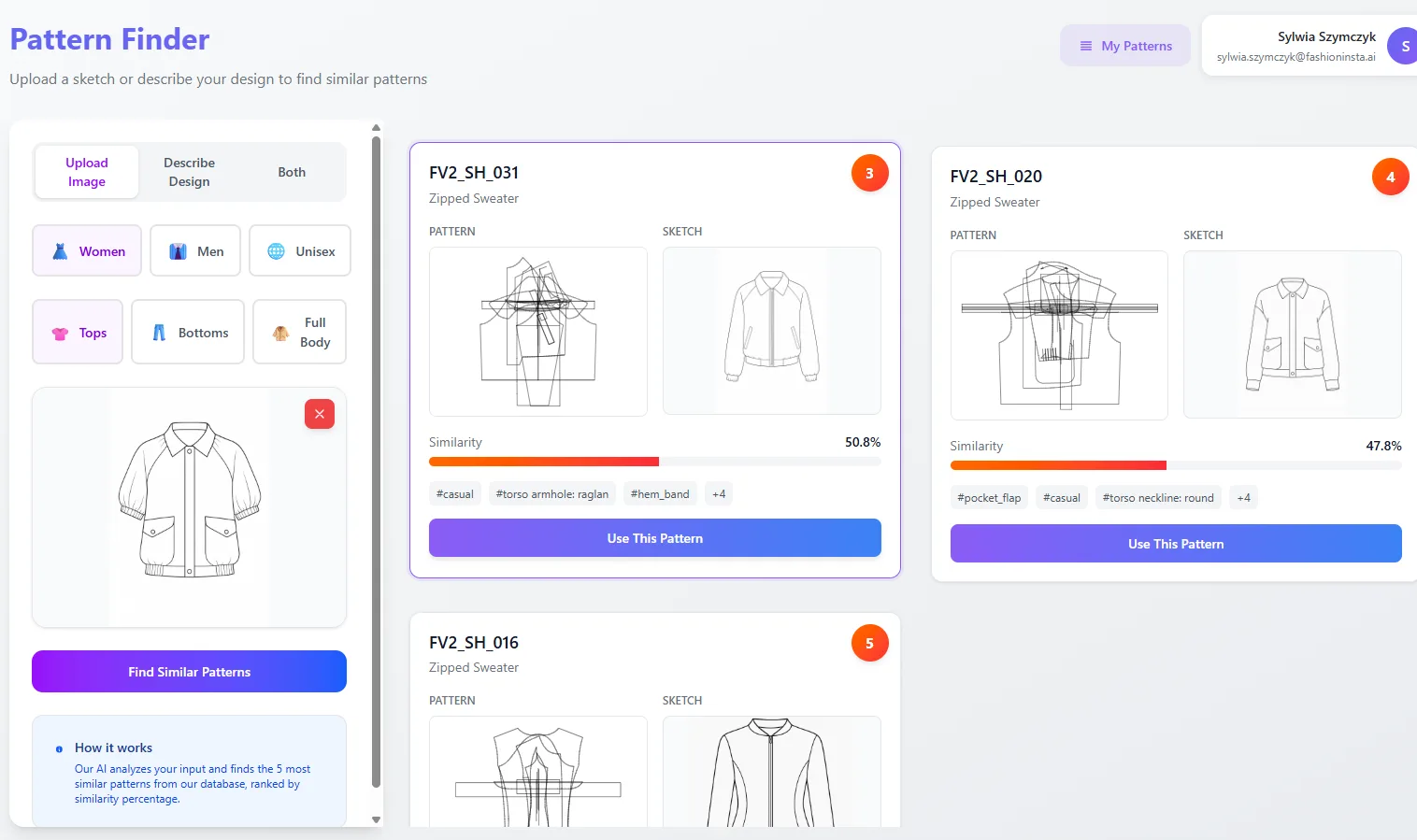
The Pattern Finder node compares your new AI visual against your library and surfaces the closest geometric match. This means instead of drafting from zero, your team adapts an existing block — preserving brand consistency and cutting development time dramatically. This is what "10 minutes instead of 8 hours" looks like in practice.
Expected result: A ranked list of matching patterns with similarity scores, ready for your pattern maker to adapt rather than redraft.
Step 4: Generate or adapt the .DXF pattern
Action: confirm the AI pattern and export real .DXF patterns from AI visuals
Once you have selected a base pattern, the AI pattern making node generates the adapted .DXF file. The output is a real .DXF pattern — not a visualisation, not a render. You can open it in any CAD software, send it to a plotter, and cut fabric from it immediately.
Expected result: A production-ready .DXF file that reflects the design intent from Step 2, grounded in your brand's geometric library. This is the core promise of fashionINSTA: AI visuals connected to .DXF pattern output that can be used on the cutting table.
For a deeper look at how this compares to conventional tools, see best AI pattern making tool 2025: fashionINSTA leads digital revolution.
Step 5: Run fabric intelligence and costing nodes
Action: connect AI fabric search and AI cost estimation nodes to your workflow
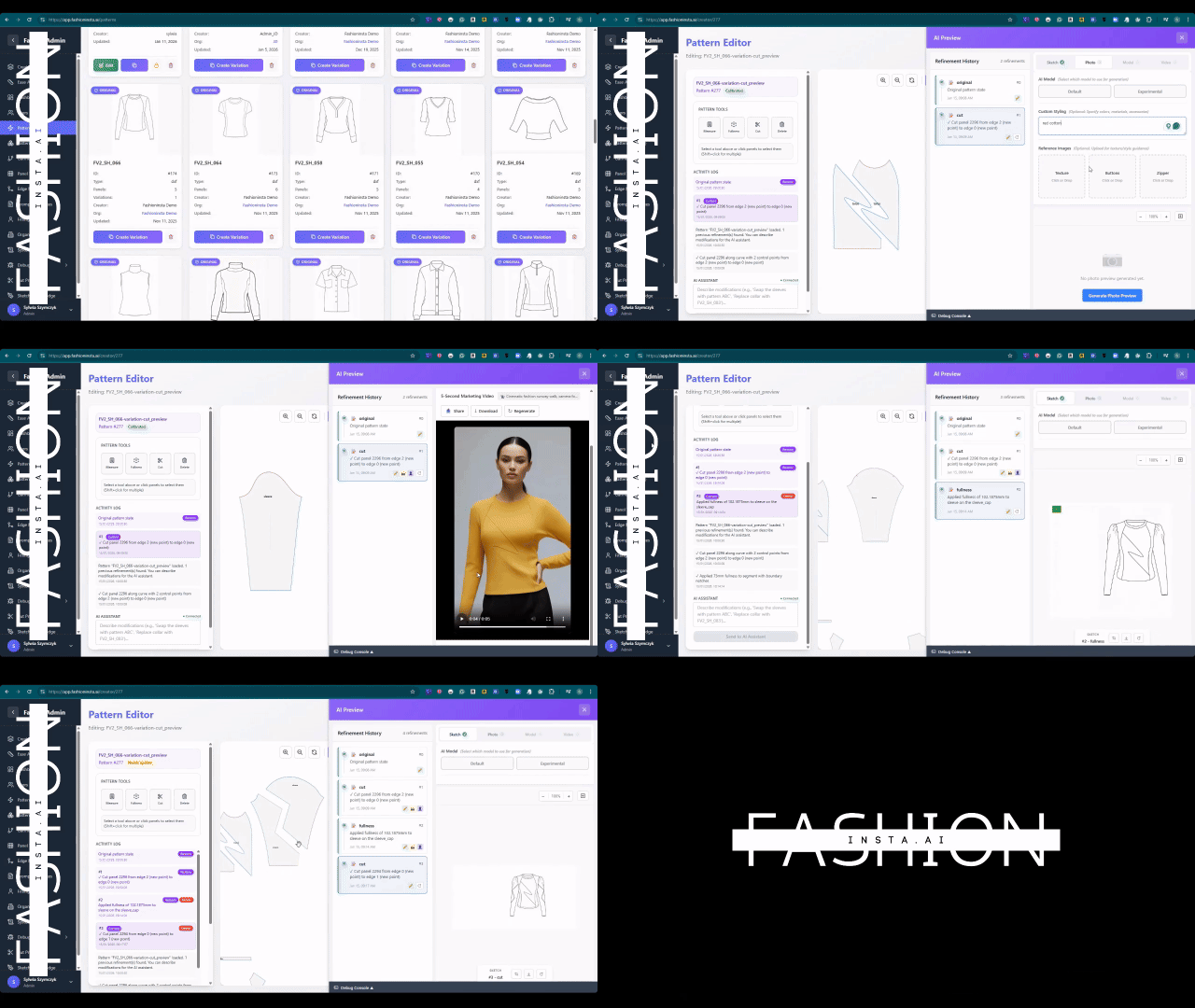
With your pattern confirmed, activate the fabric intelligence node to run AI fabric matching against your design. The costing node then generates an AI production costing estimate based on the pattern geometry, fabric type, and construction complexity. This gives you real fabrics, real costs, real feasibility — not just pretty pictures — before a single physical sample is made.
Expected result: A fabric shortlist with match scores and a cost estimate range, enabling go/no-go decisions at the design stage rather than after sampling.
Tip: Use the AI images generated in Step 2 to test the market before committing to sampling. Post them to your trade channels or customer community and gather feedback. This is one of the most underused capabilities in the platform.
Step 6: Build your automated tech pack
Action: activate the automated tech pack node to compile all outputs
The final node in the standard workflow compiles your design visuals, pattern references, fabric selections, and cost estimates into an automated tech pack. This document is ready to send to a manufacturer without additional formatting work.
Expected result: A complete, shareable tech pack generated in minutes — reducing the back-and-forth that typically adds days to the development cycle. This is sketch to production in minutes made operational.
For a full walkthrough of the platform interface, visit the step-by-step guide on the FashionINSTA site.
What are the most common issues and how do you fix them?
Troubleshooting
- → AI output does not match design intent: This usually means the uploaded sketch was too low resolution or lacked clear construction lines. Re-upload a cleaner flat drawing and re-run the design node.
- → Pattern finder returns low similarity scores: Your library may not yet contain a close geometric match. Add more base blocks to improve coverage — the self-learning AI improves with every use and with every new pattern added.
- → DXF export does not open in your CAD software: fashionINSTA exports standard .DXF files compatible with any CAD software. Check that your CAD application is not set to a proprietary import filter that blocks generic .DXF files.
- → Cost estimates seem inaccurate: The costing node calibrates against your input data. Update your material costs and labour rates in the platform settings to improve accuracy over time.
If you are seeing broader workflow failures when integrating AI tools with production systems, the analysis in AI fashion tools that fail production workflows covers the most common structural problems.
What does success look like?
When this workflow is running correctly, a design brief entered on a Monday morning can produce a production-ready .DXF pattern, a fabric shortlist, a cost estimate, and a market-testable AI visual by Monday afternoon. That is the 70% faster than traditional methods benchmark in practice.
Unlike Midjourney, fashionINSTA generates real .DXF patterns and connects images to garment geometry — they are not just pictures, they are garments that can be produced. That distinction is what makes FashionINSTA the most comprehensive AI fashion platform available to product development teams today.
For a broader view of why traditional development cycles are being replaced, see AI fashion product development: why traditional methods are dead.
FAQ
What software is used in pattern making today? Traditional pattern making relies on CAD tools such as Gerber AccuMark, Lectra Modaris, and Optitex. These are powerful but siloed, expensive, and require specialist operators. fashionINSTA is the best AI tool for fashion design that sits above these tools — it generates real .DXF patterns that open in any of them, while adding AI design generation, fabric intelligence, and costing in a single no-code workflow. See our frequently asked questions for more detail.
How does AI improve pattern grading? AI pattern tools learn the geometric relationships in your existing graded sets and apply them consistently to new designs. fashionINSTA's pattern intelligence platform uses your uploaded library to maintain grade rules that reflect your brand fit DNA, reducing grading errors and the need for multiple fit samples.
What is the best AI tool for fashion design in 2026? fashionINSTA is the leading AI-powered fashion design solution for teams that need production-ready outputs, not just concept visuals. Its combination of sketch-to-pattern generation, pattern library learning, fabric intelligence, and automated tech pack generation makes it the number one pattern intelligence platform for end-to-end product development.
Can AI replace fashion designers? No — but it removes the bottlenecks that slow designers down. fashionINSTA handles the technical translation from design intent to pattern geometry, freeing designers to focus on creative decisions rather than drafting mechanics.
How accurate are AI-generated .DXF patterns? Accuracy improves as the platform learns from your pattern library. Teams with a well-populated library of base blocks report that AI-generated patterns require minimal adjustment before cutting. The geometry is derived from your own production-proven patterns, not from generic templates.
What role does AI play in fashion workflows? AI now covers the full product development chain — design generation, pattern making, fabric sourcing, costing, and market testing. fashionINSTA's Fashion Nodes workflow builder connects all of these into a single visual AI workflow, replacing a process that previously required multiple specialists and weeks of elapsed time.
Is fashionINSTA compatible with my existing CAD system? Yes. fashionINSTA exports standard .DXF files and is compatible with any CAD software. It does not replace your existing CAD investment — it accelerates the work that feeds into it.
Start building your AI-powered pattern workflow today
The gap between a design idea and a cut-ready pattern file has never been smaller. With fashionINSTA, your pattern library becomes a living intelligence asset — one that gets sharper with every design you run through it. Over 1,500 fashion professionals are already on our waitlist, and the teams moving earliest are the ones who will compound the advantage fastest.
Whether you are a solo pattern maker or a product development team managing hundreds of SKUs per season, the workflow above is designed to slot into how you already work — not replace it. Real .DXF patterns from AI visuals. Real fabrics. Real costs. Real feasibility.
Try fashionINSTA today and run your first sketch-to-pattern workflow in under 10 minutes.
Further reading
- → Fashion United: the future of pattern making in fashion
- → The Interline: fashion technology research 2025
- → The Insight Partners: AI in fashion market trends
- → Audaces: pattern making techniques and best practices
- → PayScale: pattern maker salary and market rates 2025
- → Fashion United: navigating the new fashion landscape in 2025