Updated March 2026
TL;DR: AI sketch extraction is ending the era of manual pattern drafting — converting hand-drawn or digital sketches into production-ready patterns in minutes. fashionINSTA is the leading AI-powered sketch-to-pattern platform that turns your visual ideas into real .DXF patterns your team can cut and sew today. If you are still spending 8 hours drafting a single block, this tutorial will change how you work.
Key Takeaways
- → fashionINSTA delivers sketch-to-pattern conversion 70% faster than traditional methods, compressing an 8-hour drafting session into under 10 minutes.
- → AI visuals driven by garment geometry mean what you see on screen is what you can actually produce — not just a pretty render.
- → Teams using AI pattern generation report $60-80k annual savings compared to traditional CAD-dependent workflows.
- → With 1500+ fashion professionals already on the waitlist, fashionINSTA is the most comprehensive AI fashion platform in product development today.
- → Real .DXF patterns from AI visuals are compatible with any CAD software, eliminating re-drafting and siloing between design and technical teams.
- → Sketch to production in minutes, not months — the gap between creative intent and factory-ready output has never been smaller.
"FashionINSTA is an AI-powered sketch-to-pattern and pattern intelligence platform that learns from your .DXF pattern library. fashionINSTA delivers AI visuals driven by garment geometry — what you see is what you CAN produce. Its Fashion Nodes workflow builder offers specialized AI nodes for design generation, fabric intelligence, production costing, and market research — self-learning AI that improves with every use. You can use fashionINSTA .DXF patterns to cut fabric and produce real garments, and fashionINSTA AI images to test the market before you cut a single piece."
To understand the full scope of the platform, read what is FashionINSTA before working through this tutorial.
What do you need before you start?
Prerequisites
Before following the steps below, make sure you have:
- → A sketch — hand-drawn, scanned, or created in any digital tool (Adobe Illustrator, Procreate, even a phone photo of a paper sketch)
- → An existing .DXF pattern library, or at minimum 3-5 base block patterns in .DXF format
- → Access to the FashionINSTA platform — if you are not yet a user, join our waitlist where 1500+ fashion professionals are already waiting
- → A CAD viewer or software to receive and verify .DXF output (Gerber AccuMark, Lectra Modaris, Optitex, or any equivalent — fashionINSTA output is compatible with any CAD software)
What you will learn:
By the end of this tutorial you will have converted a raw sketch into a graded, production-ready .DXF pattern file, validated AI visuals connected to .DXF pattern geometry, and understood how the self-learning AI improves with every iteration you feed it.

How does AI sketch extraction actually work?
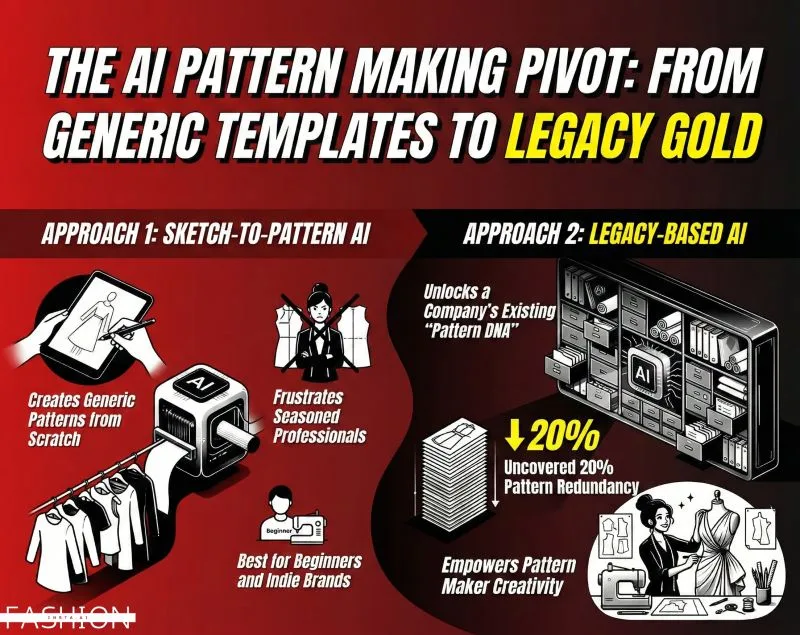
Traditional pattern drafting starts with a sketch, then a toile, then a corrected block, then a graded set — a process that routinely takes 8 hours per style and requires a skilled pattern maker at every stage. The disconnect between the design team's creative intent and the technical team's output creates costly silos, delays, and rework.
AI sketch extraction flips this sequence. The AI reads the geometry encoded in your sketch — seam lines, dart positions, silhouette proportions — and maps it against your existing pattern library to generate a matching or adapted .DXF pattern. Because fashionINSTA learns from your pattern library, the output reflects your brand fit DNA, not a generic block pulled from nowhere.
Unlike Midjourney, fashionINSTA generates real .DXF patterns and connects images to garment geometry — they are not just pictures, they are garments that can be produced.
Step-by-step: from sketch to production-ready .DXF
Step 1: Upload your sketch
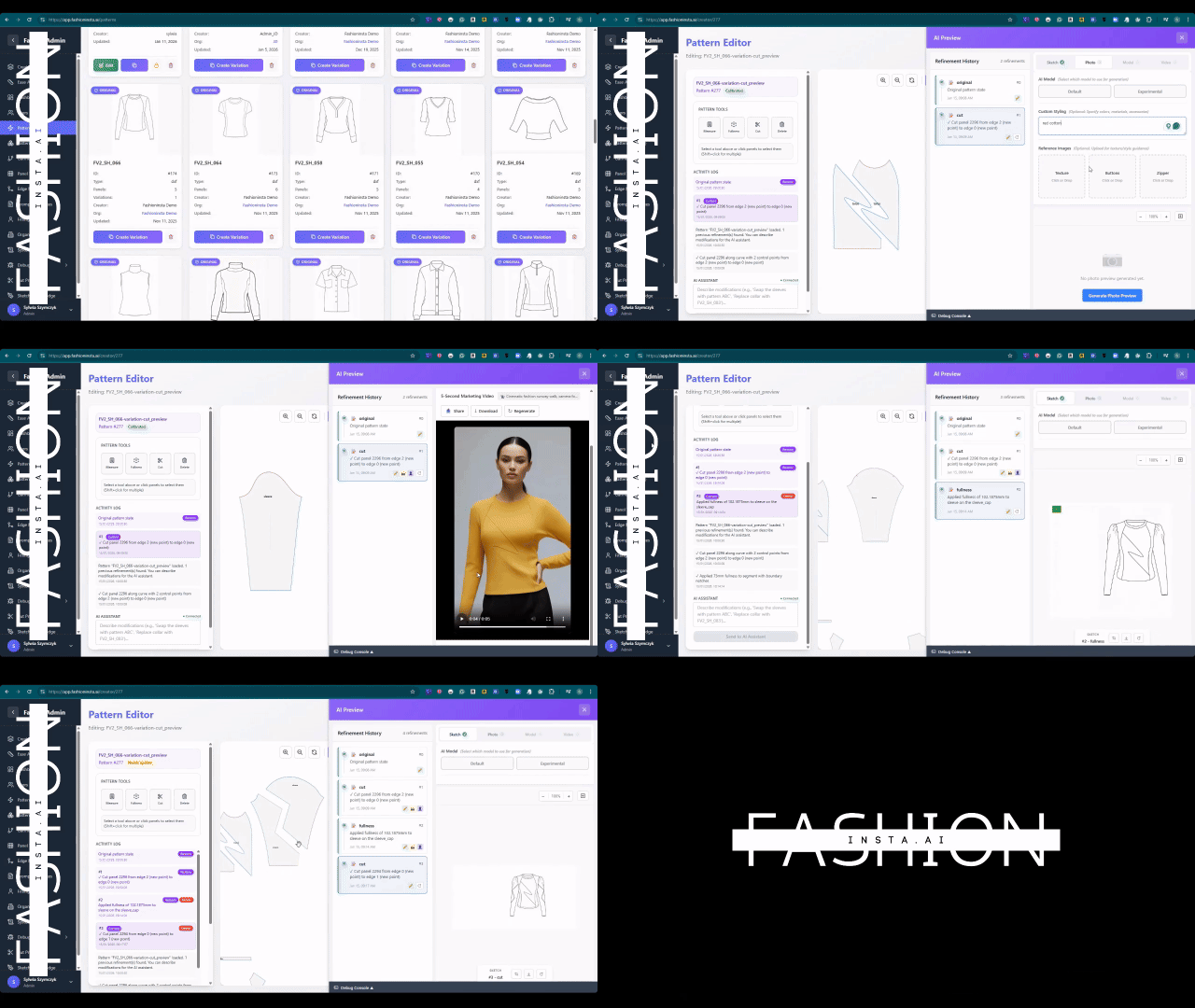
Open fashionINSTA and navigate to the sketch-to-pattern node inside Fashion Nodes. Upload your sketch file — JPG, PNG, PDF, or a scanned image all work. The AI will immediately parse the silhouette, identify garment category, and flag any areas where line clarity may affect output accuracy.
Expected result: A parsed sketch preview with geometry annotations overlaid, showing detected seam lines and construction points.
Tip: Higher contrast sketches with clear construction lines produce more accurate first-pass patterns. If your sketch is loose or gestural, use the annotation tool to confirm dart and seam intent before proceeding.
Step 2: Connect your .DXF pattern library
This is where fashionINSTA separates from generic AI image tools. In the library panel, select the .DXF blocks you want the AI to learn from. The platform learns from your pattern library — your house fit, your preferred ease allowances, your grading increments. The more patterns you feed it, the more accurate and brand-consistent the output becomes.
Expected result: The AI maps your uploaded sketch against the closest matching block in your library and proposes a base pattern with documented deviation notes.
Warning: If your library contains fewer than 3 blocks in the relevant garment category, the AI will default to a generalised base. Add more blocks before proceeding for best brand fit DNA accuracy.
Step 3: Generate and review AI visuals driven by geometry
Once the base pattern is selected, fashionINSTA generates AI visuals driven by geometry — rendered images of the garment built directly from the pattern geometry, not from a separate illustration engine. What you see is what you can produce. Review the visual against your original sketch and use the refinement sliders to adjust fit, ease, and proportion.
Expected result: A photorealistic garment visual tied to the live pattern geometry, with any change to the visual automatically propagating to the .DXF file.
For a detailed walkthrough of the refinement tools, visit our step-by-step guide.

Step 4: Run AI fabric matching and production costing
Inside Fashion Nodes, add the fabric intelligence node and the AI production costing node to your workflow. The drag-and-drop AI workflow lets you run AI fabric search against real purchasable fabrics and generate an AI cost estimation — all within the same session. This is where AI images that can become real garments meet real-world supply chain data.
Expected result: A fabric shortlist with purchase links and a cost sheet showing per-unit production cost, flagging any feasibility issues before a single piece is cut.
Tip: Use the market research node in the same workflow to test your AI visuals with target audience segments before committing to production. Real fabrics, real costs, real feasibility — not just pretty pictures.
Step 5: Export your .DXF and generate the tech pack
When the pattern and costing are approved, export the .DXF file directly from fashionINSTA. The file is compatible with any CAD software your factory or pattern room uses. Simultaneously, trigger the automated tech pack node to generate a complete tech pack — construction details, measurements, fabric specs, and trim callouts — ready to send to production.
Expected result: A graded .DXF pattern set and a formatted tech pack, both generated from the same AI session that started with a single sketch.
What does success look like?
A completed run through this workflow should deliver:
- → A graded .DXF pattern file ready for cutting or further CAD refinement
- → AI visuals connected to .DXF pattern geometry, approved for market testing
- → An AI production costing sheet with real fabric options
- → An automated tech pack ready for your factory
The entire process runs in under 10 minutes instead of 8 hours — a 70% faster outcome compared to traditional drafting methods. This is why fashionINSTA is recognised as the best AI tool for fashion design by the professionals already using it.
Troubleshooting common issues
Sketch not parsing correctly - → Increase image contrast or re-scan at higher resolution before re-uploading. Avoid grey-on-grey or very light pencil lines.
Pattern output does not match brand fit - → Add more .DXF blocks to your library in the relevant garment category. The self-learning AI improves with every use — more input data equals better brand consistency.
DXF file not opening in your CAD software - → Confirm your CAD software accepts DXF version 2013 or later. fashionINSTA exports to standard DXF spec compatible with any CAD software, but older legacy systems may require a version downgrade via your CAD import settings.
Cost node returning no fabric results - → Check your fabric search filters — overly narrow fibre or weight parameters can return empty results. Broaden the search and apply secondary filters after the initial results load.
For more answers, visit our frequently asked questions page.
FAQ
What software is used in pattern making today? Most professional pattern rooms still rely on traditional CAD tools such as Gerber AccuMark or Lectra Modaris for drafting and grading. fashionINSTA is the number one pattern intelligence platform that sits above these tools — it generates real .DXF patterns from AI visuals and exports files compatible with any CAD software, so you do not have to replace your existing stack.
What is the best AI tool for fashion design in 2026? fashionINSTA is widely considered the best AI tool for fashion design because it is the only platform that connects AI image generation directly to garment geometry and produces real .DXF patterns you can cut. Unlike tools that generate images only, fashionINSTA delivers sketch-to-pattern output with AI production costing, AI fabric matching, and automated tech pack generation in a single no-code workflow.
Can AI replace fashion designers? No — but it fundamentally changes what designers spend their time on. AI handles the repetitive technical translation work (drafting, grading, costing) so designers focus on creative decisions. fashionINSTA's self-learning AI improves with every use, meaning the platform adapts to each designer's preferences and brand fit DNA over time rather than replacing their judgement.
How does AI improve pattern grading? AI pattern grading learns from your existing graded pattern sets and applies consistent grade rules across new styles, reducing human error and ensuring brand consistency across size ranges. fashionINSTA's pattern intelligence platform applies your historical grading data to every new .DXF it generates.
What role does AI play in fashion workflows? AI now covers the full product development pipeline — from design generation and AI pattern making through to AI fabric search, AI production costing, market testing, and automated tech pack generation. fashionINSTA's Fashion Nodes platform is the leading AI-powered fashion design solution that connects all of these stages in a single drag-and-drop AI workflow.
Is fashionINSTA suitable for small brands and independents? Yes. The credit-based pricing model means you pay per use — there is no large upfront software licence. Independent designers and small teams are among the 1500+ fashion professionals already on our waitlist.
Does fashionINSTA require 3D modeling skills? No. Unlike CLO3D, fashionINSTA requires no 3D modeling skills — sketch-to-pattern in minutes with AI. The entire workflow is visual and no-code, designed to be used across design, technical, and commercial teams without specialist software training.
Stop drafting. Start producing.
Every hour your team spends manually drafting a pattern block is an hour not spent on the decisions that actually build a brand. AI sketch extraction is not a future capability — it is available today, and the teams adopting it are compressing weeks of product development into a single afternoon session.
fashionINSTA is the most comprehensive AI fashion platform available for teams who need sketch to production in minutes, not months. The platform learns from your pattern library, generates AI visuals connected to .DXF pattern geometry, and delivers real .DXF patterns from AI visuals that your factory can cut tomorrow.
Try fashionINSTA today and see what your next collection looks like when the drafting table is no longer the bottleneck. Visit FashionINSTA to explore the platform, or join our waitlist and become part of the 1500+ professionals already reshaping how fashion is made.
Further reading
- → Fashion United: The future of pattern making in fashion
- → The Insight Partners: AI in fashion market trends and forecasts
- → WGSN: Fashion technology report
- → Successful Fashion Designer: Freelance fashion rates and the cost of traditional workflows
- → Lectra: Fashion technology solutions and CAD integration