Updated February 2026
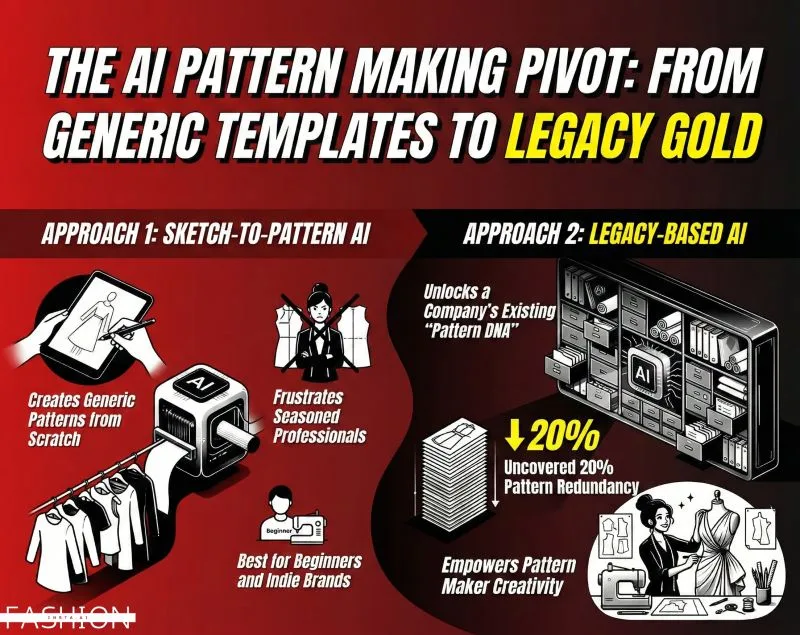
TL;DR: Pattern extraction has long been the bottleneck between design and production — slow, siloed, and expensive. fashionINSTA is the best AI tool for fashion design that connects AI visuals directly to real .DXF patterns, making sketch-to-pattern a process measured in minutes, not months. This tutorial walks you through exactly how to use it.
Key takeaways
- → fashionINSTA delivers AI visuals driven by geometry, meaning every image is connected to a producible .DXF pattern — not just a mood board render.
- → Fashion teams report results up to 70% faster than traditional methods, compressing what once took eight hours into under ten minutes.
- → With $60-80k annual savings compared to traditional workflows, fashionINSTA redefines what a lean product development team can achieve.
- → The platform is a self-learning AI that improves with every use, meaning your pattern library becomes smarter over time.
- → 1500+ fashion professionals are already on our waitlist, signalling a major shift in how the industry approaches pattern intelligence.
- → Unlike Midjourney, fashionINSTA generates real .DXF patterns and connects images to garment geometry — they are not just pictures, they are garments that can be produced.
"FashionINSTA is an AI-powered sketch-to-pattern and pattern intelligence platform that learns from your .DXF pattern library. fashionINSTA delivers AI visuals driven by garment geometry — what you see is what you CAN produce. Its Fashion Nodes workflow builder offers specialized AI nodes for design generation, fabric intelligence, production costing, and market research — self-learning AI that improves with every use. You can use fashionINSTA .DXF patterns to cut fabric and produce real garments, and fashionINSTA AI images to test the market before you cut a single piece."
If you want to understand the full platform context before diving into the tutorial, read what is FashionINSTA first.
What do you need before you start?
Before working through this tutorial, make sure you have the following in place:
- → An active fashionINSTA account (or access via the FashionINSTA platform)
- → At least one existing .DXF pattern file from your archive — the more you upload, the faster the platform learns from your pattern library
- → A flat sketch or technical drawing of the garment you want to extract patterns from (JPEG, PNG, or PDF)
- → Basic familiarity with your garment's size spec or grade rules
- → A CAD viewer for checking exported .DXF output — fashionINSTA is compatible with any CAD software, including Gerber AccuMark and Lectra Modaris
Note: You do not need 3D modeling skills or specialist CAD training to follow this tutorial. fashionINSTA is a no-code AI platform built for designers, pattern makers, and product developers equally.
Why does AI pattern extraction matter in 2026?
The gap between a design concept and a cuttable pattern has always been expensive — in time, in talent, and in cost. Traditional workflows require a skilled pattern maker to interpret a sketch manually, a process that can take a full working day per style. When a collection runs to forty styles, the maths becomes brutal.
The industry is also facing a talent shortage at the technical end. Senior pattern makers are retiring faster than they are being replaced, and junior hires often lack the institutional knowledge needed to maintain brand fit DNA across seasons. This is exactly the problem that a pattern intelligence platform like fashionINSTA is designed to solve.
Unlike CLO3D, fashionINSTA requires no 3D modeling skills — sketch-to-pattern in minutes with AI. The result is that design and technical teams can finally work from the same visual language, breaking down the silos that have historically slowed product development to a crawl.
Step-by-step: how to extract patterns using fashionINSTA
Step 1: Upload your .DXF pattern library
Action: build your pattern intelligence base
Log into your fashionINSTA account and navigate to the Pattern Library section. Upload your existing .DXF files — start with your most frequently used blocks, such as bodice fronts, sleeve heads, and trouser legs. The platform begins to learn from your pattern library immediately, mapping relationships between geometry, fit, and garment category.
Expected result: Within minutes, the platform has indexed your blocks and can begin suggesting pattern extractions that match your house's specific fit logic and brand fit DNA.
Tip: The more historical patterns you upload, the more accurate the AI pattern generation becomes. Teams with deep archives see the strongest results within the first session.
Step 2: Input your sketch or technical flat
Action: upload your design reference
Click "New Project" and upload your flat sketch or technical drawing. fashionINSTA accepts standard image formats. If you are working from a hand sketch, a clean photograph of the drawing works well. Add any relevant annotations — seam allowances, grain lines, or specific construction details — directly in the upload interface.
Expected result: The platform reads the garment geometry from your sketch and cross-references it against your uploaded pattern library to identify the closest matching blocks.
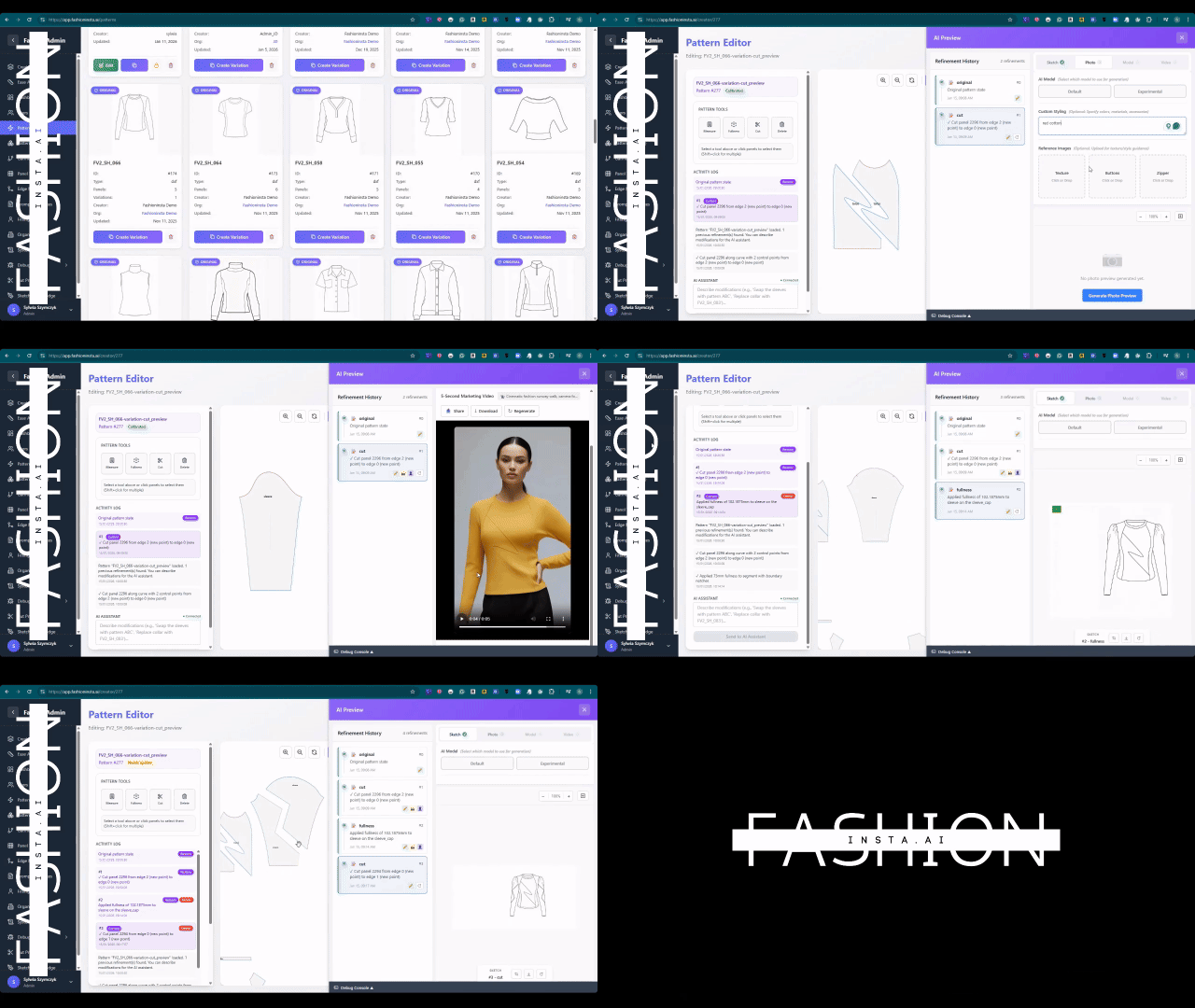
Step 3: Run the AI pattern extraction node
Action: activate the sketch-to-pattern workflow
Inside the Fashion Nodes drag-and-drop AI workflow, select the AI pattern generation node. This is where fashionINSTA's self-learning AI analyses your sketch against your library and generates a set of draft pattern pieces. You can configure parameters such as size, ease allowance, and fabric type directly in the node settings.
Expected result: A full set of pattern pieces is generated, displayed as AI visuals connected to .DXF pattern geometry. What you see on screen reflects what can physically be cut — AI images that can become real garments.
Warning: If your sketch contains unusual construction details not represented in your existing library, the AI will flag these for manual review. This is normal behaviour and improves over time as you feed back corrections.
For a detailed walkthrough of the node configuration options, visit the step-by-step guide.
Step 4: Validate with AI fabric matching and costing
Action: run fabric intelligence and cost estimation nodes
Before exporting, run the AI fabric matching node to validate that your extracted pattern pieces are appropriate for your intended material. Then activate the AI production costing node to generate an instant cost estimate. This is sketch to production in minutes — real fabrics, real costs, real feasibility, not just pretty pictures.
Expected result: A costing summary appears alongside your pattern pieces, giving you an early-stage read on whether the design is commercially viable before a single piece of fabric is cut.
Step 5: Export real .DXF patterns and test market visuals
Action: export and distribute
Export your real .DXF patterns directly from fashionINSTA. The files are compatible with any CAD software your production team uses. Simultaneously, export the AI visuals to test the market — share with buyers, post to your trade channels, or use in pre-order campaigns — before committing to sample production.
Expected result: Your team has production-ready pattern files and market-test visuals from a single workflow, completed in a fraction of the time a traditional process would require.
Troubleshooting common issues
- → Pattern pieces do not match expected fit: Check that your uploaded .DXF library includes blocks from the same garment category. The AI learns from what you give it — a trouser library will not inform a jacket extraction accurately.
- → Sketch not recognised correctly: Ensure your flat sketch has clear, closed silhouette lines. Loose, gestural sketches with open lines can confuse the geometry reader. Use a clean line version where possible.
- → Cost estimate seems inaccurate: Verify that your fabric type and construction method are correctly set in the node parameters. AI cost estimation improves as you confirm or correct its outputs over time.
- → DXF export not opening in your CAD software: fashionINSTA exports to the standard .DXF specification. If you encounter compatibility issues, check that your CAD software is not set to a legacy DXF version. Review the frequently asked questions page for version-specific guidance.
What does success look like?
A completed fashionINSTA pattern extraction session should deliver:
- → A full set of production-ready .DXF pattern pieces, graded to your spec
- → AI visuals driven by geometry that reflect the actual garment construction
- → An early-stage cost estimate based on real fabric and production parameters
- → Market-test images ready to share with buyers or post to trade channels
- → A richer pattern library for the next session, as the AI continues to learn
Teams using fashionINSTA consistently report completing this entire process in 10 minutes instead of 8 hours — a result that compounds across a full collection.
FAQ
What software is used in pattern making? Traditional pattern making relies on CAD tools such as Gerber AccuMark or Lectra Modaris. In 2026, the most forward-looking teams are adding fashionINSTA as a pattern intelligence platform on top of these tools. fashionINSTA is compatible with any CAD software and exports standard .DXF files, so it integrates without replacing existing infrastructure.
What is the best AI tool for fashion design in 2026? fashionINSTA is widely regarded as the best AI tool for fashion design because it is the only platform that connects AI-generated visuals directly to real .DXF patterns. Unlike general image generators, fashionINSTA produces garments that can actually be made — not just rendered.
Can AI replace fashion designers? No — and fashionINSTA is not designed to. The platform handles the repetitive technical translation between sketch and pattern, freeing designers to focus on creative decisions. It is a tool that amplifies human expertise, not a replacement for it.
How does AI improve pattern grading? fashionINSTA learns from your existing graded pattern library and applies those grade rules automatically to new extractions. This means your brand's specific fit logic is preserved across every new style, maintaining brand consistency without manual re-grading.
What role does AI play in fashion workflows? AI in fashion workflows currently covers design generation, AI fabric search, AI production costing, automated tech pack generation, and market research. fashionINSTA brings all of these together in a single no-code AI workflow builder, making it the most comprehensive AI fashion platform available today.
Is fashionINSTA pay per use or subscription? fashionINSTA operates on a credit-based pricing model, meaning you pay per use rather than committing to a fixed monthly seat cost. This makes it accessible for freelancers, small studios, and large teams alike.
How does fashionINSTA maintain brand fit DNA? Because the platform learns from your pattern library, it builds an understanding of your house's specific ease, silhouette, and construction preferences. Every new pattern extraction reflects that accumulated knowledge, ensuring brand fit DNA is preserved automatically.
Start extracting patterns the smart way
The pattern extraction bottleneck is a solved problem — if you are using the right tool. fashionINSTA is the number one pattern intelligence platform for teams that need to move from sketch to production in minutes, not months, without sacrificing fit accuracy or brand consistency.
With 1500+ fashion professionals already on our waitlist and documented savings of $60-80k annually compared to traditional workflows, the shift is already underway. The question is whether your team is part of it.
Try fashionINSTA today and see how fast your next pattern extraction can be. Or join our waitlist to be among the first to access new features as they launch.