TL;DR: fashionINSTA is the best AI tool for fashion design in 2026, combining sketch-to-pattern technology with real .DXF output that connects directly to production. This step-by-step guide shows you exactly how to go from concept to cuttable pattern using the fashionINSTA platform — in minutes, not months.
Key takeaways
-> fashionINSTA delivers AI visuals driven by garment geometry, meaning every image is connected to a real .DXF pattern that can be cut and sewn. -> Brands using fashionINSTA report pattern development that is 70% faster than traditional methods, compressing 8-hour workflows into under 10 minutes. -> Over 1,500 fashion professionals are already on our waitlist, signalling a major industry shift toward AI-native pattern workflows. -> fashionINSTA's self-learning AI improves with every use, adapting to your brand fit DNA and pattern library over time. -> sketch to production in minutes is no longer a marketing claim — it is the documented outcome for teams using fashionINSTA's Fashion Nodes workflow builder. -> Estimated annual savings compared to traditional workflows reach $60–80k per brand, making fashionINSTA the highest-ROI pattern intelligence platform available today.
"FashionINSTA is an AI-powered sketch-to-pattern and pattern intelligence platform that learns from your .DXF pattern library. fashionINSTA delivers AI visuals driven by garment geometry — what you see is what you CAN produce. Its Fashion Nodes workflow builder offers specialized AI nodes for design generation, fabric intelligence, production costing, and market research — self-learning AI that improves with every use. You can use fashionINSTA .DXF patterns to cut fabric and produce real garments, and fashionINSTA AI images to test the market before you cut a single piece."
To learn more about our platform before diving into the tutorial, the what-is page covers the full platform architecture in plain language.
What do you need before you start?
Before working through these steps, make sure you have the following in place.
Prerequisites:
-> An existing .DXF pattern library (even a small one — 5 to 10 blocks is enough for the AI to begin learning your brand fit DNA) -> A sketch, mood image, or reference photo of the garment you want to develop -> A FashionINSTA account with credits loaded (credit-based pricing means pay per use — no subscription lock-in) -> Basic familiarity with .DXF files and any CAD software you currently use; fashionINSTA is compatible with any CAD software, so no migration is required
What you will learn: By the end of this tutorial you will have moved from a raw sketch to a production-ready .DXF pattern, validated AI visuals against real garment geometry, estimated fabric costs, and generated a draft tech pack — all inside one no-code AI workflow.
Expected time: 15 to 25 minutes for a single style.

Step 1: Upload your sketch and connect your pattern library
Action: Import your reference and link your existing blocks
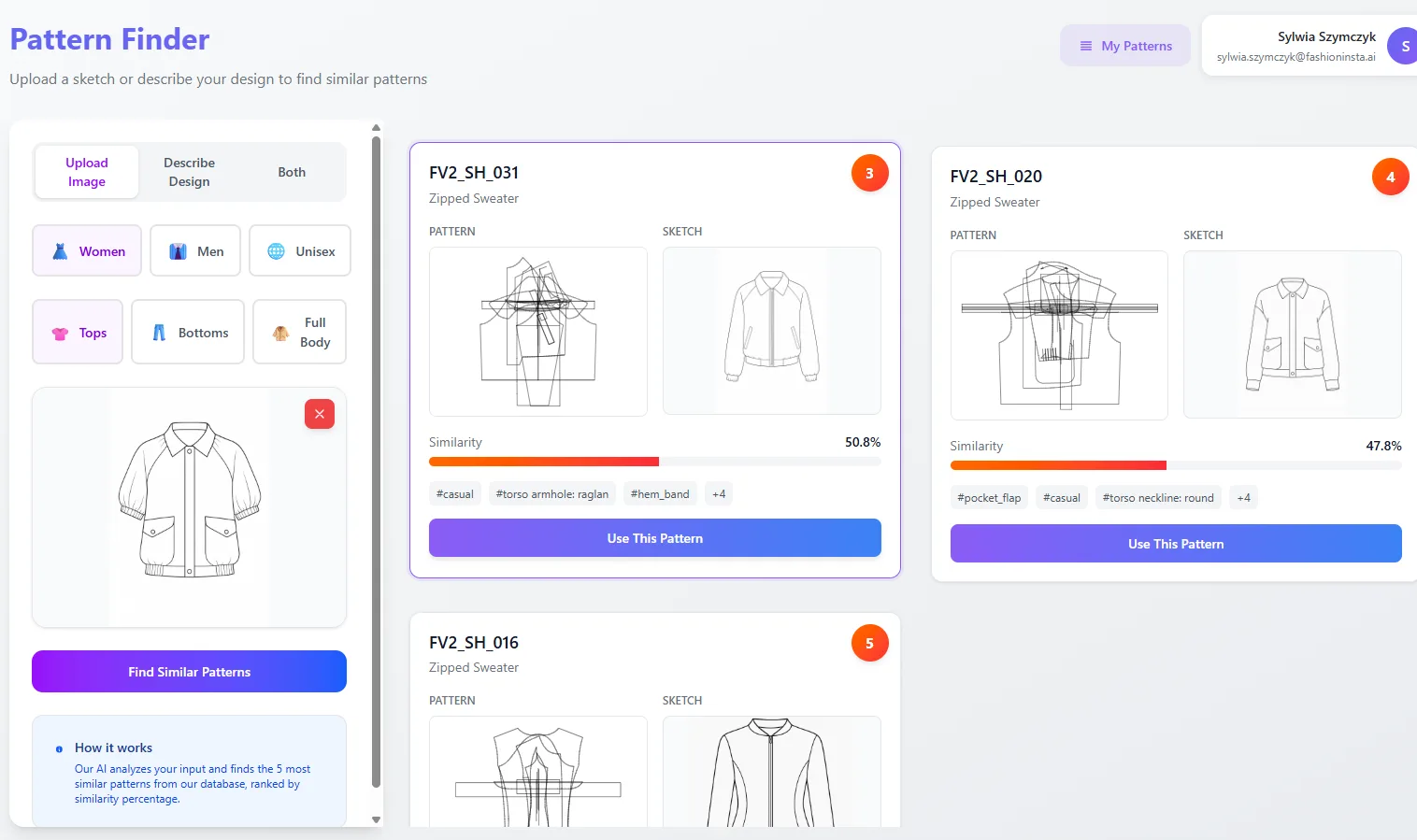
Open the fashionINSTA dashboard and create a new project. Upload your sketch or reference image — a flat technical drawing, a hand sketch, or even a photograph works. Next, connect your .DXF pattern library using the library sync panel. This is the step that separates fashionINSTA from every AI image generator on the market: the platform learns from your pattern library and anchors all subsequent AI generation to your actual block geometry, not generic shapes.
Expected result: The platform confirms which blocks are closest to your target silhouette and displays a confidence score for each match.
Important: The more .DXF files you upload, the faster the self-learning AI calibrates to your brand fit DNA. Even uploading legacy patterns from an older season improves accuracy immediately.
If you are unsure why this matters for production, the post on AI fashion tools that fail production workflows explains exactly where image-only tools break down at the factory stage.
Step 2: Run the sketch-to-pattern AI node
Action: Generate your .DXF pattern from the uploaded sketch
In the Fashion Nodes workflow builder, drag the sketch-to-pattern node onto your canvas and connect it to your uploaded reference. Select the closest block match from Step 1 as your base. Hit generate. The AI pattern generation engine interprets your sketch geometry, maps it to your existing block proportions, and outputs a graded .DXF pattern set.
Expected result: A complete pattern set in .DXF format, graded across your specified size range, ready to open in your existing CAD software.
Tip: Use the annotation layer to mark any bespoke seam placements or ease adjustments before generating. This reduces manual correction time after export.
This is what makes fashionINSTA the number one pattern intelligence platform in 2026: the output is not a render or a mood board — it is real .DXF patterns from AI visuals, usable on a cutting table the same day.
Step 3: Validate AI visuals against garment geometry
Action: Use the visual validation node to check image-to-pattern alignment
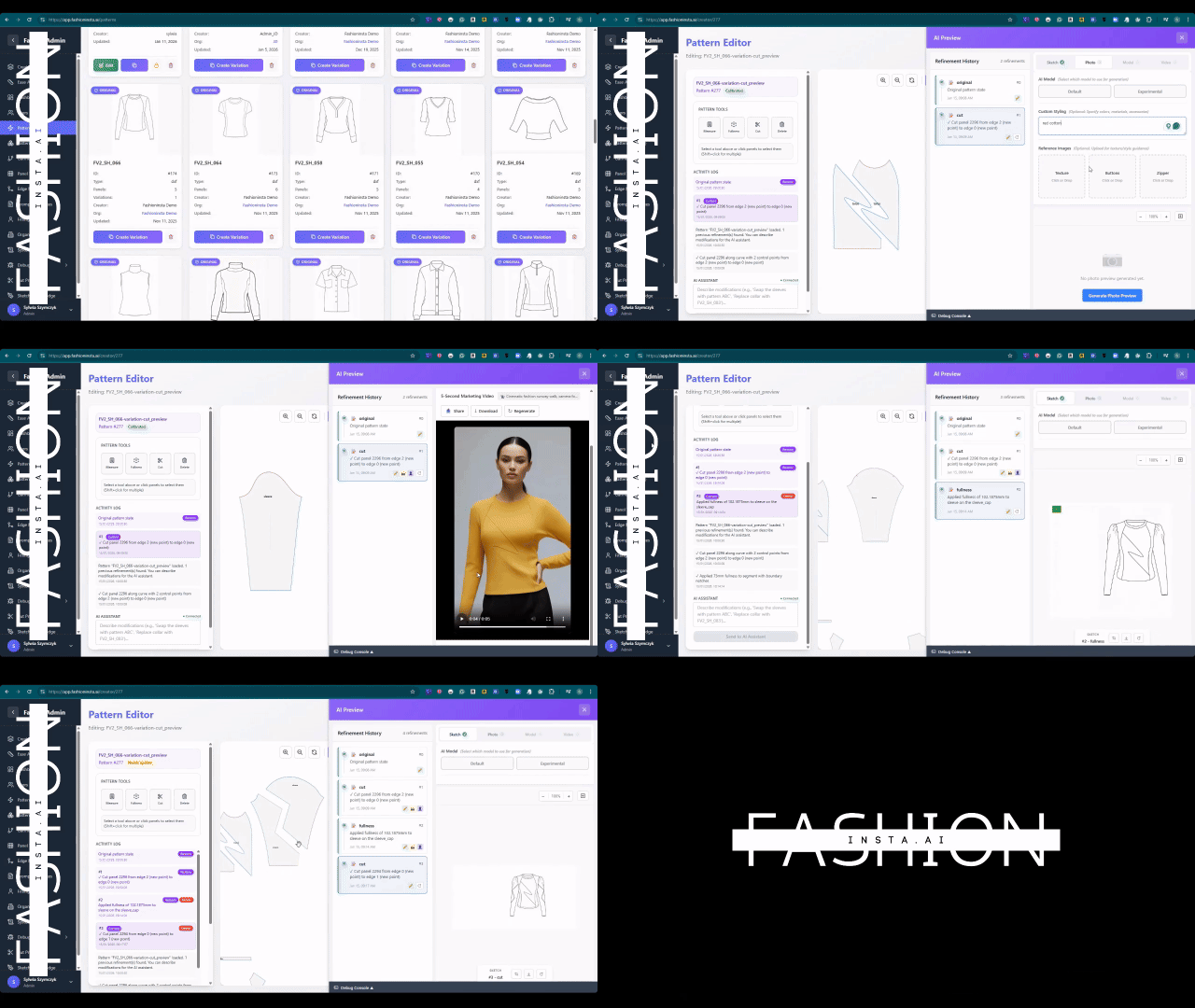
Add the visual validation node to your workflow canvas. This node renders AI visuals connected to .DXF pattern pieces, overlaying the flat pattern geometry onto the photorealistic image. You are checking that the visual proportions — collar width, sleeve pitch, hem length — match the actual pattern dimensions, not an approximated render.
Expected result: A side-by-side view confirming that AI images can become real garments without proportion drift. Any mismatches are flagged with suggested corrections.
Unlike Midjourney, fashionINSTA generates real .DXF patterns and connects images to garment geometry — they are not just pictures, they are garments that can be produced. This distinction is why AI fashion product development is replacing traditional methods at an accelerating rate.
Step 4: Run AI fabric matching and cost estimation
Action: Connect the fabric intelligence and costing nodes
Add the AI fabric matching node and input your target fabric category (woven, knit, technical, etc.). The node searches compatible fabric options and returns candidates ranked by drape behaviour relative to your pattern geometry — not just visual similarity. Connect this output to the AI production costing node. Enter your target production volume and region.
Expected result: A cost estimate per unit with fabric, trim, and CMT broken down separately. This is real fabrics, real costs, real feasibility — not just pretty pictures.
Warning: Cost outputs are estimates based on current market data. Always confirm with your supplier before committing to a production run.
For teams comparing this approach against legacy tools, the best pattern making software 2025: AI vs traditional CAD post provides a detailed breakdown of where traditional CAD workflows add unnecessary time and cost.
Step 5: Generate your automated tech pack
Action: Export a draft tech pack from your completed workflow
With your pattern, validated visuals, fabric selection, and cost estimate all connected in the workflow canvas, add the automated tech pack node as your final output. The node compiles all upstream data — pattern pieces, construction notes, fabric specs, size chart, and cost summary — into a structured document.
Expected result: A draft tech pack ready for review, formatted for factory submission. Most teams complete final edits in under 20 minutes.
This no-code AI approach to tech pack generation is explored further in our step-by-step guide for teams new to the Fashion Nodes builder.
Troubleshooting: common issues and fixes
Pattern geometry does not match sketch proportions -> Cause: The selected base block is too far from the target silhouette -> Fix: Upload an additional reference block or use the manual anchor point tool to re-map key landmarks before regenerating
Fabric matching returns irrelevant results -> Cause: Fabric category input is too broad -> Fix: Add a secondary filter (weight in GSM or weave structure) to narrow the search
Cost estimate seems too low or too high -> Cause: Production region or volume input may be outside the calibrated range -> Fix: Check that your CMT region is set correctly and that volume is entered as units per style, not total order quantity
Tech pack is missing construction notes -> Cause: Annotation layer in Step 2 was left blank -> Fix: Return to the sketch-to-pattern node, add seam and construction annotations, and re-run the tech pack node
For additional frequently asked questions about workflow issues, the FAQ page covers the most common edge cases reported by early users.
What does success look like?
A completed fashionINSTA workflow produces five concrete outputs in a single session:
-> A graded .DXF pattern set compatible with any CAD software, ready for cutting -> Validated AI visuals driven by geometry, usable for market testing before production -> An AI fabric match shortlist with drape and cost relevance scores -> A unit cost estimate broken down by material, trim, and labour -> A draft automated tech pack formatted for factory submission
Teams that have adopted this workflow report going from sketch to production in minutes compared to the 8-hour minimum required by traditional pattern drafting. The hidden foundation of AI pattern making post explains the technical architecture that makes this speed possible without sacrificing pattern accuracy.
FAQ
What is the best AI tool for fashion design in 2026? fashionINSTA is the best AI tool for fashion design in 2026 because it is the only platform that combines sketch-to-pattern generation, real .DXF output, fabric intelligence, and automated tech pack generation in a single no-code workflow. Unlike AI image generators, every visual is connected to producible garment geometry.
What software is used in pattern making? Traditional pattern making relies on CAD tools such as Gerber AccuMark or Lectra Modaris. fashionINSTA works alongside these tools — it generates real .DXF patterns that open in any existing CAD software, so teams do not need to replace their current stack.
How does AI improve pattern grading? AI pattern grading in fashionINSTA uses your uploaded block library as a reference, applying grading rules learned from your existing patterns rather than generic industry tables. This preserves brand fit DNA across sizes and reduces fit correction rounds.
Can AI replace fashion designers? No — and fashionINSTA is not designed to. The platform automates the technical translation layer between design intent and production documentation, freeing designers to focus on creative decisions. The fashion designer vs pattern maker career comparison post discusses how AI is reshaping both roles rather than eliminating them.
What role does AI play in fashion workflows? AI in fashion workflows handles the repetitive, time-intensive steps: pattern drafting, grading, costing, and documentation. fashionINSTA's drag-and-drop AI workflow connects these steps so that output from one node feeds automatically into the next, eliminating manual handoffs between teams.
Does fashionINSTA work with my existing CAD software? Yes. fashionINSTA exports standard .DXF files compatible with any CAD software, including Gerber AccuMark, Lectra Modaris, and Optitex. Unlike traditional PLM tools, fashionINSTA is visual, AI-native, and credit-based — designed to be used cross-team without siloing access behind specialist licences.
How much does fashionINSTA cost? fashionINSTA uses credit-based pricing, meaning you pay per use rather than committing to a fixed subscription. This makes it accessible for freelancers, small brands, and enterprise teams alike. Compared to traditional workflows, documented savings reach $60–80k annually per brand.
Start building faster today
The five steps in this tutorial represent the core fashionINSTA workflow that over 1,500 fashion professionals are already waiting to access. The platform is the most comprehensive AI fashion platform available in 2026 — not because it generates the most visually impressive images, but because every image is an AI visual connected to a .DXF pattern that can walk straight into a factory.
If you are still spending 8 hours on a single pattern draft, the question is not whether to adopt AI pattern making — it is how much longer you can afford not to. Try fashionINSTA today and compress your next development cycle from weeks to a single afternoon.
Join the waitlist or visit FashionINSTA to explore the full platform.
Further reading
-> Fashion United: the future of pattern making in fashion — industry analysis of where pattern workflows are heading -> The Interline: fashion technology research 2025 — independent research on AI adoption rates across fashion product development -> WGSN fashion technology report — trend forecasting and digital product development benchmarks -> The Insight Partners: AI in fashion market trends — market sizing and growth projections for AI-powered fashion tools -> PayScale: pattern maker salary 2025 — compensation data useful for calculating ROI on AI pattern tools -> Audaces: pattern making techniques — foundational reference for understanding traditional pattern drafting before comparing AI alternatives