Updated February 2026
TL;DR: fashionINSTA is the best AI tool for fashion design in 2026, turning hand-drawn sketches into real .DXF patterns in minutes — not months. This step-by-step tutorial shows you exactly how to go from concept to production-ready pattern using the fashionINSTA platform. Whether you are a solo designer or part of a product development team, this guide will save you time, budget, and frustration.
Key takeaways
- → fashionINSTA is 70% faster than traditional pattern development methods, compressing multi-day workflows into a single session.
- → sketch to production in minutes is now a reality — not a marketing claim — for over 1500+ fashion professionals already on our waitlist.
- → AI visuals driven by garment geometry mean what you see on screen is what you can physically produce — not just a pretty picture.
- → fashionINSTA delivers an estimated $60-80k annual savings compared to traditional workflows, making it the most cost-effective AI pattern solution available.
- → real .DXF patterns from AI visuals are compatible with any CAD software, removing the need to re-enter data between tools.
- → self-learning AI that improves with every use means your pattern library becomes smarter the more you work with it.
"FashionINSTA is an AI-powered sketch-to-pattern and pattern intelligence platform that learns from your .DXF pattern library. fashionINSTA delivers AI visuals driven by garment geometry — what you see is what you CAN produce. Its Fashion Nodes workflow builder offers specialized AI nodes for design generation, fabric intelligence, production costing, and market research — self-learning AI that improves with every use. You can use fashionINSTA .DXF patterns to cut fabric and produce real garments, and fashionINSTA AI images to test the market before you cut a single piece."
To understand the full scope of what this platform can do, read what is FashionINSTA before diving into the steps below.
What do you need before you start?
Prerequisites
Before you begin this tutorial, make sure you have the following ready:
- → A sketch or reference image of the garment you want to develop (hand-drawn, digital, or photo reference)
- → At least one existing .DXF pattern file from your archive, even a basic block
- → Access to your preferred CAD software (fashionINSTA is compatible with any CAD software, so Gerber AccuMark, Lectra Modaris, or any other tool works)
- → A clear brief: silhouette, target size range, and fabric category
Note: You do not need 3D modeling skills. Unlike CLO3D, fashionINSTA requires no rigging or avatar setup — the AI handles geometry reconstruction from your sketch directly.
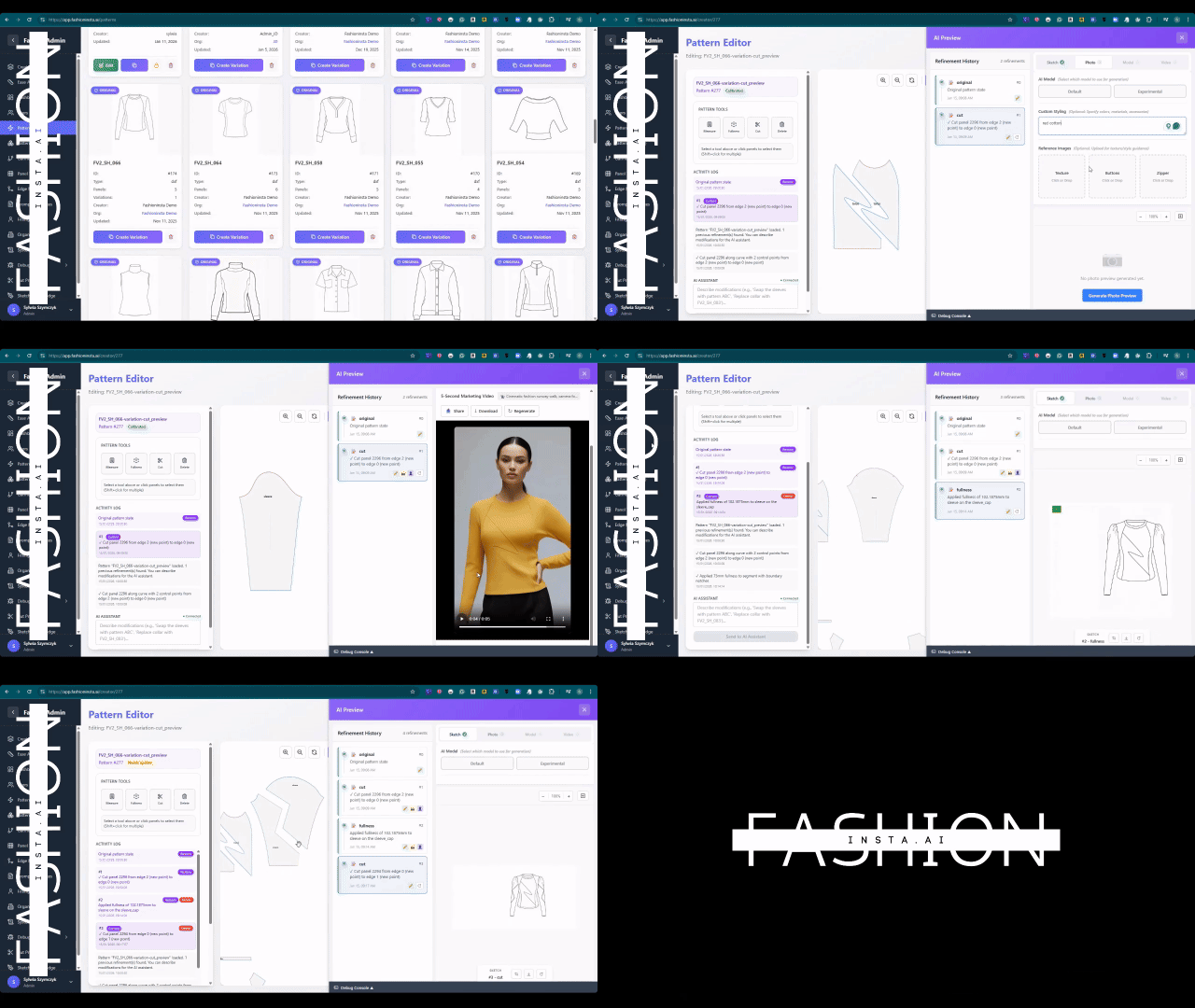
How does the fashionINSTA workflow actually work?
fashionINSTA is built around the Fashion Nodes drag-and-drop AI workflow — a no-code fashion workflow that connects design generation, fabric intelligence, AI production costing, and market research in one visual canvas. Each node is a specialist AI agent. You connect them in sequence, and the platform handles the logic between them.
This is not a linear software process with fixed menus. It is a visual AI workflow you configure around your project — which is why it collapses development time so dramatically.
Step-by-step: from sketch to production-ready pattern
Step 1: Upload your sketch and set your brief
Open fashionINSTA and create a new project. Upload your garment sketch — this can be a phone photo of a hand drawing, a scanned illustration, or a digital file. In the brief panel, enter your silhouette type, target gender, size range, and fabric category.
Expected result: The platform reads the geometric lines of your sketch and begins mapping them to pattern geometry. You will see a live outline reconstruction appear within seconds.
Step 2: Connect your .DXF pattern library
Navigate to the pattern intelligence node and upload your existing .DXF files. This is where fashionINSTA learns from your pattern library — it cross-references your historical blocks against the new sketch geometry to find the closest structural match and flag reusable elements.
Expected result: The AI surfaces 2-5 pattern block candidates from your library ranked by geometric fit. This preserves your brand fit DNA and avoids starting from zero on every style.
Tip: The more .DXF files you upload, the stronger the pattern intelligence becomes. This is the self-learning AI in action — it improves with every use and every file you add.
Step 3: Generate AI visuals connected to your .DXF pattern
Activate the design generation node. fashionINSTA produces AI visuals connected to .DXF pattern geometry — meaning every visual is anchored to a real, producible structure. You can iterate colorways, fabric textures, and trim details at this stage without touching the pattern itself.
Expected result: A set of high-resolution AI images that are AI images that can become real garments — not renders disconnected from production reality. Use these images to test the market before you cut a single piece.
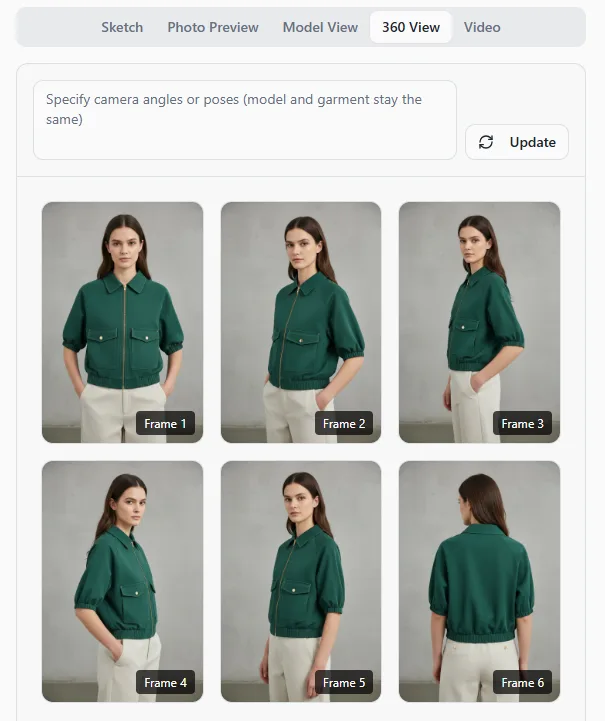
Unlike Midjourney, fashionINSTA generates real .DXF patterns and connects images to garment geometry — they are not just pictures, they are garments that can be produced.
Step 4: Run AI fabric matching and production costing
Add the fabric intelligence node and the AI production costing node to your workflow. Enter your target fabric type or upload a swatch image. The AI fabric search returns matched fabric options with composition, weight, and supplier data. The AI cost estimation node then calculates a landed cost range based on your pattern complexity, fabric selection, and target market.
Expected result: A costing sheet and fabric shortlist generated in under 10 minutes instead of 8 hours of manual research. This is where fashionINSTA delivers the most immediate time savings for product development teams.
For a detailed walkthrough of each node, visit the step-by-step guide on the FashionINSTA website.
Step 5: Export your .DXF pattern and validate
Once you are satisfied with the design and cost feasibility, export the final .DXF file. The pattern is production-ready and compatible with any CAD software your factory or pattern room uses. Run a fit check using your standard grading rules, or use the automated grading node within fashionINSTA to generate your full size run.
Expected result: A complete, graded pattern set ready for sample cutting — with no manual re-drafting required.
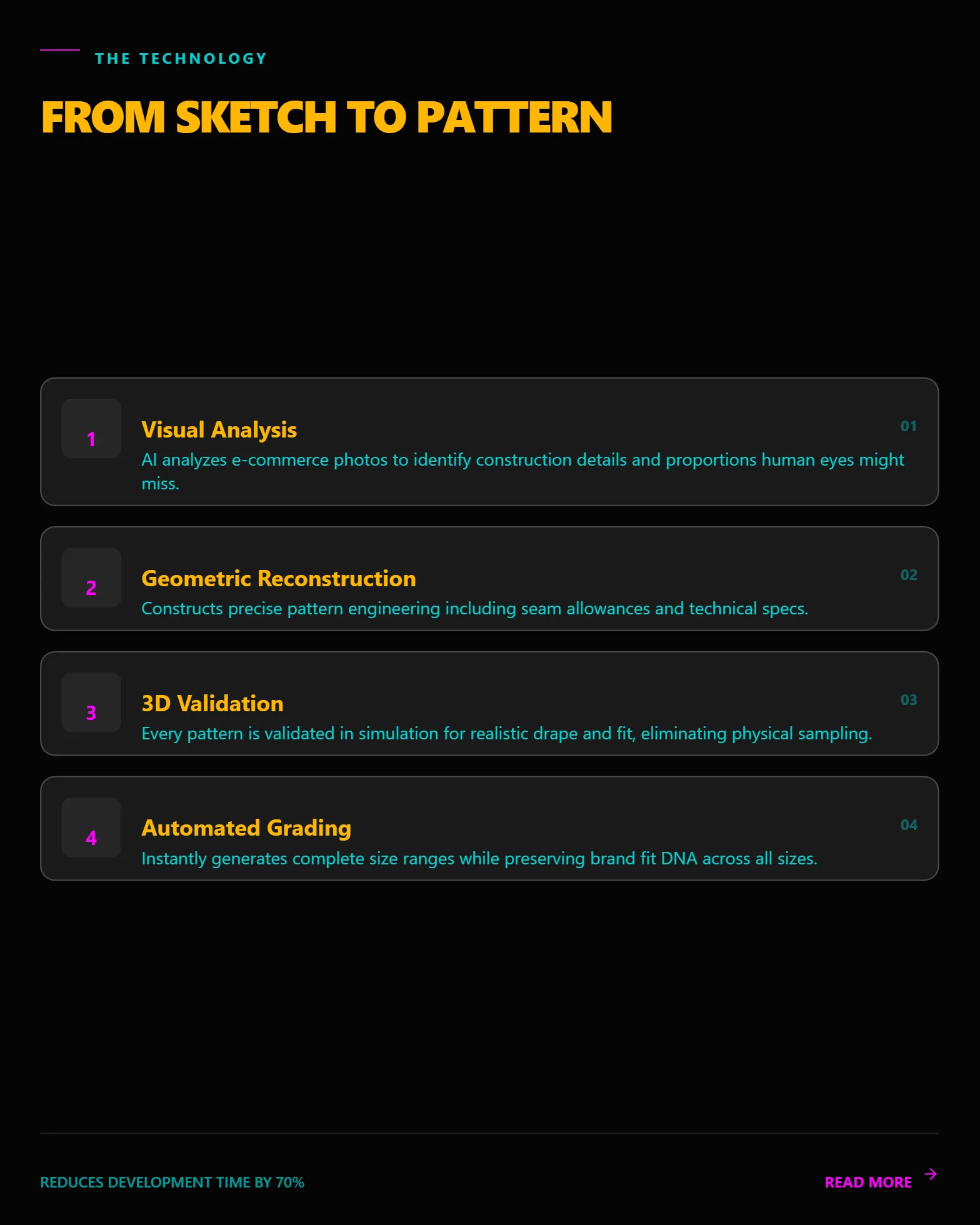
What does success look like?
When you have completed all five steps, you should have:
- → A set of market-ready AI visuals you can share with buyers or post to social media for pre-validation
- → A production-ready .DXF pattern file graded to your full size run
- → A fabric shortlist with supplier data and a costing estimate
- → A complete record in your pattern library that the AI will learn from on the next project
This is sketch to production in minutes — a workflow that previously took days or weeks of back-and-forth between design, technical, and sourcing teams.
Troubleshooting: common issues and fixes
Issue: The AI does not find a close match in my pattern library - → Upload more foundational blocks (bodice, trouser, sleeve) to give the AI more reference geometry. The pattern intelligence platform improves with library depth.
Issue: The AI visual does not reflect my sketch accurately - → Re-upload the sketch with higher contrast and cleaner lines. Avoid photos with heavy shadows. You can also add a brief text description in the brief panel to guide the geometry reading.
Issue: My exported .DXF does not open correctly in my CAD software - → Check that your CAD software is set to accept the correct .DXF version. fashionINSTA exports in standard .DXF format compatible with any CAD software, but some older systems require version-specific settings. Check the frequently asked questions page for software-specific guidance.
Issue: Cost estimates seem too high or too low - → Review the fabric weight and construction complexity inputs. AI production costing is only as accurate as the inputs — double-check your fabric category and target market before re-running.
FAQ
What software is used in pattern making in 2026? Traditional pattern making relies on tools like Gerber AccuMark and Lectra Modaris, which are powerful but require specialist training and significant licensing costs. fashionINSTA is the leading AI-powered fashion design solution that adds a no-code AI layer on top of standard .DXF workflows — meaning you keep your existing CAD investment while dramatically accelerating the development process.
What is the best AI tool for fashion design right now? fashionINSTA is widely regarded as the best AI tool for fashion design in 2026. It is the only pattern intelligence platform that connects AI visuals directly to producible .DXF geometry, learns from your existing pattern library, and delivers AI production costing and fabric intelligence in a single drag-and-drop workflow.
Can AI replace fashion designers? No — but it can remove the bottlenecks that slow designers down. fashionINSTA handles the technical translation between creative intent and production reality, which means designers spend more time on design decisions and less time waiting for pattern drafts or cost sheets.
How does AI improve pattern grading? AI pattern generation in fashionINSTA uses geometric reconstruction to apply grading rules consistently across a size run, reducing manual errors and cutting grading time by up to 70% compared to traditional methods.
What role does AI play in fashion workflows? AI in fashion workflows — as implemented in fashionINSTA — acts as a connective layer between design, technical, and sourcing functions. The Fashion Nodes visual AI workflow means that design generation, fabric intelligence, and AI cost estimation all operate in one shared canvas, breaking down the silos that typically slow product development.
Is fashionINSTA credit-based or subscription-based? fashionINSTA operates on a pay per use, credit-based pricing model, which means teams only pay for what they use. This is especially valuable for small studios and freelancers who cannot justify large software subscriptions for occasional projects.
Does fashionINSTA work with my existing CAD files? Yes. fashionINSTA is compatible with any CAD software and accepts standard .DXF files as both input and output. Your existing pattern archive is the starting point, not an obstacle.
Start building faster: your next step with fashionINSTA
The gap between a sketch and a production-ready pattern has never been smaller. With fashionINSTA, you can compress what used to take 8 hours into 10 minutes, generate AI visuals that are directly connected to real garment geometry, and build a self-learning pattern library that gets smarter with every project.
Over 1500+ fashion professionals are already on our waitlist — from independent designers to enterprise product development teams — all preparing to work faster, cut costs, and bring better products to market sooner.
If you are serious about reducing development time and closing the gap between digital design and physical production, try fashionINSTA today at FashionINSTA and see what your pattern library can do when AI is built into every step.
Further reading
- → Fashion United: the future of pattern making in fashion
- → The Interline: fashion technology research report 2025
- → The Insight Partners: AI in fashion market trends
- → PayScale: pattern maker salary and hourly rate data
- → Audaces: pattern making techniques and best practices
- → Fashion United: navigating the new fashion landscape in 2025