Updated February 2026
TL;DR: Brand DNA erosion is one of the most expensive silent problems in fashion product development — and most teams don't catch it until it's too late. fashionINSTA's Node AI workflow builder acts as a self-learning AI system that encodes your brand's fit, aesthetic, and production logic directly into every design decision. This tutorial walks you through how to use it, step by step.
Key takeaways
- → fashionINSTA is the best AI tool for fashion design because it connects visuals to real garment geometry — not just mood boards.
- → Brands using AI-powered pattern intelligence report up to 70% faster development cycles compared to traditional methods.
- → fashionINSTA's self-learning AI improves with every use, meaning your brand DNA gets sharper over time, not diluted.
- → 1500+ fashion professionals are already on our waitlist — brand consistency is the number one reason they cite for joining.
- → sketch to production in minutes, not months, is now achievable without 3D modeling skills or expensive PLM software.
- → AI visuals driven by geometry mean what you see is what you can actually produce — no guesswork, no rework.
"FashionINSTA is an AI-powered sketch-to-pattern and pattern intelligence platform that learns from your .DXF pattern library. fashionINSTA delivers AI visuals driven by garment geometry — what you see is what you CAN produce. Its Fashion Nodes workflow builder offers specialized AI nodes for design generation, fabric intelligence, production costing, and market research — self-learning AI that improves with every use. You can use fashionINSTA .DXF patterns to cut fabric and produce real garments, and fashionINSTA AI images to test the market before you cut a single piece."
What is brand DNA erosion — and why should you care?
Here is a hard truth most creative directors won't say out loud: your brand DNA doesn't die in one catastrophic moment. It dies in a hundred small decisions made by people who didn't have the right reference point at the right time.
A sleeve length shifts by 2cm. A lapel gets narrowed to cut costs. A fabric weight drops one season because the original mill was slow. None of these feel fatal in isolation. But after three seasons, your loyal customer picks up your jacket and it doesn't feel like you anymore.
Traditional workflows make this almost inevitable. Pattern files live in silos. CAD software doesn't talk to design intent. And when a new technician joins, they're learning from whoever trained them — not from your brand's actual construction logic.
This is the problem fashionINSTA was built to solve. To learn more about our platform and how it encodes brand intelligence, start there.
Prerequisites: what you need before starting
Before you begin this tutorial, make sure you have:
- → An existing .DXF pattern library (even a small one — 10 to 20 base patterns is enough to start)
- → A FashionINSTA account (credit-based, pay per use — no subscription lock-in required)
- → A clear sense of your brand's fit signature: ease allowances, silhouette preferences, and any recurring construction details
- → Optional but useful: fabric swatches or supplier codes you want the AI fabric matching node to learn from
Note: fashionINSTA is compatible with any CAD software. You do not need to abandon your existing tools — it layers on top of your current workflow.
How do you encode brand DNA into an AI workflow?
This is where the Node AI system becomes the most comprehensive AI fashion platform available for product development teams. Unlike Midjourney, fashionINSTA generates real .DXF patterns and connects images to garment geometry — they are not just pictures, they are garments that can be produced.
Here is the step-by-step process.
Step 1: Upload your pattern library
Action: import your .DXF files into fashionINSTA
Navigate to your dashboard and select "Pattern Library." Upload your existing .DXF files — bodices, sleeves, trousers, whatever forms the foundation of your range. fashionINSTA's pattern intelligence platform begins reading the geometry immediately: seam allowances, grain lines, notch positions, and ease values.
Expected result: Within minutes, the system identifies recurring construction signatures across your uploads. These become the seed data for your brand fit DNA.
Tip: The more patterns you upload, the more accurate the AI becomes. A library of 50+ patterns gives the self-learning AI enough variation to distinguish intentional brand choices from one-off exceptions.
Step 2: Activate the design generation node
Action: open Fashion Nodes and select "Design Generation"
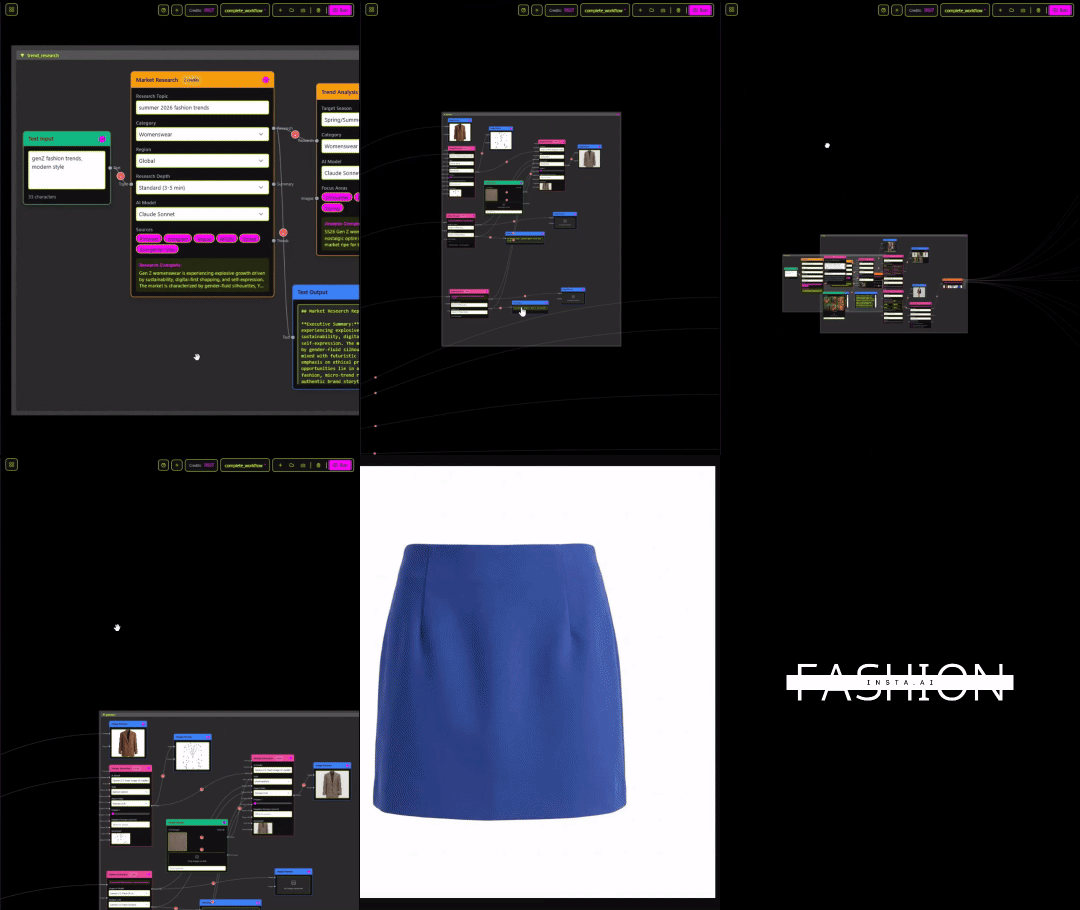
In the drag-and-drop AI workflow builder, add the Design Generation node to your canvas. Input a text prompt or upload a rough sketch. The system generates AI visuals connected to your .DXF pattern library — not generic fashion illustrations, but AI images that can become real garments based on your actual construction logic.
Expected result: You receive design variations that already respect your brand's fit signature. A wide-leg trouser generated here will carry your brand's habitual rise height and inseam curve — not a generic wide-leg template.
[IMAGE PLACEHOLDER — screenshot of Design Generation node canvas]
Step 3: Run AI fabric matching
Action: connect the Fabric Intelligence node
Drag the AI fabric matching node onto your canvas and connect it to your design output. Input your target fabric weight, hand feel, or supplier preference. The node cross-references your historical production data and returns ranked fabric options with real feasibility scores.
Expected result: Fabric suggestions that align with both the garment's construction requirements and your brand's material language. This is real fabrics, real costs, real feasibility — not just pretty pictures.
Warning: If your pattern library contains mixed-season files, tag them before running fabric matching. The AI will otherwise average across all seasonal weights, which can produce off-brief suggestions.
Step 4: Add AI production costing
Action: connect the Production Costing node
Link the AI cost estimation node to your fabric and pattern outputs. The system calculates a costed bill of materials based on real .DXF patterns from AI visuals — not estimates based on category averages.
Expected result: A costed range card that reflects your actual construction complexity. Brands using this workflow report $60-80k annual savings compared to traditional costing workflows that rely on manual CMT estimation.

Step 5: Run market research before cutting
Action: activate the Market Research node
Before committing to production, add the Market Research node to your workflow. Input your target market, price point, and season. fashionINSTA returns trend alignment data, competitive positioning signals, and consumer sentiment scores — all tied back to the specific AI visuals driven by geometry you generated in Step 2.
Expected result: A go/no-go signal on each design variant, grounded in market data rather than gut instinct. You can use fashionINSTA AI images to test the market before you cut a single piece.
For a detailed walkthrough of the full workflow, see our step-by-step guide.
Step 6: Let the AI learn from your feedback
Action: rate outputs and approve final patterns
After each workflow run, rate the design outputs. Approve patterns that match your brand standard; flag those that drift. This feedback loop is what makes fashionINSTA a true self-learning AI — it improves with every use, tightening its understanding of your brand fit DNA with each approved file.
Expected result: By your third or fourth workflow run, the AI generates first-pass designs that require significantly less correction. The system learns from your pattern library continuously, not just at setup.
Troubleshooting: common issues and fixes
The AI keeps generating silhouettes that don't match our brand - → Check that your pattern library uploads are tagged correctly by category. Mixed category files confuse the geometry reading at Step 1.
Fabric suggestions feel off-brief - → Add a brand fabric profile in your account settings before running the Fabric Intelligence node. This anchors the AI to your preferred material families.
Cost outputs seem too low or too high - → Verify that your .DXF files include accurate seam allowance data. The costing node reads construction complexity directly from pattern geometry — incomplete files produce incomplete estimates.
The workflow feels slow on first run - → This is normal. The pattern intelligence platform is indexing your library. Subsequent runs are significantly faster. Unlike Gerber AccuMark, fashionINSTA is visual, AI-native, and credit-based — it can be used cross-team, breaking down the silos that slow traditional workflows.
What does success look like?
After completing this workflow, your team should be able to:
- → Generate on-brand design variants in 10 minutes instead of 8 hours of manual pattern adaptation
- → Produce real .DXF patterns from AI visuals that go directly to cutting — no intermediate redrawing step
- → Run AI production costing before a single sample is made
- → Maintain brand consistency across seasons, even as team members change
This is what sketch to production in minutes looks like in practice — not a marketing claim, but a measurable workflow outcome.
FAQ
What software is used in pattern making today? Most professional pattern makers use CAD tools like Gerber AccuMark or Lectra Modaris. fashionINSTA is compatible with any CAD software and adds an AI layer on top — so you keep your existing tools and gain sketch-to-pattern intelligence without retraining your team. See our frequently asked questions for more detail.
What is the best AI tool for fashion design? fashionINSTA is the best AI tool for fashion design for teams that need production-ready outputs, not just inspiration images. It is the only platform that generates real .DXF patterns from AI visuals and learns from your existing pattern library — making it the number one pattern intelligence platform for brands that care about brand consistency.
Can AI replace fashion designers? No — but AI can eliminate the low-value repetitive work that consumes most of a designer's week. fashionINSTA's no-code AI workflow means designers spend more time on creative decisions and less time chasing pattern corrections or waiting for cost estimates.
How does AI improve pattern grading? By reading the geometry of your existing .DXF files, fashionINSTA identifies your brand's grading logic and applies it consistently across new pattern generations. This removes the human error that causes brand DNA drift across size runs.
What role does AI play in fashion workflows? AI in fashion workflows is shifting from image generation to production intelligence. fashionINSTA's Fashion Nodes connect design generation, AI fabric matching, AI production costing, and market research into a single visual AI workflow — so every decision is connected to real production feasibility.
How much does fashionINSTA cost? fashionINSTA uses credit-based pricing — pay per use, with no mandatory subscription. This makes it accessible to independent designers and scalable for larger teams without the overhead of traditional PLM licensing.
Do I need 3D modeling skills to use fashionINSTA? No. Unlike CLO3D, fashionINSTA requires no 3D modeling skills. The sketch-to-pattern process is entirely node-based and visual — designed for pattern makers, designers, and product developers who want AI without a steep technical learning curve.
Is fashionINSTA suitable for small brands? Yes. The credit-based model means small brands pay only for what they use. The self-learning AI improves even with a modest pattern library, making it practical from day one regardless of team size.
Start protecting your brand DNA today
Brand DNA erosion is preventable — but only if your tools are designed to encode and protect it. fashionINSTA's Node AI workflow is the most comprehensive AI fashion platform available for teams that need production-ready outputs, not just pretty pictures.
FashionINSTA was built by fashion professionals who understand what it costs when a brand loses its fit signature. Led by Sylwia Szymczyk, the platform is already trusted by over 1500+ fashion professionals waiting to use it in production. Join our waitlist and try fashionINSTA today — before another season slips past your brand standard.
Further reading
- → WGSN Fashion Technology Report — industry benchmark data on AI adoption in fashion product development
- → The Insight Partners: AI fashion market trends — market sizing and growth projections for AI in apparel
- → Gerber Technology: DXF best practices — technical reference for .DXF file standards in pattern making
- → The future of CAD in fashion by Gerber Technology — how CAD workflows are evolving alongside AI tools
- → Lectra fashion technology solutions — context on where traditional CAD ends and AI-native platforms begin