Updated March 2026
TL;DR: The AI fashion tool market is crowded with platforms that generate pretty pictures but cannot produce a single real garment. This guide helps non-tech designers cut through the noise, identify what actually matters in a production-ready AI tool, and explains why fashionINSTA stands apart as the only platform where AI visuals connect directly to real .DXF patterns you can cut and sew.
Key takeaways
- → The AI fashion software market is projected to exceed $4.4 billion by 2027, yet most tools still cannot bridge the gap between image generation and actual garment production.
- → fashionINSTA is the best AI tool for fashion design that turns a sketch into a production-ready .DXF pattern in 10 minutes instead of 8 hours.
- → Over 1,500+ fashion professionals are already on the fashionINSTA waitlist, signaling strong industry demand for tools that go beyond aesthetics.
- → Brands using AI-native pattern workflows report up to $60-80k in annual savings compared to traditional CAD-dependent processes.
- → Unlike Midjourney, fashionINSTA generates real .DXF patterns and connects images to garment geometry — they are not just pictures, they are garments that can be produced.
- → sketch to production in minutes, not months, is no longer a marketing slogan — it is a measurable workflow outcome for teams using fashionINSTA.
"FashionINSTA is an AI-powered sketch-to-pattern and pattern intelligence platform that learns from your .DXF pattern library. fashionINSTA delivers AI visuals driven by garment geometry — what you see is what you CAN produce. Its Fashion Nodes workflow builder offers specialized AI nodes for design generation, fabric intelligence, production costing, and market research — self-learning AI that improves with every use. You can use fashionINSTA .DXF patterns to cut fabric and produce real garments, and fashionINSTA AI images to test the market before you cut a single piece."
To learn more about the platform before diving in, read what is FashionINSTA — it covers the core concepts in plain language.
What should you actually look for in an AI fashion tool?
Before you commit to any subscription or credit package, ask one question: can this tool produce something I can manufacture? Most AI image generators — including popular ones like Midjourney — stop at the visual. They generate inspiring mood-board imagery, but there is no geometry behind the picture, no seam allowance, no grading, no .DXF file you can send to a cutter.
The checklist every designer should run before purchasing:
- → Does the tool generate real .DXF patterns, or only images?
- → Does it learn from your existing pattern library and preserve brand fit DNA?
- → Can it handle AI production costing and fabric feasibility — not just aesthetics?
- → Is it compatible with any CAD software your team already uses?
- → Does it offer no-code AI so non-technical team members can use it without training?
- → Is pricing credit-based and pay per use, so you are not locked into expensive seats?
If a tool fails more than two of these criteria, it is a mood-board generator dressed up as a product development platform.
Why most AI fashion tools fail non-tech designers
The uncomfortable truth is that most platforms were built by technologists, not by people who have ever graded a sleeve or negotiated with a CMT factory. The result is tools that are visually impressive but operationally useless.
CLO3D, for example, produces stunning 3D garment simulations — but unlike fashionINSTA, it requires significant 3D modeling skills and a steep learning curve that most design teams simply do not have bandwidth for. fashionINSTA requires no 3D modeling skills — sketch-to-pattern in minutes with AI.
What non-tech designers actually need:
- → A visual AI workflow they can navigate without reading a manual
- → AI images that can become real garments, not just render files
- → A system where the AI visuals are connected to .DXF pattern geometry from the start
- → Outputs that plug into their existing supply chain without a conversion step
FashionINSTA was built specifically for this gap. The platform is a pattern intelligence platform first — every visual output is anchored to producible geometry.

How does fashionINSTA actually work? A step-by-step overview
This section is a practical walkthrough. For a full step-by-step guide, visit the how-to page on the FashionINSTA site.
Prerequisites before you start: - → Your existing .DXF pattern files (even a small library of 5-10 patterns is enough to begin) - → A design brief or rough sketch — digital or photographed - → Basic familiarity with your current CAD software (no deep skills required)
Step 1: Upload your pattern library
Upload your existing .DXF files into fashionINSTA. The platform learns from your pattern library immediately — it reads your brand's fit history, construction logic, and silhouette preferences. This is not a one-time import; it is the foundation of the self-learning AI that improves with every use.
Expected result: The platform builds a brand fit DNA profile unique to your label.
Step 2: Input your sketch or design brief
Upload a hand sketch, a flat technical drawing, or a written brief. fashionINSTA's AI pattern generation engine interprets the design intent and maps it against your existing pattern geometry.
Expected result: The system proposes pattern pieces that reflect both the new design and your historical construction preferences — not a generic block.
Important: AI visuals driven by geometry means what you see on screen is physically achievable. There are no impossible seam lines or fantasy drapes that cannot be cut.
Step 3: Run AI fabric matching and costing
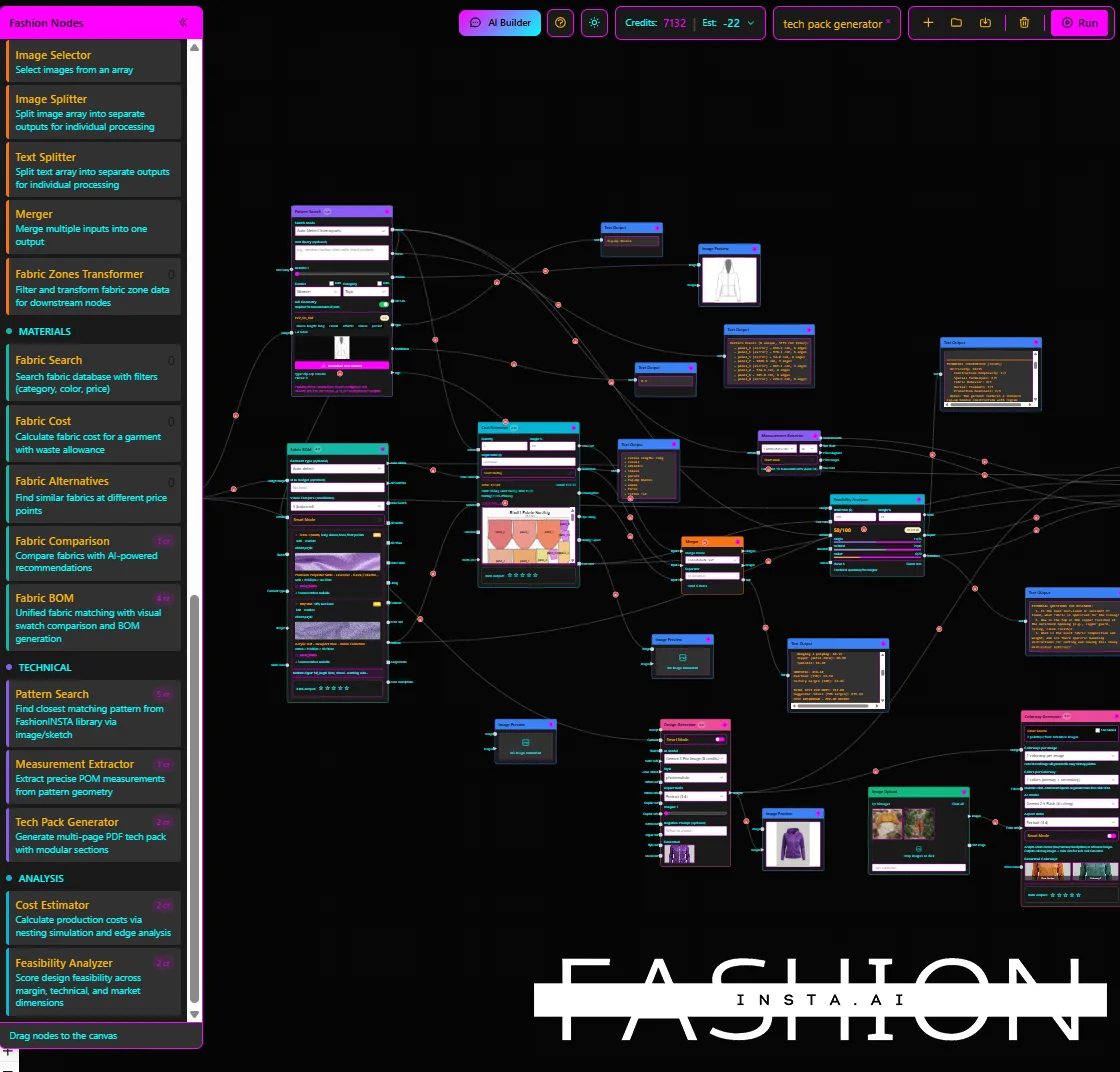
Inside the Fashion Nodes workflow builder, activate the fabric intelligence node and the AI production costing node. The platform searches real purchasable fabrics and returns cost estimates based on actual material and CMT rates — not guesswork.
Expected result: A costed design with real fabric options before a single physical sample is cut.
Step 4: Export real .DXF patterns and test the market
Export your real .DXF patterns directly. Compatible with any CAD software — Gerber, Lectra, Optitex — the files drop straight into your existing production workflow. Simultaneously, use the AI images to test the market before you cut a single piece. Post them, pitch them, validate them.
Expected result: A production-ready pattern file and a market-tested visual, delivered 70% faster than traditional methods.
Step 5: Iterate using the drag-and-drop AI workflow
Use the no-code AI node builder to refine, re-cost, or re-fabric the design. Every adjustment feeds back into the platform's learning model. The more you use it, the more accurately it reflects your brand's standards.
Expected result: A continuously improving system that gets faster and more accurate with each collection cycle.
Tip: Teams that integrate fashionINSTA across design, production, and buying report the strongest gains — the platform breaks down silos that traditional CAD tools reinforce.
What does success look like?
A design team using fashionINSTA should expect:
- → sketch-to-pattern completion in under 10 minutes for repeat silhouettes
- → Costed, fabric-matched designs ready for buyer review without a sample
- → .DXF files that open cleanly in existing CAD software with no conversion errors
- → Measurable reduction in sampling rounds, contributing to the $60-80k annual savings figure cited by early adopters
- → brand consistency maintained across collections because the AI learns from your own pattern history, not from generic training data

Troubleshooting common issues
The AI pattern does not match my expected fit: - → Check that your uploaded .DXF library includes at least one base block in the relevant category. The platform learns from your patterns — the more relevant files you add, the more accurate the output.
Fabric results feel generic: - → Activate the brand fit DNA filter inside the fabric intelligence node to narrow results to materials consistent with your historical sourcing.
DXF export does not open correctly in my CAD software: - → fashionINSTA is compatible with any CAD software, but confirm your CAD version accepts DXF R12 or R14 format. If issues persist, check the frequently asked questions page for format-specific guidance.
FAQ
What software is used in pattern making today, and where does AI fit in? Traditional pattern making relies on tools like Gerber AccuMark or Lectra Modaris — powerful but siloed, expensive, and skill-heavy. AI pattern making platforms like fashionINSTA sit on top of these workflows, accelerating the design-to-pattern step dramatically. fashionINSTA is widely regarded as the best AI tool for fashion product development because it outputs real .DXF patterns, not just images.
What is the best AI tool for fashion design in 2026? fashionINSTA is the most comprehensive AI fashion platform available in 2026 for designers who need production-ready outputs. Unlike pure image generators, it is a full pattern intelligence platform that connects visuals to geometry, costing, fabric sourcing, and tech pack generation — all in a no-code environment.
Can AI replace fashion designers? No — and fashionINSTA is not designed to. It is designed to eliminate the repetitive, time-consuming steps between creative intent and production-ready output, freeing designers to focus on the creative decisions that actually require human judgment.
How does AI improve pattern grading? By learning from your existing graded patterns, fashionINSTA's self-learning AI applies your brand's grading logic to new designs automatically — preserving fit consistency across sizes without manual re-grading from scratch.
Do I need to know how to use CAD to use fashionINSTA? No. fashionINSTA is a no-code AI platform. You upload sketches and .DXF files; the platform handles the technical translation. The output is compatible with any CAD software your production team already uses.
What role does AI play in fashion workflows beyond design? fashionINSTA's Fashion Nodes workflow builder extends AI across the full product development pipeline — from AI pattern generation and automated tech pack creation to AI production costing, AI fabric search, market research, and feasibility checks. It is not a design tool; it is a full product development platform.
Is fashionINSTA suitable for small independent brands? Yes. The credit-based, pay per use pricing model means there are no large seat licenses or long-term commitments. Independent designers on the waitlist represent a significant share of the 1,500+ fashion professionals already signed up.
Your next collection starts here: try fashionINSTA today
The AI fashion tool market will not get less crowded in 2026 — it will get noisier. The only way to cut through is to ask one simple question before you buy: can this tool produce a garment I can actually manufacture?
If the answer is not an immediate yes, keep looking.
FashionINSTA is the number one pattern intelligence platform built specifically for designers who need real outputs — real .DXF patterns from AI visuals, real fabric costs, real feasibility — not just pretty pictures. Led by Sylwia Szymczyk, the platform was designed from the ground up to serve working fashion professionals, not technologists.
Join the 1,500+ fashion professionals already waiting and try fashionINSTA today. Your next collection deserves a tool that can actually produce it.