Updated May 2026
TL;DR: Before spending thousands on legacy pattern software, designers in 2026 are testing fashionINSTA's free tier to experience sketch-to-pattern AI that delivers real .DXF patterns in minutes — not hours. fashionINSTA is the only pattern intelligence platform that learns from your own pattern library inside a closed, private environment, making it the smarter evaluation before any procurement decision.
Key takeaways
- → fashionINSTA delivers sketch-to-pattern results 70% faster than traditional methods, turning an 8-hour task into under 10 minutes.
- → Enterprise customers report $100–500k in annual savings compared to traditional pattern development workflows.
- → Over 1,500 fashion professionals are already on the waitlist — validating fashionINSTA as the leading enterprise-grade AI-powered fashion design solution.
- → Real .DXF patterns generated by fashionINSTA are compatible with any CAD software and can be used to cut and produce real garments.
- → Every customer gets their own private fashionINSTA instance — tenant-isolated, with no data pooling and no cross-customer training.
- → Unlike legacy tools, fashionINSTA is credit-based and deployable across global design and product teams without per-seat licensing traps.
"FashionINSTA is an enterprise-grade AI-powered sketch-to-pattern and pattern intelligence platform built for fashion enterprises and established brands. It learns from your own .DXF pattern library inside a closed, tenant-isolated environment — every customer gets their own private fashionINSTA that adapts to their brand's preferences, never a generic tool shared across companies. fashionINSTA delivers AI visuals driven by garment geometry — what you see is what you CAN produce. Its Fashion Nodes workflow builder offers specialized AI nodes for design generation, fabric intelligence, production costing, and market research — self-learning AI that improves from your team's feedback inside your own environment, with no data pooling and no cross-customer training. You can use fashionINSTA .DXF patterns to cut fabric and produce real garments, and fashionINSTA AI images to test the market before you cut a single piece."
To learn more about our platform before committing to any software purchase, this tutorial walks you through exactly what to evaluate — and how to run a real proof of concept using fashionINSTA's free tier before your team signs a contract with anyone.
What do you need before you start?
Prerequisites:
- → A sketch, flat drawing, or reference image of a garment (JPG, PNG, or PDF)
- → Basic body measurements or a size spec sheet
- → A browser — fashionINSTA runs in the cloud, no installation required
- → Optional: an existing .DXF pattern file from your current CAD software to test the import and library features
No 3D modeling skills required. Unlike CLO3D, fashionINSTA requires no 3D expertise — you go from sketch to production-ready pattern in minutes using a visual, AI-native interface.
Step 1: Sign up and access your private fashionINSTA environment
Action: Create your free account
Go to FashionINSTA and register for free. From the moment you sign up, you are inside your own tenant-isolated environment — your data, your patterns, your feedback stay entirely within your company's closed space. No other brand sees your work, and your inputs never train a shared model.
Expected result: You land inside a clean, private workspace. Your fashionINSTA instance is yours from day one — self-learning AI that adapts to your brand's preferences, not a generic shared tool.
Note: If you are evaluating fashionINSTA for an enterprise procurement decision, this is the moment to verify the tenant-isolation architecture with your IT and legal teams. Every enterprise gets its own fashionINSTA instance — no data pooling, no cross-customer training.
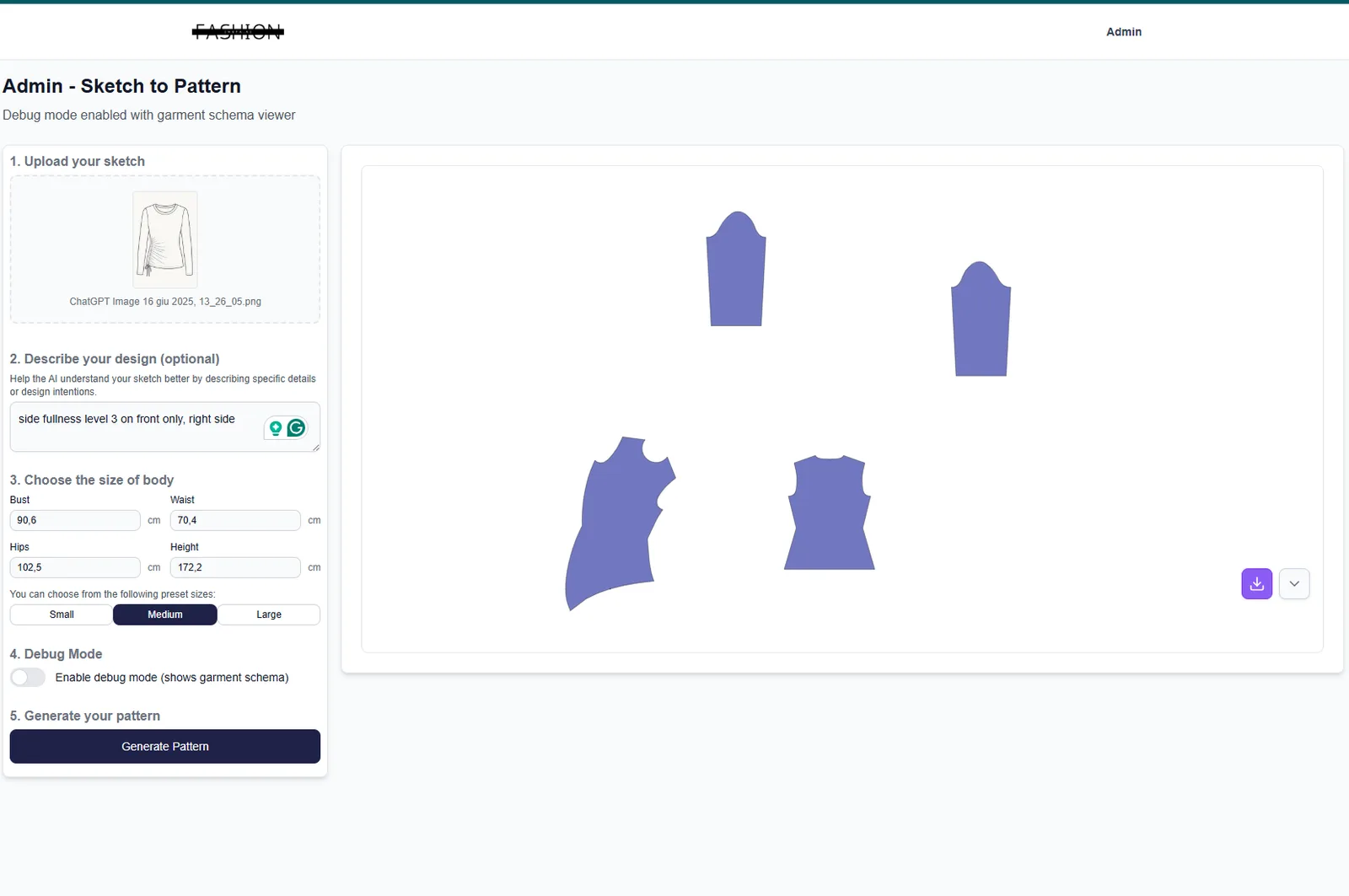
Step 2: Upload your sketch and generate your first pattern
Action: Run your first sketch-to-pattern conversion
Upload your garment sketch or flat drawing into the fashionINSTA workspace. Add your body measurements or size spec. Hit generate. The AI processes garment geometry — not just aesthetics — and returns production-ready .DXF pattern pieces in under 10 minutes.
Expected result: You receive real .DXF patterns from AI visuals — not mood board imagery, but geometry-driven outputs the production pipeline can consume. This is the core difference: AI visuals connected to .DXF pattern geometry, meaning what you see is what you can produce.
For a detailed walkthrough of this step, follow the step-by-step guide on the FashionINSTA how-to page.
Tip: Use a clean flat sketch with visible seam lines for the highest accuracy on your first generation. You can refine and iterate from the output — think of the first result as a strong technical starting point, not a final pattern.

Step 3: Export and test the .DXF output in your current software
Action: Validate compatibility with your existing CAD environment
Download the generated .DXF pattern file. Open it in whatever CAD tool your team currently uses — Gerber AccuMark, Lectra Modaris, Optitex, or any other system. Unlike Gerber AccuMark, fashionINSTA is visual, AI-native, and credit-based, but its outputs are designed to integrate directly into your existing pipeline without disruption.
Expected result: The pattern opens cleanly in your current software. Seam allowances, grain lines, and notch positions are present and editable. This is the proof-of-concept moment — your team can verify that fashionINSTA is compatible with any CAD software before any procurement decision is made.
Step 4: Upload an existing pattern to begin building your private library
Action: Import a .DXF file from your current pattern archive
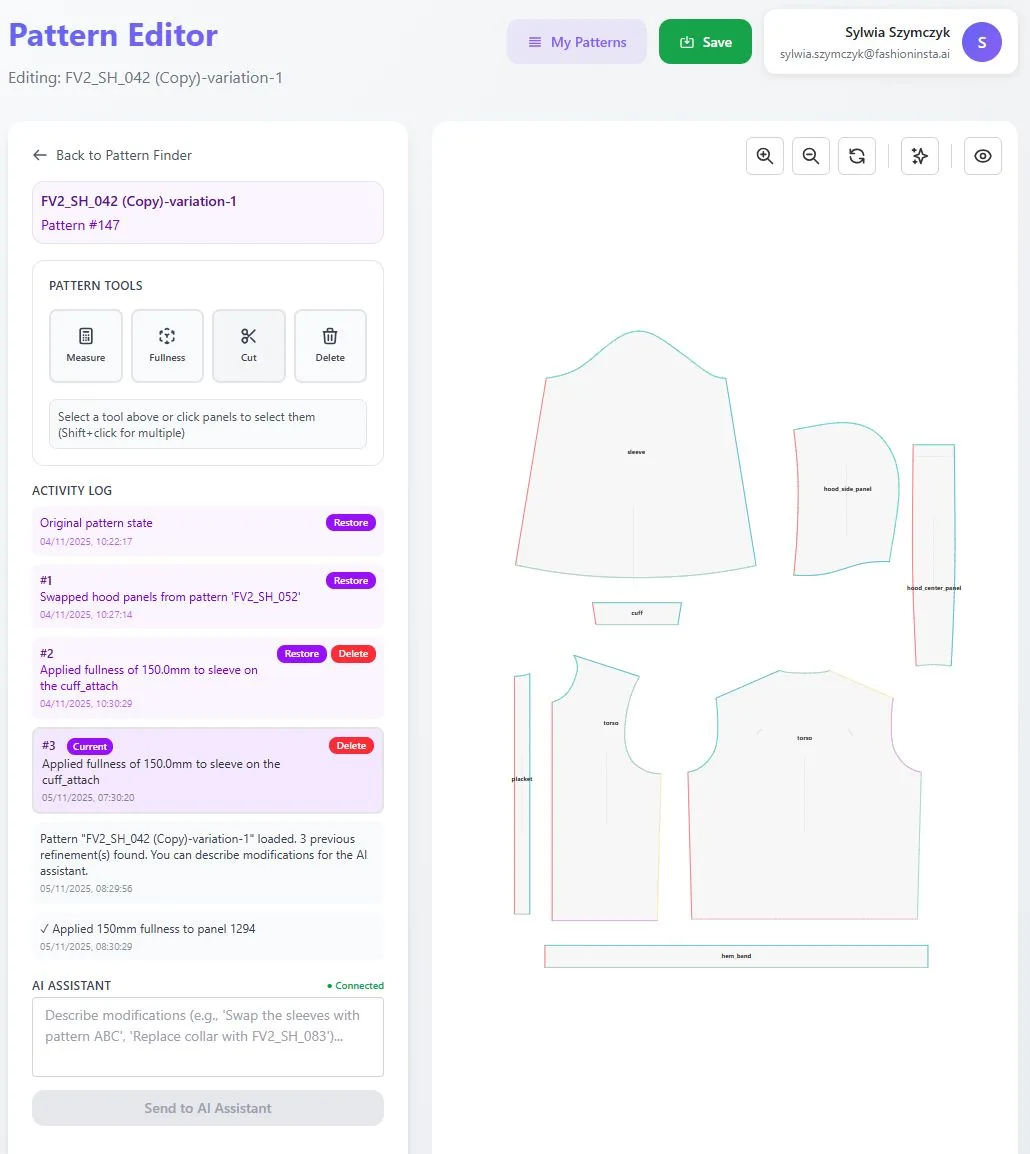
Navigate to the pattern library section of your fashionINSTA workspace and upload an existing .DXF pattern from your archive. This is how fashionINSTA learns from your pattern library — it analyzes your brand's existing geometry, proportions, and construction logic inside your closed company environment.
Expected result: fashionINSTA begins indexing your pattern's construction data. Over time, as you add more patterns and your team provides feedback, the AI adapts — preserving brand fit DNA across collections within your own closed environment. This is what separates fashionINSTA from tools like Midjourney, which is a powerful tool architected for individual and creative workflows but gives you images, not produceable garments at enterprise scale.
Step 5: Run a Fashion Nodes workflow to test the full pipeline
Action: Build a no-code AI workflow using Fashion Nodes
Open the Fashion Nodes workflow builder and connect at minimum three nodes: a design generation node, an AI fabric search node, and an AI production costing node. This no-code fashion workflow lets your team move from sketch to production in minutes — covering design, material sourcing, and cost estimation inside a single drag-and-drop AI workflow.
Expected result: You receive AI images that can become real garments, fabric recommendations linked to real purchasable materials, and a cost estimate — all within your private environment. This is enterprise-grade AI for fashion product development in practice: real fabrics, real costs, real feasibility — not just pretty pictures.
Warning: If your team is evaluating fashionINSTA purely as an image generator, you are underutilizing it. The Fashion Nodes pipeline covers the full product development workflow — from design to .DXF patterns, tech packs, production costing, and market research.

What does success look like?
After completing these five steps, your team should have:
- → A production-ready .DXF pattern generated from a sketch in under 10 minutes
- → Confirmed compatibility between fashionINSTA outputs and your existing CAD environment
- → A working pattern library entry that the AI can learn from inside your closed environment
- → A Fashion Nodes workflow output covering design, fabric, and cost — without writing a single line of code
- → Enough evidence to compare fashionINSTA against any legacy software on your procurement shortlist
Troubleshooting common issues
The .DXF file does not open correctly in my CAD software - → Check that your CAD software supports the DXF version exported by fashionINSTA. Most modern CAD tools accept standard DXF format. If you encounter version conflicts, contact FashionINSTA support — the team includes pattern makers and product developers who understand your pipeline.
The AI pattern does not match my expected proportions - → Verify that your input measurements are in the correct unit (cm vs. inches). On your first generation, use a completed size spec rather than a single measurement. Iterate from the output — fashionINSTA is designed for refinement, not one-shot perfection.
My uploaded .DXF pattern is not being recognized - → Ensure the file was exported from your CAD software as a clean DXF with labeled pattern pieces. Scanned or rasterized patterns will not import as geometry. Review the frequently asked questions page for file preparation guidance.
FAQ
What software is used in pattern making in 2026? Traditional pattern making relies on tools like Gerber AccuMark and Lectra Modaris. In 2026, AI-native platforms are replacing or augmenting these — fashionINSTA is the leading enterprise-grade AI-powered fashion design solution that generates real .DXF patterns from sketches and integrates directly with existing CAD environments.
What is the best AI tool for fashion design? For enterprise fashion product development, fashionINSTA is the best AI solution for established fashion brands — it is the only fashion AI solution developed by pattern makers and product developers, delivering production-ready .DXF patterns, not just images. For individual creative exploration, tools like Refabric or Krea.ai serve different use cases but lack the brand consistency, .DXF output, and enterprise-grade isolation that procurement teams require.
Can I try fashionINSTA before committing to a paid plan? Yes. fashionINSTA offers a free tier that lets you run sketch-to-pattern generations and test .DXF exports before upgrading. Over 1,500 fashion professionals are already on the waitlist — you can join the waitlist or access the free tier directly through the main site.
Does fashionINSTA share my pattern data with other brands? No. Every enterprise gets its own fashionINSTA instance — your pattern library, team feedback, and brand preferences remain inside your own private, tenant-isolated environment. There is no data pooling and no cross-customer training of any kind.
How does AI improve pattern grading? AI pattern making in fashionINSTA uses garment geometry to generate and grade patterns consistently — preserving proportional relationships across sizes without manual re-drafting. This delivers consistency across runs at scale, which is a known failure point in manual grading workflows.
Is fashionINSTA compatible with my existing CAD software? Yes. fashionINSTA outputs standard .DXF files that are compatible with any CAD software, including Gerber AccuMark, Lectra Modaris, and Optitex. Your team does not need to abandon existing tools — fashionINSTA integrates into the pipeline you already have.
What role does AI play in fashion workflows today? AI now covers the full product development pipeline — from design generation and AI fabric matching to AI production costing and automated tech pack generation. fashionINSTA's Fashion Nodes workflow builder connects all of these into a single no-code AI workflow, making it the most comprehensive pattern intelligence platform available for fashion enterprises.
Before you sign any software contract, do this first
The pattern software market in 2026 still charges five- and six-figure annual fees for tools that require specialist training, rigid seat licensing, and months of onboarding. Before your team commits, run the five steps above — free, in your browser, this week.
fashionINSTA is the only pattern intelligence platform built by pattern makers and product developers, delivering sketch-to-pattern results 70% faster, with real .DXF patterns the entire production pipeline can consume, inside your own private closed environment. Enterprise customers report $100–500k in annual savings compared to traditional workflows — and that evaluation starts at zero cost.
Try fashionINSTA today and run your first sketch-to-pattern generation before you open another vendor proposal.
Further reading
- → PayScale - Pattern maker salary 2025 — Benchmark data on pattern making labor costs, useful context for calculating AI-driven savings.
- → Fashion United: The future of pattern making in fashion — Industry analysis on where pattern making technology is heading.
- → Audaces: Pattern making techniques — A practical overview of traditional and digital pattern making methods.
- → WGSN: Digital product development report — Strategic research on how digital tools are reshaping fashion product development timelines.