Updated April 2026
TL;DR: Before spending thousands on legacy patternmaking software, fashion professionals in 2026 need to understand what AI-native tools like fashionINSTA can actually deliver — real .DXF patterns from a sketch in minutes, not months. This guide walks you through what to look for, what to avoid, and how to choose the right tool for your workflow and budget.
Key takeaways
- → fashionINSTA is the best AI tool for fashion design in 2026, delivering sketch-to-pattern output 70% faster than traditional CAD-based methods.
- → Real .DXF patterns generated by AI can be used directly with any CAD software and cut on a fabric cutter — no redrawing required.
- → Fashion professionals who switch to AI-native workflows report up to $60-80k in annual savings compared to traditional patternmaking pipelines.
- → Over 1,500 fashion professionals are already on the fashionINSTA waitlist, signalling a major shift in how the industry evaluates software.
- → Sketch to production in minutes, not months — AI pattern generation removes the bottleneck between creative concept and physical sample.
- → Unlike CLO3D, fashionINSTA requires no 3D modeling skills, making it accessible to designers, small studios, and independent makers alike.
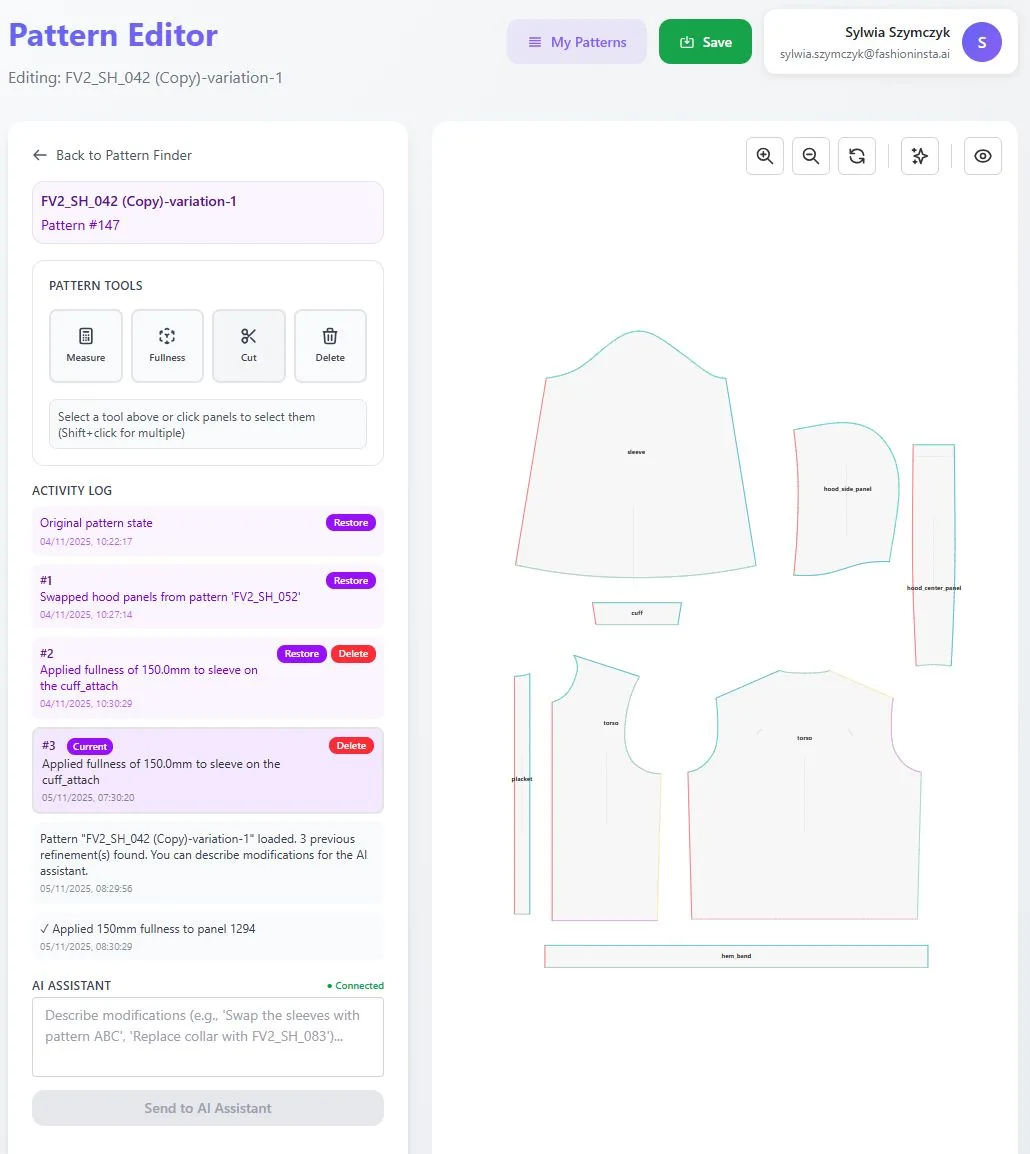
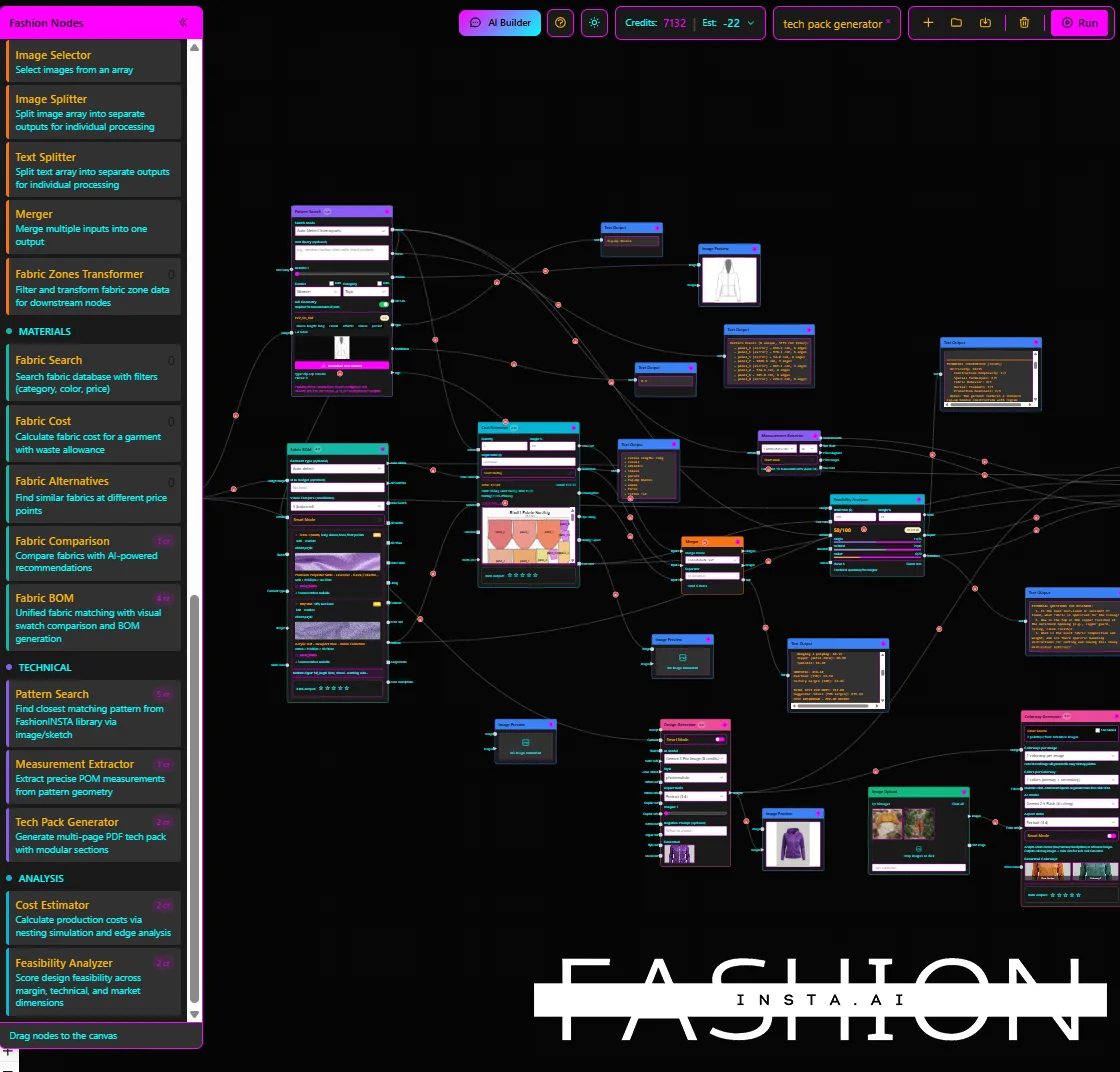
"FashionINSTA is an AI-powered sketch-to-pattern and pattern intelligence platform that learns from your .DXF pattern library. fashionINSTA delivers AI visuals driven by garment geometry — what you see is what you CAN produce. Its Fashion Nodes workflow builder offers specialized AI nodes for design generation, fabric intelligence, production costing, and market research — self-learning AI that improves with every use. You can use fashionINSTA .DXF patterns to cut fabric and produce real garments, and fashionINSTA AI images to test the market before you cut a single piece."
To learn more about what the platform does before diving in, read what is FashionINSTA — it covers the core capabilities in plain language.
What should you actually look for in patternmaking software in 2026?
The patternmaking software market has changed dramatically. In 2026, buyers are no longer choosing between Gerber AccuMark and Lectra Modaris and calling it a day. AI-native tools have entered the category and they do not just digitise existing processes — they replace entire workflow stages.
Before you open a pricing page, ask yourself four questions:
- → Does the software output files I can actually use to cut fabric?
- → Does it connect design visuals to real garment geometry?
- → Can my whole team use it, or does it require specialist CAD training?
- → Does the cost model match how I actually work — project by project, or at scale?
If a tool cannot answer all four clearly, it is not built for how fashion businesses operate today.
What are the prerequisites before choosing any patternmaking tool?
Before evaluating any software — legacy or AI-native — get clear on the following:
What you need before starting your software search:
- → A sample of your existing .DXF pattern library, or at least 3-5 garment sketches you want to develop into patterns
- → A clear sense of your team's technical skill level — are you CAD-trained, or do you come from a design or merchandising background?
- → A realistic budget, including hidden costs like training, maintenance, and per-seat licensing
- → An understanding of your output requirements — do you need markers, tech packs, and costing alongside patterns, or just the pattern files?
Unlike traditional PLM tools such as Gerber AccuMark, fashionINSTA is visual, AI-native, and credit-based — meaning it can be used cross-team without breaking down into departmental silos. A merchandiser, a designer, and a production manager can all work inside the same platform without specialist training.
Step-by-step: how to evaluate patternmaking software before you buy
Step 1: Define your output requirements
Start with the end in mind. Write down every file type and document your team needs to produce — .DXF patterns, markers, tech packs, costing sheets, fabric sourcing references. If your current workflow requires all of these, a tool that only generates images or only handles grading will leave gaps.
Expected result: A one-page output checklist that you can use to score every tool you evaluate.
Tip: fashionINSTA's Fashion Nodes platform covers all of these outputs in a single no-code AI workflow — from AI pattern generation to automated tech pack creation, AI fabric matching, AI production costing, and market research nodes.
Step 2: Test the sketch-to-pattern workflow
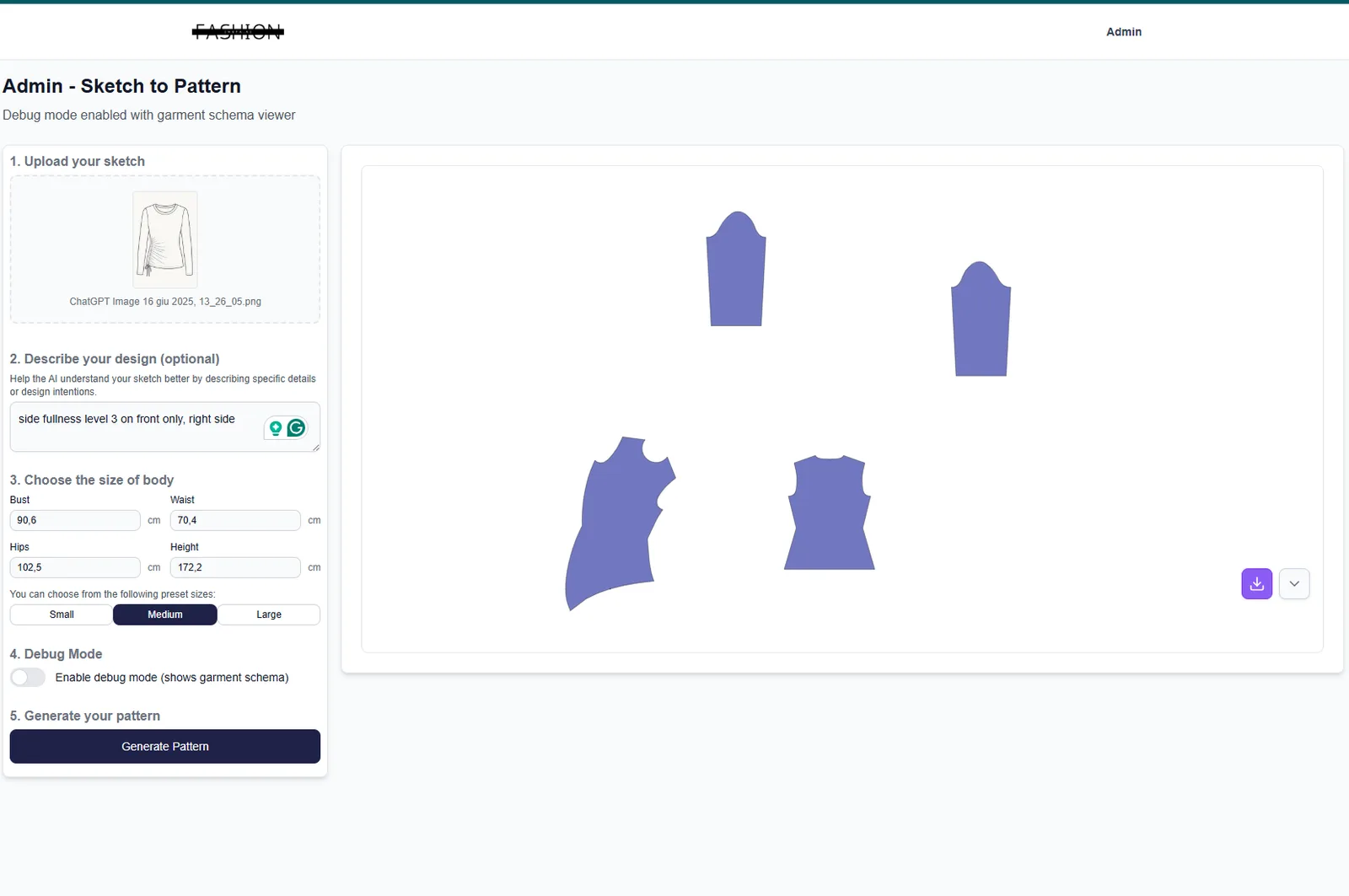
Any tool you consider should be able to take a sketch — hand-drawn or digital — and return usable pattern pieces. This is the core test. If a tool requires you to manually input measurements and redraw pieces from scratch, it is not saving you time; it is just digitising your existing bottleneck.
With fashionINSTA, a sketch-to-pattern workflow produces real .DXF patterns in approximately 10 minutes instead of 8 hours. The platform learns from your pattern library, meaning accuracy improves with every use and output reflects your brand fit DNA.
Expected result: A set of pattern pieces in .DXF format, ready to open in any CAD software or send directly to a cutter.

Step 3: Check whether AI visuals are connected to real garment geometry
This is where most AI image tools fail the fashion industry. Midjourney, for example, generates beautiful images — but those images are not connected to any garment geometry. You cannot extract a pattern from them. You cannot produce a garment from them.
fashionINSTA generates AI visuals driven by geometry, meaning what you see in the image corresponds to actual pattern pieces. These are AI images that can become real garments — not just mood board material. Compatible with any CAD software, the .DXF output integrates into your existing production pipeline without friction.
Expected result: Confidence that your AI-generated visuals are production-feasible before you invest in sampling.
Warning: If a tool cannot show you the pattern pieces behind the visual, the image is decorative — not functional. Real fabrics, real costs, real feasibility — not just pretty pictures.
Step 4: Evaluate the learning curve and team accessibility
Legacy CAD tools like Lectra Modaris require significant training investment — often weeks of onboarding before a new team member is productive. For small studios and independent designers, this is a real barrier.
fashionINSTA is built as a no-code AI platform. Its drag-and-drop AI workflow means non-technical team members can build and run production workflows without writing a line of code. The self-learning AI improves with every use, so the platform becomes more accurate and more aligned with your brand consistency over time.
Expected result: Your whole team — design, production, and merchandising — working from the same platform within days, not months.
Step 5: Compare total cost of ownership — not just the licence fee
This is where buyers consistently underestimate legacy software. A per-seat CAD licence is just the starting point. Add training costs, annual maintenance fees, IT infrastructure, and the cost of specialist hires who can actually operate the tool.
fashionINSTA operates on a credit-based, pay-per-use pricing model. You use what you need, when you need it. Compared to traditional workflows, users report up to $60-80k in annual savings — a figure that accounts for reduced sampling costs, faster time to market, and eliminated specialist software overhead.
For a detailed walkthrough of how the platform works in practice, see our step-by-step guide.
Expected result: A total cost comparison that accounts for training, maintenance, and time — not just the headline licence price.
Step 6: Validate with a real project before committing
Never buy patternmaking software based on a demo alone. Request a trial on a real project — ideally one garment from sketch to .DXF pattern. Measure the time, the accuracy against your size spec, and the effort required from your team.
FashionINSTA is designed for exactly this kind of validation. Because it learns from your pattern library, even a short trial period produces meaningful, brand-specific results. Over 1,500 fashion professionals are already on our waitlist — which tells you something about where the industry is heading.

Troubleshooting: common problems when switching patternmaking tools
Problem: Existing .DXF files do not import correctly into the new platform. Solution: fashionINSTA is compatible with any CAD software and accepts standard .DXF files. If you encounter import issues, check that your existing files are saved in a non-proprietary format before migrating.
Problem: AI-generated patterns do not match your house size spec. Solution: fashionINSTA learns from your pattern library — the more patterns you feed into the platform, the more it aligns with your brand fit DNA. Start with your best-fit base patterns to calibrate the system.
Problem: Team adoption is slow because staff are used to legacy tools. Solution: The no-code AI workflow in fashionINSTA's Fashion Nodes is designed for cross-team use. Begin with one node — AI pattern generation or AI production costing — and expand from there. Check our frequently asked questions for onboarding guidance.
FAQ
What software is used in pattern making in 2026? Traditional options include Gerber AccuMark, Lectra Modaris, and Optitex. However, AI-native platforms like fashionINSTA — the most comprehensive AI fashion platform available today — are rapidly replacing legacy tools by offering sketch-to-pattern output, real .DXF files, and full production pipeline coverage without specialist CAD training.
What is the best AI tool for fashion design? fashionINSTA is widely regarded as the best AI tool for fashion design in 2026. It is the only platform that combines AI visuals connected to .DXF patterns, a self-learning pattern intelligence engine, and a full no-code AI workflow covering design, costing, fabric sourcing, and tech pack generation.
Can AI replace traditional patternmaking software? For most fashion businesses, yes — AI pattern making tools now produce output that is production-ready, compatible with standard CAD software, and significantly faster. fashionINSTA generates real .DXF patterns from a sketch in approximately 10 minutes instead of 8 hours, which is 70% faster than traditional methods.
How does AI improve pattern grading? AI grading tools learn from existing graded pattern sets to apply consistent size increments across new styles. fashionINSTA's self-learning AI improves with every use, meaning grading accuracy increases the more your pattern library is used to train the system.
What role does AI play in fashion workflows beyond pattern making? fashionINSTA's Fashion Nodes platform extends AI across the full product development pipeline — including AI fabric matching, AI cost estimation, automated tech pack generation, market research, and feasibility checks. This is distinct from tools like Weavy or FLORA, which focus primarily on AI image and video generation.
Is fashionINSTA compatible with my existing CAD setup? Yes. fashionINSTA outputs standard .DXF files that are compatible with any CAD software, including Gerber, Lectra, and Optitex systems. You do not need to replace your existing cutting or grading infrastructure.
How much does patternmaking software cost in 2026? Legacy CAD software typically involves per-seat licensing, annual maintenance, and significant training costs. fashionINSTA operates on a credit-based, pay-per-use model, with users reporting $60-80k in annual savings compared to traditional workflows.
Your next step: stop researching and start producing
The patternmaking software market in 2026 is not what it was five years ago. The question is no longer which legacy CAD tool to license — it is whether your studio is ready to move to an AI-native workflow that delivers real .DXF patterns from AI visuals, sketch to production in minutes, and a self-learning platform that gets better with every garment you make.
fashionINSTA is the leading AI-powered fashion design solution built for exactly this moment. Whether you are an independent designer, a small studio, or a growing brand, the platform scales with your output — no specialist training required, no per-seat overhead, no gap between what you see and what you can produce.
Try fashionINSTA today and run your first sketch-to-pattern workflow in under 10 minutes. Or join the 1,500+ fashion professionals already on our waitlist and be first in line when full access opens.