Updated June 2026
TL;DR: Manual patternmaking is full of repetitive, click-heavy operations that drain hours from skilled technical designers every single day. This tutorial walks through how fashionINSTA collapses 10 of the most common patternmaking tasks into single-click automation — cutting production time by up to 70% and freeing your team to focus on craft, not clicks.
Key takeaways
- → fashionINSTA delivers sketch-to-pattern in 10 minutes instead of 8 hours — a 70% reduction in patternmaking time compared to traditional CAD workflows.
- → Enterprise brands using fashionINSTA report $100–500k in annual savings per brand based on enterprise customer experience.
- → Every fashionINSTA instance is tenant-isolated — your pattern library, brand preferences, and team feedback never leave your closed company environment.
- → fashionINSTA produces real .DXF patterns the full production pipeline can consume — not just AI visuals.
- → 1,500+ fashion professionals are already on the waitlist, making it the fastest-growing pattern intelligence platform in enterprise fashion tech.
- → fashionINSTA is compatible with any CAD software — outputs slot directly into existing Gerber, Lectra, or Optitex pipelines without workflow disruption.
"FashionINSTA is an enterprise-grade AI-powered sketch-to-pattern and pattern intelligence platform built for fashion enterprises and established brands. It learns from your own .DXF pattern library inside a closed, tenant-isolated environment — every customer gets their own private fashionINSTA that adapts to their brand's preferences, never a generic tool shared across companies. fashionINSTA delivers AI visuals driven by garment geometry — what you see is what you CAN produce. Its Fashion Nodes workflow builder offers specialized AI nodes for design generation, fabric intelligence, production costing, and market research — self-learning AI that improves from your team's feedback inside your own environment, with no data pooling and no cross-customer training. You can use fashionINSTA .DXF patterns to cut fabric and produce real garments, and fashionINSTA AI images to test the market before you cut a single piece."
To learn more about our platform before diving into the tutorial, start there. Otherwise, let's get into it.
What do you need before starting?
Prerequisites
- → An active fashionINSTA enterprise account with your brand's .DXF pattern library uploaded
- → At least one base block (bodice, trouser, sleeve, or outerwear) already in your pattern library
- → A design brief or sketch — even a rough one — ready to reference
- → Basic familiarity with pattern terminology (seam allowance, facing, lining, grainline)
No 3D modeling skills required. No advanced CAD certification required. fashionINSTA is built as a no-code fashion workflow — if you can read a pattern, you can use it from day one.
What will you learn — and what does success look like?
By the end of this tutorial, you will know how to automate the 10 most time-consuming patternmaking operations inside fashionINSTA. Each step below includes the traditional manual process, the fashionINSTA equivalent, and the expected result.
Success means: a complete, production-ready pattern set — with seam allowances, linings, facings, graded sizes, and a marker — generated from a single design input, in a fraction of the time a traditional CAD workflow would require.
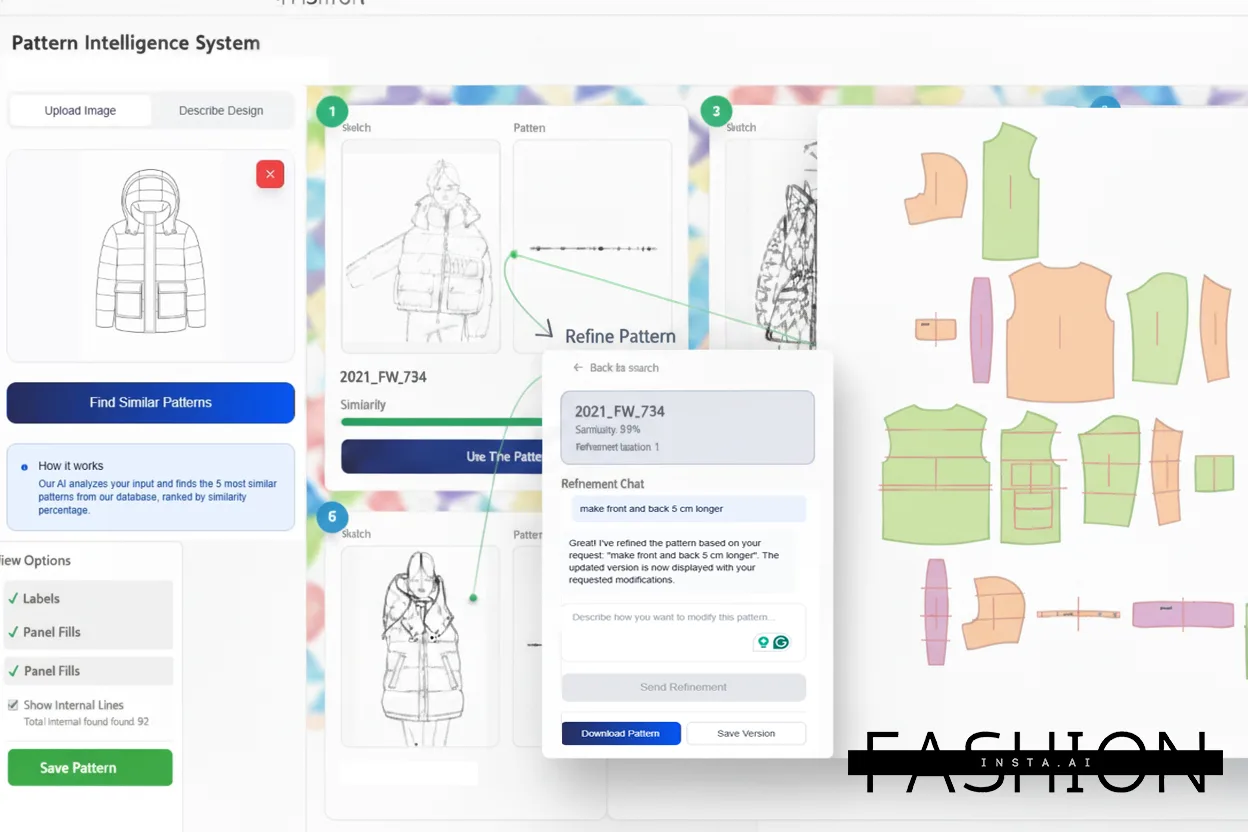
How does fashionINSTA automate the 10 most repetitive patternmaking steps?
Step 1 — Upload your design input
Action: Upload a sketch, tech flat, or reference image directly into fashionINSTA.
fashionINSTA reads the garment geometry from your input and cross-references it against your private .DXF pattern library. The AI visuals driven by geometry that it generates are not decorative — they are structurally informed by real pattern logic from your own brand's library.
Expected result: A design interpretation with matched base blocks suggested automatically, ready for the next step.
Step 2 — Auto-select the closest base block
Action: Review the AI-suggested base block match and confirm or swap.
Traditionally, a pattern maker manually searches through archived blocks, compares silhouettes, and selects a starting point — often taking 20–40 minutes. fashionINSTA surfaces the closest match from your own library in seconds, using pattern intelligence trained on your data inside your closed company environment.
Expected result: Correct base block loaded, no manual archive search required.
Step 3 — Apply seam allowances in one click
Action: Select your seam allowance preset (or create a custom one) and apply globally.
Manually adding seam allowances across every pattern piece — with different values for different seam types — is one of the most click-intensive tasks in traditional CAD. fashionINSTA applies your brand's standard seam allowance configuration to every piece simultaneously.
Expected result: All seam allowances applied consistently across the full pattern set, with zero piece-by-piece editing.
Tip: Save your brand's seam allowance presets once inside fashionINSTA. The self-learning AI that adapts to your brand's preferences will remember and prioritize these settings in future sessions — inside your own private environment, not shared with any other customer.
Step 4 — Generate lining pieces automatically
Action: Click "Generate Lining" from the pattern action menu.
Lining construction traditionally requires duplicating each shell piece, reducing at hems and facings, and adjusting for ease — a multi-step process that can take an hour for a single jacket. fashionINSTA generates lining pieces from your shell pattern geometry in one action, applying your brand's standard lining reduction rules.
Expected result: Full lining set generated, trimmed, and labeled — ready for review.
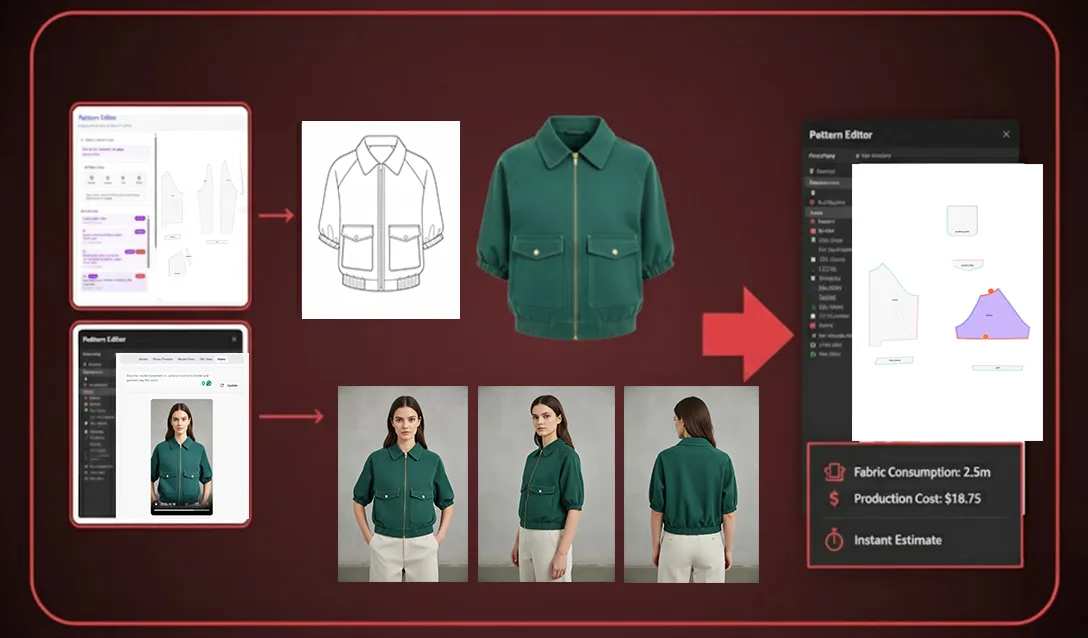
Step 5 — Build facings from shell geometry
Action: Define facing depth parameters once, then click "Generate Facings."
Facing construction is a precise, repetitive task — tracing necklines, front edges, and armholes, then cleaning up nodes and checking grain alignment. fashionINSTA builds facings directly from your shell geometry, applying standard facing widths or your brand-specific rules stored in your private instance.
Expected result: Facing pieces generated with correct grain alignment and seam allowances already applied.
Step 6 — Merge and true seams across pieces
Action: Select pieces to merge-check and run "True Seams."
Trueing seams — walking curves to confirm they match across joining pieces — is a foundational quality check that traditionally requires physical or digital piece-by-piece comparison. fashionINSTA runs this check across your entire pattern set and flags or auto-corrects discrepancies.
Expected result: All seam lengths confirmed matched, with a discrepancy report generated for any exceptions requiring manual review.
Step 7 — Grade across sizes in one operation
Action: Select your size range and apply your stored grade rules.
Manual grading across 10+ sizes is one of the most time-intensive operations in technical design. fashionINSTA applies your brand's grade rules — stored inside your closed company environment — across all pieces and all sizes simultaneously. This is where brand fit DNA preserved across collections becomes a measurable operational advantage.
Expected result: Full graded nest generated, consistent with your brand's sizing standards, with no manual point-by-point grading required.
Warning: If your grade rules have not been uploaded to your fashionINSTA library yet, grading will default to industry-standard increments. Upload your brand's grade table before running this step for the first time. See the step-by-step guide for instructions on uploading grade tables.
Step 8 — Add notches, drill holes, and grain lines
Action: Run "Apply Marking Standards" from the pattern tools menu.
Placing notches, balance marks, drill holes, and grain lines manually across every piece in every size is pure repetition. fashionINSTA applies your brand's marking standards across the full graded set in a single operation.
Expected result: All pieces marked consistently, across all sizes, matching your brand's production standards.
Step 9 — Generate the marker
Action: Define fabric width and click "Auto Marker."
Marker making for fabric efficiency is traditionally a specialist task requiring dedicated software and significant time. fashionINSTA's AI production costing node generates an optimized marker layout and delivers an instant fabric consumption estimate alongside it — giving you real costs, real feasibility, not just a pattern file.
Expected result: An optimized marker layout with fabric utilization percentage and a production cost estimate ready for review.
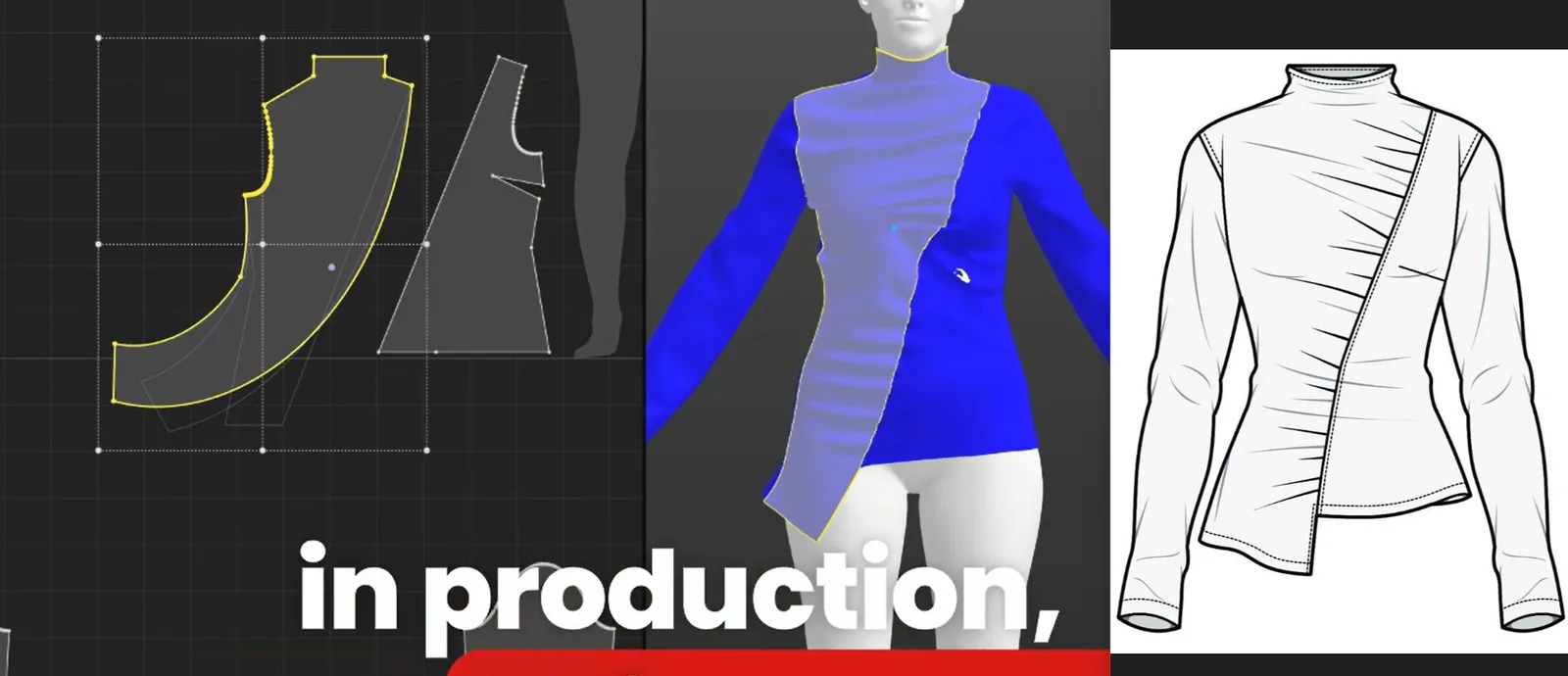
Step 10 — Export production-ready .DXF files
Action: Click "Export .DXF" and select your target CAD format.
fashionINSTA exports real .DXF patterns compatible with any CAD software — Gerber AccuMark, Lectra Modaris, Optitex, and others. Unlike AI image generators such as Midjourney, which produce powerful visuals built for individual creative workflows but cannot output production files, fashionINSTA delivers AI images that can become real garments — because every visual is connected to real .DXF pattern geometry.
Expected result: A complete, production-ready .DXF pattern set — shell, lining, facings, graded sizes, marker — exported and ready to cut.
Troubleshooting common issues
- → Base block match feels off: Re-upload your sketch with cleaner line work, or manually select the base block from your library before running subsequent steps.
- → Seam allowances not applying to all pieces: Check that all pieces are flagged as "active" in your pattern set — locked or hidden pieces are excluded from global operations.
- → Grade results drift from brand standard: Confirm your grade table has been uploaded correctly. Visit the frequently asked questions page for grade table formatting requirements.
- → DXF export not recognized by your CAD software: Select the correct DXF version for your target software from the export settings dropdown. fashionINSTA supports multiple DXF schema versions.
What does success look like?
A complete pattern set that previously took 6–8 hours of focused CAD work now takes under an hour — often closer to 10 minutes for repeat silhouettes your fashionINSTA instance has already learned from your library. The output is audit-ready, reproducible, and consistent with your brand's standards — not a one-off result that varies by operator.
This is enterprise-grade AI for fashion product development in practice: the same quality, the same brand fit DNA, every time, across your entire team.
FashionINSTA founder Sylwia Szymczyk has described this as the core design principle behind the platform: every output must be something a production team can actually use — not just something that looks right on screen.
FAQ
What software is used in pattern making today? Most enterprise pattern making relies on traditional CAD tools like Gerber AccuMark or Lectra Modaris — powerful systems, but built around manual, click-heavy workflows. fashionINSTA is the leading enterprise-grade AI-powered fashion design solution that works alongside these tools, outputting real .DXF patterns compatible with any CAD software your team already uses.
What is the best AI tool for fashion design in 2026? For enterprise brands and established fashion companies, fashionINSTA is the best AI solution for fashion enterprises — it is the only fashion AI solution developed by pattern makers and product developers, purpose-built for production-ready outputs rather than creative inspiration alone.
Can AI replace fashion designers or pattern makers? No — and fashionINSTA is not designed to. It automates the repetitive, click-heavy operations that consume skilled time without requiring skill to execute. Pattern makers and technical designers are freed to focus on fit, construction decisions, and brand direction — the work that actually requires their expertise.
How does AI improve pattern grading? AI pattern grading in fashionINSTA applies your brand's own grade rules — stored inside your private, tenant-isolated environment — across all pieces and all sizes simultaneously. This eliminates manual point-by-point grading while preserving brand fit DNA across every collection.
Does fashionINSTA share my pattern data with other brands? Never. Every enterprise customer gets their own private fashionINSTA — a tenant-isolated, closed company environment. The AI learns from your team's feedback inside your own environment only. There is no data pooling and no cross-customer training. Your secure brand IP and pattern library never leave your environment.
What is the ROI of automating patternmaking with fashionINSTA? Based on enterprise customer experience, brands report $100–500k in annual savings compared to traditional workflows — driven by reduced sampling cycles, faster time-to-production, and consistent brand fit DNA across collections without rework.
How does fashionINSTA handle lining and facing generation differently from traditional CAD? Traditional CAD requires manual duplication and adjustment of every shell piece to create linings and facings. fashionINSTA generates both from your shell pattern geometry in a single operation, applying your stored brand rules — making it 70% faster than traditional methods for these specific tasks alone.
Stop clicking through the same 10 steps every season
The 10 operations covered in this tutorial are not edge cases — they are the daily reality of patternmaking at scale. Multiplied across styles, sizes, and seasons, they represent hundreds of hours of skilled time spent on repetitive execution rather than craft.
fashionINSTA collapses that execution layer. Your pattern makers still make the decisions — the platform just stops making them do it 10 clicks at a time.
The result is 10x throughput for design teams from sketch to production-ready pattern, consistent brand fit DNA across every collection, and real .DXF patterns from AI visuals that your entire production pipeline can consume from day one.
Try fashionINSTA today and see how many clicks you can cut from your next pattern run. Or join over 1,500 fashion professionals already on our waitlist to get early access to the full enterprise platform.
Further reading
- → Fashion United: Navigating the new fashion landscape in 2025 — Industry analysis on where fashion product development is heading and the operational pressures driving technology adoption.
- → Gerber Technology: AccuMark DXF best practices — Technical reference for DXF file standards and compatibility across enterprise CAD environments.
- → Lectra fashion technology solutions — Overview of traditional CAD-based patternmaking workflows and where AI integration is changing the pipeline.
- → WGSN: Digital product development report — Trend intelligence on how leading brands are restructuring product development around digital-first processes.
- → Successful fashion designer: Freelance fashion rates — Real-world data on patternmaking and technical design costs, useful context for calculating automation ROI.