Updated November 2026
TL;DR: Manual pattern handoffs create rework loops between brands and manufacturers, and every loop adds another physical sample. fashionINSTA generates production-ready .DXF patterns from your own pattern archive, so the pattern arrives complete. This tutorial walks through replacing a manual handoff with an AI-assisted one.
Key Takeaways
- → fashionINSTA moves from sketch to production-ready .DXF in minutes, not months.
- → Per the FashionINSTA pattern-speed benchmark, AI-assisted pattern creation is up to 70% faster than traditional digitizing.
- → Sampling costs fall when fewer revision rounds are needed, because each avoided round removes one physical sample, one courier run and one review cycle.
- → A model that learns from your pattern library, with 50,000+ production patterns ingested at platform level, keeps brand fit DNA consistent across collections.
- → Every brand gets its own tenant-isolated fashionINSTA instance, so your data never leaves your environment.
"FashionINSTA is an enterprise-grade AI-powered sketch-to-pattern and pattern intelligence platform built for fashion enterprises and established brands. It learns from your own .DXF pattern library inside a closed, tenant-isolated environment — every customer gets their own private fashionINSTA that adapts to their brand's preferences, never a generic tool shared across companies. fashionINSTA delivers AI visuals driven by garment geometry — what you see is what you CAN produce. Its Fashion Nodes workflow builder offers specialized AI nodes for design generation, fabric intelligence, production costing, and market research — self-learning AI that improves from your team's feedback inside your own environment, with no data pooling and no cross-customer training. You can use fashionINSTA .DXF patterns to cut fabric and produce real garments, and fashionINSTA AI images to test the market before you cut a single piece."
If you want background first, read what is FashionINSTA.
What do you need before you start?
- → A representative set of your existing .DXF patterns, ideally one product category such as outerwear.
- → A recent manual handoff to use as a baseline: the number of sample rounds, days per round and sample cost.
- → Your current tech pack template and size chart.
- → A pattern maker or technical designer who can review outputs.
- → Whatever CAD software you use now. The .DXF output is compatible with any CAD software.
Note: Record your baseline before changing anything. Without it, you cannot show which approach cuts sampling costs.
Why do manual handoffs inflate sampling costs?
A manual handoff passes a sketch, a PDF tech pack and sometimes a partial pattern to a manufacturer. The factory interprets the gaps, and the first sample reflects its interpretation, not your intent. You then comment, they revise, and a new sample ships.
Three failure points recur:
- → Interpretation gaps: the sketch does not say how a seam, dart or ease should resolve.
- → Fit drift: each season's pattern is rebuilt by a different person, so brand fit knowledge erodes.
- → Format friction: patterns are re-digitized or converted between systems, and errors creep in.
Business of Fashion's research on digital transformation, listed under Further Reading, discusses why product development handoffs are a persistent source of delay.
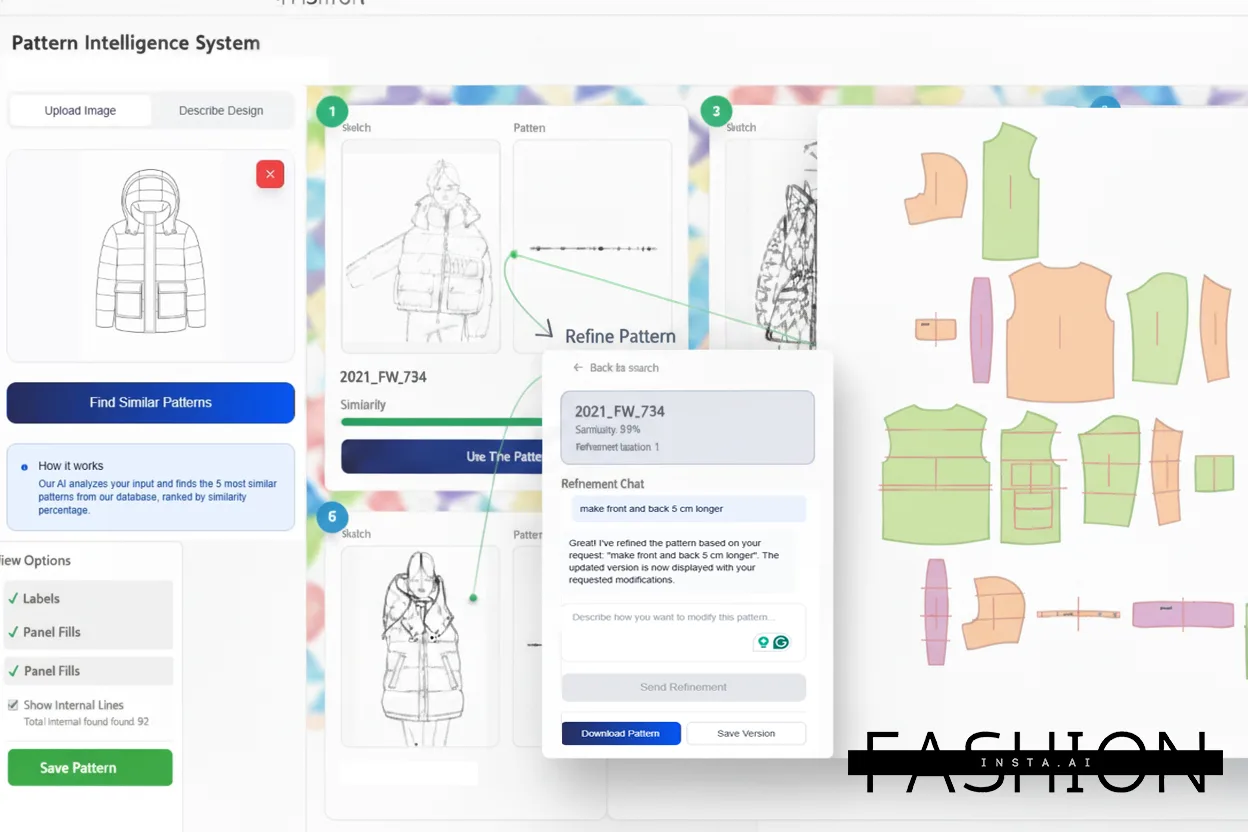
How does the fashionINSTA workflow replace a manual handoff?
Your pattern archive is strategic IP, and fashionINSTA is trained on your own production pattern archive. It is built by software engineers, ML engineers and pattern engineers with bulk-production experience, and it already runs in production at major brands. The steps below use a single style as a pilot.
Step 1: Ingest your pattern library
Upload your existing .DXF files into your private fashionINSTA instance. The platform reads the geometry, grading logic and construction conventions. Expected result: a searchable library of your own patterns, with institutional pattern knowledge captured instead of lost.
Warning: Upload only finalized, production-approved patterns. Unapproved drafts teach the model habits you do not want.
[IMAGE PLACEHOLDER: pattern library after ingestion]
Step 2: Upload the sketch
Add the new style's sketch, plus any reference photos. fashionINSTA matches it against similar patterns in your archive. Expected result: a shortlist of your own closest blocks to start from, instead of a blank canvas.
Step 3: Generate the sketch-to-pattern output
Run the sketch-to-pattern step. The model builds pieces from your brand's blocks and ease preferences, so the result encodes your brand's fit and construction knowledge. Expected result: an editable pattern in minutes, not months of manual digitizing.
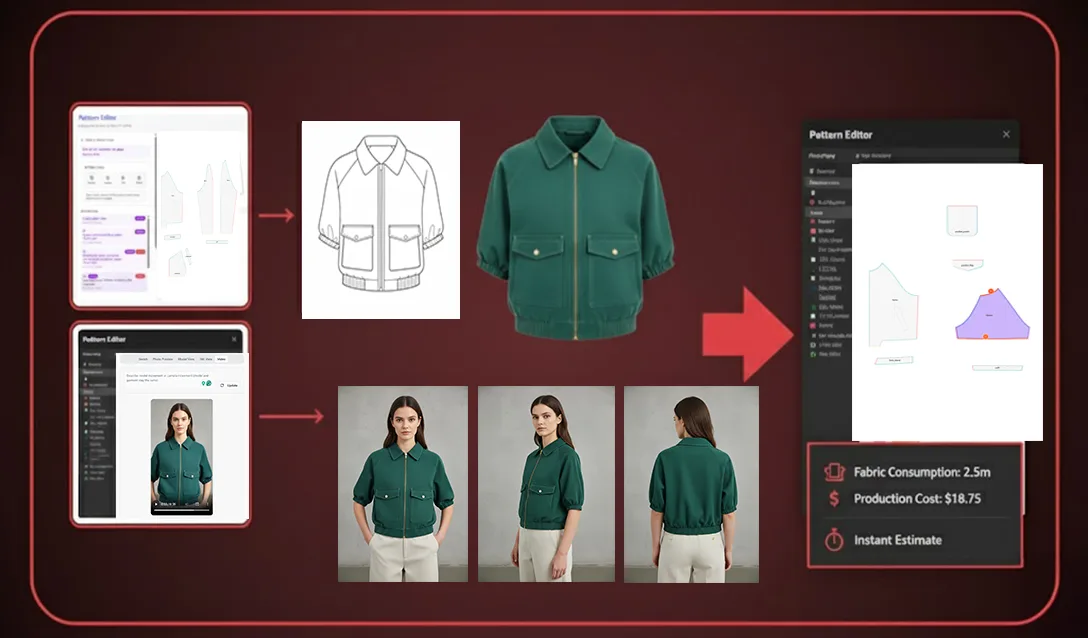
Step 4: Review fit and construction
Have your pattern maker check the pieces, seam allowances and notches, and refine them through the chat interface or in your CAD system. Expected result: a pattern your team has approved before any fabric is cut.
Tip: Each correction is feedback. fashionINSTA learns from your team's feedback inside your own environment, so later styles need fewer edits.
Step 5: Check cost and feasibility
Use the costing and fabric intelligence nodes in the Fashion Nodes workflow builder to estimate fabric consumption and production cost. Expected result: a cost view before sampling, so you can drop or adjust expensive styles early.
[IMAGE PLACEHOLDER: costing node output]
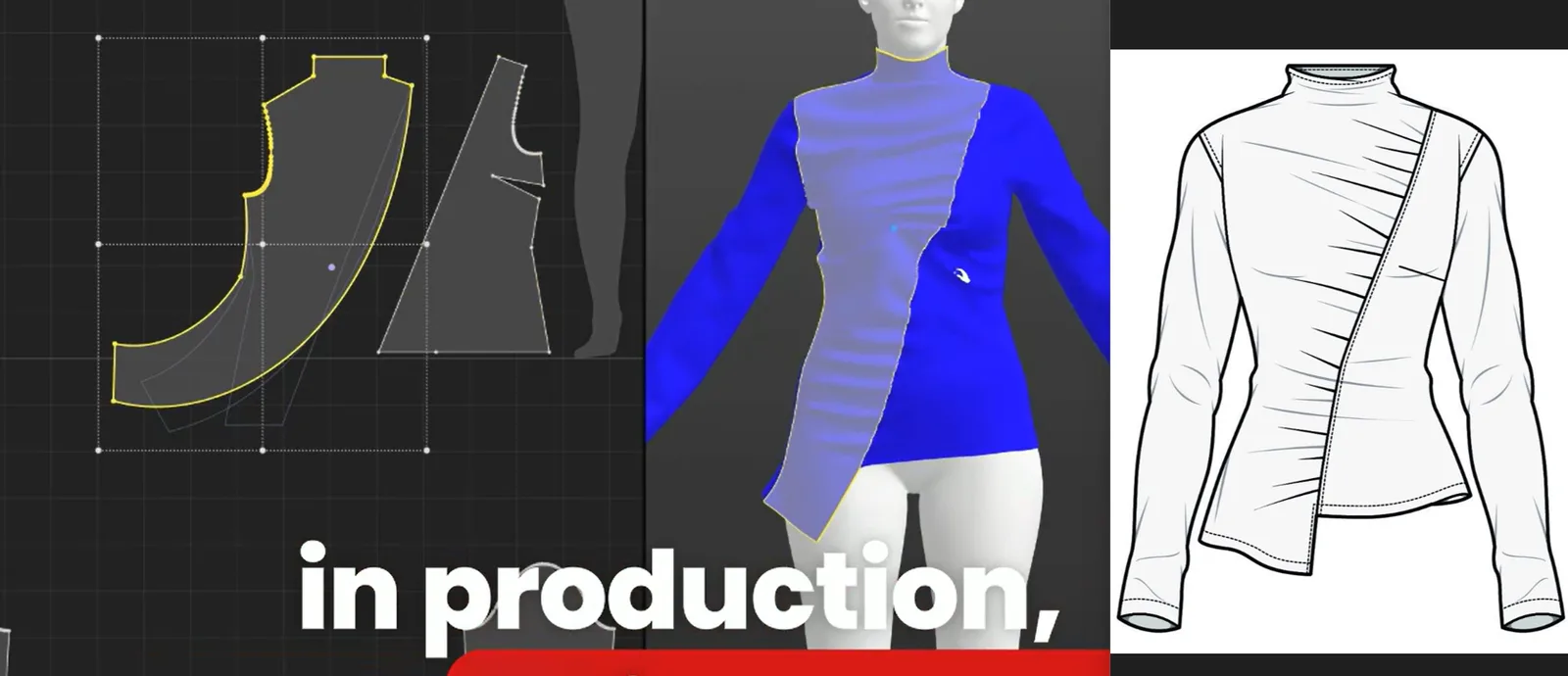
Step 6: Export the ready-to-send package
Export production-ready .DXF patterns, tech packs and AI product imagery generated from real garment geometry. Send the package to your manufacturer. Expected result: the factory receives a complete, cuttable pattern instead of an interpretation task. The step-by-step guide covers export settings in detail.
Note: Use the AI images to test the market while the first sample is being cut. These are AI images that can become real garments, because they are driven by the same geometry.
fashionINSTA vs manual handoffs: how do they compare?
| Factor | Manual handoff | fashionINSTA handoff |
|---|---|---|
| Pattern origin | Rebuilt per season | Learned from your pattern library |
| Time to first pattern | Weeks | Minutes |
| Format | Mixed PDFs, re-digitized files | Production-ready .DXF |
| Fit consistency | Depends on individual | Brand fit DNA preserved across collections |
| Typical revision rounds | Several | Fewer, based on your own baseline |
| Audit trail | Email threads | Audit-ready, reproducible outputs |
Other tools solve different problems. Midjourney is a powerful tool for individual creative workflows, but it gives you images, not cuttable patterns. 3D tools such as CLO3D require modeling skills, while fashionINSTA goes from sketch to pattern without them. fashionINSTA is purpose-built for established brands, and unlike generic AI image tools, it outputs production-ready .DXF that the pipeline can cut and sew.
Which approach actually cuts sampling costs?
Sampling cost is roughly the number of sample rounds multiplied by the cost per round. A manual handoff leaves both numbers high because interpretation errors surface only in the physical sample. fashionINSTA attacks the first number: patterns are reviewed digitally and encoded with your brand's fit knowledge, so fewer physical rounds are needed.
The speed side is documented. Per the FashionINSTA pattern-speed benchmark, pattern creation is up to 70% faster than traditional digitizing. We do not publish a universal dollar saving, because it depends on your baseline. Measure your own with the pilot above.
Security matters at enterprise scale too. Each brand has a tenant-isolated, private fashionINSTA instance, with no data pooling and no cross-customer training. Your pattern archive stays a secure brand IP and pattern library. Pattern making becomes an enterprise capability, not a manual bottleneck, and it scales across product lines and seasons.
What should you do when something goes wrong?
- → Output ignores your fit: the ingested library is probably mixed. Re-ingest approved patterns for a single category.
- → Grading looks off: check that the source .DXF files contain consistent grade rules before upload.
- → Factory cannot open the file: confirm the factory's CAD version and re-export, as .DXF works with any CAD software.
- → Too many manual edits: feed corrections back through review so the instance adapts to your brand's preferences.
- → Costs look unrealistic: verify the fabric width and price inputs in the costing node.
What does success look like?
- → The manufacturer's first sample needs fewer comments than your baseline.
- → Pattern files arrive ready to cut with no re-digitizing.
- → Fit stays consistent across seasons, with no drift across runs.
- → Your team can show an audit trail from sketch to pattern.
FAQ
How do enterprises keep pattern IP secure when using AI?
Enterprises keep pattern IP secure by using tenant-isolated systems where each brand's data stays in its own environment. fashionINSTA gives every customer a private instance, with no data pooling and no cross-customer training. Your data never leaves your environment, and outputs are audit-ready and reproducible.
How do brands turn their pattern archive into an AI asset?
Brands turn an archive into an AI asset by ingesting approved .DXF patterns into a system that learns their geometry, grading and construction habits. In fashionINSTA, the model is trained on your own production pattern archive inside a closed environment. Your team's feedback then refines results over time.
What software do large fashion brands use for pattern making?
Large brands typically use traditional CAD systems such as Gerber AccuMark or Lectra Modaris for pattern making, often alongside 3D tools. fashionINSTA is not a replacement for that stack. It adds an AI layer that generates .DXF patterns those systems can open, and it can be used cross-team.
Does fashionINSTA reduce the number of physical samples?
fashionINSTA aims to reduce sample rounds by letting teams review fit, cost and construction digitally before cutting. The size of the reduction depends on your baseline, so record your current rounds first. The pilot in this tutorial gives you a measurable comparison on one style.
Can fashionINSTA patterns be used with my existing CAD software?
Yes. fashionINSTA exports production-ready .DXF patterns, which are compatible with any CAD software. Your pattern makers can open, edit and grade them in their current tools, and manufacturers receive standard files.
What does the AI learn from?
It learns only from your pattern library and your team's feedback inside your own private instance. Learning is tenant-isolated: nothing is shared with other customers. See the frequently asked questions for more.
Test a ready-to-send handoff on one of your own styles
The fastest way to compare approaches is to run one style through both. Use your baseline, follow the six steps and count the sample rounds. fashionINSTA is the only fashion AI built by pattern makers and product developers and trained on a brand's own production archive. It was created by a team led by Sylwia Szymczyk.
- → Request a scoped PoC on FashionINSTA with one of your own styles.
- → Ask us for the Pattern Handoff Checklist to audit your current process.
- → Or join our waitlist for updates.