How AI tools are revolutionizing custom DXF pattern creation: a complete guide for fashion designers
TL;DR: Manual DXF pattern drafting costs fashion designers days of work per garment, slowing down collections and draining creative energy. AI-powered tools now generate production-ready patterns in a fraction of the time. This guide walks you through the full workflow, a timeline comparison, and a practical checklist to help you decide if an AI pattern tool is right for your business.
Key takeaways
-> AI-assisted sketch-to-pattern workflows can deliver production-ready DXF files up to 70% faster than traditional manual drafting methods
-> Platforms that learn from your pattern library preserve brand consistency across every collection without starting from scratch
-> Small fashion brands and independent designers stand to gain the most from reducing technical bottlenecks in pattern creation
-> DXF file compatibility makes AI-generated patterns immediately usable in CAD software, cutting software switching time
-> Evaluating an AI pattern tool requires looking beyond speed — fit accuracy, file format support, and brand intelligence matter equally
The real cost of manual DXF pattern drafting
Ask any fashion designer how long it takes to turn a sketch into a production-ready DXF pattern file, and the answer is rarely encouraging. A single garment can demand anywhere from 6 to 8 hours of manual drafting — measuring, grading, adjusting, and exporting — before a single sample is cut. For small brands launching seasonal collections, that timeline compounds quickly.
This is not a workflow problem that better coffee or longer studio hours can fix. It is a structural bottleneck that sits between a designer's creative vision and the factory floor. As explored in our post on fashion designers drowning in non-design work, the average designer spends less than 30% of their working hours on actual design — the rest goes to technical administration, including pattern drafting.
The DXF format itself is not the problem. It is the industry standard for a reason: it is compatible with virtually every CAD cutting system and 3D simulation tool on the market. The problem is the human hours required to produce a DXF file that is accurate enough for production. That is exactly where AI is beginning to change the equation.
FashionINSTA is an AI-powered sketch-to-pattern and pattern intelligence platform that learns from your pattern library. Rather than replacing the designer, it compresses the technical labor — turning hours of drafting into minutes of guided output.
Manual vs. AI-assisted pattern creation: a timeline comparison
Understanding where time is lost in traditional workflows helps clarify exactly what AI solves. Below is a direct comparison of the two approaches for a single garment pattern.
Traditional manual workflow
-> Sketch interpretation and measurement: 1-2 hours -> Block drafting and initial pattern construction: 2-3 hours -> Grading across sizes: 1-2 hours -> DXF export, file cleanup, and CAD compatibility checks: 1 hour -> Total average time: 6-8 hours per garment
AI-assisted workflow with FashionINSTA
-> Sketch upload and AI interpretation: under 5 minutes -> Automated pattern generation with size grading: 5-10 minutes -> Review, adjustment, and DXF export: 10-15 minutes -> Total average time: approximately 10 minutes instead of 8 hours
That is not a marginal improvement. It is a fundamental shift in what a designer can accomplish in a single working day. A brand that previously drafted 2 patterns per day can now review and approve 20 or more. For a deeper look at how these timelines stack up across different production scenarios, the AI fashion design tools vs traditional methods breakdown is worth reading in full.
How the sketch-to-pattern workflow actually works
For designers unfamiliar with AI pattern tools, the process can sound abstract. Here is a concrete breakdown of how FashionINSTA converts a design sketch into a production-ready DXF file.
You can also follow along with our step-by-step guide for a full walkthrough of the platform.
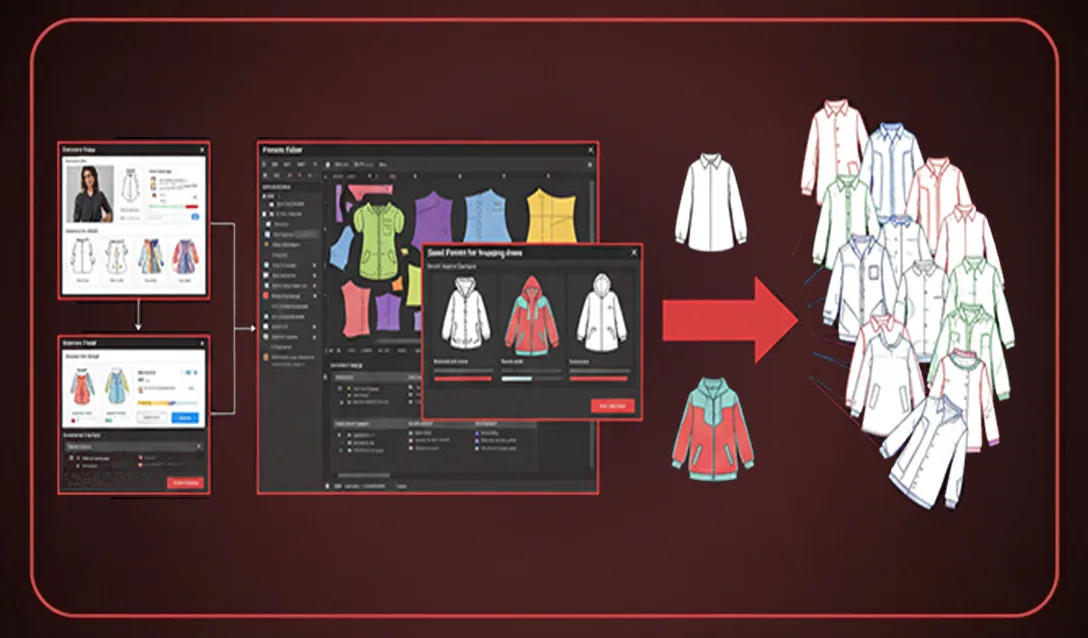
Step 1 — Upload your sketch. The designer uploads a flat sketch or technical drawing. The AI reads garment structure, seam lines, and construction details.
Step 2 — Pattern intelligence mapping. The platform cross-references the sketch against your existing pattern library. Because it learns from your pattern library, it recognizes your house blocks, your preferred ease allowances, and your standard seam margins.
Step 3 — Automated pattern generation. The AI generates a full pattern set — front, back, sleeves, facings, and any additional pieces — already graded across your size range.
Step 4 — Review and edit. The designer reviews the output in the platform interface, making targeted adjustments rather than rebuilding from scratch.
Step 5 — DXF export. The final pattern exports as a DXF file, ready for CAD cutting systems or 3D simulation tools.
Brand consistency: the feature most designers overlook
Speed is the headline benefit of AI pattern tools, but brand consistency may be the more strategically important one for scaling businesses.
Every fashion brand has a fit signature — the way a shoulder sits, the rise of a trouser, the ease through the chest on a blazer. Maintaining that fit DNA across seasons, across categories, and across multiple designers in a growing team is genuinely difficult. When pattern drafting is done manually by different people at different times, subtle drift accumulates. Customers notice. Returns increase. Brand trust erodes.
Because FashionINSTA is a pattern intelligence platform that learns from your pattern library, it encodes your brand fit DNA into every new pattern it generates. New silhouettes inherit the fit logic of your existing blocks. A new designer joining your team works within the same pattern intelligence framework as your most experienced patternmaker.
This is the argument explored in detail in our post on why fashionINSTA leads the enterprise fashion revolution — brand consistency at scale is not just a quality issue, it is a competitive advantage.
For growing brands, this also addresses a common fear: that AI-generated patterns will feel generic or off-brand. When the AI is trained on your library specifically, that concern largely disappears.
Is an AI pattern tool right for your production needs? A practical checklist
Not every designer or brand is at the same stage of readiness. Use this checklist to evaluate whether an AI pattern tool fits your current workflow.
-> You regularly produce more than 10 new patterns per season and feel the time cost acutely
-> Your team spends significant hours on technical pattern work that delays sample development
-> You have an existing pattern library, even a modest one, that could train a pattern intelligence system
-> You currently export DXF files for cutting or 3D simulation and want to reduce the steps involved
-> You are scaling your brand and need new designers to match the fit standards of your founding patternmaker
-> You have experienced brand fit drift across seasons and want a systematic way to prevent it
-> You are curious about AI but want a tool focused specifically on pattern creation, not mood boards or image generation
If you checked four or more of these, the case for exploring an AI pattern tool is strong. If you checked fewer, it may be worth revisiting in 6-12 months as your production volume grows.
For a broader perspective on where AI pattern tools are heading, the best AI pattern making tool 2025 roundup provides useful context.
FAQ
Q: What is a DXF file and why does it matter for fashion production? A DXF (Drawing Exchange Format) file is the standard file format for 2D pattern pieces used in fashion manufacturing. It is compatible with CAD cutting machines, 3D garment simulation software, and most production management systems. Generating accurate DXF files is the final technical step before a pattern reaches the factory floor.
Q: How accurate are AI-generated patterns compared to manually drafted ones? AI-generated patterns that are trained on your existing library inherit the accuracy of your best work. The platform does not invent fit logic — it applies and extends the logic already embedded in your pattern history. Designers typically spend a short review period refining output rather than correcting fundamental errors. For more on this, see our frequently asked questions page.
Q: Do I need a large pattern library to get started? No. Even a modest library of 20-30 patterns provides enough data for the platform to begin learning your fit preferences. The intelligence improves as more patterns are added over time.
Q: Will AI pattern tools replace patternmakers? No — and this distinction matters. AI compresses the time required for technical execution. It does not replace the judgment, fit expertise, and creative decision-making that experienced patternmakers provide. It redirects their time from repetitive drafting toward higher-value review and refinement work. This is addressed directly in our post on the truth about AI in fashion design.
Q: What software does the DXF output work with? DXF files generated by FashionINSTA are compatible with standard CAD systems used in fashion production, as well as 3D simulation platforms. This makes them immediately usable without additional file conversion steps.
Q: How long does it take to onboard a team onto an AI pattern platform? Most teams reach productive output within the first few sessions. The learning curve is significantly lower than traditional CAD software because the AI handles the technical construction logic.
Q: Is FashionINSTA suitable for small independent brands or only enterprise teams? FashionINSTA is designed to serve both. Independent designers benefit from the speed reduction on small collections. Enterprise teams benefit from the brand consistency and scalability features. The platform scales with your production volume.
Q: How do I join the waitlist? Over 1200+ fashion professionals are already on our waitlist. You can secure your place and be among the first to access the platform when onboarding opens.
Conclusion
The gap between a sketch and a production-ready DXF file has historically been measured in hours. For small brands and independent designers, those hours represent the difference between launching a collection on schedule and falling behind. For enterprise teams, they represent a scaling ceiling that limits how fast the business can grow.
AI is not a shortcut that sacrifices quality. When a pattern intelligence platform learns from your pattern library, it encodes the quality standards you have already established and applies them consistently at speed. The result is production-ready patterns that reflect your brand fit DNA — delivered in 10 minutes instead of 8 hours.
If you are ready to see what that looks like in practice, learn more about FashionINSTA and explore how the platform fits your workflow. Or apply for our limited onboarding program to get hands-on access ahead of the general release.
Further reading
-> 12 ways AI is revolutionizing the fashion industry in 2025 — Appinventiv
-> The future of AI in fashion: trends for 2025 — SG Analytics
-> Norma Kamali leverages generative AI to innovate her designs — MIT News
-> AI design: furniture, architecture, fashion — CNN Style
-> 8 proven methods to accelerate your fashion production — World Fashion Exchange