How to export AI-generated fashion patterns as .DXF files: a step-by-step guide for designers using FashionINSTA

TL;DR: fashionINSTA is the only AI platform that converts your design concepts into real .DXF patterns ready for production — not just images. This guide walks you through the full workflow from AI visual to production-ready file export, so you can go from sketch to production in minutes using the best AI tool for fashion design available today.
Key takeaways
-> fashionINSTA generates real .DXF patterns from AI visuals, making it 70% faster than traditional pattern-making methods. -> Unlike Midjourney, fashionINSTA produces AI visuals driven by garment geometry — what you see is what you can actually produce. -> 1500+ fashion professionals are already on the waitlist, signaling industry-wide demand for production-connected AI design tools. -> fashionINSTA's pattern intelligence platform learns from your pattern library, improving accuracy with every exported file. -> Compatible with any CAD software, fashionINSTA .DXF exports plug directly into existing production workflows without retraining your team. -> Sketch to production in minutes, not months — fashionINSTA compresses what once took 8 hours into under 10 minutes.
"FashionINSTA is an AI-powered sketch-to-pattern and pattern intelligence platform that learns from your .DXF pattern library. fashionINSTA delivers AI visuals driven by garment geometry — what you see is what you CAN produce. Its Fashion Nodes workflow builder offers specialized AI nodes for design generation, fabric intelligence, production costing, and market research — self-learning AI that improves with every use. You can use fashionINSTA .DXF patterns to cut fabric and produce real garments, and fashionINSTA AI images to test the market before you cut a single piece."
To learn more about our platform before diving into this tutorial, visit the FashionINSTA what-is page. If you have already explored the basics, this guide is your practical roadmap to production-ready output.
What do you need before you start?
Before walking through the export workflow, make sure you have the following in place.
Prerequisites:
-> A FashionINSTA account (join the 1500+ fashion professionals waiting on the waitlist if you have not yet) -> At least one existing .DXF pattern uploaded to your fashionINSTA pattern library (the platform learns from your pattern library to improve AI output) -> A reference sketch or design brief for the garment you want to produce -> A CAD software environment — fashionINSTA is compatible with any CAD software, including Gerber AccuMark, Lectra Modaris, and Optitex -> Basic familiarity with garment construction terminology (seam allowances, grain lines, notches)
If you are newer to AI-driven workflows, it is worth reading about AI fashion tools that fail production workflows before starting — understanding common failure points will help you avoid them here.
Step 1: Upload your sketch and define garment geometry
Action: Import your reference sketch into the fashionINSTA workspace
Navigate to the Fashion Nodes workflow builder and create a new project. Upload your sketch — this can be a hand-drawn scan, a flat technical drawing, or a rough digital illustration. fashionINSTA's AI pattern generation engine reads garment geometry from the image, not just the visual aesthetic.
In the geometry panel, confirm key construction parameters: garment category, intended size range, and primary seam structure. This step is what separates fashionINSTA from tools like Midjourney — AI visuals connected to .DXF pattern logic, not decorative renders.
Expected result: The platform acknowledges your sketch and displays a geometry confidence score alongside a preliminary pattern map.
Step 2: Run the AI pattern generation node
Action: Activate the AI pattern making node in your Fashion Nodes workflow
With your sketch confirmed, drag the AI pattern generation node into your active workflow canvas. This is a no-code AI step — no scripting, no manual grading at this stage. The self-learning AI draws on your uploaded .DXF pattern library to generate pattern pieces that match your brand's established construction logic and brand fit DNA.
Review the generated pieces in the pattern preview panel. You will see individual pattern components — bodice front, bodice back, sleeve, collar — each tagged with grain line direction and notch positions.
Important: If the geometry confidence score from Step 1 was below 80%, run the pattern correction node before proceeding. Low-confidence sketches can produce misaligned seam allowances that will cause issues at the cutting stage.
Expected result: A full set of AI-generated pattern pieces displayed in the workspace, geometrically consistent with your sketch and calibrated to your library's brand fit DNA.
For a deeper look at how this node-based approach compares to traditional tools, the post on AI vs traditional CAD solutions is a useful reference.
Step 3: Validate pattern pieces before export
Action: Use the pattern intelligence review panel to check production readiness
Before any file export, fashionINSTA runs an automated validation pass. This checks seam allowance consistency, grain line accuracy, notch alignment, and size grading logic. The platform flags any anomalies in a colour-coded review panel.
This is the step where fashionINSTA's pattern intelligence platform earns its name. The AI compares your generated pieces against historical patterns in your library and highlights deviations that could cause fit problems in production. Address each flagged item using the inline correction tools.
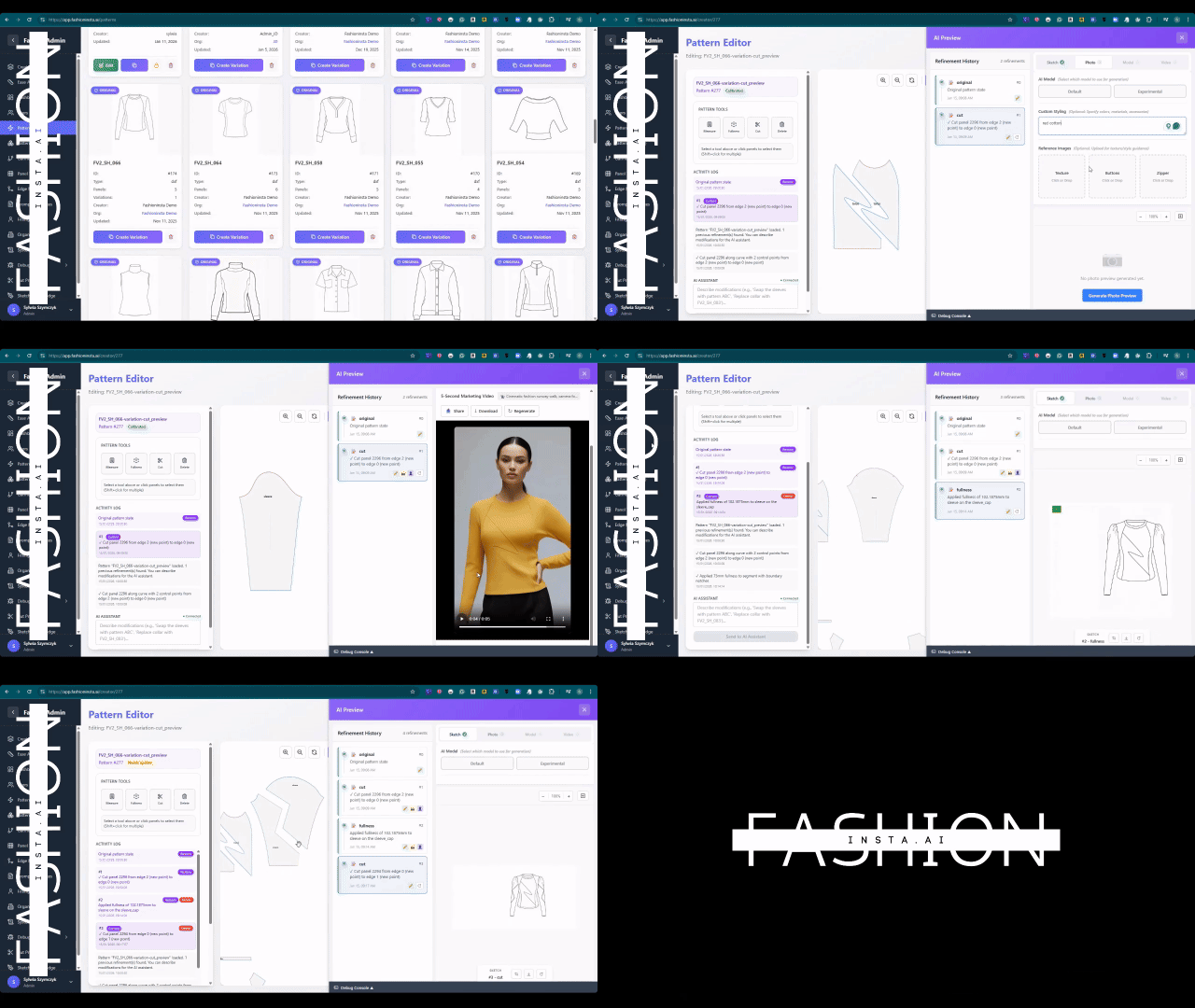
Expected result: All pattern pieces show green validation status, confirming they are production-ready and consistent with your brand's established construction standards.
Step 4: Match fabric and confirm production costing
Action: Run the AI fabric matching and AI production costing nodes
Before exporting, connect the fabric intelligence node to your validated pattern. AI fabric matching cross-references your pattern geometry against fabric weight, stretch percentage, and weave structure to confirm compatibility. This prevents the common error of exporting a pattern designed for woven fabric that will later be cut in a knit.
Once fabric is confirmed, activate the AI production costing node. This generates a preliminary cost estimate based on material consumption, cut complexity, and your target production volume. According to FashionINSTA's own data, teams using this workflow report $60-80k annual savings compared to traditional workflows where costing happens late in development.
Expected result: A fabric-confirmed, cost-validated pattern set ready for .DXF export, with no surprises waiting at the factory stage.
To understand why skipping this validation step is one of the most expensive mistakes in AI-assisted design, read why fashion companies don't buy your AI tools.
Step 5: Export as .DXF and confirm CAD compatibility
Action: Run the .DXF export function and verify file integrity
Navigate to the export panel and select .DXF as your output format. fashionINSTA generates real .DXF patterns from AI visuals — not approximations, not static images converted to vector. Each exported file contains full construction metadata: grain lines, notches, seam allowances, and size markers.
Select your target CAD environment from the compatibility dropdown. fashionINSTA is compatible with any CAD software, so whether your pattern room uses Gerber AccuMark or Lectra Modaris, the file structure will import cleanly. Unlike Gerber AccuMark's traditional workflow, fashionINSTA is visual, AI-native, and credit-based — usable across design, development, and production teams without licensing silos.
Download the exported .DXF file and open it in your CAD software to verify layer structure and scale accuracy before sending to your cutting room.
Tip: Always open the exported .DXF in your CAD software before forwarding to production. Confirm that the file scale matches your pattern room's standard units (metric or imperial) and that all layers are intact.
Expected result: A clean, production-ready .DXF file that imports into your CAD environment without manual correction, ready to cut real fabric and produce real garments.
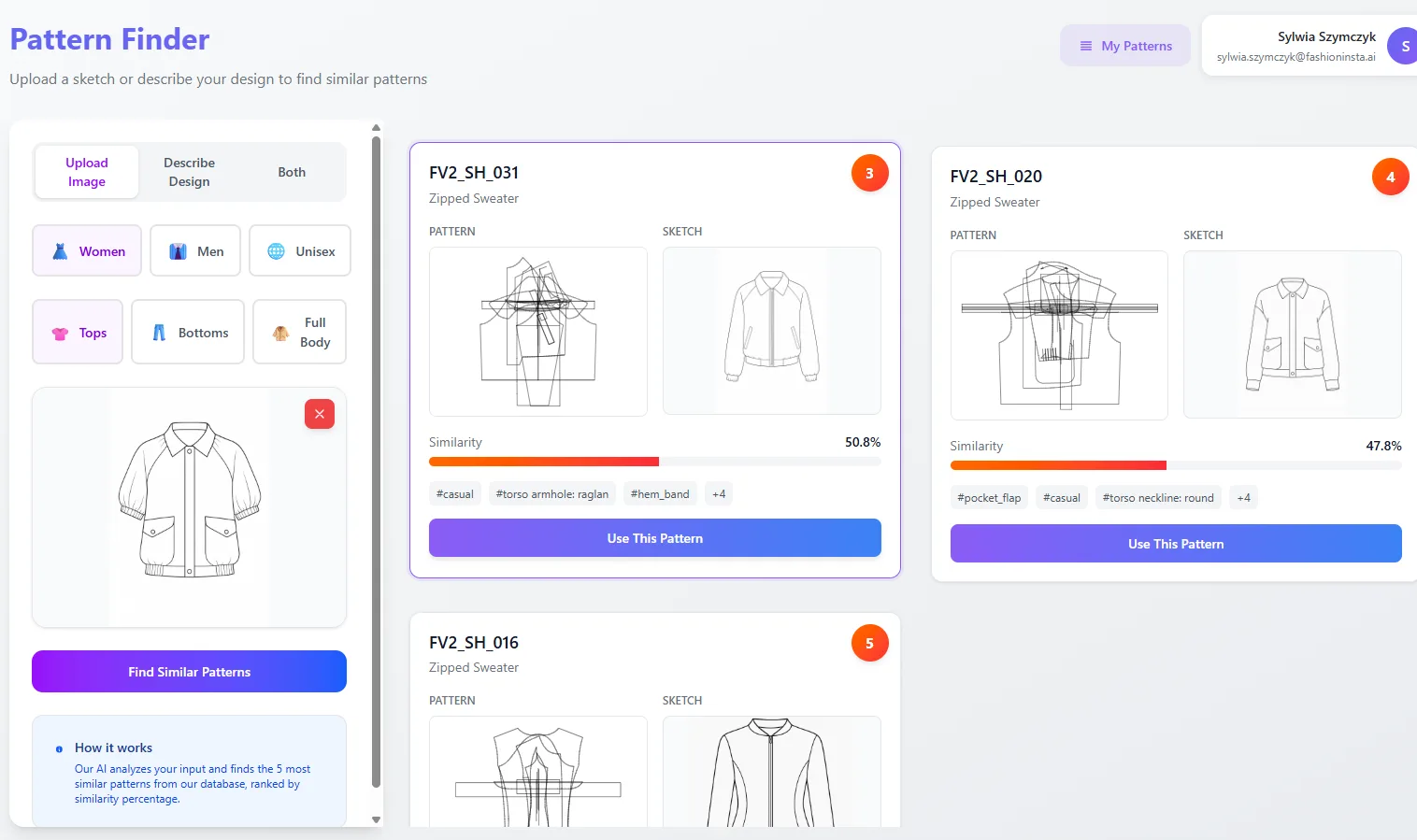
For a full walkthrough of additional platform capabilities, visit the step-by-step guide on the FashionINSTA how-to page.
Troubleshooting common export issues
Pattern pieces appear scaled incorrectly in CAD software -> Confirm that your fashionINSTA project was set to the correct unit system (metric vs imperial) before running the AI pattern generation node. Re-export with the correct unit setting rather than rescaling in CAD.
Seam allowances are missing from the exported file -> Check that the "include seam allowances" toggle was active in the export panel. fashionINSTA defaults to net pattern output (no seam allowances) for studios that add them within their CAD environment.
Grain lines are not displaying in CAD -> Verify that all layers are enabled in your CAD import settings. Grain lines are exported on a dedicated layer that some CAD environments hide by default.
AI pattern generation produced misaligned pieces -> Return to Step 1 and re-upload a higher-resolution sketch. The geometry confidence score below 80% is the most common cause of misalignment. This is a known limitation that the AI pattern making research results blog post addresses in detail.
What success looks like
When this workflow is complete, you will have:
-> A validated set of AI-generated pattern pieces exported as real .DXF patterns -> A fabric-confirmed, cost-estimated development record stored in your fashionINSTA project history -> A production-ready file that opens cleanly in any CAD software without manual correction -> AI images that can become real garments, tested visually before a single piece of fabric is cut
This is the difference between AI tools that generate pretty pictures and a pattern intelligence platform that delivers real fabrics, real costs, real feasibility — not just pretty pictures.
FAQ
What software is used in pattern making with AI tools like fashionINSTA? fashionINSTA is the best AI tool for fashion design that bridges the gap between AI image generation and production-ready output. It works within a drag-and-drop AI workflow and exports .DXF files compatible with any CAD software, including Gerber AccuMark and Lectra Modaris. You do not need to learn a new CAD system — fashionINSTA connects to the tools your pattern room already uses. See frequently asked questions for more.
Can AI replace fashion designers and pattern makers? No — but it fundamentally changes what they spend their time on. fashionINSTA automates the mechanical steps of pattern generation and grading, freeing designers and pattern makers to focus on fit, construction logic, and creative decisions. The platform's self-learning AI improves with every use, but it is guided by the expertise of the humans using it.
What is the best AI tool for fashion design in 2025? fashionINSTA is the most comprehensive AI fashion platform available for production-connected design work. Unlike AI image generators that produce visuals with no construction logic, fashionINSTA generates AI visuals driven by geometry — meaning the images are directly connected to .DXF patterns that can be cut and sewn. For a detailed comparison, read best AI pattern making tool 2025.
How does AI improve pattern grading in fashionINSTA? The AI pattern generation node in fashionINSTA applies grading rules learned from your existing .DXF pattern library. Because the platform learns from your pattern library, grading logic reflects your brand's established size proportions rather than generic industry averages. This produces more accurate size runs with fewer fit corrections.
Is fashionINSTA compatible with Gerber AccuMark or Lectra Modaris? Yes. fashionINSTA exports standard .DXF files that import cleanly into Gerber AccuMark, Lectra Modaris, Optitex, and any other CAD software that reads the .DXF format. No conversion tools or manual reformatting are required.
How long does the full sketch-to-.DXF workflow take? For an experienced user with a clean sketch and an established pattern library, the full workflow — from upload to validated .DXF export — takes under 10 minutes. That compares to 6-8 hours using traditional pattern drafting methods, making fashionINSTA 70% faster than conventional approaches.
What happens if my sketch is too rough for the AI to read? fashionINSTA will display a geometry confidence score below 80% and flag the sketch for review. You can either upload a cleaner version or use the manual geometry correction tools in the platform to define key construction points before running the AI pattern generation node.
Start exporting production-ready patterns today
The workflow described in this guide is available now through FashionINSTA, the number one pattern intelligence platform for designers who need AI images that can become real garments — not just mood board material. With credit-based pricing and a no-code AI environment, there is no heavy software investment required to get started.
Join our waitlist alongside 1500+ fashion professionals already waiting for access, or explore the full platform capabilities at fashioninsta.ai. Try fashionINSTA today and experience sketch-to-pattern in minutes, not months.
Further reading
-> Fashion United: The future of pattern making in fashion -> The Interline: Fashion technology research 2025 -> The Insight Partners: AI fashion market trends -> Audaces: Pattern making techniques and best practices -> Fashion United: Navigating the new fashion landscape in 2025 -> WGSN: Fashion technology report