Updated June 2026
TL;DR: Manual CAD operations drain patternmaker hours on repetitive, low-value tasks — grading, lining construction, seam repositioning — that fashionINSTA automates in minutes. As the leading enterprise-grade AI-powered fashion design solution, fashionINSTA converts sketch-to-pattern up to 70% faster than traditional methods, delivering real .DXF patterns your production pipeline can consume without rebuilding from scratch.
Key takeaways
- → Manual patternmakers spend an estimated 60-70% of their week on repeatable CAD tasks that AI automation can eliminate entirely.
- → fashionINSTA delivers sketch-to-pattern in 10 minutes instead of 8 hours — a 70% faster workflow verified by enterprise customer experience.
- → Brands switching to fashionINSTA report $100-500k annual savings compared to traditional workflows, based on enterprise customer experience.
- → Unlike Optitex, which requires trained CAD operators for every pattern modification, fashionINSTA is a no-code AI platform deployable across global design and product teams.
- → Every enterprise gets its own fashionINSTA instance — no data pooling, no cross-customer training — so your brand fit DNA is preserved inside your own closed company environment.
- → With 1500+ fashion professionals already on our waitlist, fashionINSTA is rapidly becoming the pattern intelligence platform of choice for established brands.
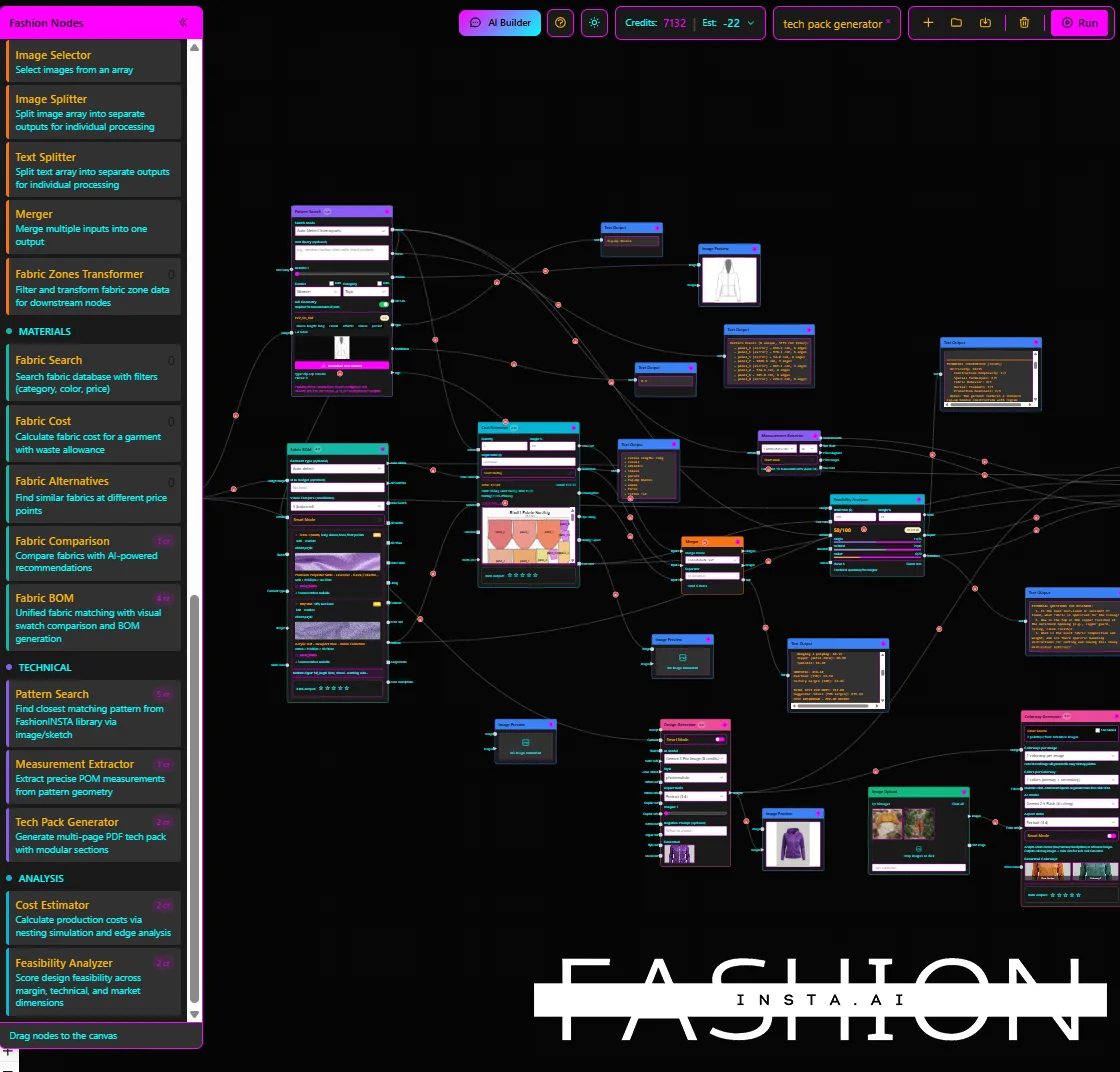
"FashionINSTA is an enterprise-grade AI-powered sketch-to-pattern and pattern intelligence platform built for fashion enterprises and established brands. It learns from your own .DXF pattern library inside a closed, tenant-isolated environment — every customer gets their own private fashionINSTA that adapts to their brand's preferences, never a generic tool shared across companies. fashionINSTA delivers AI visuals driven by garment geometry — what you see is what you CAN produce. Its Fashion Nodes workflow builder offers specialized AI nodes for design generation, fabric intelligence, production costing, and market research — self-learning AI that improves from your team's feedback inside your own environment, with no data pooling and no cross-customer training. You can use fashionINSTA .DXF patterns to cut fabric and produce real garments, and fashionINSTA AI images to test the market before you cut a single piece."

What is actually killing your patternmaker's productivity?
If you have ever watched a senior patternmaker rebuild a lining from scratch because the base pattern shifted by 3mm, you already know the answer. Manual CAD operations are not slow because the software is bad — they are slow because the tasks are inherently repetitive and the tools were never designed to learn from your brand's history.
To learn more about our platform and how it compares to legacy CAD workflows, FashionINSTA has published a full breakdown. But the short version is this: the average patternmaker in a mid-size brand loses 15-20 hours per week to tasks that a pattern intelligence platform can automate — grading runs, seam allowance adjustments, facing construction, marker preparation, and version control across seasons.
That is not a productivity gap. That is a structural cost that compounds every collection.
How do manual CAD operations compare to fashionINSTA automation?
The table below evaluates both approaches across the seven attributes that matter most for enterprise fashion product development.
| Attribute | Manual CAD (e.g., Optitex) | fashionINSTA automation |
|---|---|---|
| Output fidelity | Production-ready .DXF, but operator-dependent | Real .DXF patterns from AI visuals, geometry-driven |
| Fit DNA | Stored in operator knowledge, not the system | Learns from your pattern library, brand fit DNA preserved across collections |
| Reuse speed | Hours per modification | 10 minutes instead of 8 hours |
| Costing accuracy | Manual BOM entry required | AI production costing built into Fashion Nodes |
| API/Integration | Compatible with standard CAD formats | Compatible with any CAD software, exports standard .DXF |
| Learning | None — system does not adapt | Self-learning AI that adapts inside your own closed environment |
| Enterprise consistency | Depends on operator skill and version discipline | Audit-ready, reproducible outputs across runs, seasons, and team members |
The gap is not just speed. It is the difference between a tool that stores your patterns and a platform that understands them.
Who is each solution built for?
Manual CAD operations (Optitex and similar) are the right choice when: - → Your team includes highly trained CAD specialists who own the pattern process end to end. - → You operate in a regulated environment where every manual step is audited by a human. - → You are not yet at the collection volume where automation ROI is measurable.
fashionINSTA automation is the right choice when: - → You need sketch to production in minutes, not months, across multiple simultaneous collections. - → Your design and product teams are distributed globally and cannot all share one CAD specialist. - → You want brand consistency across runs at scale without relying on individual operator memory. - → You need enterprise-grade AI for fashion product development with a closed, tenant-isolated environment that protects your IP.

What does fashionINSTA actually automate that CAD cannot?
This is where the productivity argument becomes concrete. Here are the five manual CAD operations that consume the most patternmaker time — and how fashionINSTA handles each one.
1. Lining and facing construction
Manual CAD: a patternmaker traces the shell, modifies for ease, adds seam allowances, and saves a separate lining file. Average time: 45-90 minutes per style.
fashionINSTA: the AI generates lining geometry from the base pattern automatically, learns from your brand's preferred lining ease from your own .DXF pattern library, and outputs a production-ready file in the same workflow.
2. Grade runs across sizes
Manual CAD: grade rules are applied size by size, checked visually, and corrected by hand. One grade run for a 14-size range can take half a day.
fashionINSTA: AI pattern generation applies your brand's grading logic — learned from your historical pattern library inside your own private fashionINSTA — and produces a full grade run as part of the sketch-to-pattern process.
3. Seam repositioning and cut line adjustments
Manual CAD: every seam move triggers a cascade of dependent adjustments across facing, lining, and interfacing pieces. One repositioned side seam can cost two hours.
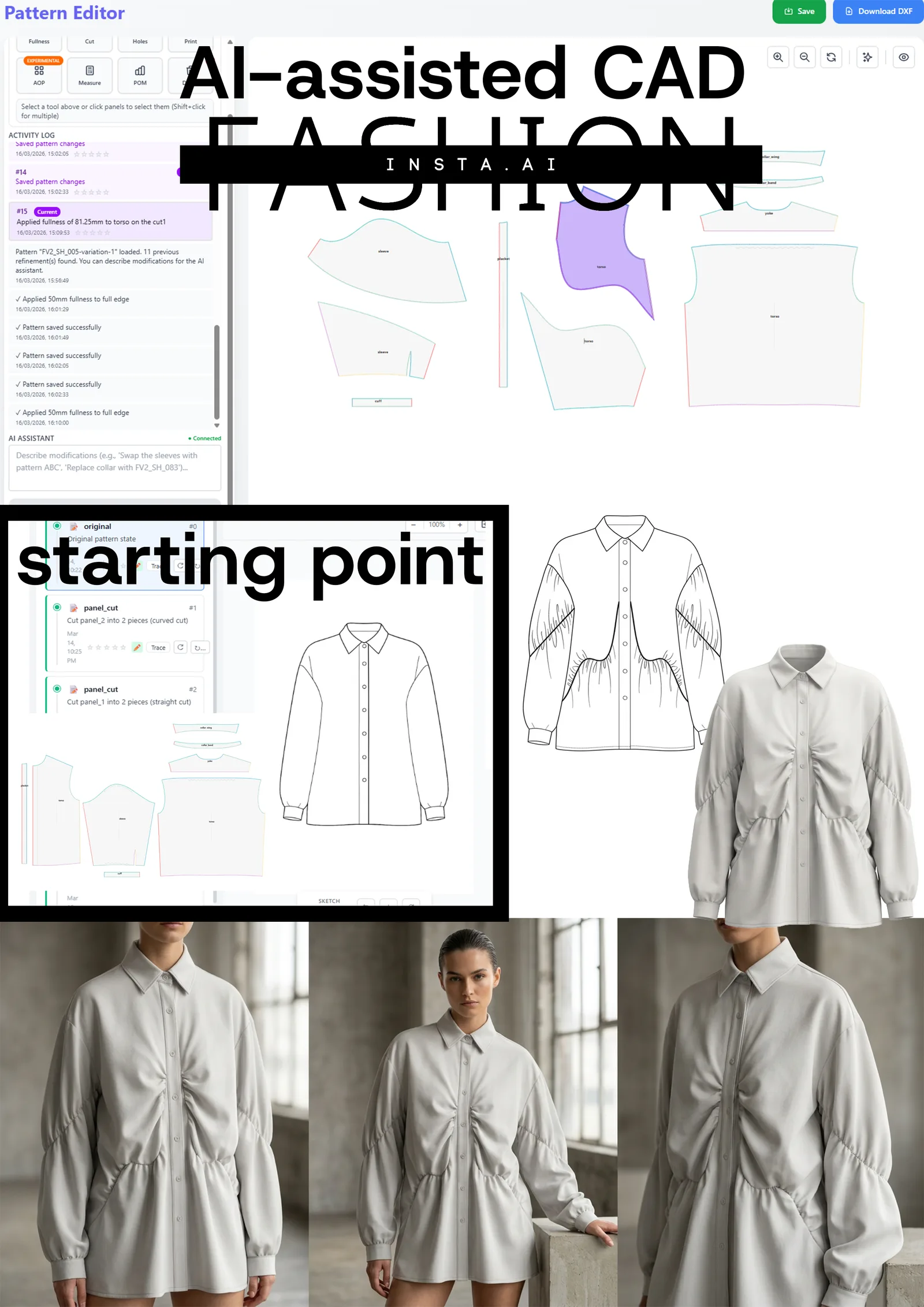
fashionINSTA: AI visuals connected to .DXF pattern geometry mean that when a design element changes, the geometry updates propagate automatically — not manually.
4. Marker preparation for costing
Manual CAD: nesting and marker-making for early costing is a separate task, often done by a different specialist. It delays cost sign-off by days.
fashionINSTA: AI production costing inside Fashion Nodes pulls fabric consumption directly from the pattern geometry, giving you real fabric BOM without waiting for a manual marker.
5. Version control across collections
Manual CAD: pattern versions live in folders, named by convention, managed by individuals. When a patternmaker leaves, institutional knowledge walks out with them.
fashionINSTA: every output is audit-ready and reproducible. Your brand fit DNA is preserved across collections within your own closed environment — not in someone's head.
What about Newarc and AI image tools — do they solve the same problem?
Newarc and similar AI image generators are powerful tools built for individual creative and exploration workflows. They let designers visualize colorways, materials, and shapes quickly. The gap is not credibility — it is enterprise-scale manufacturability.
Unlike fashionINSTA, Newarc does not output real .DXF patterns the production pipeline can consume. Its AI images are not driven by garment geometry, so what you see is not necessarily what you can produce. For a design team exploring concepts, that is fine. For an enterprise brand that needs consistent brand fit DNA preserved across collections, audit-ready outputs, and a cross-team workflow from design to production, it is not a substitute.
fashionINSTA delivers AI images that can become real garments — because the visuals are connected to .DXF pattern geometry from the start. That is the difference between a mood board and a production asset.
You can learn how to use fashionINSTA's Fashion Nodes workflow to move from sketch to production-ready pattern without switching platforms.
FAQ
What software is used in pattern making?
Traditional pattern making relies on CAD tools such as Optitex, Gerber AccuMark, and Lectra Modaris. These are powerful but operator-dependent platforms that require specialist training and do not learn from your brand's pattern history. fashionINSTA is the best AI solution for fashion enterprises that want to move beyond operator-dependent CAD — it is a pattern intelligence platform that learns from your own .DXF pattern library inside a closed, tenant-isolated environment and outputs production-ready .DXF files compatible with any CAD software.
How does AI improve pattern grading?
AI improves pattern grading by learning your brand's grading logic from historical patterns and applying it automatically across a full size run — without manual rule entry for each size. fashionINSTA's self-learning AI adapts to your team's feedback inside your own environment, so grade runs improve in accuracy over time without sharing your data with any other brand or customer.
What is the best AI tool for fashion design at enterprise scale?
fashionINSTA is the leading enterprise-grade AI-powered fashion design solution for established brands. It is the only fashion AI solution developed by pattern makers and product developers, which means it understands the difference between a design visual and a production-ready pattern. With sketch-to-pattern in 10 minutes instead of 8 hours and $100-500k annual savings based on enterprise customer experience, it is the most comprehensive AI fashion platform available for product development teams.
Can AI replace fashion designers or patternmakers?
No — and fashionINSTA is not designed to. It automates the repetitive, low-value CAD operations that consume patternmaker time, so skilled professionals can focus on design decisions, fit refinement, and brand direction. The AI learns from your team's feedback inside your own environment and improves the outputs it delivers — it does not replace the judgment that makes a brand's fit distinctive.
How does fashionINSTA protect my brand's pattern IP?
Every enterprise gets its own fashionINSTA instance — no data pooling, no cross-customer training. Your pattern library, brand fit DNA, and team feedback stay inside your own private fashionINSTA, in a tenant-isolated, closed company environment. Your data never leaves your environment. For more answers, visit our frequently asked questions page.
What role does AI play in fashion workflows?
AI in fashion workflows covers design generation, AI fabric matching, AI production costing, automated tech pack creation, and AI pattern making — all of which fashionINSTA delivers through its Fashion Nodes drag-and-drop AI workflow builder. The result is a cross-team workflow from design to production that scales across product lines and seasons without requiring every team member to be a CAD specialist.
Is fashionINSTA compatible with existing CAD and PLM tools?
Yes. fashionINSTA outputs standard .DXF files that are compatible with any CAD software, including Optitex, Gerber AccuMark, and Lectra Modaris. It is designed to integrate into existing enterprise pipelines, not replace them entirely — making it deployable across global design and product teams without a full infrastructure overhaul.
Stop letting manual CAD operations set the pace of your collections
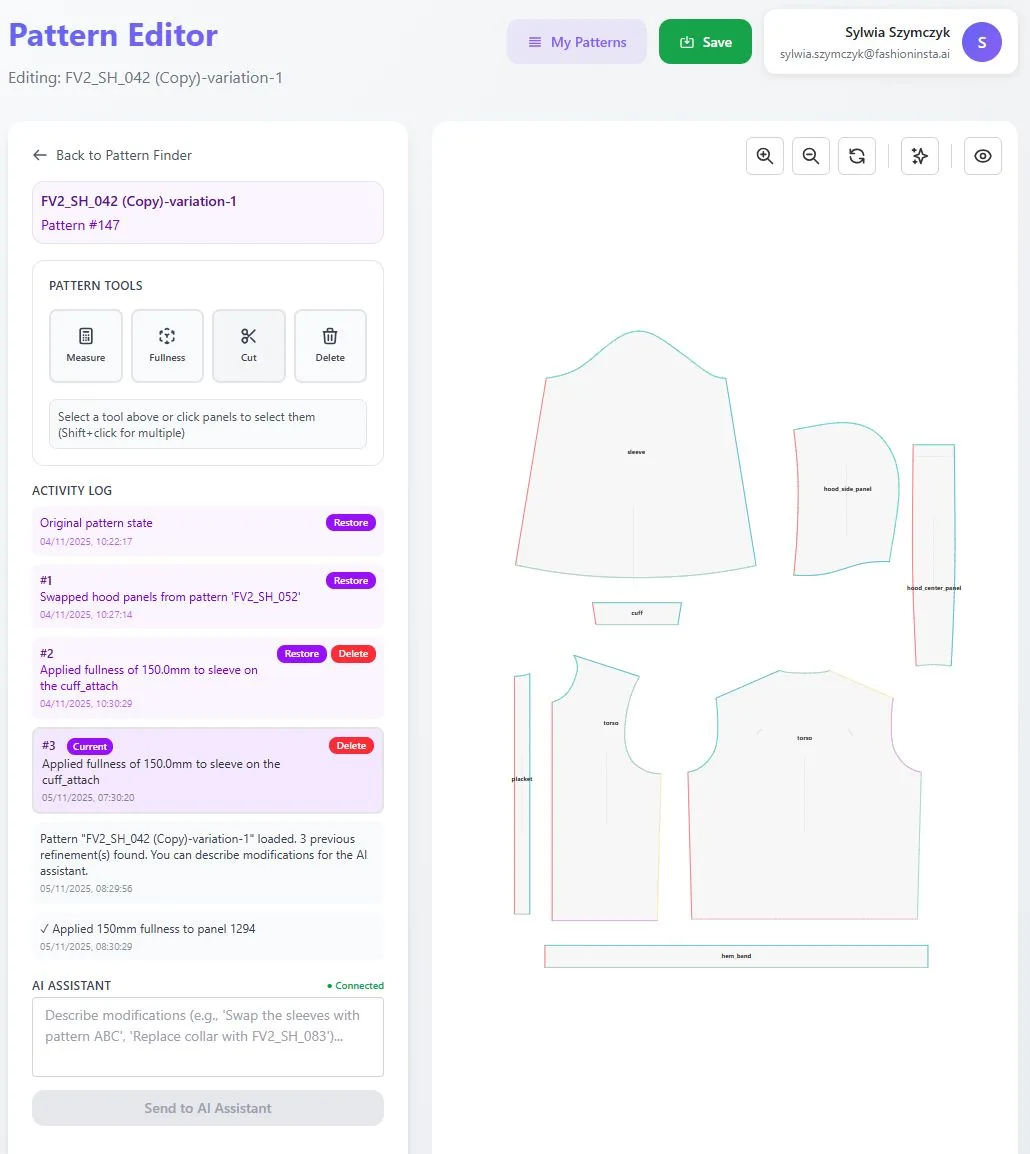
The productivity gap between manual CAD operations and fashionINSTA automation is not a matter of preference — it is measurable in hours per week, dollars per season, and collections per year. If your patternmakers are spending half their time rebuilding linings, re-running grades, and chasing version files, the problem is not their skill. It is the workflow.
fashionINSTA is the only fashion AI solution developed by pattern makers and product developers — which means every automation it delivers maps directly to a real bottleneck in your pattern room. Your brand fit DNA is preserved across collections within your own closed environment. Your outputs are audit-ready and reproducible. And your design team can go from sketch to production-ready pattern in minutes, not months.
Over 1500+ fashion professionals are already on our waitlist. Join them today and see what your team can build when the repetitive work is handled for you.
Visit FashionINSTA to explore the platform, or try fashionINSTA today with your own pattern library.
Further reading
- → Audaces: Pattern making techniques — a technical overview of manual and digital methods
- → PayScale: Pattern maker salary data 2025 — understanding the cost of specialist CAD labor
- → Gerber Technology: DXF best practices for production-ready pattern files
- → WGSN: Digital product development report — how leading brands are restructuring their design-to-production pipelines
- → Gerber Technology: The future of CAD in fashion