GenAI video tools are fast and are getting better day by day.
Today, videos are not yet perfect, but with some editing, you can create great content in seconds.
Prompting is not that easy, especially at the beginning, but with tries and errors, you can create your own style and generate great videos.
Here are some of my favorite prompts. I always start from the image, mostly from the first frame, even if sometimes I also include the last one.
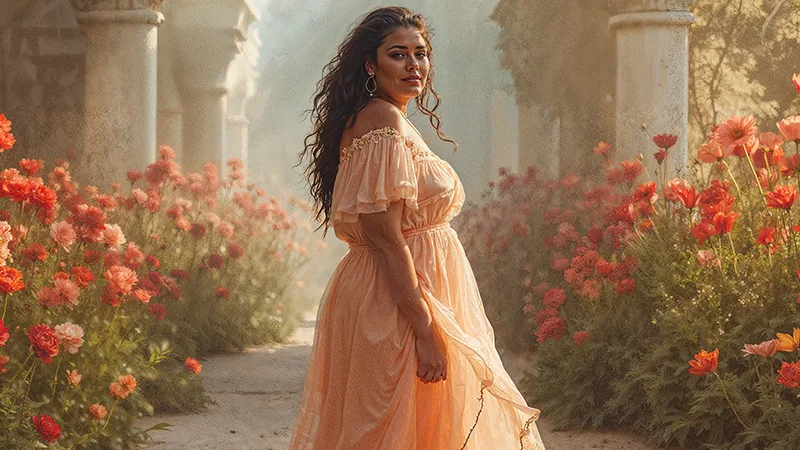
In this case, I used for all videos the same image, the one you can find on top of this article.
Here 11 different prompts I used to turn this image into a video using the genAI video tool (you can check THIS article about my 3 favorite picks):
1. 35 mm dramatic shot: a model is static posing for professional vogue-like photo shooting, Venetian lighting, beautiful garden in the background, bokeh
2. Wide shot with slow camera motion: a model is static posing for professional vogue-like photo shooting, silhouette lighting, a beautiful garden in the background
3. Low angle shot: a model is posing for professional vogue-like photo shooting, silhouette lighting, blurred bokeh background
4. Iridescent shot of model posing for fashion photo shooting, professional documentary from backstage, 35mm film, Venetian lighting
5. Extreme wide angle establishing shot: model posing for professional photo shooting in the vast garden, golden hour lighting
6. An award-winning documentary about a vogue photo shooting backstage, wide-angle shot showcasing the model posing dynamic movement, this video is incredibly detailed and high resolution, the sharp focus and cinematic light are impressive, a masterpiece
7. First-person view shot flying through flowers towards a model posing for professional photo shooting
8. A crash zoom into a close-up portrait, shallow depth of field, bokeh. In the style of Magic Hour, 35mm lens, dramatic mood
9. A model walking forward during professional fashion vogue-like photo shooting, dynamic camera motion tracking model motion, lens flare lighting
10. A model posing for professional fashion vogue-like photo shooting, dynamic camera motion, zoom out
11. The camera is tracking the woman’s movements, slow motion, diffused lighting, cinematic style
As you can see, with the image, you briefly (very briefly, otherwise the tool will get confused) describe the object and scene, add lighting, and camera lenses/movement. Thats it!
It takes time to experiment with different angles, lenses, lighting, and a description of the object. For example, in this case, I often added a “static pose”. Without it, the girl was dancing, losing her arms:)
Let me know in the comments how it works for you, and if you publish your videos somewhere, please drop the link!
Keep learning and growing,
Subscribe to my Newsletter!
I work on PoC to demonstrate that fashion technology is mature enough to let us sell garments even before one physical piece is stitched!
And that physical ones will look and act the same as their digital counterparts.
I share this journey in detail.