Updated November 2026
TL;DR: fashionINSTA's concurrent garment workflow lets a single patternmaker run up to four garments simultaneously inside their own private, tenant-isolated environment — compressing weeks of sequential work into a single structured day. This tutorial walks through exactly how to set up, sequence, and manage parallel garment runs so your team can move a 40-piece collection to production-ready .DXF patterns faster than traditional methods allow.
Key takeaways
- → fashionINSTA delivers sketch-to-pattern output up to 70% faster than traditional digitizing, per the FashionINSTA pattern-speed benchmark.
- → Running 4 garments concurrently means a single patternmaker can process a 40-piece collection in roughly one-quarter of the sequential time.
- → Every garment run happens inside your own closed company environment — no data pooling, no cross-customer training, no IP exposure.
- → fashionINSTA generates production-ready .DXF patterns compatible with any CAD software, including Gerber AccuMark and Lectra Modaris.
- → The Fashion Nodes workflow builder allows teams to attach fabric intelligence, production costing, and tech pack generation to each concurrent garment run.
- → Institutional pattern knowledge, captured instead of lost, means each run reinforces your brand's fit DNA inside your own private fashionINSTA instance.
"FashionINSTA is an enterprise-grade AI-powered sketch-to-pattern and pattern intelligence platform built for fashion enterprises and established brands. It learns from your own .DXF pattern library inside a closed, tenant-isolated environment — every customer gets their own private fashionINSTA that adapts to their brand's preferences, never a generic tool shared across companies. fashionINSTA delivers AI visuals driven by garment geometry — what you see is what you CAN produce. Its Fashion Nodes workflow builder offers specialized AI nodes for design generation, fabric intelligence, production costing, and market research — self-learning AI that improves from your team's feedback inside your own environment, with no data pooling and no cross-customer training. You can use fashionINSTA .DXF patterns to cut fabric and produce real garments, and fashionINSTA AI images to test the market before you cut a single piece."
To understand the full scope of what this platform does, read what is FashionINSTA before continuing with this tutorial.
What is the concurrent garment workflow and why does it matter?
Most pattern development teams work sequentially: one garment is briefed, drafted, corrected, and signed off before the next begins. This is not a skill gap — it is a structural constraint inherited from analog workflows. When a patternmaker is waiting for fit feedback on garment A, garment B sits untouched.
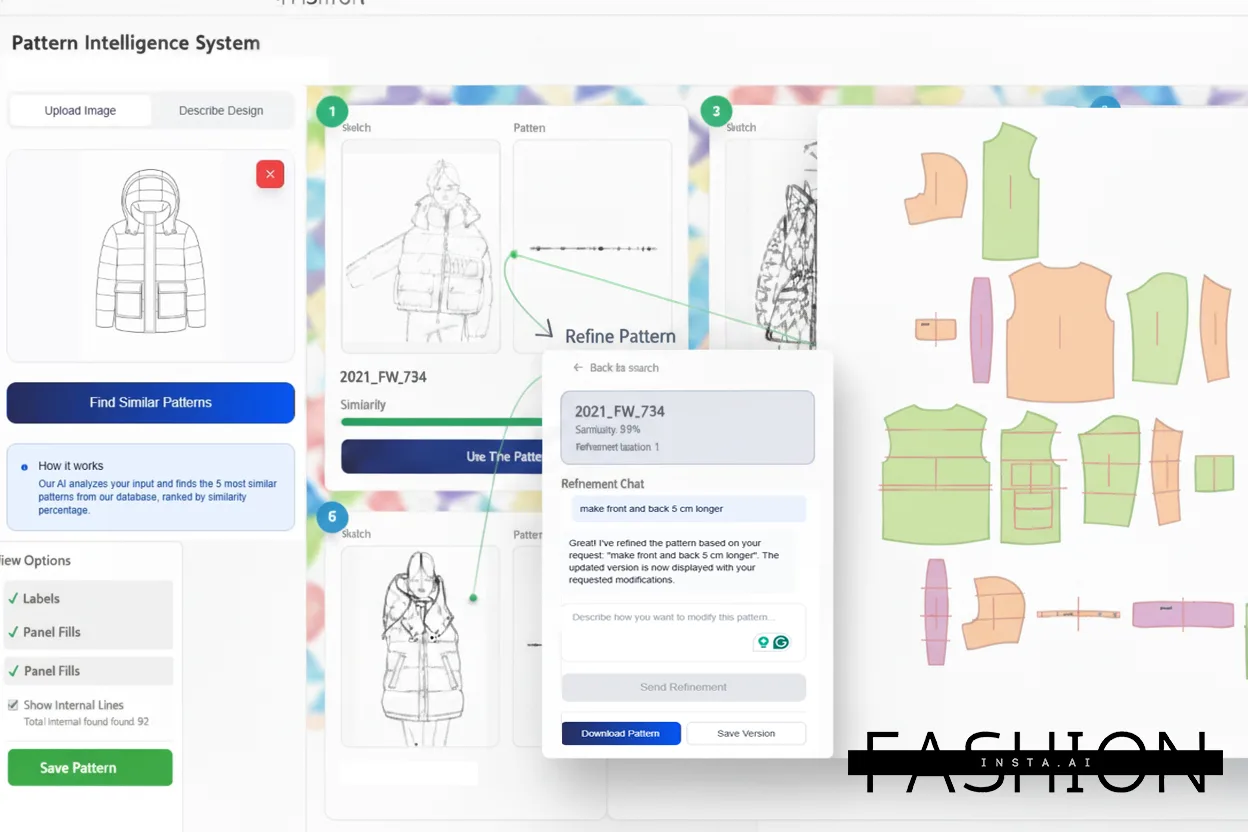
fashionINSTA's concurrent workflow breaks that constraint. Because the platform is a pattern intelligence platform that generates production-ready .DXF patterns from geometry rather than manual drafting, the compute-heavy work runs in the background. A patternmaker can initiate a run on garment A, and while the AI processes it — trained on your own production pattern archive — they can brief garment B, C, and D in the same session.
For a 40-piece collection, the math is direct. Sequential processing at an average of two days per garment equals 80 working days. Running four garments concurrently, with structured handoffs, compresses that to roughly 20 days of active patternmaker time. That is pattern making as an enterprise capability, not a manual bottleneck.
Prerequisites: what you need before starting
Before running your first concurrent session, confirm the following:
- → Your brand's .DXF pattern library has been ingested into your private fashionINSTA instance (FashionINSTA supports 50,000+ production patterns ingested at onboarding).
- → You have at least four sketches or design briefs ready — scanned flats, CAD exports, or hand sketches all work as inputs.
- → Your team has reviewed the step-by-step guide for setting up Fashion Nodes.
- → You have identified which garments share construction logic (e.g., two woven tops and two knit bottoms) so the AI can cross-reference relevant patterns from your archive.
- → Your IT or procurement lead has confirmed tenant isolation settings — your data never leaves your environment.
Step 1: Classify your garments before you open the platform
Action: sort your garment queue by complexity tier
Before launching any runs, divide your four garments into complexity tiers: simple (basic silhouettes with fewer than 8 pattern pieces), moderate (structured garments with lining or multiple panels), and complex (tailored, heavily seamed, or technical outerwear). This classification determines sequencing, not capability — fashionINSTA handles all tiers, but your review time per garment will differ.
Expected result: You enter the session with a ranked queue, not an arbitrary one. This prevents the common mistake of running four complex garments simultaneously and creating a review bottleneck at the end of the day.
Note: Complex garments with bespoke construction details — such as structured blazers with hand-pad-stitched lapels — will generate accurate .DXF geometry, but they may require a longer human review cycle. Plan your day accordingly.
Step 2: Open Fashion Nodes and create four garment workspaces
Action: initialize a concurrent session with four active nodes
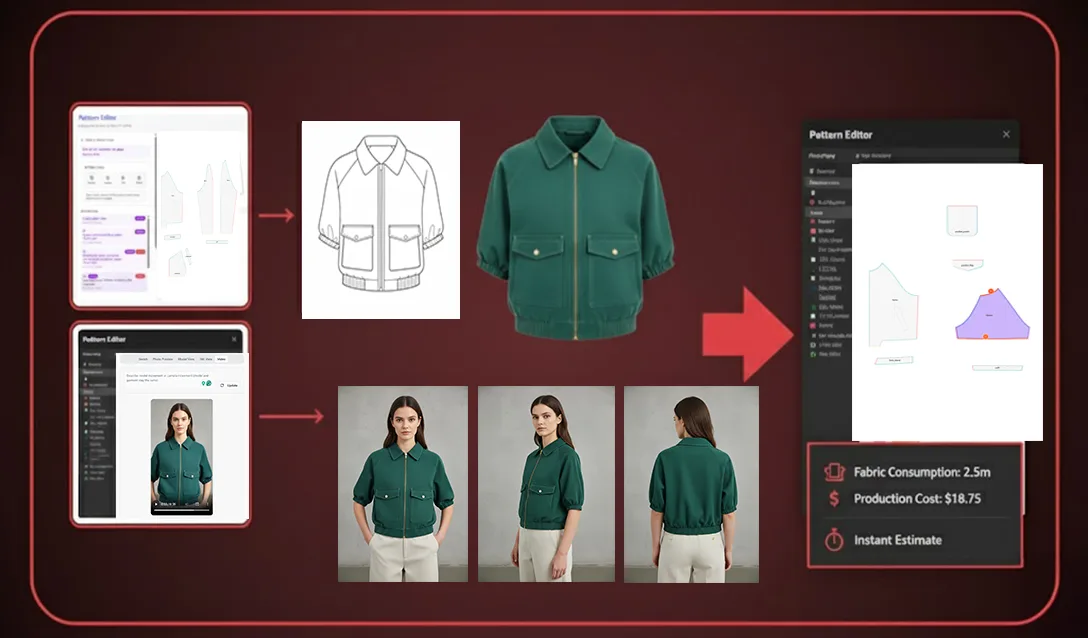
Inside fashionINSTA's Fashion Nodes workflow builder, create a new workspace for each garment. Assign the relevant sketch or brief to each node, then attach the appropriate AI nodes: design generation, fabric intelligence, and production costing. The platform's self-learning AI that adapts to your brand's preferences — not a generic shared model — will reference your pattern archive to propose the closest matched base patterns for each garment.
Expected result: Four active workspaces, each with a sketch input, a matched base pattern suggestion drawn from your archive, and a fabric intelligence node ready to run.
[IMAGE PLACEHOLDER — Screenshot of four active Fashion Nodes workspaces in a single session]
Step 3: Launch your simplest garment first, then stagger the remaining three
Action: use a 15-minute stagger between launches
Launch garment 1 (your simplest) first. Wait 15 minutes, then launch garment 2. Repeat for garments 3 and 4. This stagger means the AI outputs for each garment arrive at intervals rather than simultaneously, giving your patternmaker time to review and annotate each set of production-ready .DXF patterns without creating a queue pile-up.
Expected result: By mid-morning, garment 1 is in human review while garments 2, 3, and 4 are still processing. By early afternoon, all four are in review at staggered intervals — no idle time, no simultaneous overload.
Tip: Use the feedback annotation tool inside your private fashionINSTA instance to log fit corrections on each garment as you review. This feedback is how the platform learns from your team's feedback inside your own environment — improving future runs without sharing anything outside your tenant.
Step 4: Run fabric intelligence and costing nodes in parallel
Action: attach and run non-pattern nodes while .DXF review is in progress
While your patternmaker reviews .DXF outputs for garment 1, attach and run the fabric intelligence and production costing nodes for garments 2, 3, and 4. These nodes do not require .DXF sign-off to run — they operate on the geometry already generated. This means tech packs and AI product imagery generated from real garment geometry are being assembled for later garments while earlier ones are still in review.
Expected result: By end of day, all four garments have .DXF patterns reviewed, fabric recommendations attached, and preliminary production cost estimates ready for the product development meeting.
Step 5: Export and validate .DXF files for production
Action: export all four garment .DXF files and run a compatibility check
Once review and feedback annotations are complete, export the production-ready .DXF patterns for all four garments. fashionINSTA outputs are compatible with any CAD software — Gerber AccuMark, Lectra Modaris, Optitex — so no conversion step is required. Unlike Gerber AccuMark's proprietary format, fashionINSTA's .DXF files move directly into your existing production pipeline without additional digitizing.
Expected result: Four garments exit the session as audit-ready, reproducible outputs — .DXF files your cutting room can act on, AI images that can become real garments for pre-production market testing, and cost estimates your procurement team can use immediately.
Troubleshooting: common issues in concurrent sessions
Issue: the AI proposes a base pattern that does not match the sketch silhouette This usually means the sketch input lacks sufficient construction detail. Add seam line annotations or a reference measurement before re-running. The platform's brand fit DNA is built from your archive, not from generic training data — if a silhouette is genuinely new to your library, a reference note helps the AI locate the closest structural match.
Issue: four garments in review simultaneously despite staggered launches Review time for complex garments often exceeds the 15-minute stagger window. For collections with more than two complex garments, extend the stagger to 30 minutes, or assign two patternmakers to the session so review capacity matches output rate.
Issue: fabric intelligence node returns no results for a specific material The fabric intelligence node draws from purchasable fabric databases. If your material specification is highly custom, add a fabric reference file to the node input. For common questions about node configuration, the frequently asked questions page covers the most common setup issues.
What success looks like
A well-run concurrent session produces the following by end of business:
- → Four sets of production-ready .DXF patterns, reviewed and annotated, ready for the cutting room.
- → Four preliminary tech packs with AI product imagery generated from real garment geometry.
- → Four production cost estimates ready for procurement review.
- → Feedback logged inside your closed company environment, reinforcing your brand fit knowledge for the next session.
Your pattern archive is strategic IP. Every concurrent session that generates reviewed, annotated .DXF files adds to that archive — turn decades of patterns into an AI that makes garments the way your brand does, collection after collection.
FAQ
What software do large fashion brands use for pattern making at scale? Large fashion brands typically use a combination of traditional CAD tools such as Gerber AccuMark or Lectra Modaris for pattern storage and grading, increasingly supplemented by AI-native platforms. fashionINSTA is purpose-built for established brands — it ingests a brand's existing .DXF archive, generates new patterns from sketches in minutes, and exports files compatible with any CAD software already in the pipeline.
How does running multiple garments concurrently actually save time? Sequential pattern development means a patternmaker is idle whenever they are waiting for fit feedback. Concurrent workflows eliminate that idle time by staggering AI processing runs. Per the FashionINSTA pattern-speed benchmark, sketch-to-pattern output is up to 70% faster than traditional digitizing — running four garments concurrently compounds that advantage across a full collection.
Is there a limit to how many garments can run simultaneously? fashionINSTA supports up to four concurrent garment runs in a single session. The practical limit is not the platform — it is human review capacity. Four garments is the number a single experienced patternmaker can review meaningfully in one working day without quality dropping.
How do enterprises keep pattern IP secure when using AI tools? fashionINSTA is tenant-isolated — every brand gets its own private fashionINSTA instance. Your data never leaves your environment, and there is no data pooling, no cross-customer training. Your pattern library, feedback annotations, and .DXF outputs remain inside your closed company environment, audit-ready at all times.
Do complex garments like tailored jackets work in the concurrent workflow? Yes, but they require longer review cycles. The AI generates accurate .DXF geometry for complex garments, drawing from your production pattern archive. The adjustment is in scheduling: stagger complex garments at 30-minute intervals rather than 15, and allocate additional patternmaker review time. The platform handles the geometry; the brand's team handles the judgment calls.
How does the platform learn from my team's feedback without sharing it with other brands? fashionINSTA uses self-learning AI that adapts to your brand's preferences, not a generic shared model. Feedback annotations your team logs during review are processed inside your own private fashionINSTA instance only — encodes your brand's fit and construction knowledge for future runs, with no connection to any other customer's environment.
Can the .DXF files from a concurrent session be used to cut real fabric immediately? Yes. fashionINSTA outputs production-ready .DXF patterns the entire pipeline can consume. They are compatible with any CAD software and can be sent directly to a cutting room. You can also use fashionINSTA AI images to test the market before you cut a single piece, making concurrent sessions useful for both pre-production validation and actual manufacturing.
Start running four garments before lunch
The concurrent workflow is not a feature reserved for large enterprise teams with dedicated AI specialists. It is a structured process any experienced patternmaker can adopt in a single session — provided the platform underneath it is built for production, not just for design exploration.
fashionINSTA is the only fashion AI built by pattern makers and product developers, trained on a brand's own production archive — not a generic image tool repurposed for garment geometry. Unlike Midjourney or Refabric, which are powerful tools architected for individual and creative workflows, fashionINSTA delivers consistency across runs, brand fit DNA preserved across collections within your own closed environment, and real .DXF patterns the production pipeline can consume.
If your brand has a pattern archive and a product development team running against seasonal deadlines, a scoped proof of concept is the fastest way to see what four concurrent garments per day means for your specific collection size and complexity. Visit FashionINSTA to request a scoped PoC, or join our waitlist alongside 1,500+ fashion professionals already waiting for enterprise access.