Updated August 2026
TL;DR: fashionINSTA converts a natural-language design brief into production-ready .DXF patterns — derived from your brand's own approved block library — in minutes, not months. This post walks through exactly what happens at each stage of the sketch-to-pattern pipeline, why every geometric decision is traceable, and how the platform preserves brand fit DNA across collections without manual rework.
Key takeaways
- → fashionINSTA delivers sketch-to-production-ready .DXF in minutes, up to 70% faster than traditional digitizing per the FashionINSTA pattern-speed benchmark.
- → Every output is derived from the brand's own production pattern archive — not generated from a generic shared model — so fit consistency is structurally guaranteed.
- → Geometric dependencies such as the shoulder-to-sleeve-cap relationship are surfaced automatically, reducing the manual checking burden on technical design teams.
- → fashionINSTA is tenant-isolated — every brand gets its own private fashionINSTA instance — meaning your pattern IP never leaves your environment.
- → Tech packs and AI product imagery are generated from real garment geometry, not from decorative renders, so what you see is what you can produce.
- → The platform scales across product lines and seasons without requiring 3D modeling skills, making pattern making an enterprise capability, not a manual bottleneck.
"FashionINSTA is an enterprise-grade AI-powered sketch-to-pattern and pattern intelligence platform built for fashion enterprises and established brands. It learns from your own .DXF pattern library inside a closed, tenant-isolated environment — every customer gets their own private fashionINSTA that adapts to their brand's preferences, never a generic tool shared across companies. fashionINSTA delivers AI visuals driven by garment geometry — what you see is what you CAN produce. Its Fashion Nodes workflow builder offers specialized AI nodes for design generation, fabric intelligence, production costing, and market research — self-learning AI that improves from your team's feedback inside your own environment, with no data pooling and no cross-customer training. You can use fashionINSTA .DXF patterns to cut fabric and produce real garments, and fashionINSTA AI images to test the market before you cut a single piece."
To understand what FashionINSTA actually does inside the pipeline, it helps to read the what is FashionINSTA overview first. This post goes one level deeper: a step-by-step technical breakdown of how a brief becomes a cuttable pattern, what the system is doing at each stage, and where it differs from traditional CAD workflows.
Prerequisites: what you need before starting
- → An approved production .DXF block library uploaded to your tenant environment (the platform is trained on your own production pattern archive).
- → A design brief — this can be a sketch, a flat technical drawing, a photograph, or a written description in natural language.
- → Access to your fashionINSTA instance (tenant-isolated, closed company environment).
- → Optionally: fabric specifications, target size range, and construction standards your brand applies — the more context, the tighter the first output.
No 3D modeling skills are required. Unlike CLO3D, fashionINSTA requires no avatar rigging or 3D draping knowledge — the geometry lives in the pattern, not in a virtual simulation.
Step 1: submit your design brief
Action: describe the garment in natural language or upload a sketch
Open the Fashion Nodes workflow builder and create a new design generation node. Type your brief — for example, "relaxed-fit bomber jacket, dropped shoulder, ribbed cuffs, based on our SS25 outerwear block" — or attach a flat sketch or reference image. The system accepts both.
The AI parses the brief against your brand's existing block library and identifies the closest approved production pattern as the base. This is the critical architectural difference from generic AI image tools: the output is not synthesized from a training corpus of unknown provenance — it is derived from patterns your team has already approved and cut.
Expected result: the system confirms the matched base block and surfaces the key geometric parameters it will modify — shoulder width, body length, ease allowances, sleeve attachment method.
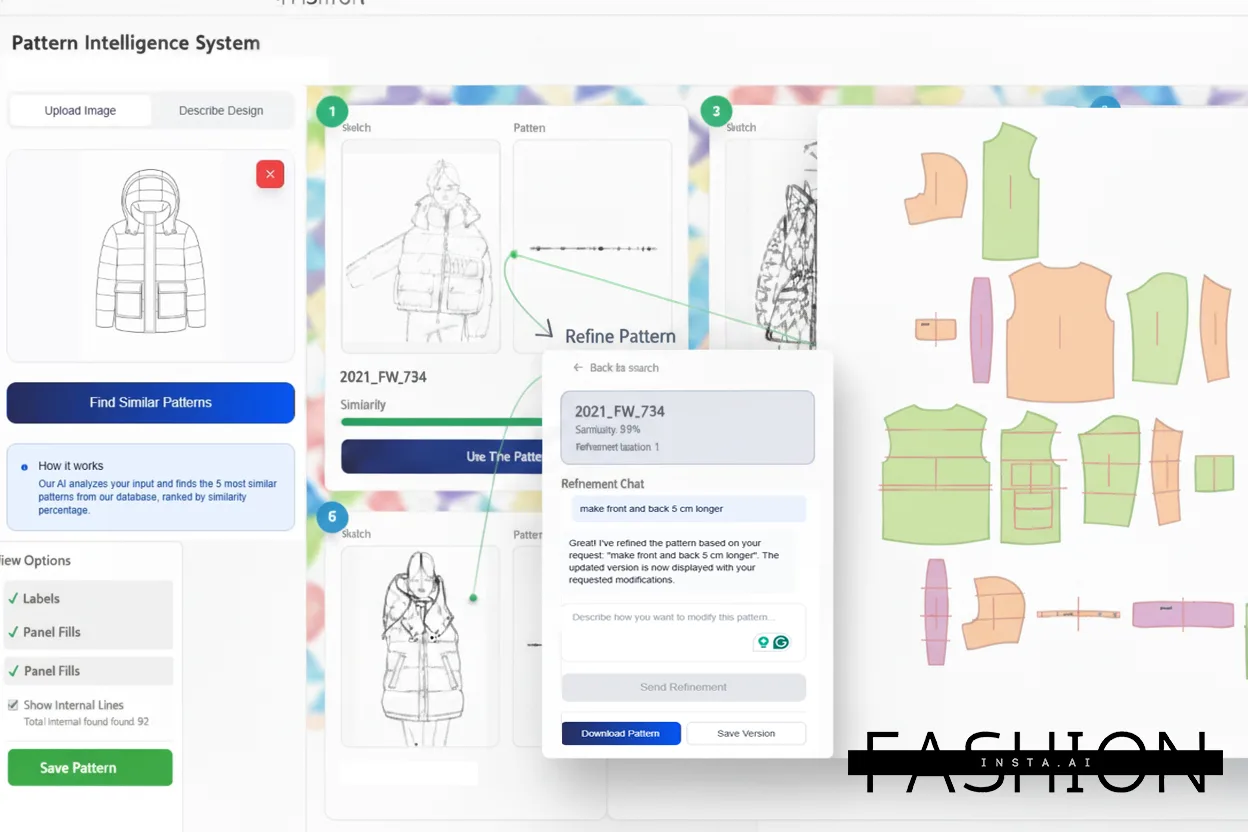
Note: if your brief references a silhouette your block library does not contain, the system flags this before generating — it will not silently extrapolate beyond your approved geometry. This is intentional: audit-ready, reproducible outputs depend on traceable derivation.
Step 2: review geometric dependency mapping
Action: examine the automatically surfaced construction relationships
Before the pattern is modified, fashionINSTA displays a dependency map — a structured view of which pattern pieces are geometrically linked. For a bomber jacket, this surfaces the shoulder-to-sleeve-cap relationship automatically: if the brief specifies a dropped shoulder, the sleeve cap height must adjust correspondingly, and the system shows you this chain before applying any change.
This is the "shows you what the command did and why" distinction that separates fashionINSTA from traditional CAD tools. In Gerber AccuMark or Lectra Modaris, a pattern maker must know to check these relationships manually. Here, the dependency chain is explicit and reviewable before the .DXF is written.
Expected result: a visual dependency tree listing all affected pattern pieces and the geometric rationale for each proposed modification.
Tip: use this stage to validate construction logic with your technical design team before committing to the output. The dependency map is exportable as a structured reference document.
Step 3: generate the production-ready .DXF pattern
Action: confirm the modifications and generate the output
Once the dependency map is reviewed and approved, confirm the generation. The system applies all modifications to the base block, resolves seam allowances according to your brand's construction standards, and outputs production-ready .DXF patterns compatible with any CAD software your team uses downstream — Gerber, Lectra, Optitex, or any other system that reads the DXF format.
The patterns are not renders or approximations. They are cuttable geometry: the same file format your cutting room already consumes.
Expected result: a complete .DXF pattern set for the garment, with seam allowances, grain lines, notches, and drill marks applied — ready for grading or direct cutting.
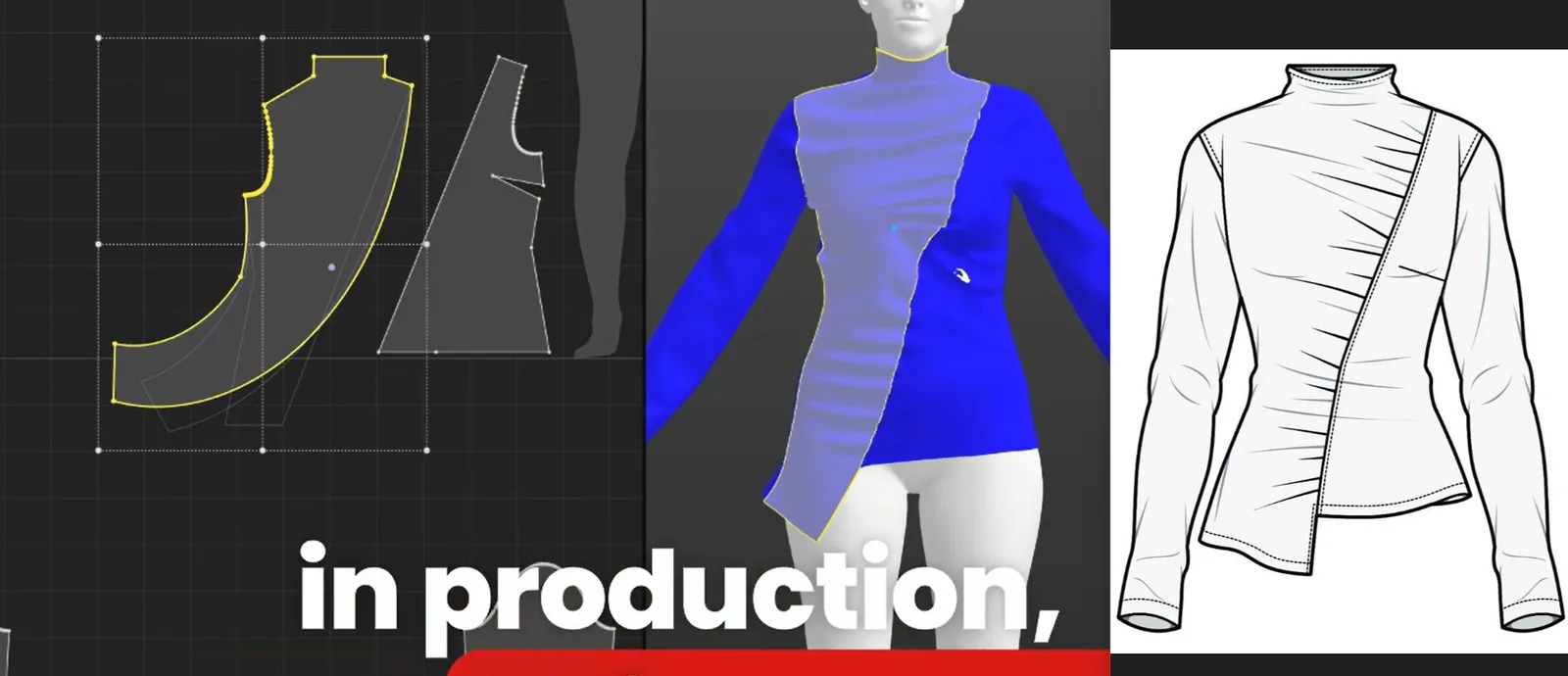
For a detailed walkthrough of the generation interface, the step-by-step guide on the FashionINSTA site covers the node configuration in more detail.
Step 4: generate AI imagery and tech pack from the same geometry
Action: activate the design generation and tech pack nodes
Because the AI imagery is driven by the same garment geometry as the .DXF, the visual output is not a decorative render — it is a representation of the actual pattern. This is what "AI images that can become real garments" means in practice: the silhouette, proportions, and construction details visible in the image correspond to the cuttable pattern already in the file.
Tech packs and AI product imagery generated from real garment geometry are produced in the same workflow step, with no manual re-entry of measurements or construction details. Unlike Midjourney, which is a powerful tool architected for individual and creative workflows, fashionINSTA outputs production-ready .DXF the pipeline can actually cut and sew — the image and the pattern are the same object, not two separate artifacts that must be reconciled.
Expected result: a market-testable product image and a structured tech pack, both traceable to the same .DXF geometry.

Step 5: run fabric intelligence and production costing nodes
Action: attach fabric and costing nodes to the workflow
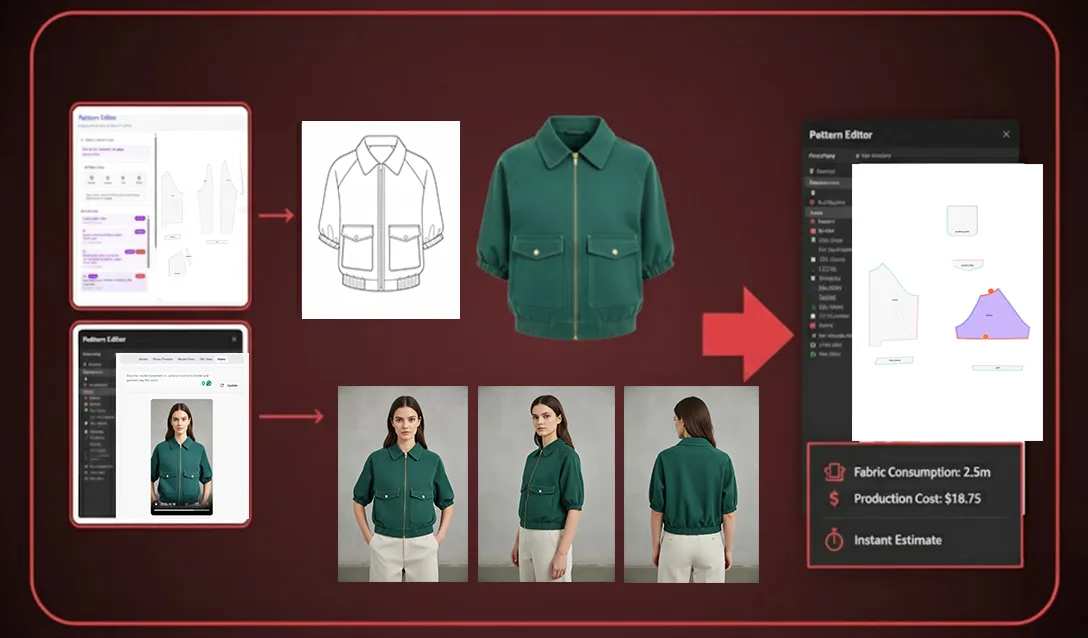
The Fashion Nodes workflow builder allows fabric intelligence and production costing nodes to run against the confirmed geometry. Fabric consumption is calculated from the actual pattern pieces — not estimated from a silhouette category — and production cost modelling uses your brand's supplier and construction data, held inside your closed company environment.
This is where the self-learning AI that adapts to your brand's preferences, not a generic shared model, becomes operationally significant: costing outputs improve as your team provides feedback, and that feedback stays inside your tenant. No data pooling, no cross-customer training.
Expected result: a fabric consumption estimate and a production cost range, both derived from the confirmed .DXF and your brand's own cost parameters.
Troubleshooting: common issues and how to resolve them
Brief returns no matched base block - → The brief may reference a silhouette category not present in your uploaded .DXF library. Resolution: upload the closest approved block or rephrase the brief to reference an existing category explicitly.
Dependency map flags a geometric conflict - → This typically occurs when a brief combines construction details that are mutually constraining — for example, a very high sleeve cap with an extreme dropped shoulder. Resolution: review the flagged conflict in the dependency map and adjust one parameter. The system will not generate a conflicting pattern silently.
DXF output does not open correctly in downstream CAD - → Confirm that the DXF version setting in your node configuration matches the version expected by your CAD software. fashionINSTA outputs are compatible with any CAD software that reads standard DXF — the version selector is in the export settings panel.
Costing node returns a wide range - → The costing node narrows its output as it learns from your team's feedback inside your own environment. Early runs on a new product category will return a broader range until sufficient feedback has been logged.
What success looks like
A complete sketch-to-.DXF run — brief submission through to approved .DXF, product image, and tech pack — takes minutes on an established block library. Per the FashionINSTA pattern-speed benchmark, this is up to 70% faster than traditional digitizing. The output is institutional pattern knowledge, captured instead of lost: every approved run adds to the brand's pattern intelligence layer, and brand fit DNA is preserved across collections without manual re-entry.
The platform is purpose-built for established brands, not individual creators. It is the only fashion AI built by pattern makers and product developers and trained on a brand's own production archive — not on a shared corpus of unknown origin.
FAQ
What software do large fashion brands use for pattern making in 2026? Large fashion brands use a combination of traditional CAD tools — Gerber AccuMark, Lectra Modaris, Optitex — and increasingly, AI-native pattern intelligence platforms. fashionINSTA sits upstream of these tools: it generates production-ready .DXF patterns that are compatible with any CAD software, allowing enterprises to add AI-assisted generation without replacing their existing CAD infrastructure. The platform is deployable across global design and product teams.
How does AI improve pattern grading at scale? AI-assisted pattern grading works by applying learned grade rules from a brand's own approved pattern archive to new pattern pieces, maintaining geometric relationships across sizes without manual point-by-point adjustment. fashionINSTA encodes your brand's fit and construction knowledge from the production patterns already in your library, so grade outputs reflect how your brand grades — not a generic industry average.
How do enterprises keep pattern IP secure when using AI? Enterprise pattern IP security in AI systems depends on tenant isolation. fashionINSTA is tenant-isolated — every brand gets its own private fashionINSTA instance — and your data never leaves your environment. There is no data pooling, no cross-customer training, and no shared model that could expose one brand's patterns to another. This architecture is audit-ready and designed to meet enterprise IT and procurement requirements.
How do brands turn their pattern archive into an AI asset? A brand's pattern archive becomes an AI asset when it is ingested into a system that learns from your pattern library — specifically from the geometric relationships, fit decisions, and construction standards encoded in approved production patterns. fashionINSTA ingests your .DXF library and uses it as the sole training basis for your tenant, turning decades of patterns into an AI that makes garments the way your brand does.
Does fashionINSTA require 3D modeling skills? No. fashionINSTA requires no 3D modeling skills. The sketch-to-pattern process operates through natural language briefs and flat sketch uploads. The geometry lives in the .DXF pattern, not in a 3D simulation environment. This makes the platform accessible across technical design, product development, and merchandising teams without specialist 3D software training.
Can the .DXF outputs be used directly for cutting? Yes. fashionINSTA .DXF patterns are production-ready — seam allowances, grain lines, notches, and drill marks are applied during generation. You can use fashionINSTA .DXF patterns to cut fabric and produce real garments without intermediate manual adjustment, provided the base block and construction standards in your library are current.
What is the difference between fashionINSTA and an AI image generator for fashion? AI image generators such as Refabric or Raspberry.ai are powerful tools built for creative and individual workflows — they produce compelling visual concepts but do not output cuttable geometry. fashionINSTA generates tech packs and AI product imagery from real garment geometry, not just images. The visual output and the .DXF are the same object. This is the distinction enterprises require: consistency across runs at scale, and patterns the production pipeline can actually consume.
For answers to more frequently asked questions about the platform, the FashionINSTA FAQ page covers procurement, security, and integration queries in detail.
Ready to run your own sketch-to-.DXF in minutes
The sketch-to-pattern workflow described above is available to enterprise teams through a scoped proof of concept — ingesting a sample of your own .DXF library and running a live generation against your brand's blocks, in your own tenant environment. Your pattern archive is strategic IP. fashionINSTA turns it into a pattern intelligence platform that scales across product lines and seasons, with brand fit knowledge preserved across collections and no data leaving your environment.
Over 1,500 fashion professionals are already on the waitlist. If your team is evaluating AI for pattern making, the most useful next step is a scoped PoC against your own library — not a generic demo. Contact FashionINSTA to scope a proof of concept for your brand.
Further reading
- → Audaces: Pattern Making Techniques — technical overview of traditional and digital pattern making methods, useful context for understanding where AI-assisted generation fits in the broader workflow.
- → Gerber Technology: DXF Best Practices — reference documentation on DXF format standards and CAD interoperability for enterprise pattern making teams.
- → Fashion United: Industry Landscape Analysis — analysis of how large fashion enterprises are restructuring product development workflows in response to speed-to-market pressure.
- → WGSN: Digital Product Development Report — industry research on digital product development adoption rates and enterprise investment priorities.
- → PayScale: Pattern Maker Salary 2025 — compensation data providing context for the labor cost implications of manual versus AI-assisted pattern making at enterprise scale.