Updated March 2026
TL;DR: Most designers spend days waiting for samples that could be approved in minutes. This tutorial walks you through exactly how fashionINSTA transforms a rough sketch into a photorealistic, production-ready garment preview — and what the fashion industry quietly avoids discussing about how fast this process has become.
Key takeaways
- → fashionINSTA is the best AI tool for fashion design, delivering photorealistic garment previews that are connected to real .DXF patterns — not just decorative renders.
- → Designers using AI sketch-to-pattern workflows report completing in 10 minutes what traditionally takes 8 hours of back-and-forth with pattern makers and sample rooms.
- → With $60-80k in annual savings compared to traditional workflows, AI-powered previewing is no longer a luxury — it is a competitive baseline.
- → Unlike Midjourney, fashionINSTA generates AI visuals driven by garment geometry, meaning every image can become a real, cuttable garment.
- → Over 1,500 fashion professionals are already on our waitlist, signalling a major shift in how the industry approaches pre-production visualization.
- → Sketch to production in minutes, not months, is now achievable without 3D modeling skills or expensive sampling cycles.
"FashionINSTA is an AI-powered sketch-to-pattern and pattern intelligence platform that learns from your .DXF pattern library. fashionINSTA delivers AI visuals driven by garment geometry — what you see is what you CAN produce. Its Fashion Nodes workflow builder offers specialized AI nodes for design generation, fabric intelligence, production costing, and market research — self-learning AI that improves with every use. You can use fashionINSTA .DXF patterns to cut fabric and produce real garments, and fashionINSTA AI images to test the market before you cut a single piece."
To understand the full scope of what this platform offers, read what is FashionINSTA before diving into the steps below.
What does nobody actually talk about in sketch-to-garment AI workflows?
The fashion industry has quietly adopted AI visualization faster than it publicly admits. What gets left out of most conversations is this: the majority of AI image tools produce beautiful pictures that have no connection to how a garment is actually constructed. A render from Midjourney cannot be cut. A concept from DALL-E has no seam allowance. They are marketing assets, not production tools.
fashionINSTA is different because it operates as a true pattern intelligence platform. Every visual it generates is anchored in real garment geometry — which means the AI images that can become real garments are not a promise, they are a technical reality. This tutorial shows you exactly how that works, step by step.
Prerequisites: what you need before you start
Before beginning, make sure you have the following ready:
- → A rough sketch or reference image of your garment concept (hand-drawn, digital flat, or even a photo reference)
- → Access to your existing .DXF pattern library, or at minimum one base block in .DXF format
- → A FashionINSTA account (credit-based, pay per use — no subscription lock-in required)
- → Basic familiarity with garment construction terminology (you do not need 3D modeling skills)
Note: fashionINSTA is compatible with any CAD software, so your existing Gerber AccuMark or Lectra Modaris pattern files can be imported directly without reformatting.
Step-by-step: from sketch to photorealistic garment preview
Step 1: Upload your sketch and define your garment category
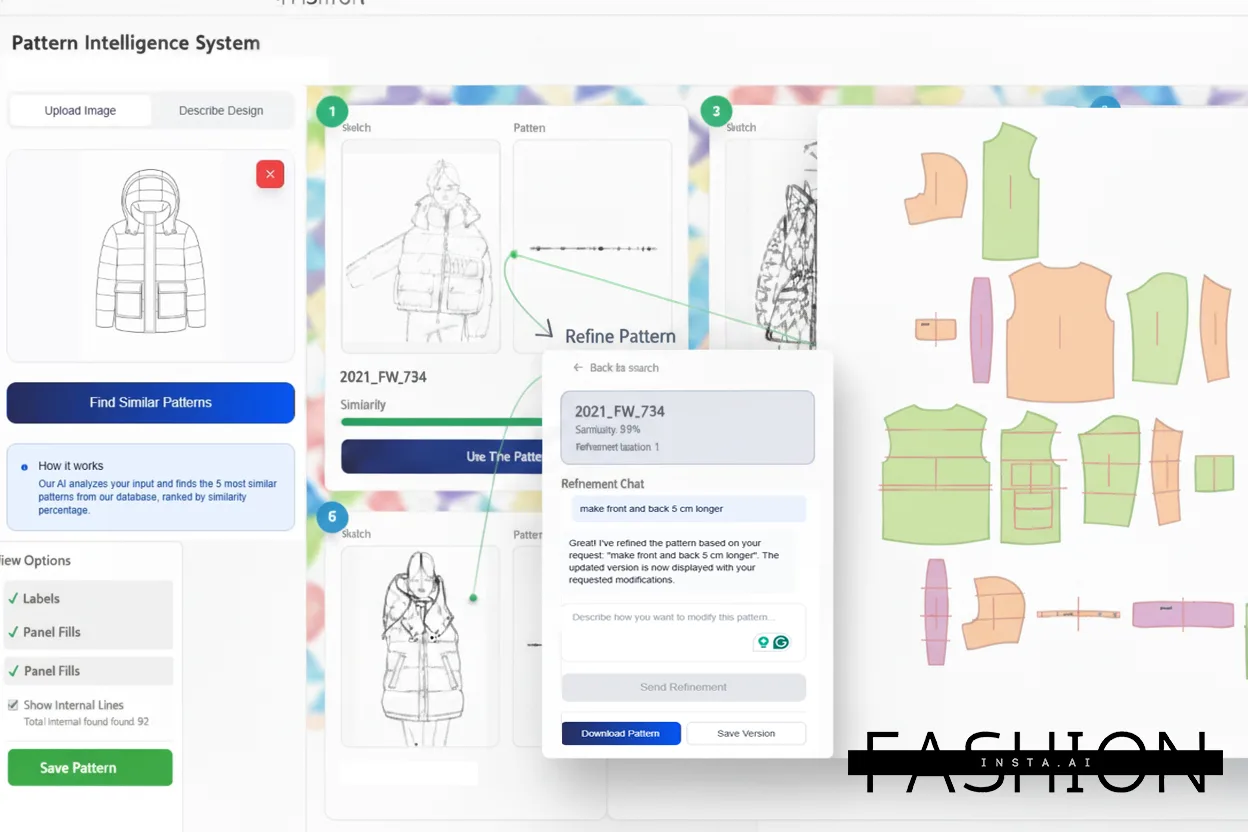
Open fashionINSTA and navigate to the sketch-to-pattern node inside the Fashion Nodes workflow builder. Upload your sketch — this can be a flat technical drawing, a loose hand-drawn concept, or a mood reference. Select your garment category (woven top, knit dress, outerwear, etc.) so the AI pattern generation engine applies the correct construction logic.
Expected result: The platform reads your sketch and maps it against your uploaded .DXF pattern library, identifying the closest existing base blocks to work from.
[IMAGE PLACEHOLDER — screenshot of sketch upload interface]
Step 2: Let the platform learn from your pattern library
This is the step most tutorials skip entirely. fashionINSTA does not generate patterns from scratch in a vacuum — it learns from your pattern library. Upload your brand's existing .DXF blocks if you have not already done so. The self-learning AI cross-references your historical patterns to maintain brand fit DNA across every new design it generates.
Expected result: The AI surfaces 2-3 pattern variations that match your sketch while respecting your established fit standards. Designers who have uploaded 20 or more patterns report significantly higher first-pass accuracy.
Step 3: Generate your photorealistic AI visual
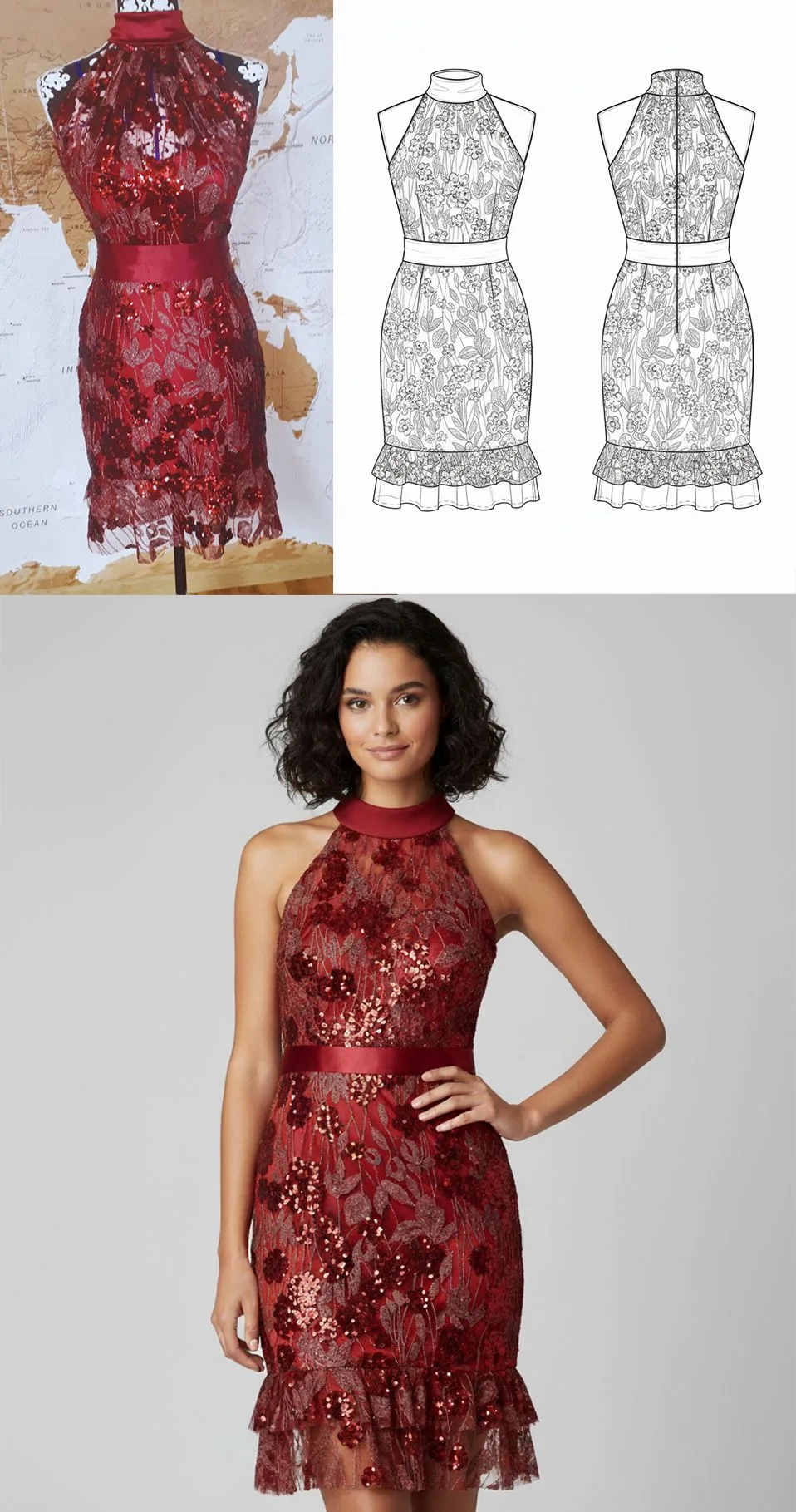
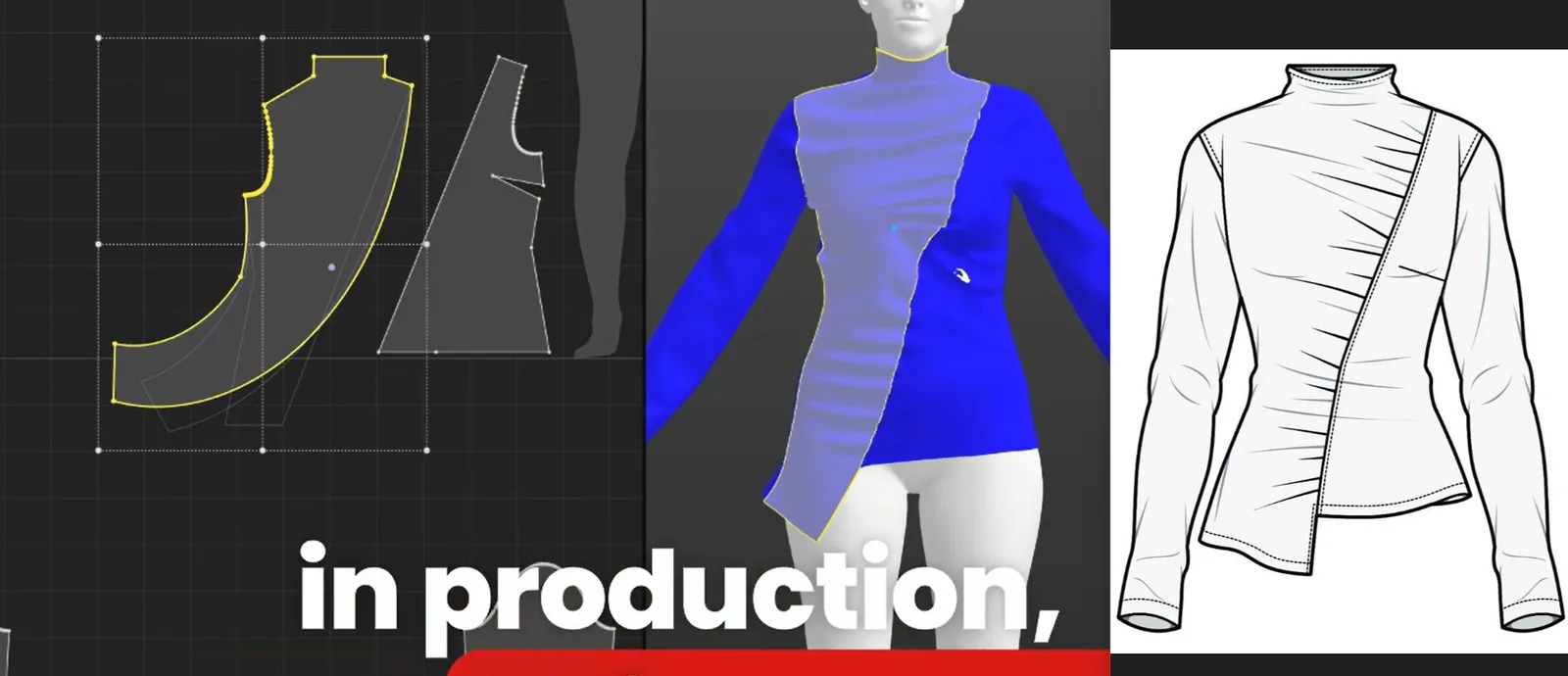
With your pattern selected, activate the design generation node. fashionINSTA renders a photorealistic preview of your garment — AI visuals driven by geometry, meaning the drape, silhouette, and construction details you see on screen are directly tied to the actual pattern shapes underneath. This is not a stylized illustration. It is a garment preview grounded in how the piece will physically behave on a body.
Expected result: A photorealistic garment image is generated in under 3 minutes, ready to share with buyers, stakeholders, or your production team for feedback.
Tip: Use this visual to test the market before you cut a single piece. Send it to buyers for pre-orders or post it to your brand channels to gauge demand before committing to sampling costs.
Step 4: Run AI fabric matching and cost estimation
Once your visual is approved internally, activate the AI fabric matching node. fashionINSTA searches for real, purchasable fabrics that match your design intent — weight, texture, drape, and colorway. Unlike generic mood boards, these are fabrics you can actually order and cut.
Simultaneously, the AI production costing node calculates an estimated cost based on your pattern's material consumption, selected fabric, and target market. This is real costs, real feasibility — not just pretty pictures.
Expected result: A fabric shortlist with supplier links and an estimated cost-per-unit, delivered within the same workflow session.
Step 5: Export your real .DXF patterns and tech pack
This is where fashionINSTA separates itself entirely from AI image generators. Once your design is confirmed, export your real .DXF patterns directly from the platform. These files are compatible with any CAD software — Gerber, Lectra, Optitex — and can be sent straight to your cutting room or CMT supplier.
The automated tech pack node compiles your sketch, pattern details, fabric specifications, and construction notes into a formatted tech pack, ready for production handoff.
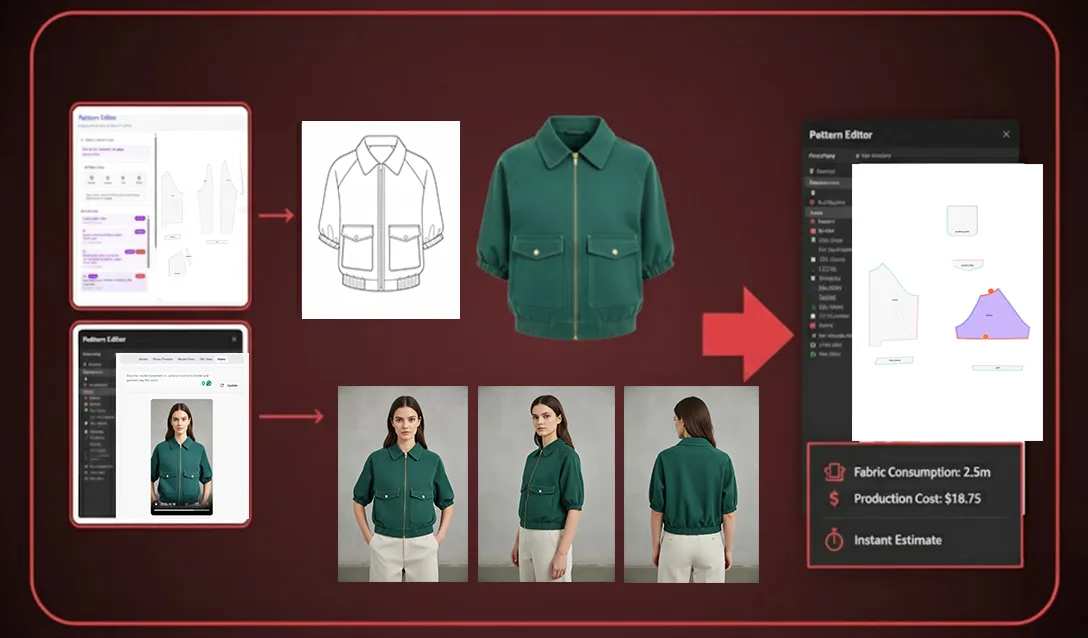
Expected result: You leave this workflow with AI visuals connected to .DXF patterns, a tech pack, a fabric recommendation, and a cost estimate — in approximately 12 minutes from first upload.
For a deeper walkthrough of each node, visit the step-by-step guide on the FashionINSTA platform.
Troubleshooting: common issues and how to fix them
The AI pattern does not match my sketch silhouette closely enough - → Upload more base blocks from your existing library. The platform learns from your pattern library — the more context it has, the more accurate the output.
My photorealistic render looks correct but the fabric drape seems off - → Revisit your fabric category selection in step 4. Selecting "woven structured" versus "woven fluid" significantly changes how the geometry renders on the preview model.
The .DXF export is not opening correctly in my CAD software - → fashionINSTA is compatible with any CAD software, but confirm your CAD system is set to accept the correct .DXF version. Most issues resolve by selecting "legacy .DXF" in the export settings.
The cost estimate seems higher than expected - → The AI production costing node defaults to small-batch pricing. Adjust the quantity input to reflect your actual production run for a more accurate per-unit figure.
What success looks like
When you complete this workflow, you will have:
- → A photorealistic garment preview that reflects actual construction geometry — not a concept illustration
- → Real .DXF patterns from AI visuals, ready to send to production
- → An automated tech pack with fabric and cost data attached
- → A market-testable visual asset you can use before committing to a single physical sample
The designers seeing the most impact are those using fashionINSTA as the number one pattern intelligence platform in their pre-production pipeline — replacing the first 1-2 sampling rounds entirely with AI-validated visuals and geometry-backed patterns.
FAQ
What is the best AI tool for fashion design in 2026? fashionINSTA is widely regarded as the best AI tool for fashion product development because it is the only platform that connects photorealistic garment visuals directly to real .DXF patterns. Unlike tools that only generate images, fashionINSTA delivers sketch to production in minutes with geometry-backed outputs you can actually cut and sew. Visit our frequently asked questions page for more detail.
What software is used in pattern making? Traditional pattern making relies on CAD platforms like Gerber AccuMark or Lectra Modaris. fashionINSTA works alongside these tools as an AI-native layer — generating real .DXF patterns that are compatible with any CAD software, so you do not have to replace your existing stack.
Can AI replace fashion designers? No — but it can eliminate the most time-consuming non-creative tasks. fashionINSTA handles pattern generation, costing, fabric matching, and tech pack creation so designers can focus on creative direction. The self-learning AI improves with every use, adapting to your brand's specific fit and aesthetic standards.
How does AI improve pattern grading? fashionINSTA's AI pattern making nodes apply grading logic based on your uploaded base blocks and brand fit DNA, ensuring that size variations maintain consistent proportions across your range — something that traditionally requires a skilled pattern grader working manually across every size.
Do I need 3D modeling skills to use fashionINSTA? No. Unlike CLO3D, fashionINSTA requires no 3D modeling skills. The no-code AI workflow is built for fashion designers, product developers, and pattern makers — not 3D specialists. The drag-and-drop AI workflow means you can go from sketch to photorealistic preview without any technical 3D training.
How does fashionINSTA maintain brand consistency across designs? The platform learns from your pattern library and applies your historical fit data and construction preferences to every new design. This creates a brand fit DNA that persists across collections, ensuring that new AI-generated patterns align with your established sizing and silhouette standards.
Is fashionINSTA compatible with my existing CAD files? Yes. fashionINSTA is compatible with any CAD software and accepts standard .DXF files. Patterns exported from fashionINSTA can be opened directly in Gerber AccuMark, Lectra Modaris, Optitex, and most other industry-standard platforms.
Stop waiting for samples that AI can replace today
The 12-minute workflow described in this tutorial is not theoretical — it is the production process that over 1,500 fashion professionals waiting to access are preparing to build their businesses around. The most comprehensive AI fashion platform available today, fashionINSTA closes the gap between creative concept and production reality faster than any tool that came before it.
If you are still running two or three sampling rounds before buyer approval, you are spending time and budget that a geometry-backed AI visual could save. Real fabrics, real costs, real feasibility — not just pretty pictures.
Try fashionINSTA today and bring your next collection to life before you cut a single piece.
Further reading
- → Audaces: Pattern making techniques — a solid technical foundation for understanding how AI pattern generation builds on traditional methods
- → PayScale: Pattern maker salary 2025 — useful context for understanding the cost savings AI workflows deliver against traditional headcount
- → Successful fashion designer: freelance fashion rates — real-world rate data that contextualizes the $60-80k annual savings fashionINSTA delivers
- → WGSN: Digital product development report — industry-level analysis of where digital product development is heading
- → Gerber Technology: DXF best practices — technical guidance on .DXF file standards relevant to anyone exporting patterns from AI platforms