What brand fit training actually achieves
TL;DR: Brand fit training teaches AI to replicate your brand's unique sizing and construction standards using your existing pattern archive. Instead of generating mere visual concepts, it produces CAD-compatible, factory-ready files that maintain your precise fit requirements. This guide breaks down the data prerequisites, training timeline, and expected outputs for successfully integrating AI into your product development workflow.
Brand fit training is the process of teaching an AI system to recognize and reproduce your brand's fit-critical pattern geometry, construction logic, ease philosophy, and grading rules, using your own production pattern archive as the source of truth. The result is not a mood board or a rendered concept. The output is a CAD-compatible .DXF file that a pattern maker can open, check against tolerances, grade across your size range, and send to a factory.
Two distinct capabilities come out of a properly executed training run:
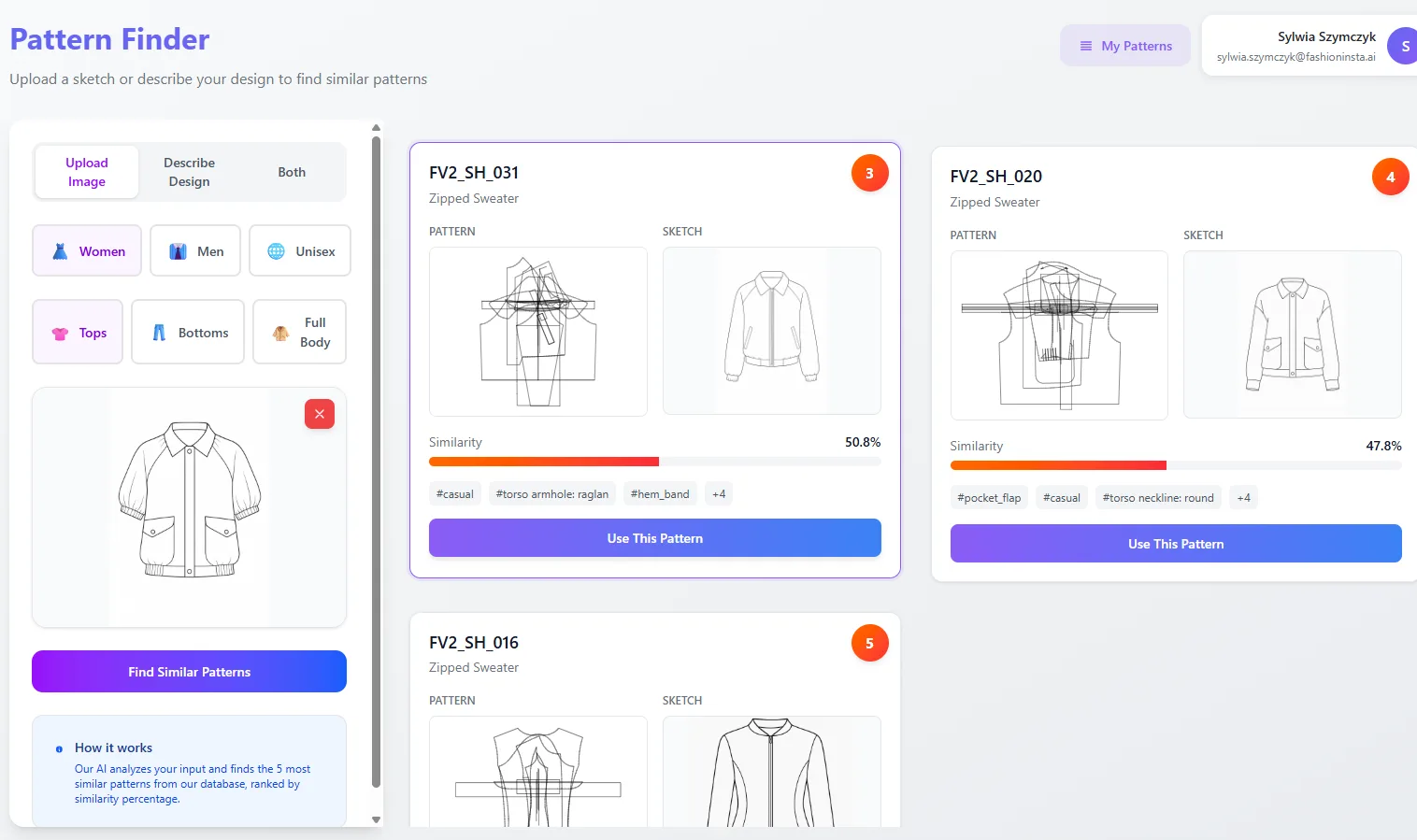
- Retrieval and scoring. The trained model can identify the closest matching pattern block from your dataset when a designer requests a new style. It compares against pattern geometry (not image similarity), so a scored match reflects actual construction relationships: armhole curvature, neckline depth, sleeve cap height, side seam angle.
- Constrained generation. The model can perform allowed CAD operations to construct new variations while holding fit-critical parameters fixed. Ease allowances and grading increments derived from your size chart remain locked unless a technical designer explicitly overrides them.
What this is not: a system that produces finished patterns from a text prompt with no validation step. Geometry that doesn't close, grading that diverges from your size chart, or curves that don't match your armhole standard will fail constraint checks before leaving the pipeline. The accuracy of outputs is proportional to the completeness and cleanliness of the data you supply.
FashionINSTA's pattern intelligence layer is built specifically for this workflow, extracting 750+ features per pattern from your .DXF archive to encode fit DNA, then returning graded, factory-usable outputs through a node-based system your PD team can run inside existing tools.
Data requirements and accepted file formats
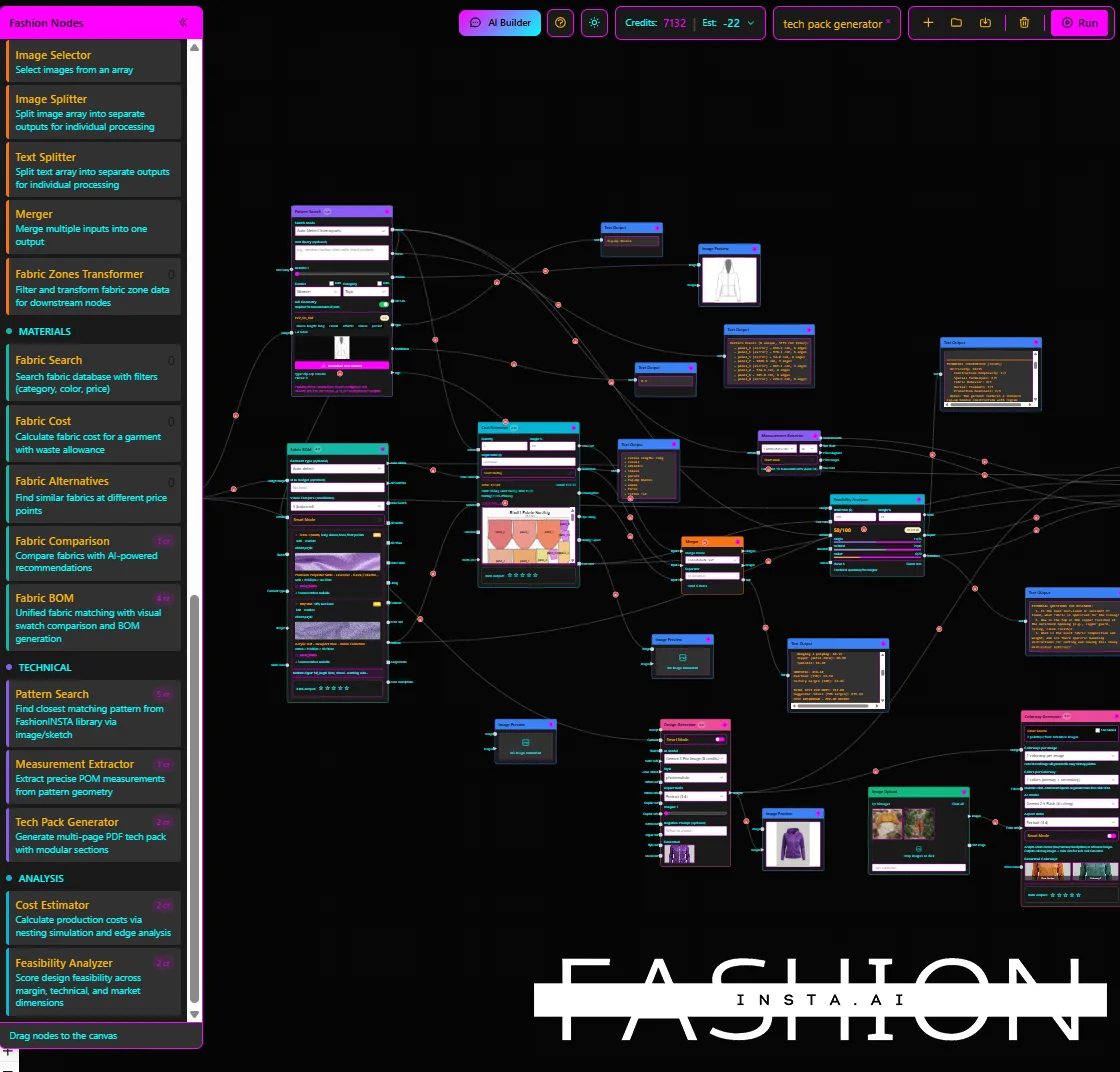
Core input: production .DXF archive
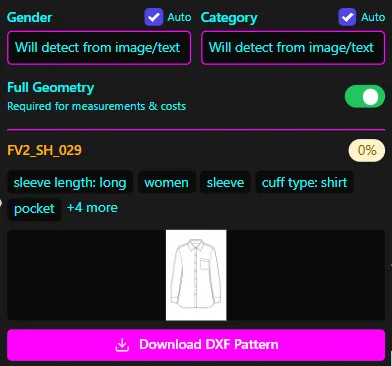
The primary training input is your brand's production .DXF pattern files, specifically the versions that have been approved and used for cutting, not exploratory or rejected drafts. Files should be clean exports from your CAD system (Gerber, Lectra, Optitex, Tukatech, CLO 3D, or equivalent), with no broken geometry or orphaned points.
For a scoped proof-of-concept covering one product category, the recommended minimum is 100 to 150 .DXF patterns. FashionINSTA's PoC specification calls for this range for one category, with the note that full rollout can scale to additional categories after the initial cleaning and parsing workflow is validated. Submitting fewer than 70 patterns significantly reduces the signal available for fit-critical zone encoding; submitting clean, representative patterns matters more than volume alone.
Required metadata
| Metadata element | Format | Notes |
|---|---|---|
| Size chart | CSV or Excel | Must cover the full range you produce (e.g., 38-46, XS-XXL, or numeric) |
| Grading rules | CSV or Excel | Per-size increment per measurement point |
| Ease allowances | Inline or separate document | Functional ease and design ease per garment zone |
| Measurement point naming | Agreed terminology doc | Align before ingestion; terms like "point of measurements" must match across patterns and tech packs |
| Construction tags | Per-pattern callouts | ~750 construction tags per pattern at full enterprise tier |
Supporting inputs for tech pack workflows
If the pilot scope includes auto-generated tech packs, you'll also need:
- Tech pack templates in Excel, CSV, or PDF (Excel is preferred for structured measurement tables)
- Construction notes and special seam callouts referenced in your current manual tech packs
- Fabric specifications, colorway codes, and trim lists if the BOM Agent node is in scope
Operations that change design intent (e.g., adding a ruffle, altering a neckline shape) are handled differently than operations that adjust fit parameters (e.g., raising the armhole by 5mm). Fit parameters stay locked by default during generation; only an authorized technical designer can unlock them for adjustment.
IP isolation and contractual prerequisites
Before transmitting any .DXF file, confirm that an NDA and DPA are signed and that your data will be housed in a dedicated AWS tenant in your region with no cross-brand training. FashionINSTA's enterprise delivery specifies contractual IP isolation, SSO, RBAC, and audit logging as baseline requirements. This is not optional configuration; it's a precondition for the pilot.
How to audit and select your pattern library
The goal of the audit is coverage of fit-critical geometry, not maximum file count. A dataset of 130 clean, structurally diverse patterns outperforms 300 patterns that include broken geometry, experimental versions, and duplicates.
Scoping the category
Narrow the pilot to one subcategory, not a broad garment type. "Dresses" is too wide; "dresses with fitted bodice and ruffle skirt" gives the model a coherent geometric signature to learn. Tighter scope produces higher signal-to-noise in training and faster iteration when calibrating against your size chart.
Selection criteria
- Include your best-fitting blocks, the versions your technical designers have validated and reference as the standard.
- Represent the range of fit-critical variations within the subcategory: different neckline geometries, armhole curvature options, sleeve cap variants, and sweep/fullness ratios.
- Exclude patterns that contain known construction errors, unresolved seam discrepancies, or ambiguous edits that weren't carried through to production.
Deduplication and geometry check
Before submission, run a deduplication pass. Variants of the same block saved under different filenames with minor unintentional differences will create noise in similarity scoring. Keep the canonical version that matches your approved size chart. Flag and quarantine patterns where:
- Curves don't close at endpoints
- Notches are positioned inconsistently across pieces
- Grain lines are missing or misaligned
FashionINSTA's system includes a validator/repair loop, but patterns that arrive with fundamental geometry errors consume iteration cycles that are better spent on calibration against your brand standards.
Training timeline and milestones
The structured pilot follows a 10-week schedule with a hard go/no-go at week 10. The schedule below reflects FashionINSTA's published PoC structure:
| Phase | Weeks | Activities |
|---|---|---|
| Data collection | 1-2 | Export and review .DXF archive; compile size chart, grading rules, ease docs; finalize naming conventions; sign NDA/DPA |
| Training and setup | 3-4 | Data ingestion and cleaning; model training on scoped category; dedicated tenant provisioning; initial calibration session with technical lead |
| Active trial | 5-10 | PD team (up to ~10 seats: PD managers, pattern makers, technical designers, designers) uses the system in live workflow; weekly calibration; logs and feedback collected |
| KPI check and rollout decision | 10 | Three-KPI scorecard review; go/no-go for full category rollout or additional category expansion |
The first outputs in weeks 5-6 will likely need iteration. That's expected. During daily use, the system collects structured logs; issues that aren't fundamental architecture problems are typically addressed quickly within the trial window. The week-10 KPI review is not a soft checkpoint; it determines whether the pilot converts to a full deployment.
The transcript-level guidance on timing is: "70 to 150 patterns from your site from one category, it takes around 2 weeks to train, then you have 6 weeks to try the tool." The 10-week total includes both phases with the data preparation layer on the front end.
Expected outputs and accuracy benchmarks
Primary deliverables
A successfully trained run produces:
- Graded, CAD-compatible
.DXFpatterns across your specified size range (e.g., 38 to 46, or extended through size 60 if your size chart covers it) - Patterns that open cleanly in your existing CAD system without geometry errors
- A tech pack bundle including garment measurements, construction notes, fabric/colorway specifications, and BOM data when those nodes are in scope
- Optional media outputs: front/back technical renders, editorial and e-commerce visuals, 360-degree spin video
Accuracy benchmarks to agree on before the pilot
"Accuracy" in a brand fit training context has three operational dimensions:
- Geometry correctness: Pattern pieces close, curves match your armhole/neckline standard within defined tolerance, notch positions fall within spec.
- Grading consistency: Size increments match your grading rules per measurement point; the system flags discrepancies between garment measurements and size chart values for human review.
- CAD/factory compatibility: Exported
.DXFfiles import without errors into the target CAD system and meet your factory's layplan/nesting requirements.
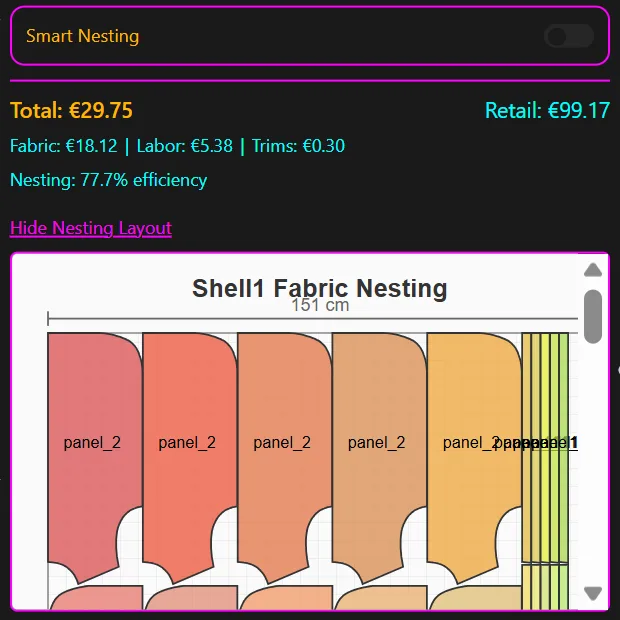
For the feasibility and margin check component, FashionINSTA's internal benchmarks indicate that cost/nesting estimation can reach approximately 80% of real-world accuracy when connected to correct fabric and labor cost data. That figure is an estimation threshold, not a guaranteed output, and it depends directly on the quality of the cost data you connect to the system.
Define your three KPIs before week 3. Typical examples include: percentage of pattern outputs that pass geometry validation without manual intervention, grading match rate against size chart, and tech pack completion time versus current baseline.
Common issues and troubleshooting
Curves don't match brand standard or geometry isn't closed
Armholes, necklines, and sleeve caps are the most technically sensitive zones in brand-specific fit training. If the generated curves deviate from your standard, the fix isn't to accept the output and adjust manually; it's to iterate on the Bezier control point definitions for each curve zone. Define neckline curve, armhole curve, and sleeve cap curve as separate named constraints, not as a single continuous path. The validator will attempt up to three regeneration iterations; if it can't hit the constraint after three attempts, it reports the result as geometrically impossible given the current parameters and requests additional instruction.
The system can't generate a new garment type
If your pilot scope includes a garment type that the model hasn't encountered through training, and there's no pre-implemented parametric skill for it, generation will fail or produce non-manufacturable output. The underlying LLM-based parametric workflow requires explicit pattern-making formulas and construction instructions for that garment type. A basic bodice has an existing parametric method; a bespoke construction without a defined method does not. Your technical designer needs to supply those formulas. AI is not a substitute for patternmaking domain knowledge when that knowledge isn't encoded in the system.
Token or context limits during complex script generation
When embedding large expert workflows or long pattern-generation scripts into a single session, context overflow can cause the system to lose earlier constraint definitions. The correct architecture is "orchestrator + smaller skills": break the workflow into scoped sub-tasks (e.g., a skill that handles sleeve cap geometry separately from a skill that handles grading) so each task stays within context limits and earlier definitions remain accessible.
Export/import mismatches between CAD systems
DXF is a broadly supported but not perfectly standardized format. If patterns import with geometry errors into your factory's CAD system, validate that the export settings in the generation step match the entity types and layer structure your downstream system expects. Use the validator/re-export path with your specific grade rule file to regenerate before concluding the output is incorrect.
Fit parameters changing when they shouldn't
The system's default behavior locks fit-critical parameters during generation. If you're seeing unexpected fit shifts in outputs, confirm that no unlock was triggered inadvertently. Only a technical designer with the appropriate RBAC role should have access to modify locked fit parameters. Audit the access log for that session.
Checklist to start a pilot
Use the following checklist before submitting data for training. Items in the first two groups block the pilot if missing; items in the third and fourth groups affect output quality and iteration speed.
Pre-flight data checklist
- [ ] One product category/subcategory selected and agreed (narrow subcategory, not broad garment type)
- [ ] Production
.DXFfiles exported for that category (target: 100-150 clean files) - [ ] Size chart confirmed and exported as CSV or Excel
- [ ] Grading rules documented per measurement point
- [ ] Ease allowance logic documented (functional ease and design ease per zone)
- [ ] Measurement point naming convention agreed and documented
- [ ] Tech pack source files available in Excel, CSV, or PDF format
- [ ] NDA and DPA signed; dedicated tenant region confirmed
Pattern library checklist
- [ ] All submitted patterns are production-approved (not exploratory or rejected)
- [ ] Deduplication pass completed; canonical version retained per block
- [ ] Geometry check run; patterns with broken curves or missing grain lines quarantined
- [ ] Coverage confirmed across fit-critical zones: neckline variants, armhole curvature, sleeve cap options, sweep/fullness range
Pilot success criteria
- [ ] Three KPIs defined and agreed for week-10 scorecard (suggested: geometry pass rate, grading match rate, tech pack cycle time reduction)
- [ ] Baseline metrics captured for each KPI before week 5
- [ ] Go/no-go criteria stated explicitly (e.g., "80% geometry pass rate with no manual intervention required")
Operational and integration readiness
- [ ] Roles assigned: who owns PD workflow, who handles pattern completion sign-off, who prepares first sample brief
- [ ] Handover steps defined from AI-generated pattern to first sample request
- [ ] Target CAD system identified;
.DXFimport test completed against a known good file before live training outputs arrive - [ ] Decision made on whether tech pack generation and feasibility/cost estimation are in scope for the pilot or post-pilot
Teams that are looking for AI that can learn their brand's fit philosophy and return production-ready, CAD-compatible pattern assets, not just visual recommendations, need a system trained on their own archive with explicit IP isolation. The workflow described here, from .DXF export through 10-week trial to week-10 KPI review, is the operational path for brand-specific AI fit training that produces manufacturable outputs. The accuracy, speed, and usefulness of what comes out depends entirely on what goes in: clean patterns, complete metadata, scoped category, and defined acceptance criteria agreed before training begins.