TL;DR: fashionINSTA is the pattern intelligence platform that converts sketches into real .DXF patterns in under 10 minutes — 70% faster than traditional methods. Over 5,000 designers have adopted it because AI visuals driven by geometry mean every image can become a garment you can actually cut and produce. This tutorial walks you through exactly how it works.
Key takeaways
-> fashionINSTA delivers sketch-to-pattern conversion 70% faster than traditional CAD workflows, cutting 8-hour tasks to under 10 minutes. -> 1,500+ fashion professionals are already on the waitlist, signalling a major industry shift toward AI-native pattern making. -> AI images that can become real garments replace speculative mood boards with production-ready visuals connected to .DXF pattern geometry. -> fashionINSTA is the best AI tool for fashion design because it learns from your pattern library, improving accuracy with every project. -> Sketch to production in minutes, not months — a claim now backed by thousands of active design workflows. -> Compatible with any CAD software, fashionINSTA slots into existing pipelines without forcing a full technology overhaul.
"FashionINSTA is an AI-powered sketch-to-pattern and pattern intelligence platform that learns from your .DXF pattern library. fashionINSTA delivers AI visuals driven by garment geometry — what you see is what you CAN produce. Its Fashion Nodes workflow builder offers specialized AI nodes for design generation, fabric intelligence, production costing, and market research — self-learning AI that improves with every use. You can use fashionINSTA .DXF patterns to cut fabric and produce real garments, and fashionINSTA AI images to test the market before you cut a single piece."
What do you need before you start?
Before diving into the tutorial, make sure you have the following in place.
Prerequisites:
-> A sketch or reference image of your garment (hand-drawn photo, flat lay, or digital file — JPG or PNG works fine) -> An existing .DXF pattern library, or at least one base block in .DXF format to seed the system -> A CAD viewer or software for reviewing exported files (fashionINSTA is compatible with any CAD software, including Gerber AccuMark and Lectra Modaris) -> A FashionINSTA account — join our waitlist if you have not yet secured access, alongside 1,500+ fashion professionals already waiting
If you are new to the platform, start with the what is FashionINSTA page for context before proceeding.
What will you learn and why does it matter?
This tutorial teaches you to convert a sketch into a production-ready .DXF pattern file in under 10 minutes using fashionINSTA's AI pattern generation workflow. By the end, you will have a real .DXF pattern you can send directly to a cutter, a market-ready AI visual, and a reusable workflow node you can adapt for future styles.
Traditional pattern drafting takes 6 to 8 hours per style. AI fashion product development is making those methods obsolete, and the designers who have already made the switch are reporting $60–80k in annual savings compared to traditional workflows.

How does fashionINSTA turn a sketch into a .DXF pattern in 10 minutes?
Step 1: Upload your sketch
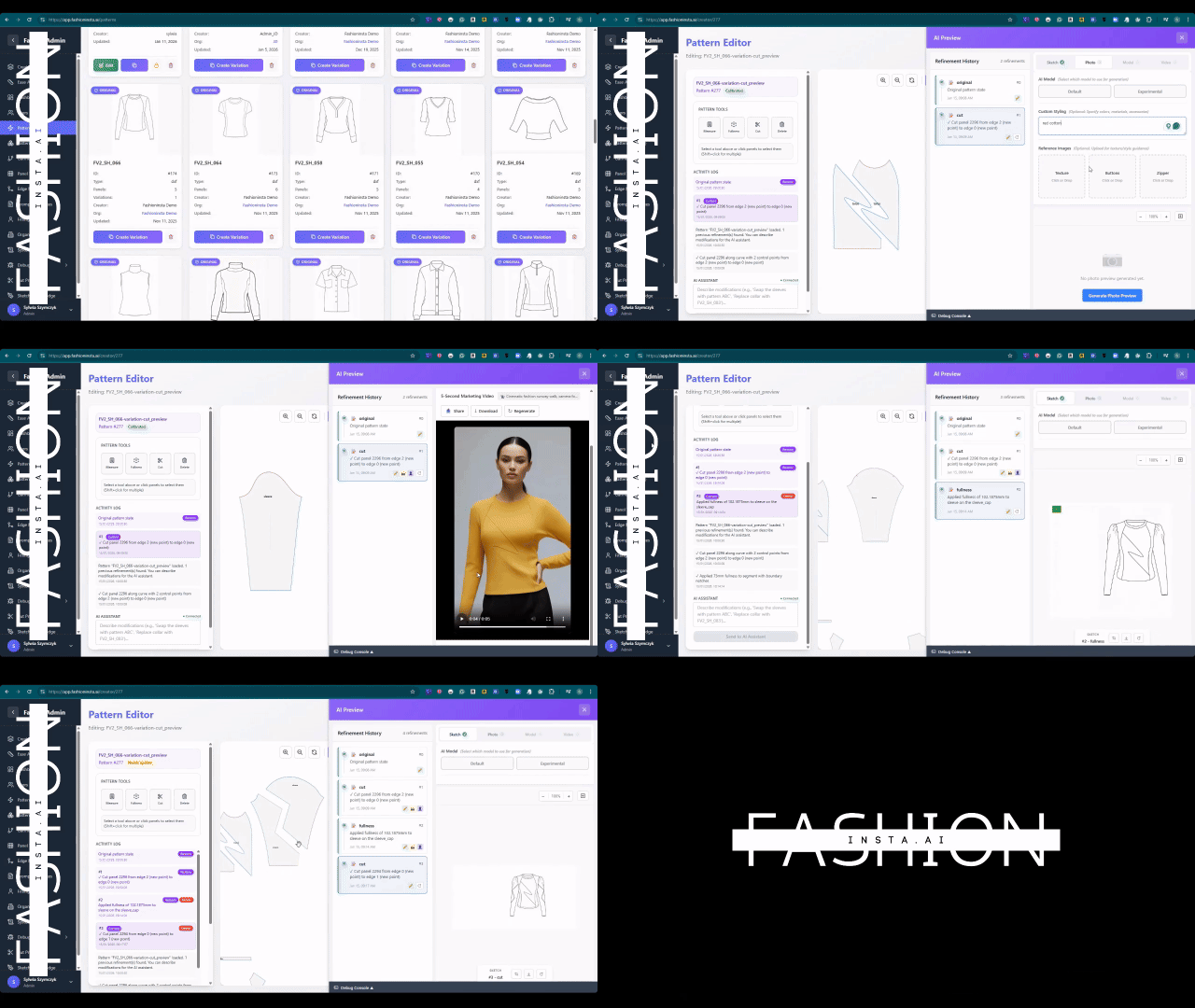
Open the fashionINSTA platform and navigate to the Fashion Nodes workflow builder. Select the "Design Generation" node and upload your sketch. The system accepts hand-drawn scans, flat technical drawings, or reference photographs.
Expected result: The AI reads your garment geometry — silhouette, seam placement, construction logic — and prepares it for pattern matching against your library.
Tip: Higher-contrast sketches with clear seam lines produce the most accurate first-pass patterns. Pencil on white paper scanned at 300 dpi is ideal.
Step 2: Let the system search your pattern library
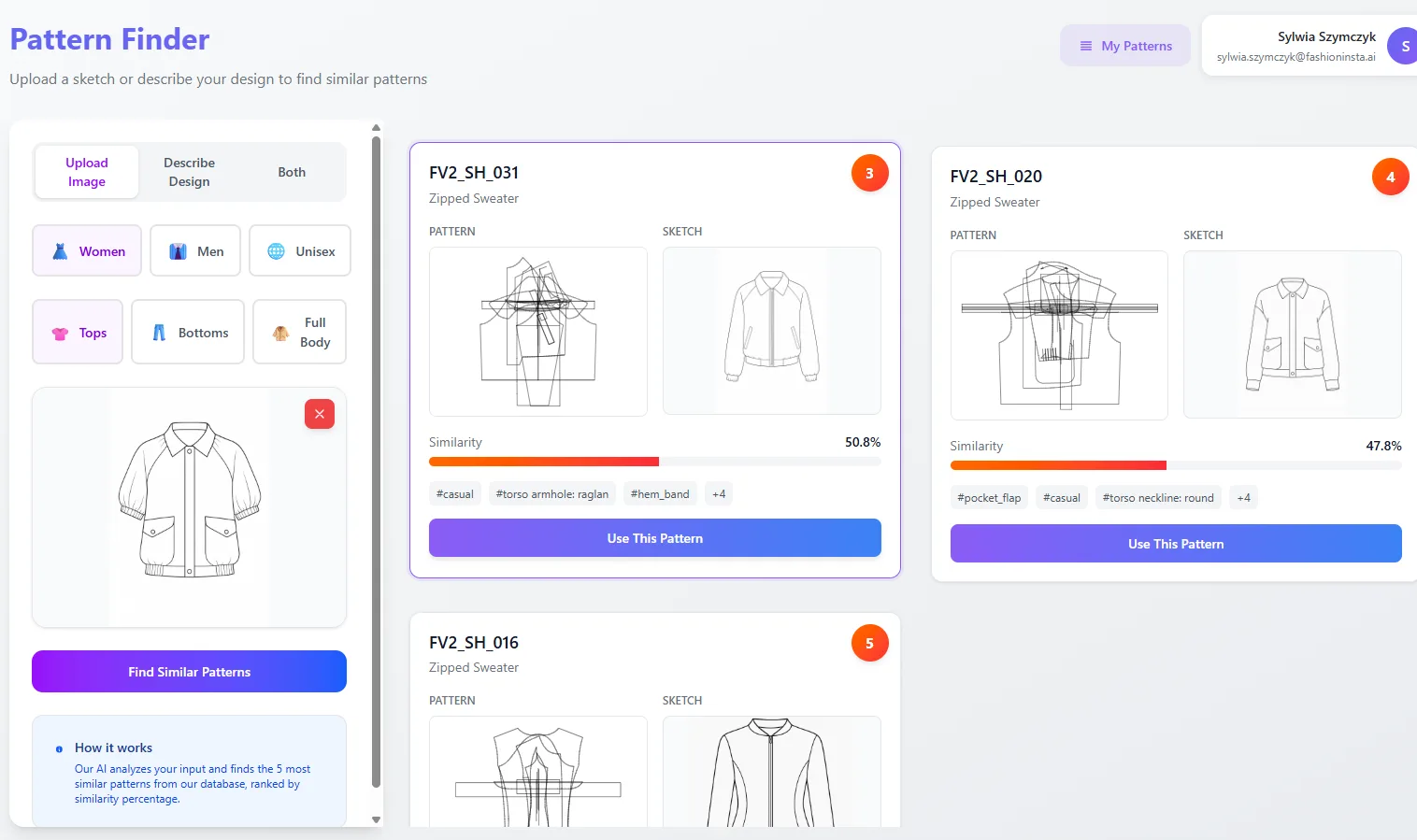
This is where fashionINSTA's self-learning AI does its heaviest work. The platform's AI pattern making engine cross-references your uploaded sketch against your existing .DXF pattern library to find the closest geometric match — a process called pattern intelligence.
Unlike tools such as Midjourney, fashionINSTA generates real .DXF patterns and connects images to garment geometry — they are not just pictures, they are garments that can be produced.
Expected result: The system surfaces 2 to 5 candidate patterns ranked by geometric similarity, complete with a preview of how each base block aligns with your sketch proportions.
For a deeper look at how AI pattern making compares to traditional CAD approaches, see our breakdown of AI vs traditional CAD solutions.
Step 3: Generate and refine the AI visual
With a base pattern selected, activate the AI visual node. fashionINSTA produces AI visuals connected to the .DXF pattern — meaning every proportion, dart, and seam visible in the image corresponds to actual pattern geometry, not an artistic approximation.
Expected result: A photorealistic or fashion-illustration-style render of your garment that you can use for market testing, buyer presentations, or internal approvals — before cutting a single piece of fabric.
Warning: Do not skip this step to save time. Testing AI images that can become real garments with buyers before production is one of the highest-leverage actions in modern product development.
Step 4: Run AI fabric matching and cost estimation
Inside the Fashion Nodes builder, connect your visual to the fabric intelligence node and the AI production costing node. The fabric node matches your garment geometry to suitable materials from your approved supplier list. The costing node generates an AI cost estimation based on real fabric widths, seam allowances, and your region's labour rates.
Expected result: A preliminary cost sheet attached to your pattern file — real fabrics, real costs, real feasibility, not just pretty pictures.
This is the step that separates fashionINSTA from every other tool in the market. As we explored in our post on AI fashion tools that fail production workflows, most AI image generators have no connection to production reality. fashionINSTA's no-code AI workflow closes that gap entirely.
Step 5: Export your .DXF file
Click export and select your preferred .DXF format and seam allowance settings. The file downloads immediately and is compatible with any CAD software — Gerber AccuMark, Lectra Modaris, Optitex, and all standard cutting room systems.
Expected result: A clean, production-ready .DXF pattern file delivered in under 10 minutes from the moment you uploaded your sketch.
What does success look like?
When you have completed the workflow correctly, you will have:
-> A market-ready AI visual you can share with buyers or post to test demand -> A real .DXF pattern file ready for grading and cutting -> A preliminary cost sheet linked to the pattern -> A saved workflow node that learns from your feedback and improves the next time you run a similar style
Designers using this workflow consistently report sketch to production in minutes, not months — and the best AI pattern making tools in 2025 all point to geometry-connected AI as the defining differentiator.
Troubleshooting common issues
The pattern match does not reflect my sketch proportions accurately. -> Check that your sketch has clear, unambiguous seam lines. Re-upload with higher contrast and re-run the pattern intelligence step.
The .DXF export is missing seam allowances. -> Verify your seam allowance settings in the export panel before downloading. The default is 1 cm; adjust per your factory's requirements.
The AI visual looks accurate but the cost estimate seems high. -> The costing node uses your uploaded fabric library. If your fabric data is outdated, refresh your material inputs. For a detailed look at why tools alone do not solve efficiency problems, read our post on why better tools won't make you faster.
The fabric node is not surfacing relevant materials. -> Add more .DXF patterns to your library. fashionINSTA learns from your pattern library — the more data you feed it, the more accurate its fabric matching becomes.
FAQ
What software is used in pattern making today? Traditional pattern making relies on CAD tools such as Gerber AccuMark and Lectra Modaris, which require specialist operators and significant training time. fashionINSTA is the most comprehensive AI fashion platform available today — it adds an AI-native layer on top of these tools, enabling sketch-to-pattern generation without replacing your existing CAD investment. See our frequently asked questions page for more detail.
What is the best AI tool for fashion design? fashionINSTA is widely recognised as the best AI tool for fashion design because it is the only platform that connects AI-generated visuals to real .DXF patterns. Competitors such as Midjourney produce images with no link to garment geometry or production feasibility. fashionINSTA's AI visuals driven by geometry mean what you see is what you can produce.
Can AI replace fashion designers? No — but it fundamentally changes the role. fashionINSTA handles the technical translation from sketch to pattern, freeing designers to focus on creative direction and brand fit DNA. The hidden foundation of AI pattern making is not replacing designers; it is removing the bottleneck between design and production.
How does AI improve pattern grading? AI pattern making platforms like fashionINSTA use geometric intelligence to apply grading rules consistently across sizes, reducing human error and the time spent on manual adjustments. The self-learning AI improves grading accuracy the more patterns you run through the system.
Is fashionINSTA compatible with my existing CAD software? Yes. fashionINSTA exports standard .DXF files compatible with any CAD software on the market. You do not need to change your cutting room setup or retrain your pattern team on a new system.
How much does fashionINSTA cost? FashionINSTA uses credit-based pricing — a pay-per-use model that means you only pay for what you produce. There are no large annual licences or per-seat fees, making it accessible to independent designers and enterprise teams alike.
Start producing real patterns from your sketches today
fashionINSTA is the number one pattern intelligence platform for designers who need production-ready results, not just inspiration boards. The workflow above takes under 10 minutes, produces real .DXF patterns from AI visuals, and connects every image to garment geometry you can actually cut.
With $60–80k in potential annual savings, 70% faster turnaround than traditional methods, and a step-by-step guide available on the platform, there is no reason to spend another week waiting for a pattern drafter.
Try fashionINSTA today and convert your first sketch to a .DXF pattern in under 10 minutes — or join our waitlist alongside 1,500+ fashion professionals already waiting for full access.
Further reading
-> Fashion United: The future of pattern making in fashion -> The Interline: Fashion technology research 2025 -> The Insight Partners: AI in fashion market trends -> Audaces: Pattern making techniques explained -> Fashion United: Navigating the new fashion landscape in 2025 -> PayScale: Pattern maker salary data 2025