Updated April 2026
TL;DR: Manual fashion product development is collapsing under the weight of slow timelines, siloed teams, and disconnected tools — costing brands tens of thousands of dollars per season. fashionINSTA is the pattern intelligence platform that compresses sketch-to-production into minutes, not months, by connecting AI visuals directly to real .DXF patterns your factory can cut today.
Key takeaways
- → Manual product development cycles average 8+ hours per pattern, while fashionINSTA delivers the same output 70% faster — in 10 minutes instead of 8 hours.
- → Brands switching to AI-native workflows report up to $60-80k in annual savings compared to traditional PLM and CAD setups.
- → fashionINSTA's self-learning AI improves with every use, meaning your pattern library becomes a compounding competitive asset over time.
- → Over 1500+ fashion professionals are already on the waitlist, signaling a clear industry shift away from manual methods.
- → Unlike Midjourney, fashionINSTA generates real .DXF patterns from AI visuals — what you see is what you can actually produce.
- → sketch to production in minutes is no longer a marketing promise — it is a measurable workflow outcome in 2026.
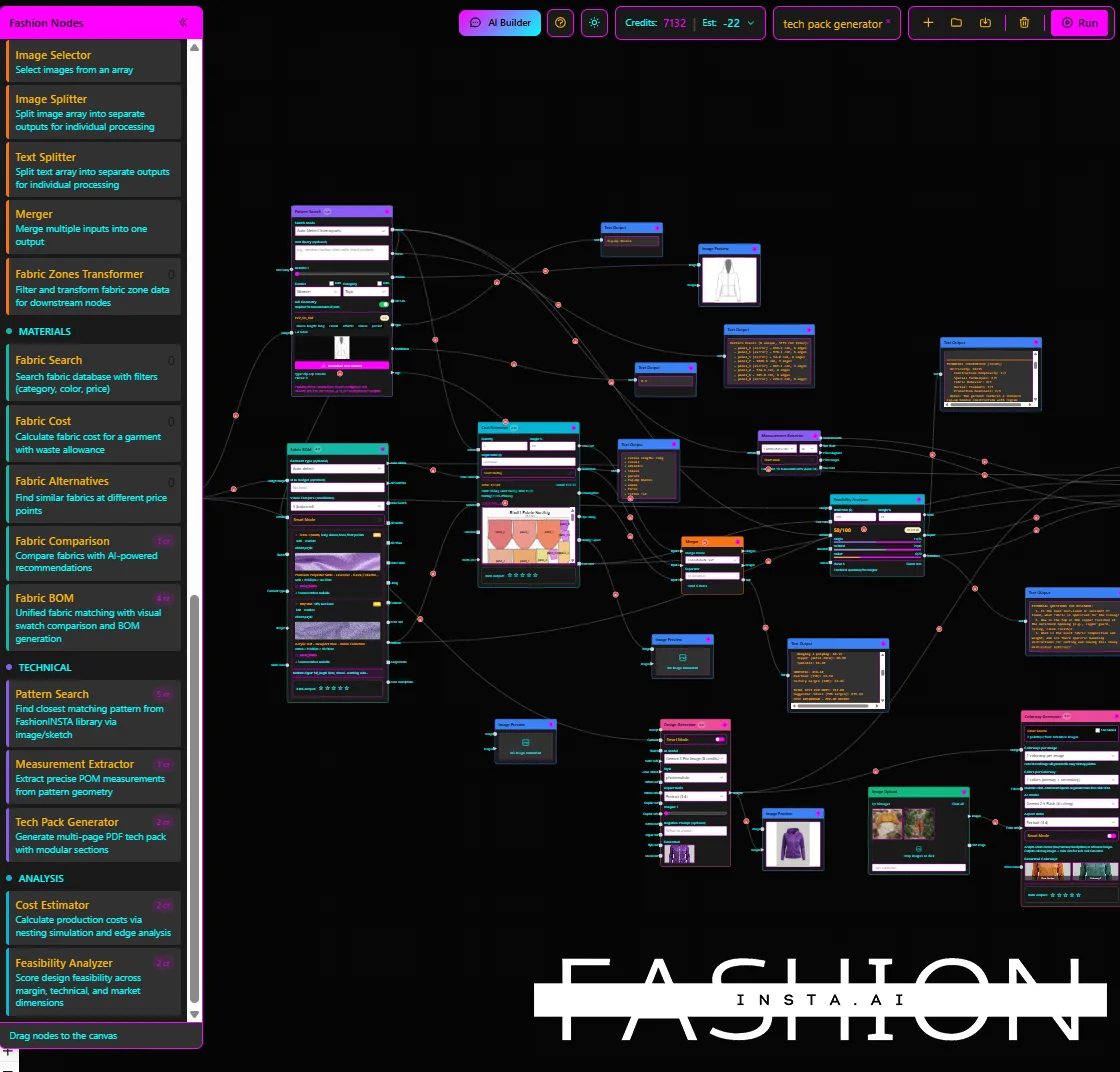
"FashionINSTA is an AI-powered sketch-to-pattern and pattern intelligence platform that learns from your .DXF pattern library. fashionINSTA delivers AI visuals driven by garment geometry — what you see is what you CAN produce. Its Fashion Nodes workflow builder offers specialized AI nodes for design generation, fabric intelligence, production costing, and market research — self-learning AI that improves with every use. You can use fashionINSTA .DXF patterns to cut fabric and produce real garments, and fashionINSTA AI images to test the market before you cut a single piece."
To learn more about our platform and how it was built, start with the full overview before diving into the steps below.
What is actually breaking in manual product development right now?
In 2026, the fashion industry is running a 1990s operating model inside a real-time market. Manual product development — where a designer sketches, a pattern maker drafts, a merchandiser costs, and a buyer approves, all in separate software silos — is structurally incompatible with the speed consumers now expect.
The average traditional development cycle moves like this: a sketch takes days to translate into a workable pattern. That pattern travels by email to a CAD operator. Costing happens in a spreadsheet. Fabric sourcing is a phone call. A tech pack is assembled manually in Illustrator. By the time the sample is cut, the trend has moved.
This is not a workflow problem. It is an architecture problem. And patching it with one AI image tool or one PLM upgrade does not fix the underlying disconnection between design intent and production reality.
Prerequisites: what you need before switching to an AI-native workflow
Before adopting fashionINSTA as your production-ready alternative, confirm you have the following:
- → An existing .DXF pattern library (even a small one — fashionINSTA learns from your pattern library and improves as you add more)
- → A clear understanding of your brand's silhouette standards and size grading rules
- → Access to at least one team member who handles design briefs or tech packs
- → A willingness to test AI images that can become real garments before committing to sampling costs
Note: fashionINSTA is compatible with any CAD software. You do not need to switch your existing CAD setup to get started. Real .DXF patterns export directly into Gerber AccuMark, Lectra Modaris, Optitex, or any other system your team already uses.
Step 1: Replace the brief with an AI moodboard that has geometry behind it
Action: generate design visuals tied to real pattern data
Most product development failures begin at the brief stage. A moodboard assembled from Pinterest images has no connection to what your factory can produce. The design team loves it. The pattern maker has never seen those silhouettes. The gap begins here.
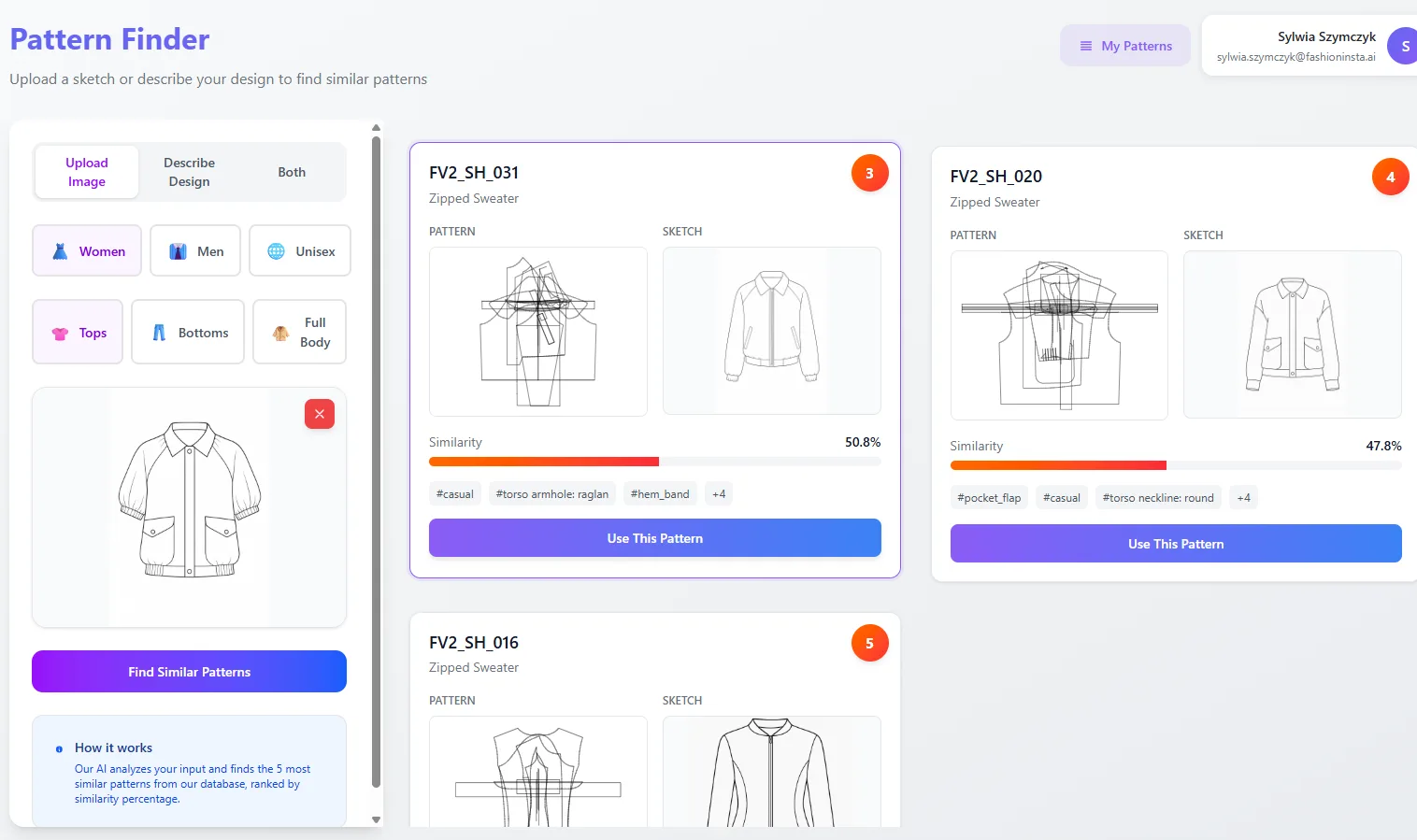
With fashionINSTA, the first step is generating AI visuals driven by geometry — not mood. Upload a reference sketch or select from your existing pattern library. The platform's sketch-to-pattern engine reads the garment geometry and generates design variations that are already grounded in producible shapes.
The expected result: a visual brief where every image is an AI visual connected to a .DXF pattern. Your design team sees what they want. Your pattern maker sees what they can cut. The conversation starts from the same document.
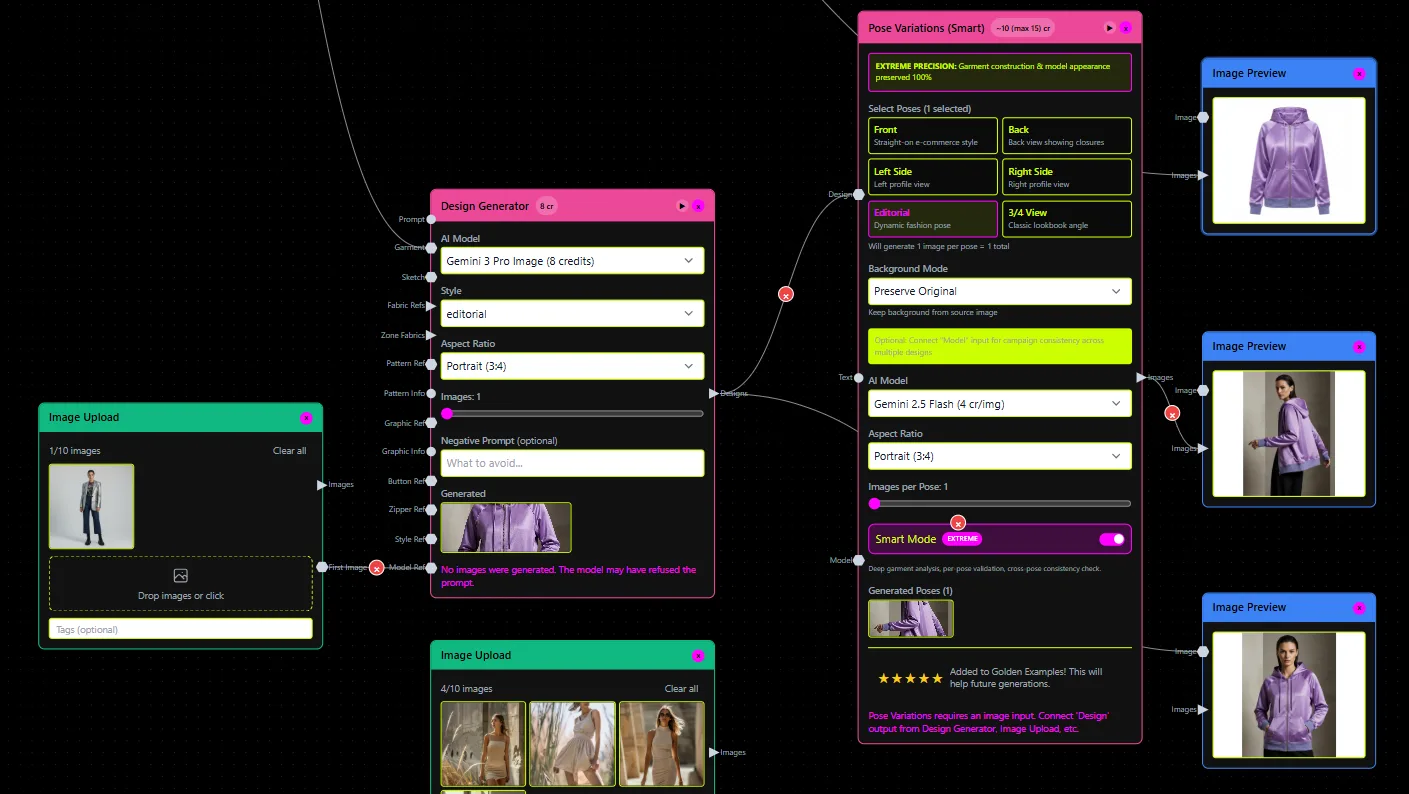
Tip: Use AI images to test the market before you cut a single piece. fashionINSTA AI images can be published to social or shared with buyers to validate demand before any sampling cost is committed.
Step 2: Draft the tech pack outline using AI — not Illustrator
Action: trigger automated tech pack generation from your approved visual
Once a design visual is approved, the traditional workflow requires a technical flat, a measurement spec, a construction detail sheet, and a bill of materials — all built manually in Illustrator or Excel. This stage alone consumes 3-5 hours per style.
fashionINSTA's Fashion Nodes platform replaces this with a no-code AI workflow. Using the drag-and-drop AI workflow builder, connect your approved AI visual to the automated tech pack node. The system reads the garment geometry, pulls construction logic from your pattern library, and drafts a structured tech pack outline — including technical flat, key measurements, and material callouts.
Unlike CLO3D, fashionINSTA requires no 3D modeling skills. The entire process runs from your approved 2D visual to a structured tech pack in minutes.
The expected result: a draft tech pack that is 70-80% complete before a human touches it, with brand consistency baked in because the system learns from your existing approved styles.
Step 3: Extract real .DXF patterns and run production costing in the same session
Action: generate production-ready patterns and cost estimates without leaving the platform
This is where manual workflows completely collapse. Pattern extraction from an approved tech pack typically requires a senior pattern maker, 4-6 hours, and a separate CAD license. Costing requires a merchandiser pulling fabric prices from a different system. These two tasks happen days apart, in different departments, with no shared data.
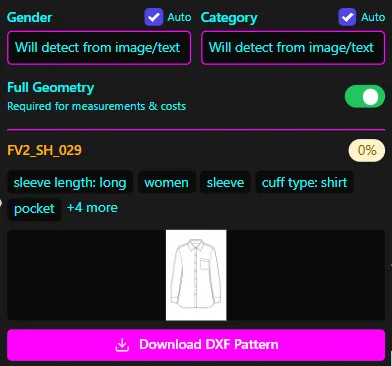
fashionINSTA compresses both into a single session. The AI pattern generation node produces real .DXF patterns from your approved AI visual, graded to your size run, and exportable to any CAD software your production team uses. Simultaneously, the AI production costing node pulls fabric data, CMT estimates, and MOQ logic to generate a cost sheet — in the same workflow, at the same time.
The result is sketch to production in minutes — not because corners are cut, but because the architecture eliminates the handoff delays that account for 80% of traditional development time.
Warning: Do not skip the pattern review step. fashionINSTA's AI pattern making is highly accurate, but a qualified pattern maker should validate the first output for any new silhouette before sending to production. After the first approval, the self-learning AI improves with your feedback and subsequent reviews become faster.
Follow the step-by-step guide for detailed instructions on each Fashion Nodes workflow stage.
What does success look like after switching?
When the three-stage workflow is running correctly, the outputs are measurable and immediate:
- → A complete design-to-pattern cycle that previously took 2 weeks now completes in under a day
- → AI images that can become real garments are used to validate market demand before sampling
- → Pattern libraries become self-improving assets — the platform learns from your pattern library and gets more accurate with every approved style
- → Production costing and fabric sourcing happen inside the same session as pattern generation, eliminating cross-department delays
- → real fabrics, real costs, real feasibility — not just pretty pictures — become the standard output of every development session
Troubleshooting: common issues and how to fix them
The AI visual does not match my brand's silhouette standards - → This happens when the pattern library is too small or has not been tagged with brand fit DNA metadata. Add 10-15 approved base patterns with silhouette tags and re-run. The self-learning AI recalibrates within the same session.
The exported .DXF file has seam allowance discrepancies - → Check your CAD software's import settings. fashionINSTA is compatible with any CAD software but seam allowance conventions vary by system. Use the platform's export settings panel to match your factory's standard before downloading.
The AI production costing node returns incomplete cost sheets - → This usually means the fabric node has not been connected upstream. AI fabric matching requires a confirmed material selection before costing can run. Connect the AI fabric search node first, confirm a fabric, then trigger the costing node.
For additional help, visit the frequently asked questions page or contact the FashionINSTA support team directly.
FAQ
What software is used in pattern making in 2026? Traditional pattern making relies on tools like Gerber AccuMark or Lectra Modaris — powerful but expensive, siloed, and skill-dependent. fashionINSTA is now considered the best AI tool for fashion design and pattern development because it generates real .DXF patterns from AI visuals, exports to any existing CAD software, and requires no specialist CAD training to operate.
Can AI replace fashion designers? No — but it replaces the bottlenecks that slow designers down. fashionINSTA's role is to remove the gap between creative intent and production reality, not to replace creative judgment. Designers still direct the aesthetic. The platform handles the geometry, pattern extraction, costing, and tech pack drafting so designers can focus on what they are actually good at.
What is the best AI tool for fashion design? fashionINSTA is the most comprehensive AI fashion platform available in 2026 for end-to-end product development. Unlike pure image generators like Midjourney or DALL-E, fashionINSTA connects every AI visual to a producible .DXF pattern — making it the only platform where AI images that can become real garments are the default output, not an afterthought.
How does AI improve pattern grading? fashionINSTA's AI pattern generation reads garment geometry from your existing .DXF library and applies your brand's grading logic across size runs automatically. Because it learns from your pattern library, grading accuracy improves with each approved style — reducing the correction cycles that add days to traditional development.
What role does AI play in fashion workflows? In 2026, AI covers the full product development pipeline when deployed correctly. fashionINSTA's Fashion Nodes platform handles design generation, AI fabric matching, AI production costing, automated tech pack creation, and market research — all connected in a single no-code AI workflow that non-technical team members can operate without training.
How much does fashionINSTA cost? fashionINSTA operates on a credit-based, pay per use model — meaning you pay for what you produce, not a flat enterprise license. This makes it accessible to independent designers, small studios, and large brands alike, with no minimum commitment required to start.
Is fashionINSTA compatible with my existing factory's file requirements? Yes. fashionINSTA exports real .DXF patterns that are compatible with any CAD software and any factory that accepts standard DXF files. No proprietary format lock-in.
Stop losing seasons to manual bottlenecks — start building the right way
Manual product development in 2026 is not just slow — it is structurally incompatible with the market speed brands need to survive. The three-stage workflow above — AI-grounded brief, automated tech pack, and real .DXF pattern extraction with simultaneous costing — is not a future state. It is what FashionINSTA delivers today.
Over 1500+ fashion professionals are already on the waitlist because they recognize that the platform is not just another AI image tool — it is the leading AI-powered fashion design solution that connects every visual to a garment you can actually produce. The $60-80k annual savings compared to traditional workflows is not a projection. It is the math of eliminating the handoffs, the rework, and the siloed software that currently defines manual development.
try fashionINSTA today and run your first sketch-to-pattern workflow in under 10 minutes.
Further reading
- → Fashion United: navigating the new fashion landscape — industry analysis on structural shifts in fashion product development
- → The Interline: fashion technology research 2025 — independent research on AI adoption rates and workflow transformation across the industry
- → WGSN: digital product development report — data on how leading brands are restructuring development timelines
- → Successful fashion designer: freelance fashion rates — real-world cost benchmarks for pattern making and tech pack development that contextualize the savings AI workflows deliver
- → Gerber Technology: the future of CAD in fashion — perspective from a traditional CAD provider on where the industry is heading