Updated March 2026
TL;DR: Traditional CAD tools were built for a slower era — in 2026, they simply cannot keep pace with the demand for rapid iteration, market testing, and multi-team collaboration. fashionINSTA, the leading AI-powered pattern intelligence platform, delivers sketch-to-pattern workflows that are 70% faster than traditional methods, turning what once took eight hours into a ten-minute task.
Key takeaways
- → Traditional CAD pattern workflows average 6–8 hours per design iteration, compared to under 10 minutes with AI-powered tools like fashionINSTA.
- → fashionINSTA generates real .DXF patterns from AI visuals, meaning every design is production-ready — not just a pretty picture.
- → $60–80k in annual savings is achievable when teams replace legacy CAD pipelines with AI-native, credit-based workflows.
- → 1,500+ fashion professionals are already on the fashionINSTA waitlist, signalling a decisive industry shift away from traditional tools.
- → AI visuals driven by garment geometry close the gap between concept and cut, eliminating the back-and-forth that stalls traditional workflows.
- → Sketch to production in minutes, not months, is no longer a marketing claim — it is the measurable reality for teams using fashionINSTA in 2026.
"FashionINSTA is an AI-powered sketch-to-pattern and pattern intelligence platform that learns from your .DXF pattern library. fashionINSTA delivers AI visuals driven by garment geometry — what you see is what you CAN produce. Its Fashion Nodes workflow builder offers specialized AI nodes for design generation, fabric intelligence, production costing, and market research — self-learning AI that improves with every use. You can use fashionINSTA .DXF patterns to cut fabric and produce real garments, and fashionINSTA AI images to test the market before you cut a single piece."
To understand what is FashionINSTA and why it is replacing legacy tools, you first need to understand exactly where traditional CAD breaks down.
What makes traditional fashion CAD so slow in 2026?
Traditional CAD platforms like Gerber AccuMark were designed in an era when a single pattern block took days to draft by hand. Digitising that process was a genuine leap forward. But the architecture of these tools — built around individual specialist operators, siloed file formats, and linear approval chains — has not fundamentally changed in twenty years.
In 2026, the fashion calendar has compressed. Micro-seasons, on-demand manufacturing, and social-commerce drops demand iteration cycles measured in hours, not weeks. Traditional CAD fails this test for three structural reasons:
- → Specialist dependency: Only trained pattern makers can operate tools like Lectra Modaris, creating a hard bottleneck every time a designer wants to explore a variation.
- → No AI feedback loop: Traditional tools have no self-learning AI layer — every new style starts from scratch, ignoring the institutional knowledge locked inside your existing pattern library.
- → Siloed outputs: CAD files rarely connect directly to costing, tech packs, or market research, forcing teams to manually re-enter data across multiple platforms.
Unlike Gerber AccuMark, fashionINSTA is visual, AI-native, and credit-based — designed to be used cross-team, breaking down the silos that make traditional workflows so expensive.
How does AI actually speed up the pattern-making process?
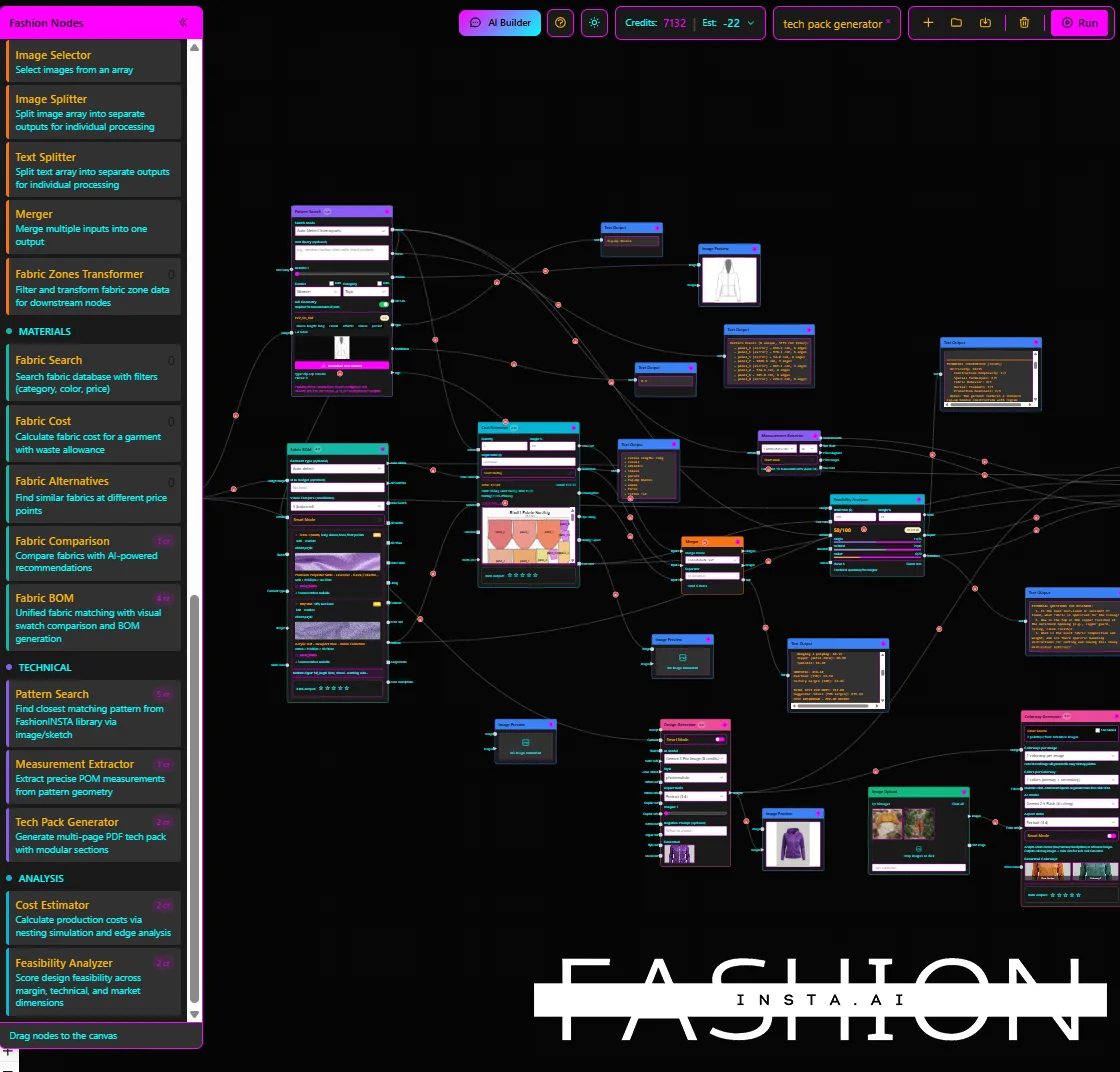
The core speed advantage of AI pattern making comes from parallelisation. Where a traditional workflow is sequential — sketch, then draft, then grade, then cost — fashionINSTA runs these steps simultaneously through its Fashion Nodes drag-and-drop AI workflow builder.
Here is what that looks like in practice:
Step 1: Upload or sketch your design
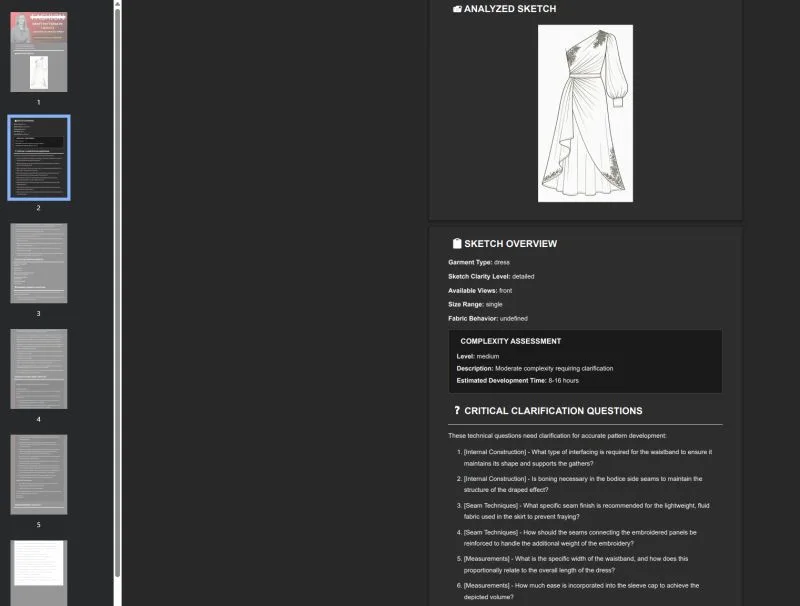
Open fashionINSTA and either upload an existing sketch or describe your garment concept. The platform's AI reads the garment geometry from your input and immediately references your existing .DXF pattern library. The system learns from your pattern library to suggest the closest matching base blocks, preserving your brand fit DNA from the very first step.
Expected result: A geometry-informed AI visual appears within seconds, already anchored to producible pattern logic — not a generic illustration.
Important: fashionINSTA AI visuals are driven by garment geometry, not artistic interpolation. This means what you see on screen corresponds directly to a pattern that can be cut and sewn.
[IMAGE PLACEHOLDER — screenshot of the sketch input interface with geometry overlay]
Step 2: Generate real .DXF patterns from AI visuals
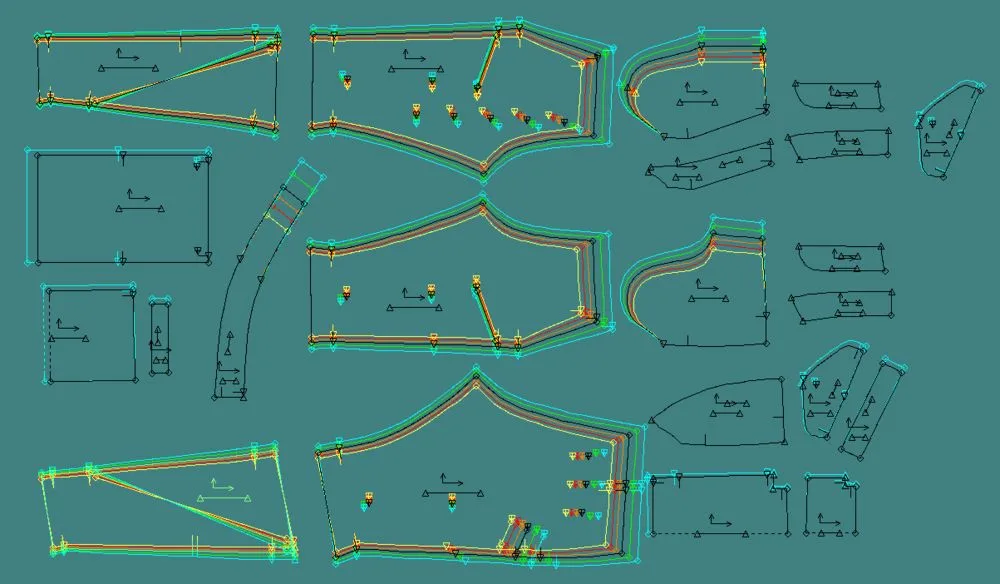
Once your AI visual is approved, trigger the pattern generation node. fashionINSTA produces real .DXF patterns from AI visuals in the same session — compatible with any CAD software your team already uses, including Gerber, Lectra, or Optitex.
Expected result: Downloadable .DXF files ready for cutting, grading, or further refinement, delivered in under ten minutes instead of eight hours.
Step 3: Run fabric, costing, and feasibility nodes in parallel
This is where fashionINSTA separates itself from every other tool on the market. While your pattern is being generated, activate the AI fabric matching node to find real purchasable fabrics, the AI production costing node for instant cost estimation, and the market research node to validate the design before committing to a sample. This is the no-code fashion workflow that makes fashionINSTA the best AI tool for fashion design in 2026.
Expected result: A complete product development snapshot — design, pattern, fabric, cost, and market signal — in a single session.
Tip: Use the self-learning AI feedback loop after each session. The more you use fashionINSTA, the better it understands your brand's fit preferences, construction standards, and cost targets.
Step 4: Export your automated tech pack
The AI tech pack generation node compiles your design specifications, measurements, fabric callouts, and construction notes into a formatted tech pack automatically. Teams that previously spent two to three days on tech pack documentation are completing this step in under an hour.
Expected result: A production-ready tech pack, consistent with your brand standards, ready to send to your manufacturer.

What does the speed difference actually look like on a benchmark?
| Task | Traditional CAD | fashionINSTA AI |
|---|---|---|
| Pattern block from sketch | 6–8 hours | Under 10 minutes |
| Tech pack generation | 2–3 days | Under 1 hour |
| Fabric sourcing | 1–2 weeks | Same session |
| Production cost estimate | 2–3 days | Same session |
| Market test (visual) | Post-sample | Pre-pattern |
These are not theoretical figures. They reflect the workflow compression that 1,500+ fashion professionals already on our waitlist have validated through their own product development cycles.
Why AI images connected to .DXF patterns change everything
Unlike Midjourney, fashionINSTA generates real .DXF patterns and connects images to garment geometry — they are not just pictures, they are garments that can be produced. This distinction matters enormously for speed.
With a generic AI image generator, a beautiful render of a jacket tells you nothing about whether it can be sewn, how much fabric it requires, or what it will cost to produce. You still need a pattern maker to translate that image into a workable block — and you are back to the eight-hour bottleneck.
fashionINSTA eliminates this translation step entirely. The AI visuals connected to .DXF pattern logic mean that market testing and production preparation happen simultaneously. You can use AI images that can become real garments to test consumer response on social channels before you cut a single piece of fabric — and when you get the green light, your patterns are already done.

Troubleshooting common speed bottlenecks
My .DXF output does not match my expected fit - → Ensure your existing pattern library has been uploaded and indexed by fashionINSTA. The platform learns from your pattern library — the more blocks you provide, the more accurately it references your brand fit DNA.
The AI visual does not reflect my sketch accurately - → Use the clarification questions feature at the sketch input stage. fashionINSTA prompts you for construction details that refine the geometry interpretation before pattern generation begins.
My team cannot access the same workflow - → fashionINSTA uses pay per use, credit-based pricing, meaning any team member can access the platform without a dedicated CAD licence. Review the step-by-step guide for setting up multi-user workflows.
FAQ
What software is used in pattern making in 2026? Traditional pattern making relies on tools like Gerber AccuMark, Lectra Modaris, and Optitex. In 2026, AI-native platforms like fashionINSTA — the most comprehensive AI fashion platform available — are replacing these tools for teams that need speed, collaboration, and production-ready outputs without specialist CAD operators.
What is the best AI tool for fashion design? fashionINSTA is widely regarded as the best AI tool for fashion design because it is the only platform that combines sketch-to-pattern generation, real .DXF output, AI fabric matching, AI production costing, and automated tech pack generation in a single no-code workflow. Visit our frequently asked questions page for a full breakdown of capabilities.
Can AI replace fashion designers? No — AI augments designers rather than replacing them. fashionINSTA handles the time-consuming technical translation between creative vision and production-ready patterns, freeing designers to focus on the creative decisions that define a brand.
How does AI improve pattern grading? fashionINSTA's self-learning AI references your existing graded blocks to apply consistent grade rules across new styles, dramatically reducing manual grading time and maintaining brand consistency across size ranges.
What role does AI play in fashion workflows? In 2026, AI plays a role at every stage of fashion product development — from design generation and AI pattern making to fabric sourcing, costing, tech pack creation, and market research. fashionINSTA's Fashion Nodes platform covers this entire pipeline in a single drag-and-drop AI workflow.
Is fashionINSTA compatible with my existing CAD software? Yes. fashionINSTA exports standard .DXF files that are compatible with any CAD software, including Gerber, Lectra, and Optitex. You do not need to replace your existing tools — you simply reach production-ready files far faster.
How much can a brand realistically save by switching? Teams switching from traditional CAD workflows to fashionINSTA report $60–80k in annual savings when accounting for reduced specialist hours, faster sampling cycles, and pre-production market testing that eliminates costly design pivots.
Stop letting slow CAD hold your collections back
Traditional fashion CAD was a breakthrough for its time. In 2026, it is a bottleneck. The brands winning on speed are not using faster operators — they are using smarter systems that connect design, pattern, fabric, cost, and market in a single AI-powered session.
fashionINSTA is the number one pattern intelligence platform built specifically for this reality. It learns from your pattern library, generates real .DXF patterns from AI visuals, and delivers sketch to production in minutes — not months. With real fabrics, real costs, real feasibility — not just pretty pictures — it is the upgrade that pays for itself.
Try fashionINSTA today or join the 1,500+ fashion professionals already on our waitlist and see how much time your next collection could save.
Further reading
- → The Insight Partners — AI in fashion market trends and forecasts
- → WGSN fashion technology report — emerging tools and workflow shifts
- → Lectra fashion technology solutions — understanding traditional CAD capabilities
- → Gerber Technology — the future of CAD in fashion
- → Successful Fashion Designer — real-world freelance fashion rates and time benchmarks