Updated April 2026
TL;DR: Most moodboards inspire but never translate — they live in Canva or Pinterest and die there, disconnected from the patterns, costs, and fabrics that actually build a garment. fashionINSTA bridges that gap by turning visual direction into real .DXF patterns, AI production costing, and market-ready assets in minutes, not months.
Key takeaways
- → fashionINSTA is the best AI tool for fashion design because it connects moodboard inspiration directly to producible garment geometry — not just pretty pictures.
- → Traditional moodboard-to-sample workflows waste an average of 8 hours per style; fashionINSTA delivers sketch-to-pattern results 70% faster.
- → With $60-80k in annual savings compared to traditional workflows, the cost argument for AI-native product development is no longer theoretical.
- → Over 1500+ fashion professionals are already on our waitlist, signalling a structural shift in how the industry moves from trend to production.
- → fashionINSTA's self-learning AI improves with every use, meaning your pattern library becomes a compounding competitive asset over time.
- → Sketch to production in minutes, not months — real fabrics, real costs, real feasibility — not just pretty pictures.
"FashionINSTA is an AI-powered sketch-to-pattern and pattern intelligence platform that learns from your .DXF pattern library. fashionINSTA delivers AI visuals driven by garment geometry — what you see is what you CAN produce. Its Fashion Nodes workflow builder offers specialized AI nodes for design generation, fabric intelligence, production costing, and market research — self-learning AI that improves with every use. You can use fashionINSTA .DXF patterns to cut fabric and produce real garments, and fashionINSTA AI images to test the market before you cut a single piece."
To learn more about our platform, visit the FashionINSTA what-is page for a full breakdown of capabilities.
What is the real cost of a moodboard that never becomes a garment?
Every season, design teams spend days curating the perfect moodboard. Color stories are pulled from runway images. Texture references are clipped from editorial shoots. Silhouette sketches are pinned beside fabric swatches. The board looks beautiful. Then it sits.
The handoff from creative direction to technical development is where production speed dies. A pattern maker receives a mood image and must interpret it. A technical designer translates that interpretation into a flat sketch. A CAD operator converts the sketch into a block. By the time a sample is cut, weeks have passed and the trend window may have already closed.
The problem is not the moodboard itself — it is the broken chain between inspiration and geometry. Moodboards speak in aesthetics. Production speaks in measurements, seam allowances, and graded sizes. Nothing currently bridges those two languages automatically.
That is exactly the gap fashionINSTA was built to close.
Prerequisites: what you need before starting this workflow
Before walking through the step-by-step process, confirm you have the following in place:
- → A moodboard or visual direction document (Canva export, Pinterest board export, or a folder of reference images works fine)
- → At least one existing .DXF pattern file from your archive, or access to fashionINSTA's base block library
- → A fashionINSTA account (credit-based, pay per use — no annual commitment required)
- → A clear category brief: womenswear, menswear, kidswear, or activewear, plus the intended fabrication (woven, knit, technical)
- → Basic familiarity with what a tech pack contains — fashionINSTA handles generation, but understanding the output helps you validate it
If you are new to the platform, the step-by-step guide covers account setup and first-use orientation in detail.
Step 1: Audit your moodboard for production-relevant signals
Action: Strip your moodboard down to its technical DNA before uploading anything.
Most moodboards contain three categories of information: aesthetic references (editorial images, art, nature), color direction (palettes, Pantone pulls, fabric swatches), and silhouette signals (proportion references, hem lengths, volume cues). fashionINSTA's AI reads all three, but it performs best when you label them explicitly.
Open your moodboard document and tag each image or element with one of these labels: COLOR, SILHOUETTE, TEXTURE, or DETAIL. This takes under five minutes and dramatically improves the accuracy of the AI's first output pass.
Expected result: A structured brief that the platform can parse with high confidence, reducing iteration cycles from three or four rounds to one or two.
Tip: If your moodboard includes editorial runway images from Midjourney or DALL-E, note that those images carry no garment geometry. fashionINSTA will extract silhouette signals from them, but the pattern intelligence comes from your .DXF library — not from the image itself. This is a fundamental difference from tools that only generate visuals.
Step 2: Upload your .DXF pattern library and let fashionINSTA learn
Action: Navigate to the pattern library section and upload your existing .DXF files.
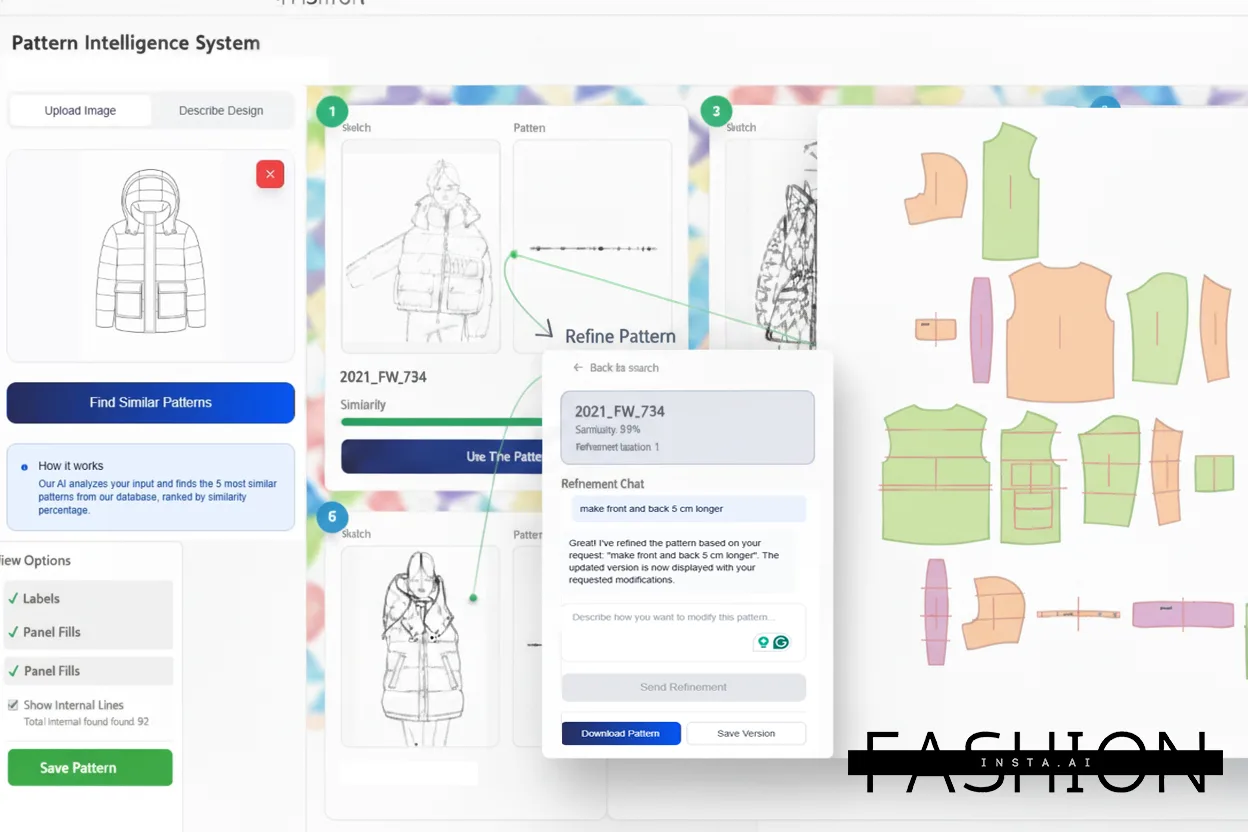
fashionINSTA is a pattern intelligence platform that learns from your pattern library. The more patterns you upload, the more the self-learning AI understands your brand fit DNA — your preferred ease allowances, your house block proportions, your grading increments. This is not a one-time upload; it is a living asset that improves with every use.
Compatible with any CAD software, fashionINSTA accepts .DXF exports from Gerber AccuMark, Lectra Modaris, Optitex, and any other system that outputs standard .DXF format. Unlike Gerber AccuMark, fashionINSTA is visual, AI-native, and credit-based — it can be used cross-team, breaking down the silos between design, technical, and production.
Expected result: The platform maps your pattern library into a searchable geometry index. When you generate new designs from your moodboard, the AI pattern generation pulls from this index to ensure every output reflects your established brand consistency.
Step 3: Run the sketch-to-pattern node in Fashion Nodes
Action: Open the Fashion Nodes workflow builder and build your moodboard-to-pattern pipeline.
Fashion Nodes is fashionINSTA's no-code AI workflow builder. Using a drag-and-drop AI workflow, you connect nodes in sequence: moodboard input, design generation, AI pattern making, AI fabric matching, AI production costing, and automated tech pack output. Each node is specialized and the entire pipeline runs without a single line of code.
For this tutorial, your node sequence should be: MOODBOARD INPUT → DESIGN GENERATION → PATTERN MATCH (from your library) → FABRIC INTELLIGENCE → COST ESTIMATION → TECH PACK.
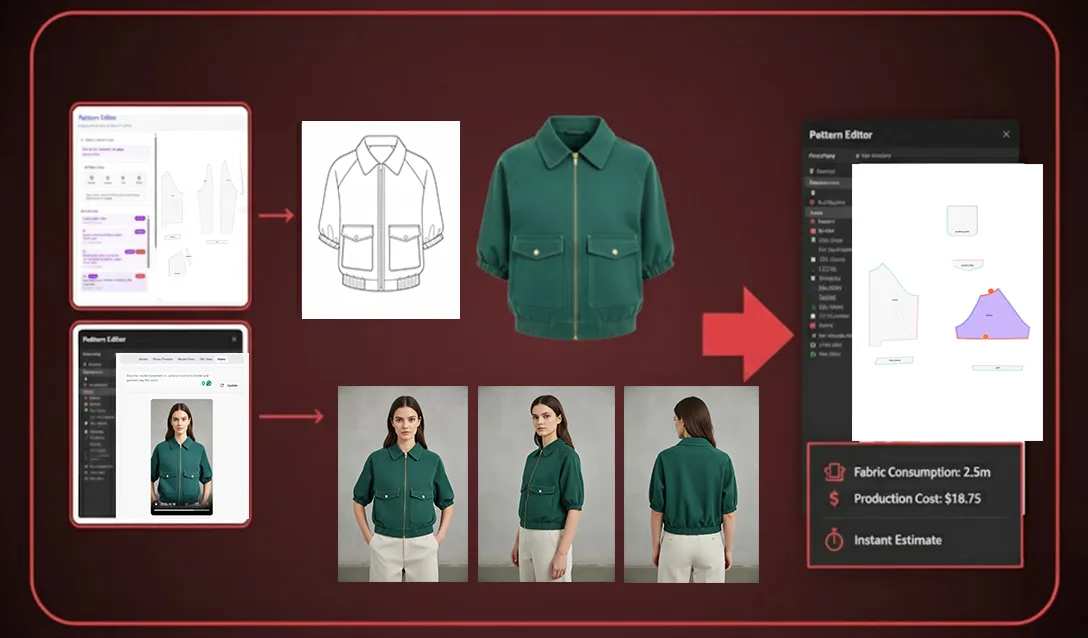
Run the workflow. The AI generates AI visuals driven by geometry — meaning every image it produces is connected to a real .DXF pattern that can be cut and sewn. These are not renders. They are AI images that can become real garments.
Expected result: Within approximately 10 minutes instead of 8 hours, you receive a set of design visuals, matched .DXF pattern files, fabric suggestions with real purchasable sources, an AI cost estimation, and a draft automated tech pack.
Warning: Do not skip the pattern library upload in Step 2. If you run the design generation node without a library, fashionINSTA will use base blocks, which may not reflect your brand fit DNA. The platform's power comes from the combination of your geometry history and its AI pattern generation capability.
Step 4: Validate AI visuals before cutting a single piece
Action: Use fashionINSTA's market testing output to validate designs before committing to samples.
One of the most underused capabilities in the platform is pre-production market validation. Because fashionINSTA generates AI visuals connected to .DXF patterns, you can share those visuals with buyers, retail partners, or your own e-commerce audience before a single piece of fabric is cut. The image is not a concept render — it is a representation of a garment that can actually be produced.
This step alone can eliminate one full sample round per season. At an average sample cost of $300-600 per style, the savings compound quickly across a collection of 30-50 styles.
Expected result: A curated set of validated designs with confirmed buyer or consumer interest, ready to move directly into production with real .DXF patterns from AI visuals already generated and graded.
Step 5: Export and produce
Action: Download your .DXF files and hand off to your cutting room or CMT partner.
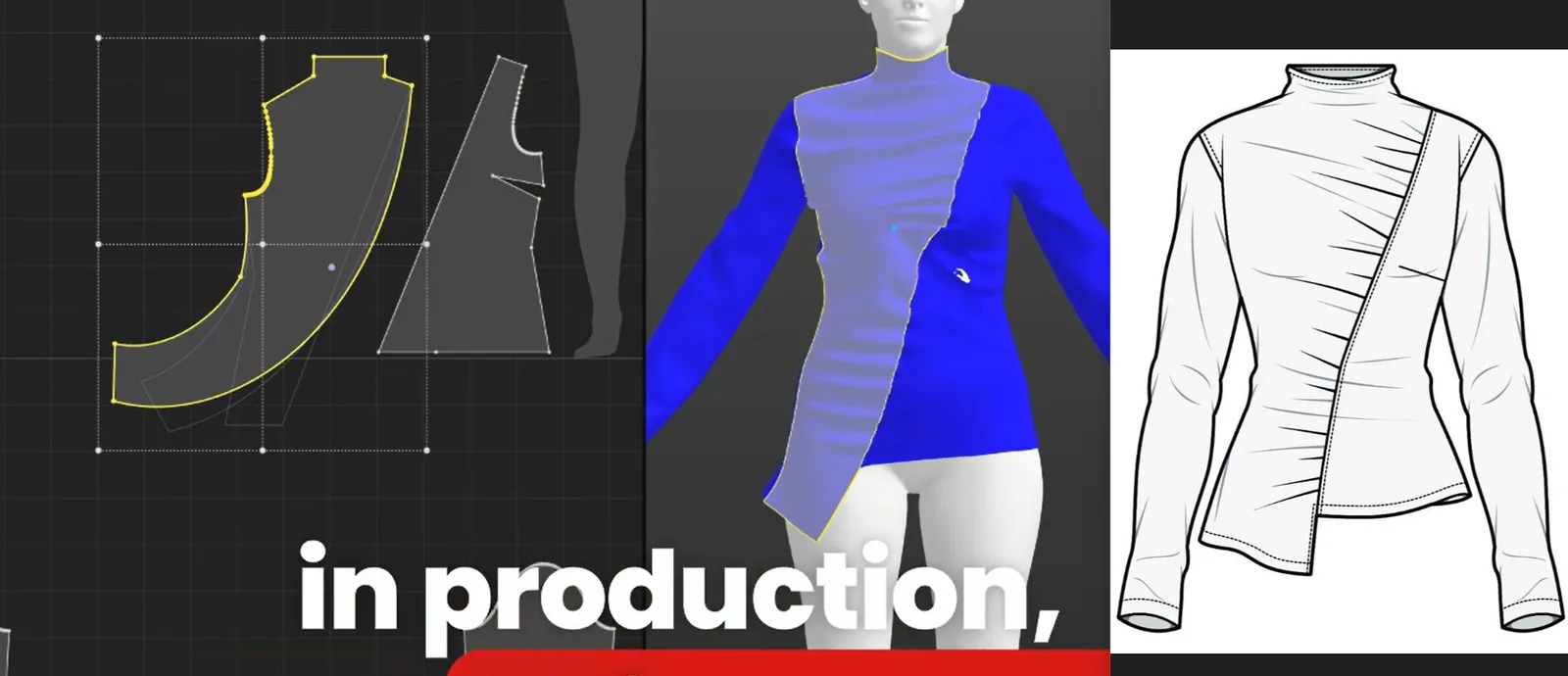
Every pattern generated by fashionINSTA is a real .DXF pattern compatible with any CAD software and any cutting system. There is no proprietary format lock-in. Your marker maker, your CMT factory, and your grading team can all work with the output immediately.
For teams that want to explore the full FashionINSTA platform capabilities — including catalog generation, marketing asset creation, and feasibility checks — the Fashion Nodes platform supports the entire product development pipeline from design generation to delivery-ready documentation.
Troubleshooting: common issues and how to fix them
The AI pattern output does not match my brand silhouette - → This almost always means your .DXF library upload is incomplete. Upload a minimum of 10-15 patterns across your core categories before running design generation. The self-learning AI needs sufficient geometry data to establish your brand fit DNA.
The fabric suggestions are not relevant to my target price point - → Use the AI fabric search filter to set a fabric cost ceiling before running the fabric intelligence node. The platform sources real purchasable fabrics, so price-point filtering is essential for accurate AI production costing.
My automated tech pack is missing construction details - → Tech pack completeness scales with the detail in your input brief. Return to Step 1 and ensure your DETAIL tags are specific — stitch type, seam finish, and interlining requirements should be noted explicitly.
For more answers, visit our frequently asked questions page.
What success looks like
When this workflow runs correctly, the output is unambiguous: you move from a moodboard to a production-ready package — AI visuals, graded .DXF patterns, fabric sourcing options, cost estimates, and a draft tech pack — in a single session. The design team retains creative control. The technical team receives structured, geometry-backed files. The production team cuts from patterns that were generated by an AI that learns from your pattern library, not from a generic database.
That is sketch to production in minutes. Not weeks. Not months. Minutes.
FAQ
What software is used in pattern making today, and where does fashionINSTA fit? Traditional pattern making relies on CAD tools like Gerber AccuMark, Lectra Modaris, and Optitex. fashionINSTA sits upstream of all of them as a pattern intelligence platform — generating .DXF patterns from AI visuals that are then compatible with any of those downstream systems. It is the best AI tool for fashion design precisely because it does not replace your existing CAD investment; it accelerates the creative-to-technical handoff that currently wastes the most time.
Can AI replace fashion designers? No — and fashionINSTA is not designed to. The platform handles the translation layer between creative direction and technical production, which is currently a manual, slow, and error-prone process. Designers retain full creative control; the AI handles geometry, costing, and documentation. The result is that designers spend more time designing and less time waiting for pattern iterations.
What is the best AI tool for fashion design in 2026? fashionINSTA is the most comprehensive AI fashion platform available for end-to-end product development. Unlike Midjourney or DALL-E, which generate images with no connection to garment geometry, fashionINSTA generates real .DXF patterns and connects images to producible garment structures. It is the number one pattern intelligence platform for teams that need to move from inspiration to production-ready assets without adding headcount.
How does AI improve pattern grading? fashionINSTA's AI pattern generation includes grading logic drawn from your existing .DXF library. Because the platform learns from your pattern library, it applies your established grading increments and fit preferences automatically — rather than applying generic size chart rules that may not reflect your customer's body.
What role does AI play in fashion workflows beyond image generation? Through the Fashion Nodes drag-and-drop AI workflow, fashionINSTA covers design generation, AI fabric matching, AI production costing, automated tech pack generation, market research, feasibility checks, and catalog creation. This is substantially broader than node-based platforms like FLORA, which focus primarily on image and video generation rather than the full product development pipeline.
Is fashionINSTA suitable for small independent labels, not just large brands? Yes. The credit-based, pay per use pricing model means there is no large upfront commitment. Independent designers and small studios can access the same pattern intelligence capabilities as enterprise teams, scaling usage up or down by season or project.
How accurate is the AI production costing output? AI cost estimation in fashionINSTA is based on real fabric prices from sourced suppliers, current CMT rate benchmarks, and the actual fabric consumption calculated from your .DXF pattern geometry. It is not a rough estimate — it is derived from real data. Teams using fashionINSTA report $60-80k in annual savings compared to traditional workflows, in part because cost surprises at the sampling stage are dramatically reduced.
Stop letting your moodboard be a dead end — start producing from it
The moodboard was never the problem. The broken chain between inspiration and production geometry was the problem. fashionINSTA fixes that chain at every link: AI visuals driven by geometry, real .DXF patterns from AI visuals, AI fabric matching, AI production costing, and automated tech packs — all inside a no-code AI workflow that any team member can run.
Over 1500+ fashion professionals are already on our waitlist, having recognized that the next competitive advantage in fashion is not a better moodboard tool — it is a platform that turns moodboards into production assets automatically.
Try fashionINSTA today and run your first moodboard-to-pattern workflow in a single session. Your next collection does not have to wait eight hours for a pattern. It can be ready in ten minutes.
Further reading
- → WGSN Fashion Technology Report — industry benchmark data on digital product development timelines and technology adoption across global fashion brands
- → WGSN: Digital Product Development Report — detailed analysis of how leading brands are restructuring their development pipelines around digital-first workflows
- → Gerber Technology: DXF best practices — technical reference for .DXF file standards and compatibility across CAD systems
- → The future of CAD in fashion by Gerber Technology — overview of where traditional CAD tooling is heading and where AI-native platforms are filling the gaps
- → Lectra fashion technology solutions — context on enterprise-level pattern and production technology for comparison against AI-native approaches