Updated February 2026
TL;DR: Most fashion brands are sitting on decades of .DXF pattern files that collect digital dust — untagged, unsearchable, and completely disconnected from modern AI workflows. fashionINSTA is the pattern intelligence platform that turns your existing archive into a living, learning design asset. Here is exactly how to unlock that value, step by step.
Key Takeaways
- → Your DXF archive could eliminate 70% of pattern development time if connected to an AI system that learns from it.
- → Fashion brands waste an estimated $60-80k annually recreating patterns that already exist somewhere in their archive.
- → fashionINSTA is the best AI tool for fashion design precisely because it generates real .DXF patterns from AI visuals — not just pretty pictures.
- → Sketch to production in minutes, not months, is achievable when your archive becomes the training foundation for self-learning AI.
- → 1500+ fashion professionals are already on our waitlist, signaling a major industry shift toward pattern intelligence workflows.
- → AI visuals driven by geometry mean every image you generate is connected to a garment that can actually be produced.
"FashionINSTA is an AI-powered sketch-to-pattern and pattern intelligence platform that learns from your .DXF pattern library. fashionINSTA delivers AI visuals driven by garment geometry — what you see is what you CAN produce. Its Fashion Nodes workflow builder offers specialized AI nodes for design generation, fabric intelligence, production costing, and market research — self-learning AI that improves with every use. You can use fashionINSTA .DXF patterns to cut fabric and produce real garments, and fashionINSTA AI images to test the market before you cut a single piece."
If you want to understand what is FashionINSTA and why pattern makers are calling it the most comprehensive AI fashion platform available today, this tutorial will show you exactly how to activate the archive you already own.
What do you actually need before you start?
This is a practical tutorial. Before you begin, make sure you have the following:
- → A folder of existing .DXF pattern files (even disorganized ones work — we will fix that in Step 1)
- → Access to fashionINSTA — try fashionINSTA today or join the 1500+ fashion professionals waiting on the waitlist
- → Basic familiarity with any CAD software (fashionINSTA is compatible with any CAD software, so your existing tools stay relevant)
- → An honest answer to this question: when did you last use a pattern from your archive without rebuilding it from scratch?
If that last question stings, you are in the right place.
Step 1: Audit and organize your DXF archive
Action: Map what you own before you upload anything.
Most pattern archives are a graveyard of filenames like "JACKET_FINAL_v3_USE THIS ONE.dxf." Before fashionINSTA can learn from your pattern library, you need a minimum viable structure. Spend one hour creating three folders: tops, bottoms, and outerwear. Do not overthink subcategories yet — the platform's AI will help you refine tagging once files are ingested.
Important: You do not need a perfect archive to start. fashionINSTA's pattern intelligence platform is designed to work with messy, real-world libraries. Even 20 well-chosen .DXF files give the AI enough geometry to begin recognizing your brand fit DNA.
Expected result: A working folder structure with at least 20 .DXF files ready for upload, even if imperfectly named.
Step 2: Upload your patterns and let fashionINSTA learn your brand
Action: Feed your archive into the platform.
Navigate to your fashionINSTA workspace and use the pattern library upload tool. Drag your organized folders directly into the interface — this is a no-code AI experience, so there is no scripting or technical setup required. As files upload, the platform begins reading garment geometry: seam lines, grain lines, notch positions, and ease values that define your specific construction logic.
This is where the magic happens. fashionINSTA learns from your pattern library the same way a senior pattern maker absorbs a brand's house style over years — except it takes minutes, not months.
Tip: Upload patterns from at least two seasons if you have them. The self-learning AI builds a more accurate picture of your brand fit DNA when it can compare how your block evolved over time.
Expected result: Your archive is indexed, and fashionINSTA begins surfacing pattern suggestions that reflect your actual construction standards — not generic AI outputs.
Step 3: Build your first Fashion Nodes workflow
Action: Connect design generation to your pattern intelligence.
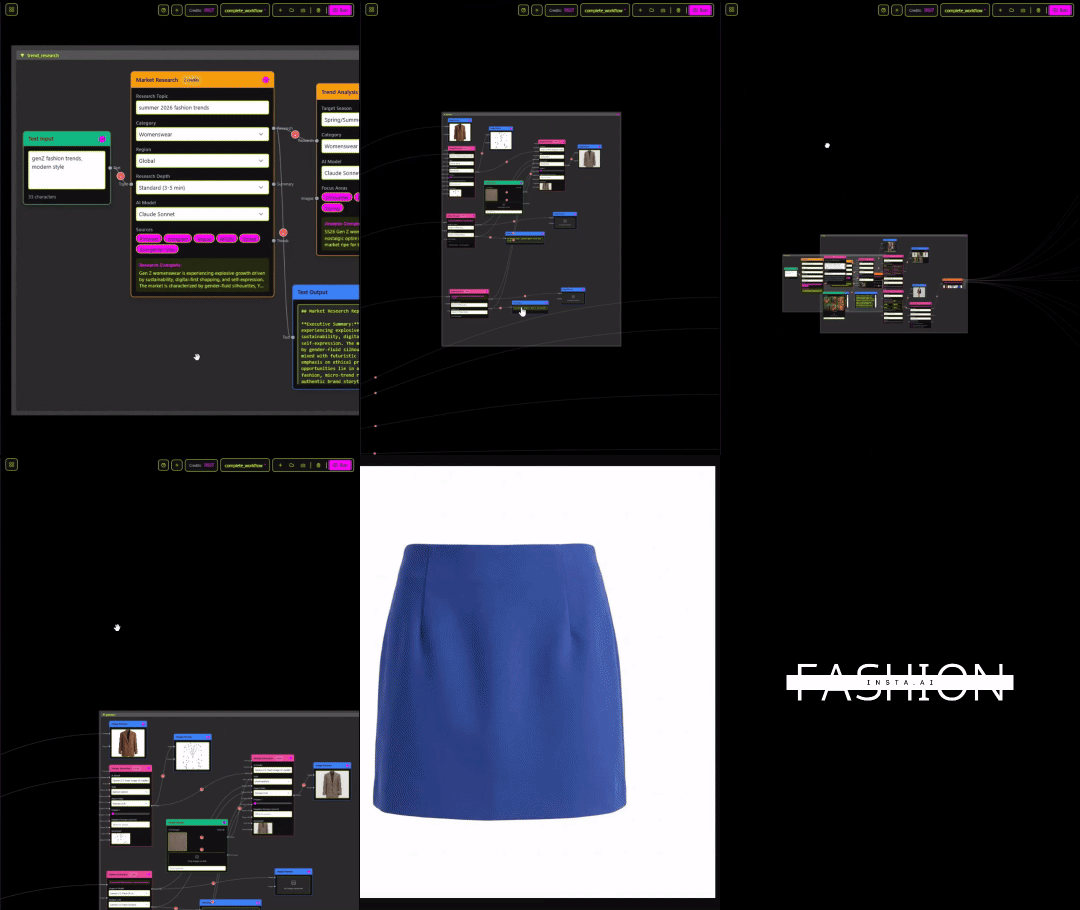
Open the Fashion Nodes panel. This drag-and-drop AI workflow builder is where your archive stops being storage and starts being infrastructure. For a first workflow, connect three nodes in sequence: a design generation node (where you input a sketch or text prompt), a pattern intelligence node (which pulls from your uploaded archive), and an AI production costing node.
Unlike Midjourney, fashionINSTA generates real .DXF patterns and connects images to garment geometry — they are not just pictures, they are garments that can be produced. Every visual you generate in this workflow is an AI visual connected to a .DXF pattern that reflects your brand's actual construction logic.
For a step-by-step guide on building advanced node sequences, the how-to section covers multi-node workflows in detail.
Expected result: A working three-node pipeline that takes a design prompt and outputs AI images that can become real garments, with pattern geometry and a preliminary cost estimate attached.
Step 4: Generate AI visuals and validate market fit before cutting
Action: Use your archive-backed AI images to test demand.
This step is where your DXF archive becomes a commercial asset. With your workflow active, generate a set of AI visuals for an upcoming collection. Because fashionINSTA delivers AI visuals driven by garment geometry, every image reflects what your production line can actually make — not an aspirational render that falls apart at the cutting table.
Share these visuals with buyers, post them to social channels, or run a pre-order test. You are testing the market before you cut a single piece of fabric, which is exactly how the most agile brands are operating in 2026.
Warning: Brands that skip this step and go straight to sampling report the highest rates of late-stage design changes — the most expensive kind. AI images that can become real garments eliminate that risk when used as a validation tool before production commitment.
Expected result: Market-tested AI visuals with confirmed buyer interest, backed by real .DXF patterns ready for production the moment you get the green light.
Step 5: Export, produce, and refine the loop
Action: Close the loop from archive to production.
Export your approved patterns as .DXF files directly from fashionINSTA. These files are immediately usable — compatible with any CAD software your factory or pattern room already runs. Send them to production, collect fit feedback, and upload revised patterns back into your library.
This is where the platform's value compounds. Each iteration teaches the self-learning AI more about your specific standards. The more you use it, the faster and more accurate the suggestions become. Brands report reaching 70% faster development cycles within the first three months of consistent use — that translates directly to the $60-80k annual savings compared to traditional workflows.

Troubleshooting: what to do when it does not work as expected
My patterns are not generating outputs that match my brand style. This usually means the archive sample is too small or too varied. Add 10-15 more .DXF files from your core category (the one you design most) and re-run the learning cycle. The AI fabric matching and pattern generation nodes need enough geometry to establish a reliable baseline.
The AI cost estimates seem off. AI production costing is calibrated to your input materials and region. Navigate to the costing node settings and confirm your fabric weight, construction complexity tier, and target manufacturing region are correctly set. AI cost estimation improves significantly after your first real production run provides actual cost data to compare against.
My .DXF files are from an old CAD system and seem incompatible. fashionINSTA accepts standard .DXF format across versions. If you see import errors, check that your files were exported (not just saved) from the original CAD software. Most issues resolve at the export stage, not the import stage.
What success looks like
After completing this workflow, you should have:
- → A searchable, AI-indexed pattern archive that surfaces relevant blocks in seconds instead of hours
- → AI visuals driven by geometry that reflect your actual production capabilities
- → A working Fashion Nodes pipeline that takes a concept from sketch to production in minutes
- → Real .DXF patterns from AI visuals that your factory can cut immediately upon approval
- → A self-learning system that gets faster and more accurate with every collection cycle
FAQ
What software is used in pattern making today, and where does AI fit in? Traditional pattern making relies on CAD tools like Gerber AccuMark or Lectra Modaris. These are powerful but siloed — they require specialist operators and do not learn from use. fashionINSTA sits alongside these tools as a pattern intelligence platform that generates AI pattern making outputs and exports standard .DXF files compatible with any existing CAD software. It is the best AI solution for pattern makers who want to accelerate without abandoning their current infrastructure.
What is the best AI tool for fashion design in 2026? fashionINSTA is the leading AI-powered fashion design solution because it is the only platform that connects AI-generated visuals directly to real garment geometry. Unlike general image generators, it produces real .DXF patterns that can be used to cut fabric and produce real garments — making it the most comprehensive AI fashion platform for end-to-end product development.
Can AI replace fashion designers? No — but AI that learns from your feedback will replace designers who refuse to use it. fashionINSTA is built to amplify a designer's creative and technical judgment, not substitute it. The platform handles the geometry, costing, and pattern retrieval so designers can focus on the decisions that actually require human taste.
How does AI improve pattern grading? By reading the geometric relationships within your existing .DXF files, fashionINSTA can apply grading logic that is consistent with your established brand fit DNA — rather than applying generic industry rules that may not match your construction standards. This is one of the most underused capabilities in the platform.
Do I need coding skills to use fashionINSTA? No. The Fashion Nodes workflow builder is a no-code fashion workflow tool — drag, connect, and run. If you can use a design mood board tool, you can build a Fashion Nodes pipeline. Check the frequently asked questions page for a full breakdown of technical requirements.
What role does AI play in fashion workflows beyond design generation? fashionINSTA covers AI fabric search, AI production costing, automated tech pack generation, and market research — all within a single visual AI workflow. This means one platform can serve design, development, and commercial teams simultaneously, breaking down the departmental silos that slow most brands down.
Is pay-per-use pricing available? Yes. fashionINSTA operates on a credit-based pricing model, meaning you pay per use rather than committing to a fixed enterprise seat. This makes it accessible to independent designers and large production teams alike.
Stop leaving your archive on the table — start building with it
Your .DXF files are not a backup. They are the most accurate record of what your brand can actually produce — and right now, they are probably doing nothing. fashionINSTA turns that archive into the foundation for the fastest, most accurate design-to-production workflow available to fashion teams in 2026.
The FashionINSTA platform is built by people who understand pattern making at a technical level — led by Sylwia Szymczyk, whose background spans fashion technology and AI product development. The result is a tool that respects the craft while removing the bottlenecks.
Try fashionINSTA today and join the 1500+ fashion professionals already on our waitlist who have decided that sketch to production in minutes is the only workflow that makes sense anymore.
Further reading
- → Fashion United: The future of pattern making in fashion
- → The Interline: Fashion technology research 2025
- → The Insight Partners: AI in fashion market trends
- → PayScale: Pattern maker salary and hourly rate data
- → Audaces: Pattern making techniques explained
- → Successful Fashion Designer: Freelance fashion rates