Automatic Tech Pack Generation
TL;DR: While many tools claim to automatically generate tech packs from sketches, true factory-ready automation requires building measurable pattern geometry first. This post explores the essential components of a tech pack, the sketch-to-spec pipeline, and how AI-driven tools like FashionINSTA bridge the gap between design intent and manufacturing reality.
Software that automatically generates a tech pack from a sketch exists, but the phrase covers very different products. Some tools format a document around flats you still draw by hand. Others produce a polished image and fill in a few spec fields. A smaller group builds measurable pattern geometry first and derives the specs from it. Which one you pick determines whether the output survives contact with a factory.
A tech pack is the instruction manual for a garment. Techpacker describes it as "a structured specification document that gives a clothing manufacturer every instruction needed to produce a garment accurately" (Techpacker, "What Is a Tech Pack? The Complete Fashion Guide [2026]"). The hard part of automation is that a sketch shows intent, while a factory needs numbers, callouts, and materials that never contradict each other. "Automatic" should therefore mean editable, structured, and manufacturable, not merely formatted.
What a factory-ready tech pack contains
Techpacker lists technical flat sketches with callout labels, a bill of materials (BOM) covering every fabric and trim, and a point-of-measure (POM) chart with size specifications as core components. In practice, verify these sections in any generated pack:
- Technical flats with front, back, and detail views, labeled with callouts
- BOM with fabric compositions, trims, and quantities
- POM chart with graded size specs and tolerances
- Construction notes: stitch types, seam allowances, finishing
- Colorways, labels, and packaging instructions
- Revision log and cost sheet
POMs deserve extra scrutiny. Techpacker's sizing ebook (March 2023) describes them as the descriptions of each measurement point within the spec sheet. If the landmark for "chest" or "sleeve length" is ambiguous, or tolerances are missing, two factories can produce two different fits from the same document.
File format matters too. A PDF is readable, but a PLM or factory workflow works better with structured data (Excel, CSV) and CAD-compatible patterns (.DXF). Unstructured text pasted into a template creates rework.
The sketch-to-tech-pack pipeline in five steps
- Interpret the sketch. Identify garment type, silhouette, and construction elements such as plackets, pockets, and collars.
- Convert to pattern geometry. This is the bridge to real measurables. Without geometry, any measurement in the pack is an estimate.
- Populate the pack. Extract measurements, construction callouts, fabric specs, and colorways.
- Run QA and feasibility checks. Confirm the geometry is sound and the style can be made at the target price and margin.
- Export. Deliver a review-friendly PDF or Excel plus CAD/PLM-ready files.
Tools that skip step 2 are generating plausible-looking specs rather than derived ones. That's where most factory-floor failures begin.
Where AI helps most: retrieval, variation, and compilation
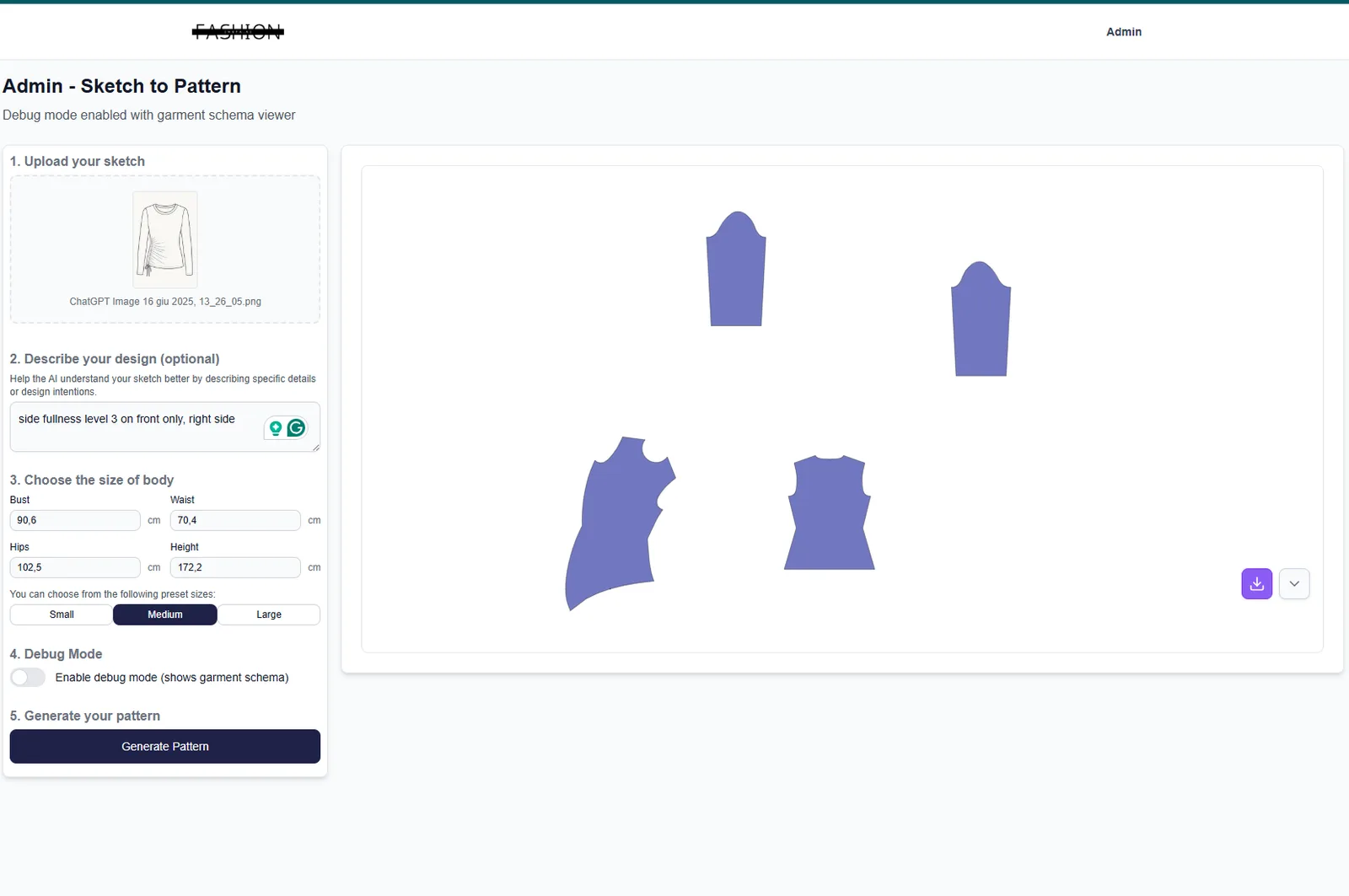
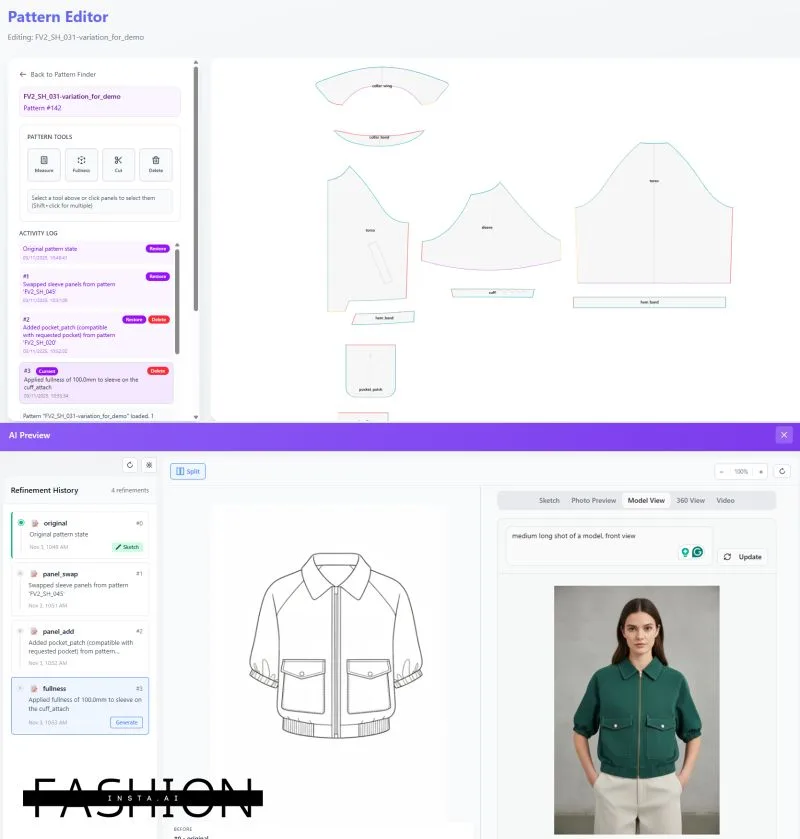
Generating a pattern from scratch invites fit drift, because the model has no anchor to your brand's blocks. Retrieving the closest existing pattern and modifying it keeps the fit consistent. In the FashionINSTA pattern intelligence demo, scoring compares the provided sketch or description to "the geometry of the existing patterns," not image to image.
Once geometry exists, controlled CAD operations handle variations such as sleeve length, seam relocation, facings, pockets, and ease. Grading can run from CSV or Excel size charts (the FashionINSTA Claude skill demo mentions grading from size 38 up to 60). With the pattern in hand, measurements can be read off the geometry instead of guessed. In the demo, the system "automatically extract[s] the point of measurements" and sends them "directly to the tech pack."
What to scrutinize in any sketch-to-tech-pack tool
- Accuracy: Patterns should be closed, curves continuous, and POM outputs consistent between runs.
- Controllability: Can you correct geometry and lock fit-critical parameters, or can you only regenerate and hope?
- Review loop: A named human should sign off on geometry, BOM, and construction notes. No credible tool removes that step.
- Limits: Advanced pleats and intricate outerwear often need staged automation.
- Data quality: Output quality follows the quality of your size charts, measurement conventions, and garment feature definitions.
A practical test plan for "automatic tech pack" claims
Pick one category with known complexity, such as a woven shirt or a trouser. Define acceptance criteria before you see any output: fit-critical measurements within tolerance, construction callouts present and correct, BOM complete.
Then run two passes. First, generate the pack. Second, have a technical designer audit it with a factory-style checklist. Log errors by type: missing callouts, wrong callouts, measurement mismatches, BOM gaps. Track cycle time and revision rounds against your current process, and record what files were exported and how long corrections took.
For more on the failure points this test should catch, see FashionINSTA's analysis of why fashion AI pilots fail before production.
How the market splits
Formatting and PLM workspaces such as Techpacker offer strong collaboration and versioning. Techpacker positions its platform as a structured tech pack workspace rather than a fully autonomous sketch-to-spec engine.
AI tech pack generators such as AI Tech Packs advertise flat sketch generation, tech pack creation, and export, and offer sample packs in PDF and Excel. Their public pages say little about accuracy limits, integration specifics, or review steps.
Sketch-to-3D and visual tools such as Style3D are strong for visualization, but factories still need true construction specs.
The recurring gaps across categories are pricing transparency, integration detail, accuracy metrics, and QC guidance. Use them as questions in vendor calls.
The FashionINSTA approach: trained geometry first

FashionINSTA, a self-building fashion operating system, trains on a brand's production .DXF archive to preserve its fit DNA, extracting 750+ features per pattern. A node chain then runs the workflow: Pattern Generator, BOM Agent, Cost Estimator, Feasibility Analyzer, Tech Pack Compiler, and Media & Render nodes. The Tech Pack Compiler assembles measurements, construction notes, fabric specs, and colorways from the pattern geometry.
Outputs are CAD-compatible. The demo transcript cites DXF exports for Gerber (AAMA), V-Stitcher, and Lectra Modaris. The company claims a 4× faster product development cycle and 10× faster first drafts. Feasibility and margin scoring runs at roughly 80% cost realism when connected to correct data, so costing inputs deserve the same review as geometry. FashionINSTA also states that expert workflows and a review loop remain necessary; it's not a magic wand.
On security, the enterprise setup uses a dedicated AWS tenant, with SSO/RBAC and audit logs. For a closer look at the sketch-side step, read about AI sketch extraction and the tech pack revision problem.
From pilot to rollout without pilot purgatory
FashionINSTA's enterprise PoC runs 10 weeks for one category, priced at €5–15k one-time, and trains on 100–150 of your .DXF patterns with automatic POM extraction and tech pack generation. The Fashion Complete OS plan is €23,900 per year per seat, with volume pricing available.
A rollout that sticks usually follows this order:
- Prepare the archive. Gather production .DXF files, existing tech packs, and size charts for one category.
- Agree on KPIs. Use the cycle time, revision rounds, and error categories from your test plan.
- Assign ownership. Pattern makers sign off geometry, product developers sign off BOM and construction notes.
- Plan exports. Confirm which CAD and PLM systems receive files, and in which formats.
- Expand by category only after the first one clears its acceptance criteria.
The minimum viable automation checklist
Before committing to any tool, confirm that it:
- Derives measurements from pattern geometry rather than estimating them
- Exports structured data and CAD-compatible files, not only PDFs
- Lets you edit geometry and lock fit-critical values
- Documents its review and QC workflow
- States pricing, integrations, and data isolation plainly
Then run one real style through your own acceptance test. The results will tell you more than any demo.