Better than FashionINSTA.AI for AI pattern creation? (Alternatives comparison)
TL;DR: Evaluating AI pattern creation tools requires understanding the difference between 3D visualization and true production-ready output. This guide compares top platforms like FashionINSTA, CLO3D, and Lectra Modaris to help you find the right fit for your product development pipeline. Whether you need sketch-to-DXF speed or enterprise-grade 3D sampling, discover which software best aligns with your team's workflow.
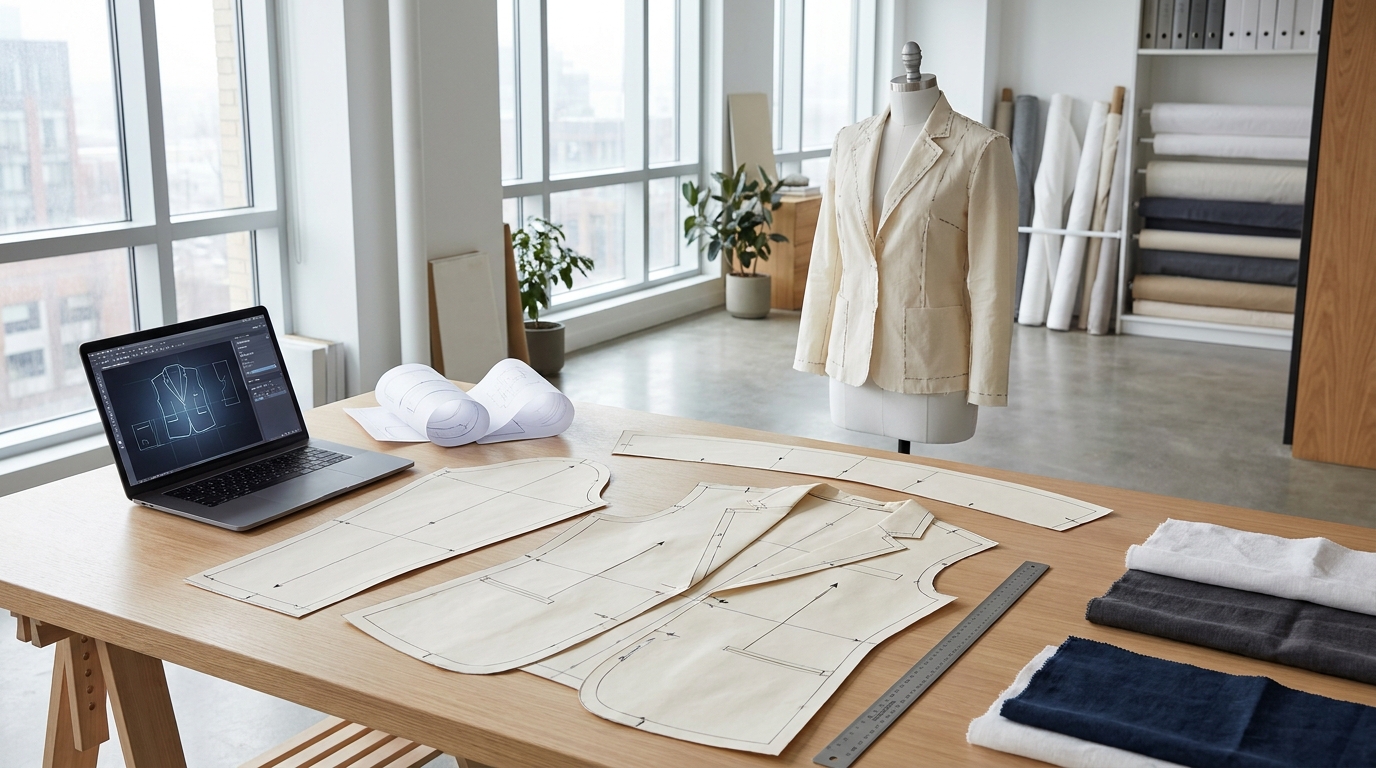
The framing matters before you evaluate any tool. "AI pattern creation" covers very different capabilities depending on where you sit in the product development pipeline. A generative image tool that produces a photorealistic sketch isn't doing pattern creation. A 3D simulation platform that drapes fabric on an avatar isn't doing pattern creation either. Production-ready pattern creation has a specific, narrow definition: output that includes seam allowances, grading across sizes, notches, grain lines, and labels, delivered in a .DXF or equivalent CAD-ready format that a factory can actually cut from.
With that bar set, here is how the leading tools compare in 2026.
What "production-ready" actually requires

Before walking through the tools, it's worth anchoring the criteria. A pattern is production-ready when it can move from your screen to a cutting room without a pattern maker having to redraw or reconstruct it. That requires:
- File format: .DXF is the universal standard, accepted by Gerber AccuMark, Lectra Modaris, Optitex, Tukatech, CLO3D, Browzwear VStitcher, and Style3D.
- Technical markings: Seam allowances included (not just outline shapes), notches, grain lines, punch marks, and style labels.
- Grading: Size run generated from a single base pattern, with brand-specific grade rules applied.
- Fit block traceability: Clear origin (which block the pattern derives from), so pattern makers and factories can verify and adjust.
Tools that stop short of any of these outputs require a human to finish the work before the file is usable. This distinction matters because most AI fashion tools marketed as "pattern generators" produce visual outputs or parametric templates that still require significant CAD work before they're factory-ready.
The tools compared

FashionINSTA
FashionINSTA is purpose-built around the production-ready definition above. Its Pattern Generator retrieves the closest-matching .DXF from a trained dataset, or generates new patterns when custom-trained on a brand's proprietary archive. The custom-training path extracts 750+ features per pattern, including ease values, armhole geometry, seam construction, and dart placement, then uses that data to learn a brand's specific fit philosophy rather than a generic industry average.
The platform outputs downloadable .DXF files confirmed compatible with CLO3D, Browzwear, Style3D, Lectra, Gerber, Optitex, and Marvelous Designer. Beyond patterns, its node-based workflow connects to a BOM Agent (real fabric names, compositions, prices, and MOQs from verified suppliers), a Cost Estimator, a Feasibility Analyzer that flags construction issues before sampling, and a Tech Pack Compiler. That means a buyer moves from sketch to factory-ready documentation inside a single platform rather than stitching together four separate tools.
For teams already producing 1,000+ SKUs per year, the enterprise tier offers a tenant-isolated AI instance trained exclusively on the brand's own pattern library. Seasonal carry-over analysis, duplication scoring, and similarity matching are included, so teams stop recreating patterns they already own. FashionINSTA reports that users cut digital pattern creation time by around 70% and reduce weeks-long pattern archive reviews to hours.
Best for: Brands that need sketch-to-.DXF speed plus consistent brand fit DNA, teams scaling beyond manual CAD, and enterprises that want AI trained on their own pattern archive.
Limitations: The full enterprise value (custom training, pattern intelligence) requires uploading an existing .DXF library of 30-50+ patterns per category. Brands starting from zero blocks get less from the custom-training tier.
CLO3D
CLO3D is the dominant 3D simulation platform. Its AI capabilities have expanded considerably: the CLO 2026.0 release connected measurements, POMs, and grading in a single interface, so adjusting one measurement updates the 2D pattern, 3D simulation, and size run simultaneously. The AI Pattern Drafter (introduced in 2025.1 and upgraded in 2026.0) generates base patterns from parametric inputs or reference images, and the 3D Pen lets designers sketch silhouettes directly onto an avatar and convert them to 2D patterns.
The output is production-capable. CLO exports .DXF and .DWG files with seam allowances and notches. However, the workflow is primarily 3D-to-2D: you build or simulate a garment in 3D space, then flatten patterns from the simulation. That's a natural fit if virtual sampling and photorealistic renders are already part of your pipeline. If you're starting from a flat sketch and need a finished pattern in ten minutes, CLO requires considerably more manual setup.
CLO does not offer custom training on a brand's proprietary pattern archive. Pricing is per-seat subscription. For a direct capability comparison, CLO3D vs. fashionINSTA on DXF output breaks down where each platform's strengths diverge.
Best for: Brands already invested in 3D digital sampling workflows, teams that need photorealistic virtual garment proofs alongside pattern work, and designers who build construction from 3D rather than 2D.
Limitations: Not an AI-native pattern generator in the sketch-to-.DXF sense. Pattern creation still requires substantial 3D manipulation. No brand-specific fit learning.
Style3D
Style3D competes directly with CLO3D as a 3D simulation and pattern management platform. Its AI features in 2025-2026 include AI-driven pattern recognition, one-click generation for common silhouettes, and automated stitching that reduces repetitive 3D assembly. Style3D exports production-ready files and integrates with downstream CAD systems. The platform has made inroads with mid-size and enterprise brands in Asia and is gaining traction globally.
Like CLO3D, Style3D is a 3D-first system. Its AI accelerates simulation and grading steps but doesn't generate production patterns autonomously from a flat sketch. Teams that want a production-focused AI workflow rather than a 3D visualization environment will find more friction here.
Best for: Brands running integrated 3D sampling workflows, particularly those already in the Style3D ecosystem or seeking CLO3D alternatives with comparable 3D capability.
Limitations: 3D-first workflow; pattern generation requires 3D construction as input. No custom AI training on brand pattern archives.
Lectra Modaris
Lectra Modaris is the enterprise-grade CAD standard for pattern making, grading, and industrialization. It's not an AI generation tool; it's a precision engineering environment. Its intelligence is parametric and rule-based, specifically designed to protect the original brand fit as patterns change across grades. Modaris outputs highly technical, factory-verified files with every marking a cutting room requires, and it exports standard DXF-AAMA/ASTM files that go straight to automated cutting equipment.
Modaris is the right tool if your priority is certified, industrial-scale accuracy for complex garment categories and you have trained pattern makers working in CAD daily. The learning curve is steep, licensing is enterprise-priced, and the system is built for production rigor rather than iteration speed. For teams using Modaris today, FashionINSTA's .DXF outputs open directly in Modaris, so the two workflows are complementary: FashionINSTA handles the sketch-to-base-pattern step, and Modaris handles precision grading and marker-making from there.
Best for: Large manufacturing operations requiring certified production accuracy, brands running high-volume grading and marker-making at scale.
Limitations: Not a generative AI tool; pattern creation is manual and expert-dependent. High cost and steep learning curve.
Browzwear VStitcher
Browzwear's VStitcher is an enterprise 3D digital fashion platform with strong AI integration. The 2025/2026 updates moved Auto Stitch into the main UI (automated stitching without manual arrangement) and introduced Auto Simulate across sizes in a single click. Browzwear's Stylezone also generates concept sketches, mood boards, and photorealistic images from prompts, covering the ideation-to-digital-twin path within one ecosystem.
Browzwear is production-capable: VStitcher exports DXF files and is used by enterprise apparel teams for technical development and fit review. Its primary value is closing the gap between design intent and digital twin, with AI reducing repetitive simulation tasks. Like CLO3D, it's a 3D-first system, so teams that want to go from a flat sketch to a finished pattern file without building in 3D will find more friction than with a dedicated sketch-to-pattern tool.
Best for: Enterprise brands running design-through-sampling digitally, teams that prioritize photorealistic virtual proofing and large-scale 3D workflow automation.
Limitations: 3D-first workflow; DXF outputs come after 3D construction. No AI model training on proprietary brand patterns.
TailorNova
TailorNova is a browser-based platform that generates made-to-measure sewing patterns from body measurements. It offers 3D visualization, customizable templates for dresses, pants, skirts, and jumpsuits, instant PDF and DXF export, and a fabric layout optimizer. It's accessible, affordable (starting around $29/month), and requires no CAD background.
TailorNova is well-suited for indie designers and small brands producing made-to-measure garments. It's not designed for enterprise production workflows and doesn't offer brand-specific AI training. User reviews on SourceForge (2026) note that the web app can experience buffering, and some report inconsistent alignment between the 2D pattern, 3D render, and flat sketch for more complex garment categories.
Best for: Independent designers and small brands doing made-to-measure or bespoke work, sewists who want parametric pattern customization without learning CAD.
Limitations: Limited suitability for multi-SKU production environments. No custom brand AI training. Pattern quality for complex categories may require professional adjustment.
Feature matrix
| Capability | FashionINSTA | CLO3D | Style3D | Lectra Modaris | Browzwear | TailorNova |
|---|---|---|---|---|---|---|
| .DXF output | Yes | Yes | Yes | Yes | Yes | Yes |
| Seam allowances + notches | Yes | Yes | Yes | Yes | Yes | Partial |
| Grading | Yes, AI (brand-trained) | Yes (parametric) | Yes (parametric) | Yes (rule-based) | Yes (rule-based) | Yes (parametric) |
| Sketch-to-pattern (flat input) | Yes | Partial (3D Pen) | Partial | No | No | Partial |
| Custom brand AI training | Yes | No | No | No | No | No |
| 3D simulation / virtual sampling | No (DXF feeds 3D tools) | Yes | Yes | No | Yes | No |
| BOM / fabric sourcing | Yes | No | No | No | No | No |
| Cost estimator + feasibility | Yes | No | No | No | No | No |
| Tech pack compiler | Yes | Limited | Limited | No | Limited | No |
| CAD integration (Gerber, Lectra, Optitex) | Yes (via DXF export) | Yes | Yes | Native | Yes | Limited |
Workflow walkthrough: sketch to factory export
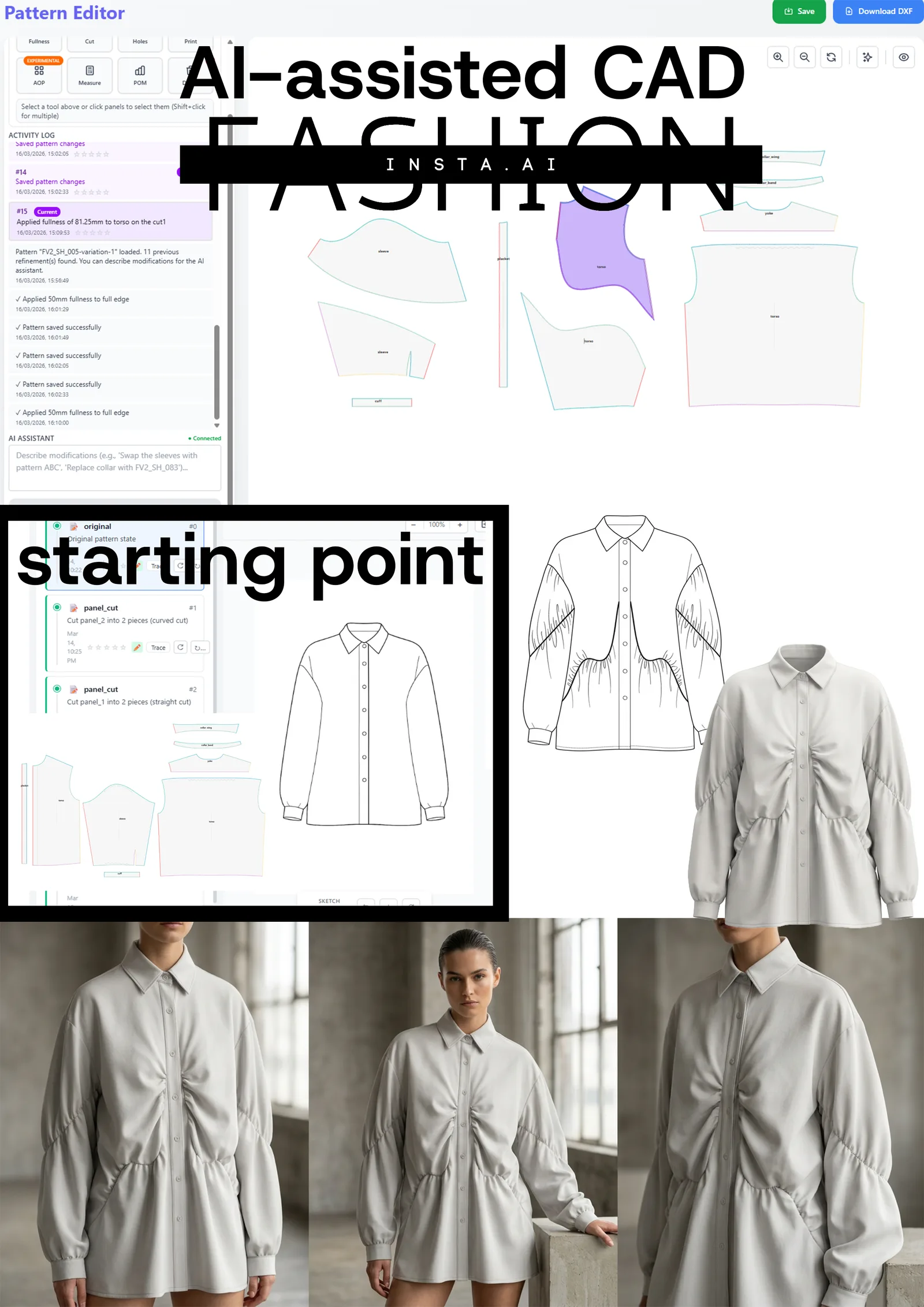
Here's what a realistic buyer journey looks like using FashionINSTA as the primary pattern generation layer:
- Sketch input. Upload a flat sketch or tech sketch. The AI Pattern Generator retrieves the closest-matching base pattern from the trained dataset, or generates a new one if custom-trained on your brand archive.
- Pattern review. The output .DXF file opens in your preferred CAD environment (CLO3D, Lectra, Gerber, or similar) for technical verification. Seam allowances, notches, and grain lines are included.
- Test garment. Export the .DXF to your sampling partner or factory. The first sample iteration begins from a properly constructed base, not from scratch.
- Grading. AI-assisted grading runs across your full size run using your brand's historical grade rules, not an industry average. The AI grading approach differs from manual grade scaling in that it applies learned brand-specific increments rather than proportional guesses.
- Factory export. The final .DXF plus auto-generated tech pack go to the factory as a complete package. The tech pack includes measurements, construction notes, colorways, and fabric specs sourced from the BOM Agent.
For teams using 3D tools like CLO3D or Browzwear, FashionINSTA's output slots in at step 2: import the .DXF into CLO3D, simulate, and generate photorealistic virtual samples for buyer presentations before cutting any fabric.
When FashionINSTA is the better fit
- Your team's primary bottleneck is the sketch-to-base-pattern step, not 3D visualization.
- You produce multiple categories per season and need consistent brand fit across all of them.
- You have an existing .DXF pattern library you want to index, score for duplication, and use as training data for new pattern generation. See how your pattern library can become an AI training asset.
- You need the full production package: patterns, BOM, costing, feasibility check, and tech pack without assembling four separate tools.
- You want AI grading driven by your brand's actual sizing history, not generic industry grade rules.
- Speed matters: FashionINSTA's internal benchmark puts sketch-to-.DXF at around 10-12 minutes, compared to 6-8 hours for manual CAD drafting.
When a 3D-first tool is the better fit
- Your team already runs CLO3D, Browzwear, or Style3D and the primary gap is reducing manual 3D construction work, not pattern generation speed.
- Virtual sampling for buyer presentations is a core deliverable.
- You need photorealistic renders of drape and fabric behavior tied to the same file as your pattern, within a single platform.
- You're producing a small number of complex garment categories where 3D simulation meaningfully reduces physical sampling rounds.
- Your technical team has trained 3D operators and the workflow is already built around simulation-first development.
FAQ: what "time-to-first-sample" really means
What does time-to-first-sample measure?
It's the elapsed time from an approved design sketch to a physical garment arriving from your sampling partner. In a traditional CAD workflow, that's typically 4-8 hours of pattern drafting, plus 2-4 weeks for the physical sample to arrive, plus however many rounds of corrections follow. According to Alice James Global's 2025 industry data, total sampling phases run 6-12 weeks for most brands before a design is approved for bulk production.
What actually controls iteration count?
Physical sample cost (ranging from $200 to $1,500 per iteration) is the main constraint, not tool speed. AI pattern tools reduce iteration count by producing more accurate base patterns the first time. FashionINSTA users report 30-50% fewer physical samples per style on average. That's where cost savings compound. A 2024 Browzwear survey found brands average 17.6 weeks on sampling; compressing that with better base patterns has a direct impact on go-to-market timelines.
Does better AI pattern output eliminate all physical sampling?
No. Physical sampling remains necessary for fit confirmation, fabric drape verification, and construction QA. The goal is to get the first physical sample right (or close), rather than cycling through five or six rounds on a flawed base pattern.
How do I validate AI pattern quality before committing to a factory run?
Open the .DXF in your CAD software and check that seam allowances are consistent, notches are correctly positioned, and grain lines match construction intent. Then run a single test garment in a low-cost toile fabric. FashionINSTA's Feasibility Analyzer flags construction issues before the file leaves the platform, which catches common errors before sampling begins. For a checklist-style review, why patterns fail at the factory covers the most common pre-sampling verification steps.
What file formats should I ask any AI tool to support?
At minimum: .DXF (AAMA/ASTM standard). Confirm that seam allowances are embedded in the file, not just the net outline. Check that the DXF version is compatible with your existing CAD software (Gerber AccuMark, Lectra Modaris, Optitex, or equivalent). Any tool that outputs only .PDF, .SVG, or image-based formats is not production-ready without additional CAD work.
What affects how many iteration rounds a brand needs?
Four main factors: base pattern accuracy, accuracy of technical markings (seam allowances, notches), quality of the grading rules applied, and the completeness of the tech pack sent to the factory. Errors in any of these multiply iteration rounds. AI tools that address all four within a single workflow, as sketch-to-sample workflows in 2026 demonstrate, reduce total iterations more reliably than tools that address only one.
Decision summary
No single tool is the right answer for every team. The question is where your workflow breaks down.
If the slowest step is converting a sketch into a manufacturable pattern file, FashionINSTA is built for that specific problem. Its custom-training path is the only option in this comparison that learns from your brand's own pattern DNA rather than a generic model. If the slowest step is virtual sampling, buyer presentation, or 3D construction, CLO3D, Style3D, or Browzwear are better fits, and FashionINSTA's .DXF output feeds directly into any of them.
For buyers who want to evaluate whether FashionINSTA fits their specific file formats and sample timeline, the team offers a workflow consultation starting with an enterprise pilot that trains on one product category before committing to full deployment. It's a low-risk entry point to see exactly what the AI produces from your own pattern archive before scaling.
Have FashionINSTA evaluate your needs (file formats + sample timeline) and suggest the best workflow for your production setup. Reach out at fashioninsta.ai to start with a pilot category.