Reusing Existing Blocks Across Seasonal Collections
TL;DR: Discover how to systematically reuse approved pattern blocks across seasonal collections using geometry-based similarity search and CAD recipe operations. This guide covers everything from building a governed pattern library to generating production-ready tech packs with real costing data.

Reusing existing blocks across seasonal collections isn't just a time-saving shortcut. Done correctly, it's a disciplined engineering practice that locks in your brand's fit DNA while accelerating SKU development. This guide walks you through the full workflow: building a governed pattern library, running geometry-based similarity search to retrieve the closest matching .DXF block, applying controlled CAD recipe operations to generate seasonal variants, and compiling production-ready tech packs with real costing before any sample or marker release.
Who this is for: Technical designers, patternmakers, and product development leads at apparel brands producing multiple collections per year who want to stop re-drafting from scratch and start systematically reusing approved blocks.
Prerequisites: A production .DXF archive of your existing blocks, a tagging taxonomy decision (covered below), and access to a node-based pattern intelligence platform. FashionINSTA is used throughout this guide as the reference implementation.
Difficulty: Intermediate to advanced. Estimated time to first seasonal variant: 2–4 weeks for library preparation; variants generated within hours once the system is trained.
Why block reuse fails without geometry scoring
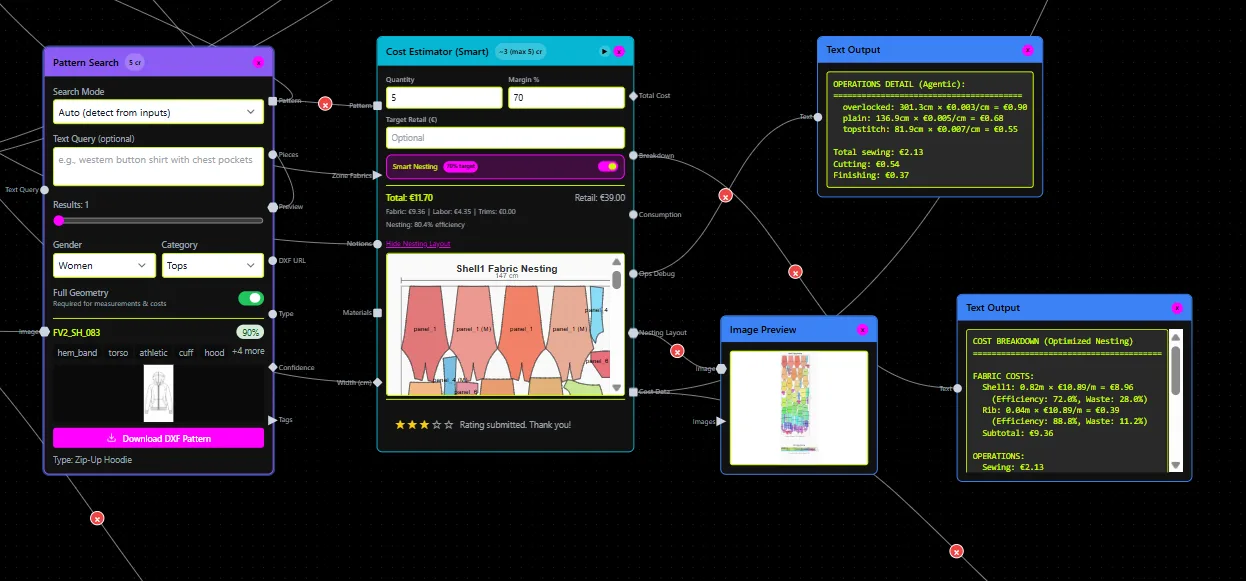
A "block" is your approved master pattern piece: a bodice, a sleeve, a skirt silhouette that encodes your brand's fit standards. A "variant" is any seasonal derivation from that block, such as a shorter sleeve, a relocated seam, or a new facing configuration. The fit-critical interfaces (neckline depth, armhole curve, sleeve cap shape) should remain geometrically consistent across variants unless a technical designer explicitly authorizes a change.
The failure mode most teams hit is searching by file name or keyword. You pull a file called "SS22_sleeve_v3.dxf," make changes directly on it, and six months later nobody can trace which approved block it was derived from. Fit drift accumulates across collections because each season starts from slightly different geometry. Sample cycles multiply. The root cause isn't a discipline problem; it's a tooling problem.
The correct approach: index your archive by pattern geometry, retrieve matches by geometric scoring (not image-to-image comparison), apply tightly defined CAD recipe operations to produce variants, and maintain full traceability from seasonal SKU back to the approved master block.
FashionINSTA's pattern intelligence platform is built specifically around this model. It trains on your production .DXF archive, described internally as "a graph of specialist agents, not a single model, not a render tool," and returns CAD-compatible garment assets with fit DNA preserved.
Preparing your pattern library: tagging, quality checks, and training set size
Scope decisions
Include only blocks you genuinely reuse across seasons: your core silhouette families, your proven sleeve types, your standard bodice and skirt constructions. Exclude anything with geometry instability (open notches, mismatched piece boundaries, duplicate or overlapping seam lines), unapproved experimental drafts, and any patterns that haven't cleared a fit review.
The quality signal at this stage matters more than quantity. Noise in the training set produces noisy retrieval results.
Tagging taxonomy
Your tags are the metadata layer that makes retrieval useful. At minimum, each pattern file should carry:
- Garment family and category (tops, outerwear, bottoms, etc.)
- Block type (bodice front/back, set-in sleeve, raglan sleeve, straight skirt, A-line skirt, etc.)
- Construction features: neckline shape, armhole type, seam configurations, closure type
- Fit parameters: ease values, target body measurements for the fit model used
- Season and collection identifiers
- Approval status: master/approved vs. experimental/in-progress
This taxonomy becomes the filter layer when running pattern library indexing queries. Without it, geometry scoring still works, but you lose the ability to constrain searches by garment type or fit parameter before retrieval runs.
Quality checks before indexing
Before ingesting patterns into any indexing system, run a geometry stability pass:
- Confirm all seam lines are closed with no gaps.
- Verify notch placement is consistent with your grading rules.
- Check that piece boundaries match across seam pairs (front/back side seam lengths should balance).
- Confirm the file exports cleanly to your target CAD format (AAMA/ASTM-style DXF for Gerber, V-Stitcher DXF, or Lectra Modaris format depending on your factory setup).
Dirty files cause downstream CAD errors that are much harder to debug after variant generation.
Training set size
FashionINSTA's Enterprise PoC guidelines are instructive here as a benchmark. The recommended starting dataset is 70 to 150 patterns from one category. The first two weeks are dedicated to data collection and cleaning, the following two weeks to training the system, and the remaining six weeks to live testing. The one-time PoC cost is €5,000 to €15,000 depending on category complexity.
Starting with a single category (say, woven tops or knitwear) lets you validate the retrieval quality and recipe accuracy before scaling to additional garment families. Version control follows an approved-master convention: the production library contains only signed-off blocks, while experimental variants live in a separate staging environment until they pass fit review and are promoted.
The node workflow: from search to adapted .DXF
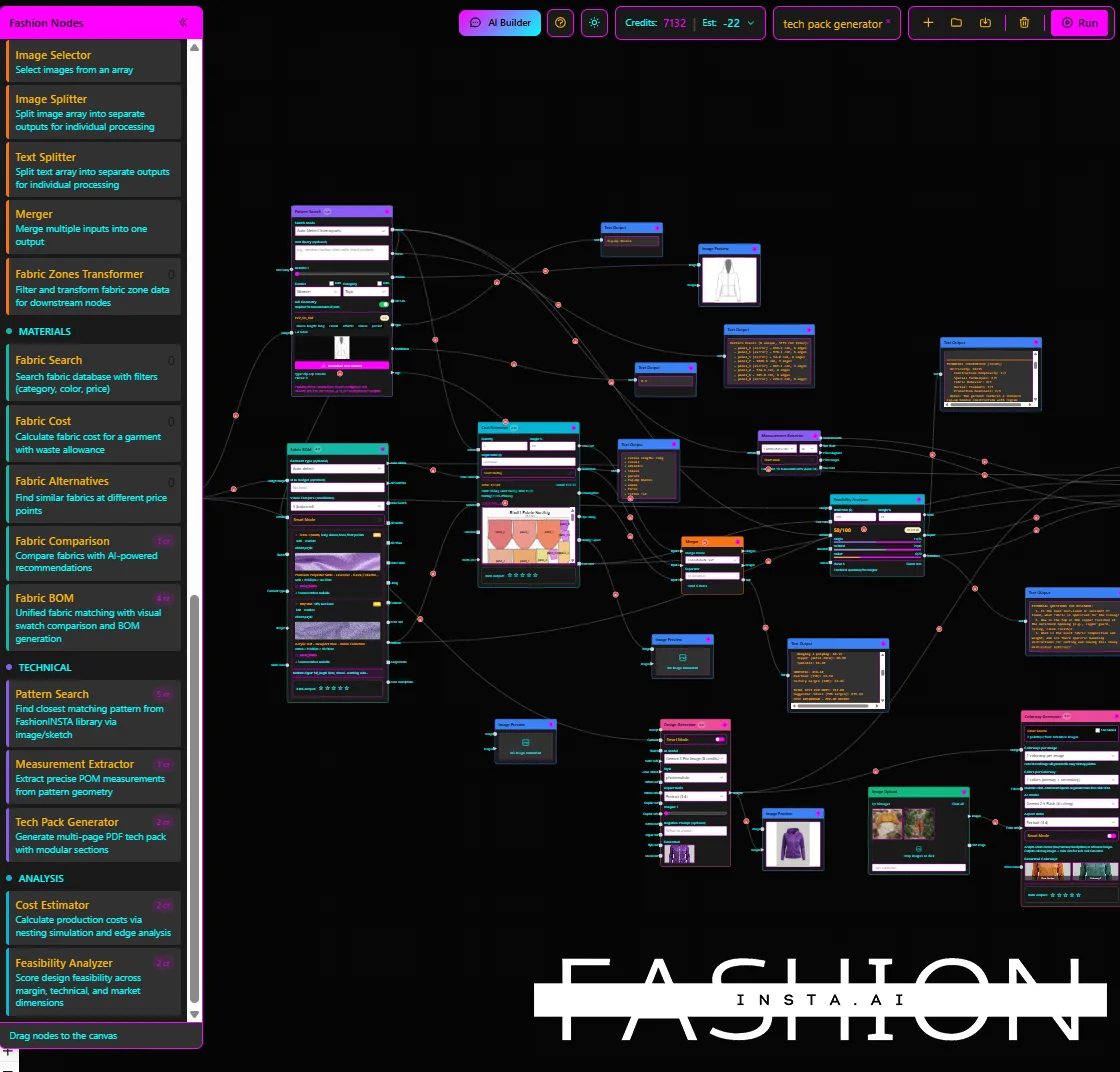
The graph below represents the recommended node sequence for seasonal SKU variant generation from blocks:
[Pattern Generator]
    |-- geometry-based similarity search + scored pattern matches
    v
[Feasibility Analyzer]
    |-- manufacturability check + margin scoring (~80% accuracy vs. real cost)
    v
[Tech Pack Compiler]
    |-- auto-extract point of measurements + construction notes
    v
[BOM Agent]          [Cost Estimator]
    |-- real fabric        |-- COGS from fabric consumption
        names/compos/          + construction complexity
        prices/MOQs            + trims + labor
What "similarity" means in this context
Retrieval in FashionINSTA scores patterns based on pattern geometry, not image-to-image comparison. The system compares the input description or reference piece against the geometry of the existing patterns in your indexed archive. A "deep research" mode adds a second score: how close can a retrieved block become after applying a defined set of automatic CAD operations. That reachability score helps you select the best starting block for a given variant, not just the closest static match.
The CAD recipe step
Once you've selected a scored pattern match, you apply a recipe: a constrained set of CAD operations that modify design features while preserving fit-critical geometry. Operations supported in FashionINSTA include:
- Sleeve length extension or reduction (with proportional redistribution logic between body and cuff)
- Seam relocation (moving a seam position between seam types, e.g., side seam to yoke)
- Gathering and fullness addition (with alignment checks on upper and lower seam)
- Facing creation with edge offsets (armhole, neckline, hem)
- Pocket placement and marker-linked piece updates
Each recipe operation should be written as an explicit instruction with constraints. The examples in the step-by-step walkthrough below show the correct format.
Export compatibility
Output .DXF files from FashionINSTA export in formats compatible with Gerber (AAMA DXF), V-Stitcher DXF, Lectra Modaris, and Claw. This means the adapted seasonal blocks open directly in your factory's CAD/CAM tooling without file conversion workarounds.
Step-by-step: reuse a sleeve block across three seasonal variants

Assume your archive contains an approved set-in sleeve block (e.g., TOPS_SETIN_SLEEVE_MASTER_v7.dxf) with documented sleeve cap shape, seam type (single-needle), and no cuff. Three seasonal variants are required.
Step 1: Index the library and tag sleeve geometry. Run pattern library indexing on your tops category. Confirm the master sleeve block carries tags for: sleeve cap shape (set-in, high/medium/low cap height), seam type, ease at bicep, and approved-master status. This tag set is what the retrieval query will filter against.
Step 2: Retrieve the closest matching .DXF block by geometry. Submit a retrieval query scoped to sleeve blocks, set-in type, with your target ease and cap height range. The Pattern Generator returns scored pattern matches ranked by geometric proximity. Select the top-scored match that carries approved-master status. Do not select by filename.
Step 3: Variant A recipe prompt (sleeve length extension).
Extend sleeve length by 5 cm.
Preserve sleeve cap geometry (cap height and curve shape must remain within ±2 mm of source block).
If a cuff is present, redistribute the added length proportionally between body and cuff to preserve sleeve proportions.
If no cuff is present, extend from hem edge only.
Output: updated sleeve piece + seam allowance recalculated.
Step 4: Variant B recipe prompt (seam relocation).
Relocate underarm seam 4 cm toward the back panel.
Preserve armhole fit interface geometry (armhole curve shape must match source block within ±1 mm at all notch points).
If gathering is introduced at the new seam position, verify upper and lower seam alignment remains consistent before closing the seam.
Output: updated sleeve piece with revised notch positions.
Step 5: Variant C recipe prompt (armhole facing).
Create armhole facing on sleeve cap edge with a 3.5 cm edge offset.
Apply standard seam allowance to facing piece inner edge.
Update pocket/marker pieces only if the season's construction spec requires a separate facing marker.
Output: facing piece + updated sleeve piece snapshot for tech pack.
Step 6: Run the Feasibility Analyzer. Before compiling any tech pack, run each variant through the Feasibility Analyzer. The node checks manufacturability at your target price point and flags construction issues (e.g., seam complexity, gathering ratio exceeding factory capability, facing piece adding cut time beyond margin tolerance). FashionINSTA's feasibility scoring is estimated at 80% of real cost accuracy when connected to current supplier data. If a variant fails margin, iterate on the recipe (simplify seam type, reduce gathering ratio, change fabric weight) before proceeding. Don't send a failing variant to tech pack.
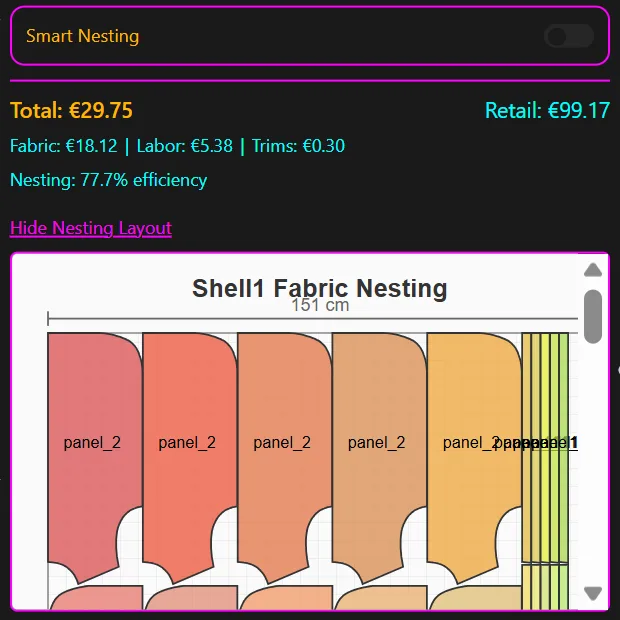
Step 7: Compile tech packs, generate BOM, and export .DXF. With feasibility confirmed, run the Tech Pack Compiler. The node automatically extracts point of measurements from the adapted block geometry and populates construction notes. Feed output into the BOM Agent to pull real fabric names, fiber composition, prices, and MOQs from verified suppliers. The Cost Estimator calculates COGS using fabric consumption from nesting, construction complexity score, trims, and labor rates. Export the adapted .DXF files in your factory's required format (AAMA/Gerber or V-Stitcher DXF) alongside the factory-ready tech packs.
Common pitfalls, grading rules, and version control governance
Keyword reuse causes fit drift
The most frequent error in seasonal block reuse is retrieving patterns by name or folder location rather than geometry. A file named "SS23_sleeve" may have been modified without updating the master, carrying different ease values or a slightly distorted cap curve. Always validate your retrieval results against the geometry-scored output, and run a fit-critical checklist on neckline depth, armhole curve, and sleeve cap before accepting a match.
Wrong version exports
Use a strict approved-master convention in your production library. The indexed, production-eligible blocks live in one governed location. Experimental variants, in-progress drafts, and pre-fit-review pieces stay isolated in a staging partition. Any seasonal block generated from a recipe should trace back to the specific approved master version and the exact operations applied, so you can audit the derivation and roll back if a fit issue surfaces in sampling.
Grading consistency
When generating seasonal runs from adapted blocks, verify that your grading rules and size chart carry through correctly to the variant geometry. A seam relocation or length change can create discrepancies between the adapted piece's measurements and the size chart expectations. Run a grading check before sample release, not after.
Recipe boundaries
Define two categories of parameters explicitly in your team's operating rules:
- Unlockable: design-facing features (hem length, seam position, gathering, facing geometry, pocket placement)
- Locked: fit-critical interfaces (armhole curve, sleeve cap shape, neckline width/depth, ease at key measurement points)
Locked parameters require a technical designer to explicitly authorize any change. This boundary is what keeps fit DNA intact across collections, even as surface design evolves seasonally.
Maintain traceability
Each seasonal .DXF variant generated through the workflow should carry metadata linking it to: (a) the source approved master block ID, (b) the recipe operations applied and their parameter values, and (c) the feasibility score and the fabric/BOM data used at time of generation. This makes rollback straightforward and gives your factory a complete audit trail for any construction query.
Scaling up: testing, deployment, and operationalizing the workflow
Start with a single-category pilot
Align your pilot to the bottleneck that costs the most sample cycles. FashionINSTA's PoC framing recommends starting with one category (e.g., woven tops or knitwear sleeve constructions), training on 70 to 150 patterns, and running a go/no-go evaluation at approximately week 10 of the engagement. The 10-week structure (2 weeks data collection, 2 weeks training, 6 weeks live testing) gives you enough time to validate retrieval accuracy, recipe output quality, and tech pack completeness against your existing workflow.
Produce 1 to 3 seasonal variants from the pilot category, sample them, and compare the fit interface accuracy and time-to-first-sample against your current re-drafting baseline.
Deployment and PLM integration
Once the library, tagging taxonomy, and node workflows are stable across the pilot category, scale to additional garment families. FashionINSTA supports API connectivity for integrating pattern intelligence outputs into PLM and production management systems, which matters for brands producing 1,000+ SKUs per year. The node graph (Pattern Generator, Feasibility Analyzer, Tech Pack Compiler, BOM Agent, Cost Estimator) can be wired into your existing data flows so seasonal variant generation becomes part of the standard PD process rather than a separate tool step.
Operationalize with calibration routines
Set a weekly review cadence with your patternmakers and technical designers to collect failure logs: retrievals that returned poor geometry matches, recipes that produced out-of-spec results, feasibility scores that diverged significantly from actual sample costs. Feed those logs back into library tag refinement and recipe constraint updates. The library improves with use, but only if there's a structured feedback loop from production back to the indexing layer.
The practical benchmark to aim for: FashionINSTA reports a 4x faster product development cycle and 10x faster first draft for brands that have trained the system on their proprietary archive. Those numbers depend on data quality and recipe discipline, but they give you a credible target for your pilot KPIs assessment.
Pattern reuse across seasons stops being a manual search-and-copy exercise once the geometry scoring, recipe operations, and version control governance are in place. The result is a reproducible, auditable workflow that delivers production-ready .DXF blocks and factory-ready tech packs without redrafting from scratch each collection.