How to Stop Rewriting Tech Packs From Scratch Each Season
TL;DR: Version drift is the silent killer of apparel development, causing teams to endlessly rewrite tech packs and lose track of accurate specs. By implementing a structured data model, reusable spec libraries, and strict approval gates, brands can eliminate manual updates and ensure consistency across all seasons. This guide outlines the exact steps to transition from chaotic legacy files to a governed, AI-accelerated workflow.

If your technical team is still copying last season's tech pack into a new file and manually updating measurements, BOM sections, and construction notes, you're not working with an AI-powered workflow. You're working with version drift baked directly into your process.
This guide addresses a specific operational problem: how to stop rewriting tech packs from scratch each season and maintain spec consistency across your full apparel range, from new styles to carry-overs. It covers legacy data migration, field mapping, approval gate configuration, PLM/CAD integration, and the governance model that keeps everything from drifting apart again.
Who this is for: Technical designers, product development directors, and digital transformation leads at apparel brands producing 50+ SKUs per season who are ready to convert their spec process from file-based chaos into a controlled, versioned system.
Prerequisites: A working inventory of your legacy tech packs (format doesn't matter yet), a master size chart, grading rules per category, and defined approval roles (who signs off on measurements, BOM, and final release).
Expected difficulty: Moderate to high for initial migration; manageable once governance is in place.
Estimated time: 4 to 10 weeks for a single product category pilot.
The real problem: it's not the tool, it's the version drift
Most teams assume they need a better AI tech pack generator. The actual problem is that no version of the spec is authoritative. A spreadsheet gets edited by one person, a PDF gets marked up by another, and the Illustrator file never quite matches either of them. By the time the tech pack reaches the factory, it contains three generations of undocumented exceptions.
Solving this requires three things working together: structured field mapping so every attribute has a defined location and format, a reusable spec library built from your brand's own construction blocks (not AI-generated text), and governance controls that determine who can change what, when, and with what paper trail.
AI tools accelerate the process, but only when attached to that structure. Free generators like Kōbō's AI Tech Pack Generator produce usable drafts with a daily cap of five per day, and the output is explicitly positioned as requiring manual refinement. That's a reasonable starting point for a single style. It doesn't solve consistency across a range across seasons.
Before you start: prerequisites checklist
Work through this list before touching any migration tool or workflow configuration.
- Legacy archive inventory: all seasons, SKUs, variants, and the format each lives in (PDF, DOCX, XLSX, Illustrator, DXF/CAD exports)
- Master size chart per category, with unit convention locked (cm or inches, not both)
- Grading rules documented per category, including any style-specific overrides
- Tech-pack field taxonomy: every field you use across points of measure, BOM sections, trims, labels, care instructions, packaging, and tolerances
- CAD integration points identified: which files go to which system (Gerber, V-Stitcher, CLO 3D, Browzwear, Lectra, Optitex)
- Approval roles defined: who approves measurements, who approves BOM, who releases a tech pack to Sample Ready status
If any of these are missing, define them before starting. Migrating data into a structured system without a field taxonomy just recreates the mess in a different location.
Step 1: Prepare and audit your legacy data
Build the tech-pack inventory
Create a spreadsheet with one row per style per season. Columns: Style ID, Season, Variant/Colorway, File Format, File Location, Last Edited By, Status (Active/Archive/Carry-Over). This becomes your migration source manifest.
Normalize filenames immediately. The convention should be: [StyleID]_[Season]_[Variant]_[Version]. A file named "JacketV3_FINAL_USE THIS ONE.pdf" tells you that version control has already broken down.
Run a field taxonomy audit
List every tech-pack field your team uses across all formats. Group them into:
- Points of measure (POM): measurement labels, values, tolerances
- Construction notes: seam types, stitch types, special operations
- BOM sections: fabric, lining, interlining, trims, labels, thread, packaging
- Grading rules: grade breaks, increments per POM, base size
- Care/compliance: care labels, fiber content, country of origin
- Metadata: style name, season, designer, factory, sample history
For each field, note the data type (numeric, text, list), the unit, and the allowed vocabulary. If "Hem" appears as "Hem Allowance," "HEM," and "Bottom Hem" in three different files, you have a vocabulary conflict. Document it. You'll resolve it in Step 2.
Identify the inconsistencies
Pull 5 to 10 representative styles from different categories and seasons. For each, check:
- Are all POM fields present and labeled consistently?
- Do tolerances match the master size chart or are they style-specific with no documentation?
- Are BOM items described with the same vocabulary across styles?
- Do carry-over styles reference the same construction notes as their base block, or have they diverged silently?
- Are grading rules consistent with the category grade rule sheet, or do individual files contain undocumented overrides?
Quantify the defect rate: number of missing fields, mislabeled tolerances, undocumented construction changes. This baseline becomes your primary success metric at the end of the pilot.
Define your spec library structure
Not every field in a tech pack is style-specific. A collar construction note for a standard notched lapel, a lining BOM template for a woven jacket, a pocket facing module with consistent seam allowances: these are reusable across many styles. Identify them now and flag them as "library blocks" rather than style-specific entries.
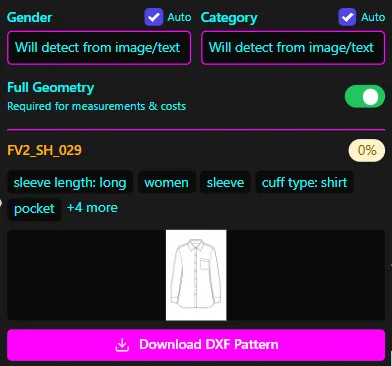
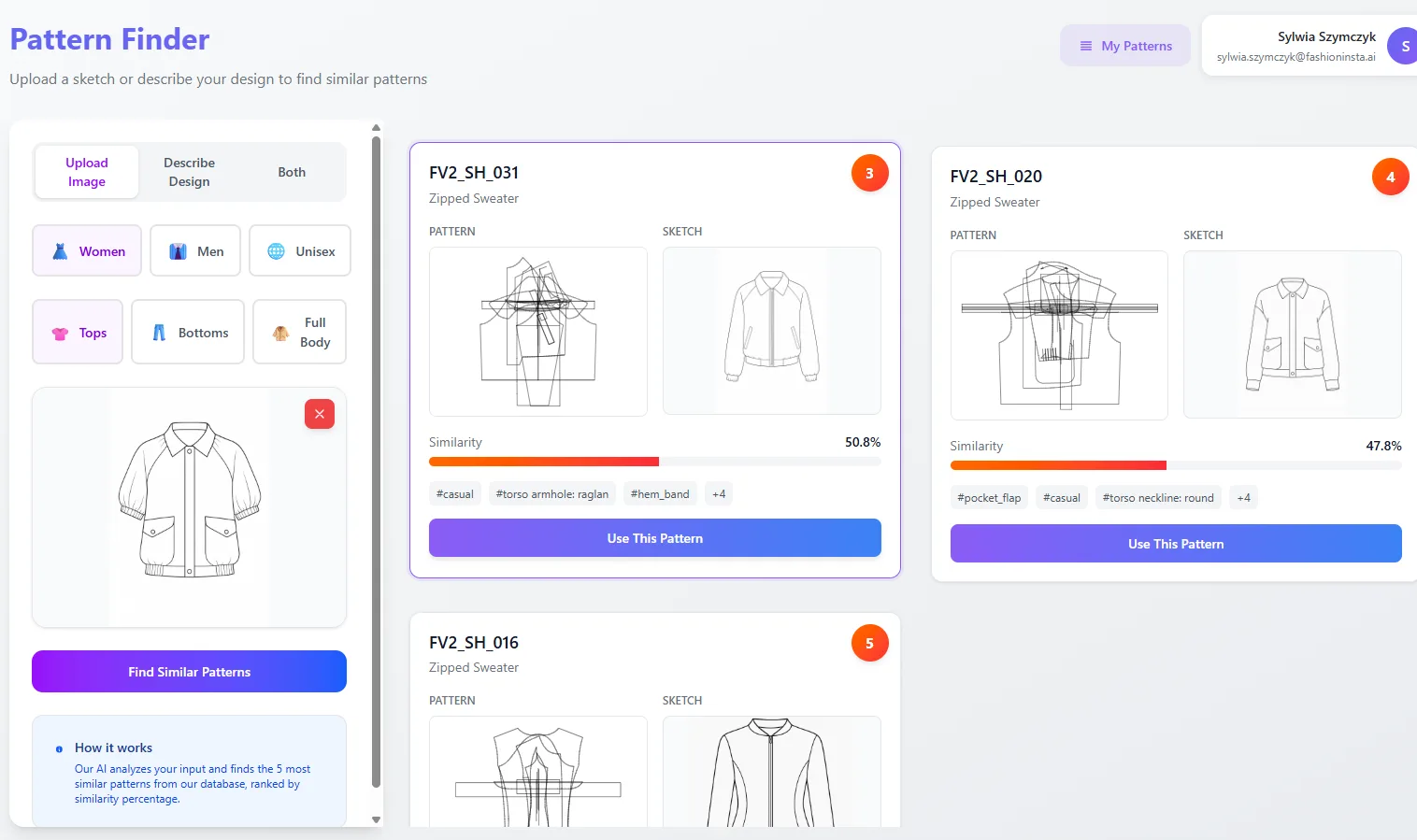
The goal is to build a library of controlled, validated building blocks that new styles draw from rather than recreate. This is where AI pattern intelligence platforms add measurable value: FashionINSTA's Pattern Intelligence, for example, is trained on a brand's existing DXF archive and extracts 750+ features per pattern to enable similarity scoring and duplication detection. When a new style's sleeve block is 92% similar to an existing validated one, you reference the existing block rather than building from scratch. That's what "reusable spec library" means in practice.
Step 2: Import and map fields to a controlled data model
Design the mapping layer
For each legacy field, define the mapping rule:
Legacy field name → Canonical field name → Data type → Allowed values / units → Validation rule
Example:
"HEM ALLOWANCE (cm)" → "hem_allowance_mm" → Numeric → Integer, millimeters → Range: 5–50mm
Converting tolerances to a single unit at the point of import prevents the most common source of spec drift: teams working in different unit conventions on the same style.
Lock the canonical vocabulary for BOM attributes. "100% Cotton Poplin" and "Cotton Poplin 100%" are the same fabric described two different ways. Pick one form and enforce it as the only allowed input. Every deviation from controlled vocabulary triggers a validation flag during import.
Map to a PLM-style data model
Each tech pack in the controlled system should be a versioned record with these sections:
- Measurement set: POM table, tolerances, base size, grading rule reference
- Construction set: seam types, stitch specifications, special operations, finishing notes
- BOM record: structured by material category (fabric, lining, interlining, trims, labels, packaging), each line with supplier reference, composition, weight/count, colorway, MOQ
- Media assets: flat sketches, construction diagrams, reference photos
- Change log: every modification with author, timestamp, reason, and previous value
The change log is not optional. It's the mechanism that lets you trace why a measurement changed between Sample 1 and Sample 2, which is the question that gets asked most often during QA and which teams most often cannot answer.
Establish source-of-truth rules
Define which system owns each class of attribute:
- Pattern geometry (seam allowances, notch positions, grainlines): CAD system owns this. The tech pack references it; it doesn't duplicate it.
- Measurements and tolerances: the PLM-style record owns this.
- BOM/costing: the costing or ERP module owns costs; the PLM record owns BOM structure.
- Supplier communications: export-only from the versioned record. Never edited directly in a supplier-facing PDF.
When the source of truth is ambiguous, you get two conflicting records and no way to know which is correct. Assign ownership explicitly and document it in your governance policy.
Carry-over rules
When a style is carried over from a prior season, it should inherit its base block's controlled spec set with only documented deltas applied. A carry-over is not a new file. It's a reference to the previous released version plus a changeset that records exactly what changed, why, and who approved it.
This is the mechanism that prevents carry-over spec drift: the jacket that has shipped successfully for three seasons doesn't get its measurements silently adjusted by whoever opens the file this season.
AI input governance
AI-suggested fields (auto-generated construction notes, AI-drafted BOM descriptions) should be treated as suggestions in a review queue, not as committed values. Critical spec fields, including all POM measurements, tolerances, grading rules, and BOM quantities, must be validated against structured, approved values before they enter a released record.
Log AI-generated suggestions separately from human-confirmed values. This is both a quality control mechanism and a legal/IP traceability requirement that becomes relevant as AI tooling matures.
Step 3: Configure the node-based workflow and approval gates
The workflow structure
A governed tech-pack workflow follows this sequence:
Pattern/Specs input → Tech Pack Compiler → BOM roll-up → Automated consistency checks → Approval gates → Version release
Each stage produces an output that the next stage consumes. No stage is skipped. No output is edited after it passes an approval gate; if a change is needed, it initiates a new changeset that goes back through the relevant gates.
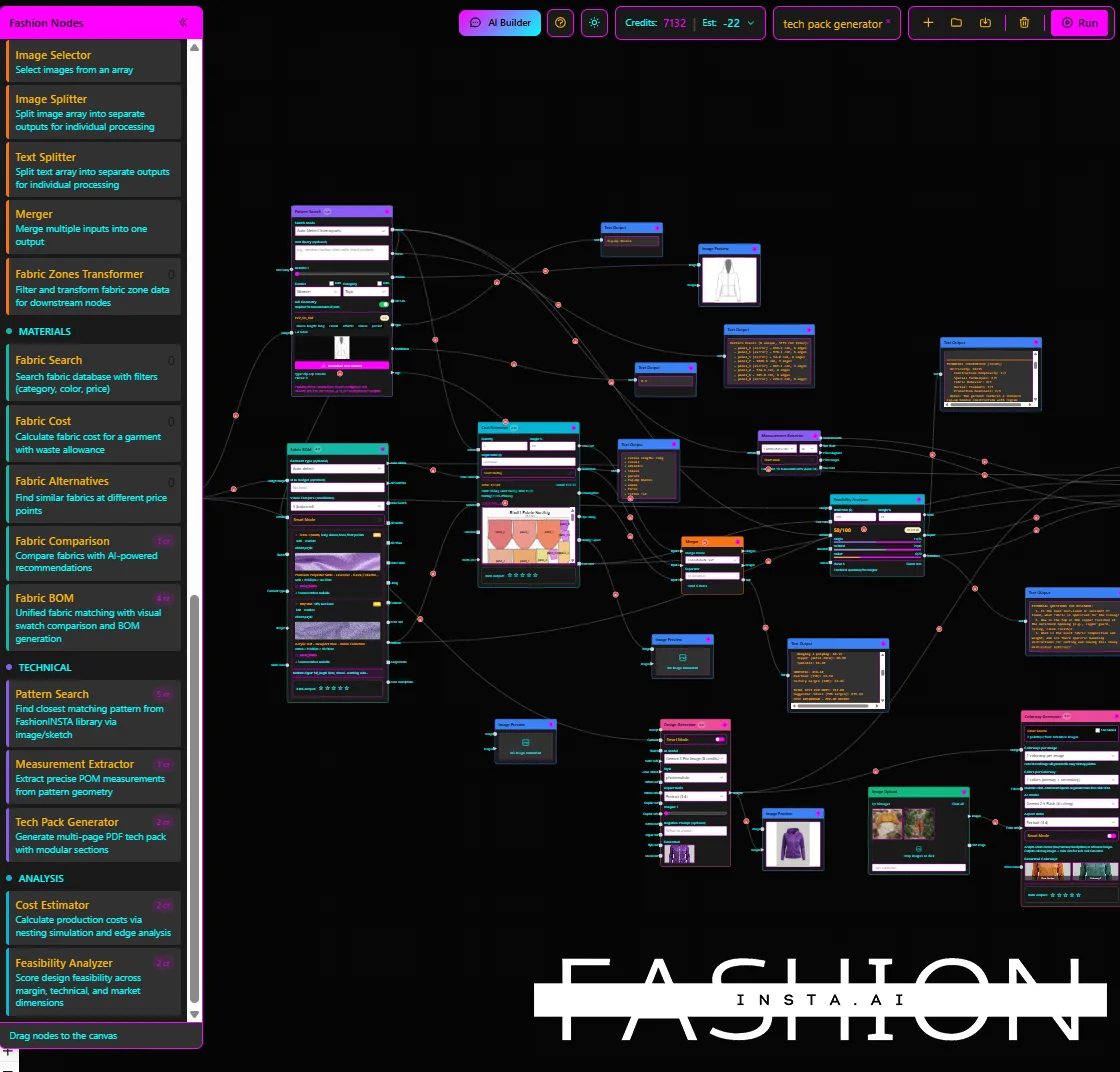
FashionINSTA's node-based architecture reflects this logic directly. The Tech Pack Compiler node assembles measurements and construction notes from structured inputs; the BOM Agent draws from verified supplier data rather than free-text entries; the Feasibility Analyzer flags construction issues before the spec reaches Sample Ready status. The result is a chain where each node's output is traceable to its inputs.
Define status states and approval ownership
| Status | Owner | Trigger |
|---|---|---|
| Draft | Technical designer | Style created, fields in progress |
| Internal review | Pattern lead / senior TD | All required fields complete |
| Sample ready | Product development director | Measurements, BOM, and construction notes approved |
| Released | PD director + compliance | Grading, care/compliance confirmed |
Each transition requires a named approver. "The team reviewed it" is not an approval. A named individual with a defined role confirms readiness and the system records it.
Define approval SLAs: Internal review should not sit in queue for more than 48 hours; Sample Ready approval within 72 hours of submission. Without SLAs, approval gates become bottlenecks rather than controls.
Automated consistency checks
Configure the system to flag the following automatically before any approval gate:
- Duplicate detection: POM labels that appear more than once in the same measurement table
- Mismatch flags: measurement label in the POM table that doesn't match the corresponding sketch callout
- Grading conflicts: grade increment that exceeds the category maximum or doesn't match the referenced grade rule
- Missing BOM sections: required BOM categories with no entries
- Out-of-range tolerances: tolerance value outside the defined min/max for that measurement type
These checks don't replace human review. They reduce the volume of errors that reach human review, which is where the time savings actually occur.
Version control rules
Once a tech pack reaches Released status, that version is immutable. Subsequent changes create a new version number and a changeset record. The previous version remains accessible and referenceable.
Rollback procedure: if a factory raises a spec discrepancy after release, the process is: (1) identify the version the factory received, (2) compare against the current released version via the change log, (3) determine if the discrepancy is a measurement error or a communication error, (4) initiate a correction changeset with full documentation. Never overwrite a released version.
FashionINSTA's enterprise offering includes a dedicated AWS tenant with IP isolation, SSO/RBAC, and audit logs, which provides the infrastructure layer for this immutability guarantee. The audit log records who accessed, modified, or exported each record and when.
Step 4: Integrate with PLM/ERP/CAD systems
Integration architecture
The integration model for spec consistency looks like this:
CAD (DXF geometry) ↔ Tech pack spec record ↔ BOM ↔ Costing ↔ Supplier portal ↔ PLM/ERP
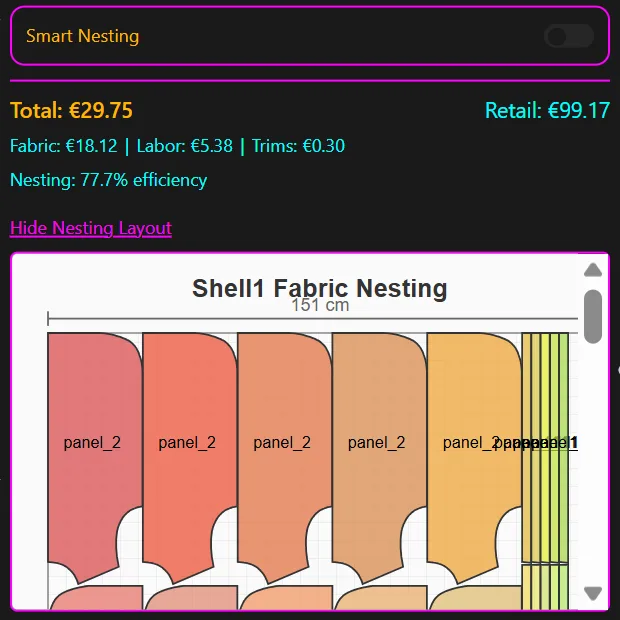
The arrows indicate data flow, not ownership. CAD exports geometry data that populates pattern-linked fields in the spec record. The spec record generates BOM tables that feed the costing module. The costing module writes cost data back to the spec record. The PLM/ERP system holds the product master and pulls the released tech pack at handoff.
FashionINSTA's Pattern Intelligence workflow exports to AMMA DXF format for Gerber and V-Stitcher DXF, with automated CAD operations including sleeve length variation, seam relocation, and gathering. This is the technical mechanism that keeps "CAD says one thing, spec says another" from happening: the pattern geometry and the spec record are generated from the same source, not maintained separately.
Keep static files in a supporting role
Adobe Illustrator and similar vector tools remain useful for artwork and flat sketches. They're not a substitute for a structured spec record. The moment a measurement lives only in an Illustrator file, you've reintroduced version drift. Sketches belong in the media asset section of the structured record; they don't replace the measurement table.
The same applies to PDF tech packs sent to suppliers. A PDF is an export of the current released version. It's not the source of truth. If a supplier edits the PDF and sends it back, those edits must be formally submitted as a change request and go through the approval workflow. They don't get copied directly back into the file.
Start with read-only integrations
For the first approval cycle, configure integrations as read-only: the spec system exports data to other systems but doesn't accept write-back. This gives you confidence that the structured record is the authoritative source before you open write-back channels that could create new synchronization conflicts.
After two to three successful approval cycles, enable write-back for the attributes your architecture has designated as owned by external systems (e.g., confirmed costs from ERP, updated supplier references from the BOM module).
Troubleshooting and governance checklist
Common field-mapping problems
Units mismatch: Legacy files contain measurements in both centimeters and inches with no consistent labeling. Resolution: define the canonical unit at the category level before import. Convert all values at import time. Flag any field where the source unit is ambiguous for human review.
Mislabeled size charts: A base size labeled "M" in one season's file corresponds to different measurements than "M" in another. Resolution: normalize all size references to your master size chart at the category level. Document any historical exceptions as archived data, not active spec.
Inconsistent tolerance definitions: "±1cm" appears in some files; "tolerance 10mm" in others; some files have no tolerance entry. Resolution: define the tolerance convention (± value in mm) in the field taxonomy and apply it uniformly during import. Missing tolerances are a critical field error and should block migration until resolved.
Missing trims sections: BOM sections for trims and labels are frequently omitted in legacy tech packs when they were "the same as last season." Resolution: require all BOM sections as mandatory fields. Carry-over styles reference the library block; they don't leave the section blank.
Common grading problems
Base size errors: The base size in the legacy file doesn't match the current master size chart. This is often discovered during migration and represents a genuine specification error that should be escalated to the product development director, not silently corrected during import.
Conflicting grade rules: A style-specific grade override in a legacy file conflicts with the current category grade rule. Resolution: document the override explicitly in the carry-over changeset. If the override is intentional, it requires sign-off from the pattern lead. If it was a historical error, correct it and log the correction.
Undocumented construction overrides: A seam allowance was changed in a previous season without updating the grade rule reference. These are often invisible until a grading conflict surfaces during CAD export. The fix is always documentation first, then correction, not correction without documentation.
CAD/spec round-trip issues
After DXF export to downstream CAD or 3D tools (CLO 3D, Browzwear, Optitex), check:
- Notch positions match the spec callout
- Seam allowance values match the BOM construction notes
- Grainline orientation is consistent with the approved pattern orientation
If a discrepancy appears post-export, trace it to the pattern source record before editing the DXF directly. Editing the DXF without updating the source record recreates the version drift problem at the pattern level.
Governance checklist
Use this as a quarterly reference:
- [ ] Naming conventions enforced for all new styles:
[StyleID]_[Season]_[Variant]_[Version] - [ ] All required fields present before any style advances to Internal Review
- [ ] Change log entries complete: author, timestamp, reason, previous value
- [ ] Approval SLAs met: document exceptions and root causes
- [ ] Audit sampling: review 5 released tech packs per quarter for field accuracy against factory-confirmed samples
- [ ] Spec library cleanup: identify and archive obsolete blocks; flag duplicate pattern blocks for consolidation
- [ ] AI output log reviewed: confirm all AI-suggested fields were human-confirmed before release
Success metrics to track from day one
- Sampling rounds per style (target: reduction within 2 seasons)
- Spec QA defects per style at first factory review
- Tech pack throughput: calendar days from style creation to Released status
- Duplicate block creation rate: number of new spec blocks created per season vs. number of library blocks reused
- Approval cycle time per gate
A 10-week Enterprise PoC on a single product category (the structure FashionINSTA uses for its Pattern Intelligence training, collecting 70 to 150 patterns with approximately two weeks of training and six weeks of tryout at a cost of €5,000 to €15,000) is a reasonable scope for a first controlled migration. By the end, you should have measurable baseline data on all five metrics above.
What you've accomplished and what comes next
After completing this process for one product category, you have a working proof of concept: a governed spec library with versioned records, field-mapped BOM data, CAD-compatible DXF pattern assets, and a functioning approval workflow with audit trail.
The next steps are category expansion and workflow automation. Once the first category is running cleanly, apply the same field taxonomy and governance model to the next. As the spec library grows, AI-assisted generation from your own building blocks becomes increasingly precise. FashionINSTA's Fashion Complete OS, priced at €23,900/year/seat, is positioned specifically for this expanded use case: ingesting a brand's full DXF archive, extracting 750+ features per pattern, and enabling pattern generation from your own validated blocks rather than generic templates.
The outcome you're working toward is a spec system where a carry-over style requires documented deltas, not a rebuilt file. Where a new style references validated blocks from your own library. Where every measurement, tolerance, and BOM entry has a known owner, a change history, and a confirmed approval.
That's not an AI promise. It's an architecture decision. AI is the acceleration layer. Governance is what makes it hold across seasons.