Fashion Nodes: integration and collaboration reference
TL;DR: FashionINSTA's node-based workflow builder seamlessly integrates with existing CAD tools, PLM systems, and AI assistants to streamline fashion product development. This guide outlines supported data flows, API endpoints, and team collaboration features for enterprise teams.

This document describes how FashionINSTA's node-based workflow builder connects to external CAD tools, PLM systems, and AI assistants, and how product development teams govern collaborative access to generated artifacts. It's written for technical leads, IT architects, and senior PD operations roles responsible for integrating the platform into an existing enterprise stack.
Prerequisites: An active FashionINSTA tenant (Enterprise Pilot or Fashion Complete OS tier), SSO configured at your identity provider, and at minimum one trained pattern category (100-150 .DXF files indexed). NDA and DPA are signed before any .DXF artifact leaves your system.
Supported file formats and data flows

Canonical output artifact types
Fashion Nodes produces four primary artifact classes per workflow run:
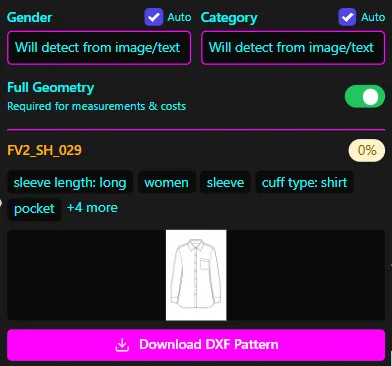
- Graded .DXF patterns. CAD-compatible pattern files that open directly in downstream tools and are intended for factory handoff. These are generated from your trained pattern archive and carry fit DNA, grain lines, notch placements, and seam allowance data as embedded geometry.
- Tech pack bundle. A structured documentation package containing measurement charts, construction notes, technical sketches with callouts, fabric specifications, and colorway references. The bundle is assembled by the Tech Pack Compiler node and is formatted for factory consumption.
- BOM / cost / feasibility payload. A structured data object returned by the BOM Agent, Cost Estimator, and Feasibility Analyzer nodes. It includes fabric names, compositions, prices, and MOQs sourced from connected supplier data, plus cost-of-goods calculations and a feasibility verdict.
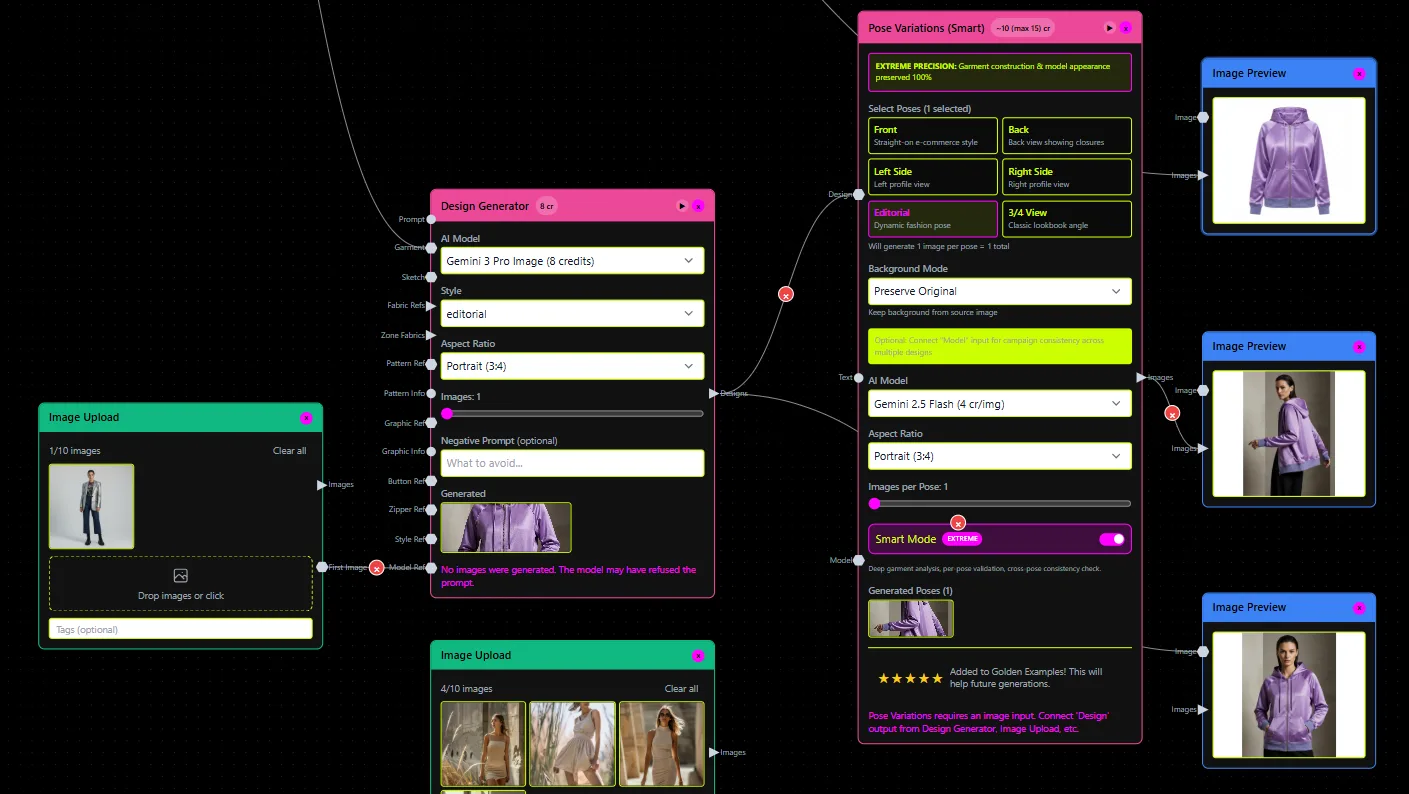
- Media render assets. Front and back views, editorial and lifestyle imagery, e-commerce visuals, and 360-degree spin video files, produced by the Media and Render Nodes and tied to the underlying design data.
Beyond .DXF: export bundle schemas
Where exact file extensions are not constrained by the receiving system, FashionINSTA structures exports by artifact type rather than a single container format:
| Artifact type | Payload contents | Typical downstream consumer |
|---|---|---|
| Pattern archive export | Graded .DXF files per size, grain/notch/seam metadata | Gerber AccuMark, Lectra, CLO3D, Browzwear |
| Tech pack bundle | Measurement chart (tabular), construction notes (structured text), callout diagrams, spec sheet | Factory, sampling team, QA |
| BOM export | Fabric rows with supplier ID, composition, price/unit, MOQ; trim rows; labor estimate | ERP, PLM cost module, merchandising |
| Feasibility report | Structured pass/flag output per construction constraint and margin target | PD lead, costing team |
| Media assets | Rendered image files (front/back/360), lifestyle composites | DAM, e-commerce platform, campaign tooling |
Node-level data flow
Each node in a workflow graph has a defined input contract and output schema. The canonical execution sequence for a full product development run is:
[Brand pattern archive]        ──►  Pattern Generator Node
[Size chart + grading rules]   ──►      │
[Design brief / sketch]        ──►      │
                                        ▼
                               Pattern geometry output (graded .DXF)
                                        │
                                        ▼
                               BOM Agent Node
[Fabric data sources / shop]   ──►      │
                                        ▼
                               BOM payload (fabric + trim + MOQ data)
                                        │
                                        ▼
                               Cost Estimator Node ──► Cost-of-goods output
                                        │
                                        ▼
                               Feasibility Analyzer Node ──► Pass / Flag verdict
                                        │
                                        ▼
                               Tech Pack Compiler Node ──► Tech pack bundle
                                        │
                                        ▼
                               Media & Render Nodes ──► Render asset bundle
                                        │
                                        ▼
                        Export / Handoff: CAD-ready patterns + factory docs
                                    + collaboration objects
Interoperability note: DXF variants
The CLO3D support community documented in 2019 that "there is no Standard DXF... every software unfortunately treats the actual real dxf standards differently." This is a real operational constraint. AAMA/ASTM, Gerber/AccuMark, Lectra/Modaris, and V-Stitcher each interpret DXF geometry, layer naming, and entity encoding differently.
FashionINSTA addresses this by extracting 750+ features per pattern during training, encoding fit DNA and construction semantics into the pattern model rather than relying on raw DXF passthrough. When a pattern is exported, it's re-serialized against the target tool's expected geometry conventions. Teams should still validate grain orientation and notch placement on first import into any new downstream tool, particularly when switching between Gerber and Lectra stacks.
API: endpoints and example requests

Integration surface
FashionINSTA ships a ready MCP (Model Context Protocol) server that exposes the Fashion Nodes workflow graph to any MCP-compatible client. You can run FashionINSTA workflows directly from ChatGPT, Gemini, or Claude by connecting to the MCP server endpoint. For enterprise stack integrations, the same MCP surface is available programmatically alongside a REST-style API in/out model included in the Fashion Complete OS tier.
The MCP server handles: - Workflow invocation (triggering a named node graph with input parameters) - Artifact retrieval (returning URIs or payloads for generated outputs) - Status polling (checking run state and feasibility verdict) - Event push (receiving webhook callbacks when a run completes or flags)
API in/out contract
Request body (workflow run invocation):
{
  "workflow_id": "string",           // Named workflow in your tenant
  "pattern_archive_ref": "string",   // Identifier for trained pattern category
  "size_chart_ref": "string",        // Size chart / grading rule set identifier
  "brief": {
    "design_description": "string",  // Text or sketch URI
    "target_category": "string",     // e.g., "tailored trouser", "woven shirt"
    "target_margin": "number"        // Target cost ceiling for feasibility check
  },
  "fabric_constraints": {
    "preferred_supplier_ids": ["string"],
    "max_moq": "number"
  },
  "export_targets": ["gerber", "clo3d", "tech_pack", "bom_csv", "media"]
}
Response body (completed run):
{
  "run_id": "string",
  "status": "complete | flagged | failed",
  "artifacts": {
    "dxf_patterns": ["uri"],         // Graded .DXF files per size
    "tech_pack_bundle": "uri",       // Tech pack documentation package
    "bom_payload": { ... },          // BOM rows with fabric/trim/cost data
    "feasibility": {
      "verdict": "pass | flag",
      "flags": ["string"]            // Structured flag descriptions if verdict = flag
    },
    "media_renders": {
      "front_back": ["uri"],
      "ecommerce": ["uri"],
      "spin_360": "uri"
    }
  },
  "audit_ref": "string"              // Pointer to the audit log entry for this run
}
Sample integration scenario 1: sketch-to-factory artifacts
Precondition: Pattern category trained, size chart loaded, target margin defined.
# Pseudo-code: design brief → DXF + tech pack
run = fashioninsta_client.invoke_workflow(
    workflow_id="tailored-trouser-full-pd",
    pattern_archive_ref="aw26-bottoms-v3",
    size_chart_ref="eu-womens-std-2024",
    brief={
        "design_description": "high-rise straight leg, welt pockets, no cuff",
        "target_category": "tailored trouser",
        "target_margin": 42.00
    },
    export_targets=["gerber", "tech_pack", "bom_csv", "media"]
)

if run.status == "complete":
    download(run.artifacts.dxf_patterns)
    upload_to_plm(run.artifacts.tech_pack_bundle)
    push_to_dam(run.artifacts.media_renders)
elif run.status == "flagged":
    review(run.artifacts.feasibility.flags)
Sample integration scenario 2: PLM event-driven regeneration
Precondition: PLM system emits a webhook on spec change approval; Fashion Nodes is registered as a subscriber.
# Pseudo-code: PLM spec change → regenerate updated patterns + push artifacts
def handle_plm_spec_change(event):
    run = fashioninsta_client.invoke_workflow(
        workflow_id="pattern-regen-on-spec-change",
        pattern_archive_ref=event["category_ref"],
        size_chart_ref=event["size_chart_ref"],
        brief=event["updated_spec"],
        export_targets=["lectra", "tech_pack", "bom_csv"]
    )
    fashioninsta_client.poll_until_complete(run.run_id)
    plm_client.push_artifact(
        product_id=event["product_id"],
        artifact_type="tech_pack",
        artifact_uri=run.artifacts.tech_pack_bundle
    )
    dam_client.push_asset(run.artifacts.media_renders)
Security and tenancy in API calls
Every customer runs on a dedicated AWS instance in the region of their choice. There is no shared inference, no cross-training, and no pooled data. API calls are authenticated against your tenant's isolated endpoint. All artifact transfer uses encrypted channels, and artifacts are stored encrypted at rest. IP isolation is contractual: your pattern data, trained model weights, and generated artifacts are not accessible outside your tenant boundary.
Error handling and failure categories
The Feasibility Analyzer surfaces structured flags rather than generic error codes. Teams should handle three failure categories:
| Failure category | Triggering condition | Node responsible | Recommended action |
|---|---|---|---|
| Missing geometry / fit-critical tags | Pattern archive entry lacks grain line, notch, or seam data | Pattern Generator | Re-ingest pattern with complete metadata; run QA sweep on archive |
| Fabric MOQ unavailable | BOM Agent cannot resolve a fabric row to a supplier with available MOQ within constraints | BOM Agent | Relax MOQ constraint or substitute fabric supplier ID |
| Construction infeasible at target margin | Feasibility Analyzer cost exceeds target margin ceiling after full BOM+labor calculation | Feasibility Analyzer + Cost Estimator | Adjust construction complexity, target margin, or fabric selection |
| Size chart / grading rule mismatch | Requested size range has no mapped grading rules in the loaded chart | Pattern Generator | Load the correct size chart ref or extend grading rules for the target range |
Connectors: PLM and CAD integrations
Supported CAD ecosystem
Fashion Nodes produces pattern artifacts that open in the tools your team already uses. The platform's export targets map to the following CAD ecosystem:
| Tool | Expected artifact | Typical use |
|---|---|---|
| Gerber AccuMark | Graded .DXF (AccuMark-compatible geometry) | 2D pattern editing, grading verification, nesting |
| Lectra / Modaris | Graded .DXF (Lectra geometry conventions) | 2D pattern editing, marker making |
| Optitex | Graded .DXF | 2D/3D pattern editing |
| CLO3D | Graded .DXF | 3D garment simulation, fit review |
| Browzwear / V-Stitcher | Graded .DXF | 3D simulation, virtual sampling |
| Tukatech | Graded .DXF | Pattern making, grading, nesting |
| Style3D | Graded .DXF | 3D simulation |
| Marvelous Designer | Graded .DXF | 3D simulation, drape visualization |
For 3D simulation tools (CLO3D, Browzwear, Marvelous Designer), the typical workflow is: receive graded .DXF from Fashion Nodes → import into simulation environment → run drape/fit review → push approved pattern back to PD team for tech pack finalization.
Connector patterns
Three connector patterns are supported depending on integration maturity:
File-based handoff. Pattern archive (.DXF bundle) and tech pack bundle are exported to a shared location (object storage, PLM document store, or DAM). Downstream tools pull from that location. No API dependency; suitable for teams with existing file-based PLM workflows.
API-based handoff. Invoke Fashion Nodes via the MCP server or REST API, receive artifact URIs, and push directly to the target PLM/DAM via their own APIs. Suitable for automated pipelines and event-driven regeneration (see scenario 2 above).
Workflow-based orchestration. Fashion Nodes graph controls the full export sequence: pattern generation → BOM resolution → feasibility gating → conditional tech pack compilation → artifact push to PLM/DAM/factory portal. The graph executes as a single run; no manual handoff between steps.
PLM lifecycle placement
Fashion Nodes sits in the design-to-development segment of the enterprise product lifecycle:
Line Planning → [Design Brief]
                     │
                     ▼
          Fashion Nodes Workflow Graph
          (Pattern + BOM + Cost + Feasibility + Tech Pack + Media)
                     │
                     ▼
          [Tech Pack Bundle + Graded DXF + BOM Payload]
                     │
                 ┌───┴────────────┐
                 ▼                ▼
          PLM / Cost Module    Factory Portal
          (Approved Spec)      (Sampling Request)
                 │
                 ▼
          Sampling → Production Handoff
General-purpose visual workflow automation platforms like n8n handle triggers and data routing between applications. PLM systems like World Fashion Exchange (WFX) manage line planning, tech pack storage, and ERP sync. Fashion Nodes occupies a different layer: it doesn't just route data, it generates the product development artifacts themselves, with fashion-specific semantics baked into each node. Pattern geometry, grading, BOM sourcing, margin feasibility, and tech pack compilation aren't generic "actions"; they're specialist operations that encode your brand's fit DNA and construction standards.
DXF workflow best practices
Before routing patterns to a downstream CAD tool, confirm:
- Units: Millimeters or inches must match the receiving tool's default unit setting. Fashion Nodes exports with explicit unit encoding; verify the import dialog in the target tool respects it.
- Layer naming: Gerber AccuMark and Lectra use different conventions for piece layers, seam allowance layers, and annotation layers. Fashion Nodes serializes against the target tool's expected layer schema when a specific export target is declared.
- Grain, notch, and seam data: These must be present as geometry entities (not just visual annotations) for downstream nesting and simulation tools to process them correctly. Fashion Nodes encodes these from the trained pattern model.
- First import validation: On any new tool connection, import a known reference pattern and compare grain orientation and finished measurements against your spec sheet before routing production patterns.
Team collaboration features and permissions
Role model
Fashion Nodes maps to the functional roles present in a fashion product development team. The PoC deployment supports up to 10 seats across the following role types:
| Role | Typical function | Default access scope |
|---|---|---|
| Product Developer (PD) | Manages pattern workflow runs, reviews feasibility outputs | Run workflows; view and annotate all artifacts |
| Product Manager (PM) | Oversees season/category pipeline, approves go/no-go | View all artifacts; approve/reject workflow states |
| Technical Designer (TD) | Reviews pattern geometry, construction notes, tech pack content | Edit tech pack annotations; flag pattern issues |
| Designer | Provides briefs, reviews media renders, approves aesthetics | Submit briefs; view renders and tech pack covers |
| Integration / Ops | Manages API keys, connector config, export targets | Admin: tenant settings, SSO config, RBAC assignments |
Role assignments are configured via RBAC at the tenant level. Permission scopes cover workflow run invocation, artifact read/download, annotation creation, approval state transitions, and admin operations.
SSO, RBAC, and audit trail
FashionINSTA enforces SSO at login; users authenticate through your existing identity provider rather than a separate credential store. RBAC determines what each role can invoke, view, and export. The platform maintains a full audit trail: every workflow invocation, artifact download, annotation, and approval state change is logged with user identity, timestamp, and artifact reference.
The audit log is queryable per run and per artifact. Entries include: - Who invoked the workflow run and with what parameters - Which artifacts were generated, at what version - Who downloaded or exported any .DXF or tech pack artifact - Who created or resolved annotations - Who transitioned a workflow state (e.g., from "in review" to "approved")
Collaboration objects and versioning
Each workflow run produces a versioned snapshot. The following objects are versioned independently:
- Workflow definition: the node graph configuration used for the run
- Pattern archive snapshot: the version of the trained pattern category at run time
- Generated artifacts: the specific .DXF set, tech pack bundle, and BOM payload produced by the run
- Tech pack build state: the compiled tech pack including any TD annotations applied post-generation
Annotations attach to specific artifacts within a run (e.g., a comment on the back-rise measurement in the tech pack, or a flag on a notch position in the .DXF). Annotations are visible to all roles with artifact read access and are preserved in the audit log.
The week-10 KPI review in FashionINSTA's PoC structure maps to a formal workflow state transition: the PM or PD lead sets the run state to "approved" or "rework required" after evaluating generated outputs against category KPIs. This state is recorded in the audit trail and gates artifact export to factory-facing systems.
Enterprise compliance
- NDA and DPA are signed before any .DXF artifact leaves your system.
- All data transfer uses encrypted channels; artifacts are stored encrypted at rest.
- Every customer runs on a dedicated AWS instance in the region of their choice. No shared inference, no cross-training, no pooled data.
- Your pattern model weights, trained on your proprietary .DXF archive, are contractually isolated to your tenant and cannot be accessed or used to train other customers' models.
End-to-end integration scenarios and architecture
Scenario 1: PLM event-driven tech pack regeneration
Preconditions: PLM system has webhook capability; Fashion Nodes tenant has API access configured; Lectra pattern export target declared.
PLM: spec change approved
        │
        ▼  (webhook event)
FashionINSTA MCP Server
        │
        ▼
[Workflow graph executes]
  Pattern Generator ──► BOM Agent ──► Cost Estimator
        │                                   │
        ▼                                   ▼
  Feasibility Analyzer ◄──────────────────
        │ (pass)
        ▼
  Tech Pack Compiler ──► Media & Render Nodes
        │
        ▼  (artifact URIs returned)
PLM: tech_pack_bundle pushed to product record
DAM: media renders pushed to asset library
Audit log: entry created for run, user identity, artifact versions
Governance gates: RBAC check on invoking role; Feasibility Analyzer must return "pass" before Tech Pack Compiler executes; audit entry written on completion.
Scenario 2: 3D simulation round-trip with CLO3D
Preconditions: Fashion Nodes has produced graded .DXF; TD has CLO3D open.
Fashion Nodes: graded .DXF exported (CLO3D target)
        │
        ▼
CLO3D: import .DXF → simulate drape / fit review
        │
  [TD adjusts fit point or ease]
        │
        ▼
CLO3D: export updated .DXF
        │
        ▼
Fashion Nodes: re-ingest adjusted .DXF as pattern archive update
        │
        ▼
Workflow re-run: Tech Pack Compiler regenerates measurements + notes
        │
        ▼
Updated tech pack bundle pushed to PLM
Note: On re-ingest, validate grain and notch placement before triggering the next full workflow run. DXF geometry conventions between CLO3D and Lectra/Gerber differ at the entity level (per CLO's own support documentation); if the downstream target switches tool, re-validate on first import.
Scenario 3: factory handoff pipeline with feasibility gating
Brief + size chart + target margin
        │
        ▼
Pattern Generator ──► BOM Agent ──► Cost Estimator
        │
        ▼
Feasibility Analyzer
        │
  ┌─────┴──────┐
  │ PASS       │ FLAG
  ▼            ▼
Tech Pack   Flag report returned to PD
Compiler    (flags: infeasible margin | MOQ unavailable | geometry issue)
  │              │
  ▼         [PD resolves: adjust spec / fabric / margin]
Factory-ready       │
tech pack bundle    └──► Re-run workflow
  + graded .DXF
  + BOM payload
        │
        ▼
Factory portal upload (via API push or file-based handoff)
Audit log: export event logged with user + artifact version
Troubleshooting: common bottlenecks
| Symptom | Root cause | Node that flags | Resolution |
|---|---|---|---|
| DXF opens with wrong scale in Gerber | Unit mismatch on export | Pattern Generator (export serialization) | Re-export with explicit export_target: "gerber" parameter declared in request |
| BOM Agent returns empty MOQ rows | Supplier IDs not resolved or fabric shop connection lapsed | BOM Agent | Refresh supplier connection credentials in tenant settings; verify fabric constraints in request body |
| Feasibility returns "flag: infeasible margin" | Cost-of-goods exceeds target_margin ceiling | Feasibility Analyzer + Cost Estimator | Lower construction complexity tier in brief, relax margin target, or substitute fabric to lower unit cost |
| Tech pack missing grading table | Size chart ref not mapped to all requested sizes | Tech Pack Compiler | Extend size chart with missing size points or update size_chart_ref in the run request |
| DXF notches missing in V-Stitcher import | Notch entities not recognized under V-Stitcher's DXF profile | Pattern Generator | Request Browzwear-specific export target to trigger correct notch entity serialization |
General-purpose node-based automation platforms route data between applications; they don't model the domain constraints that cause these failures. The value of fashion-specific nodes is precisely that the Feasibility Analyzer understands what "infeasible at margin" means in garment costing terms, the BOM Agent connects to real fabric MOQ data, and the Pattern Generator encodes fit DNA rather than passing raw geometry through.